
- Age rating4+
- CategoryPhoto & Video
- DeveloperDaiki Hirao
- LanguagesEnglish+ 1 more
- Size7.5 MB
Links to the official App Store page
Download.org hosts no file of MargineMaker. The button opens its official App Store page, published by Daiki Hirao. Listing last checked on Nov 13, 2026.
Screenshots

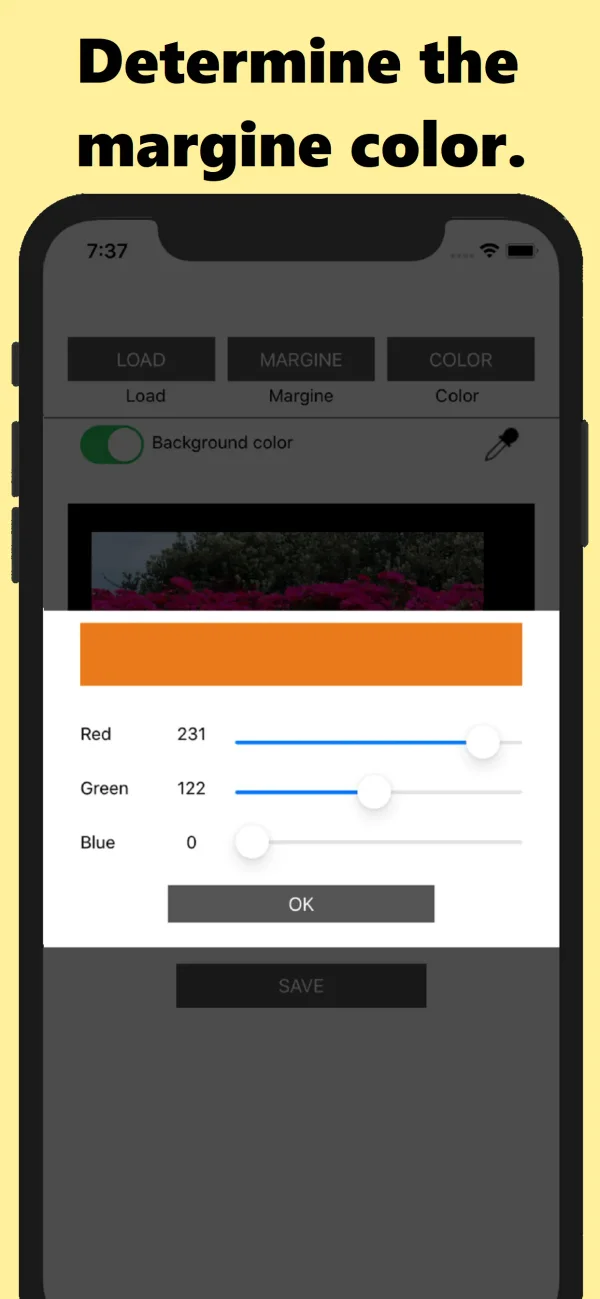

About
This app is a simple and easy-to-use app that allows you to add margins to images and save them with just a few taps. With this app, you can easily add margins to all sides of your images to make them stand out and make them look more professional.
Margin colors can be specified from the original image using the eyedropper function, or you can specify RGB pixel values to create custom colors. Additionally, the app allows you to adjust the size of the margins according to your preferences, giving you more control over the final look of your images.
The margins can be simple, such as black or white, or repeated multiple times to create double or triple colors. ,
Whether you want to add borders to your photos or add space to your illustrations, this app is perfect for all your image editing needs. Great for quick touch-ups and helps optimize images for uploading to social media.
If you're looking for an easy-to-use image editor that helps you add margins to your images, this app is for you.
What’s new
Version 1.1.13 · May 5, 2024
fixed layout
App privacy
What Daiki Hirao declares on the App Store about how this app handles data.
-
Data not collected
The developer does not collect any data from this app.
Privacy practices may vary, for example with the features you use or your age.
Information
- Seller
- Daiki Hirao
- Category
- Photo & Video
- Version
- 1.1.13
- Updated
- May 5, 2024
- Released
- Nov 28, 2019
- Size
- 7.5 MB
- Requires
- iOS 13.0 or later
- Age rating
- 4+
- Price
- Free
- Languages
- English, Japanese
- Copyright
- © 2019 Daiki Hirao
You might also like
-
 No Crop: Photo & Video BorderFilm Frames, Date Stamp & 3:4
-
 Square Fit Photo: PicFitterNo Crop Photo Border Frame
-
 壁紙フィッターPhoto & Video
-
 QUADRATO: Square Fit, No CropPhoto & Video Borders & Blur
-
 NoCrop Photo BorderーWhiteFrameAdd White Border, Photo Ratio
-
 FRMM:Harmonizing Photos & InfoEXIF Frame processing
-
 Fit Photo to wallpapersResize your favorite photos
-
 SquareadySmart Layouter for Instagram
-
 Combine Photos - ConcatImgTile or row, merge in one tap
-
 Fit Photo as WallpaperMake photos fit your screen