Matrix Wise Matrix Calculator
Your Go-To Matrix Calculator
Designed for iPhone, iPad
- Age rating4+
- CategoryUtilities
- DeveloperHideyuki Inada
- LanguagesEnglish
- Size5.6 MB
Links to the official App Store page
Download.org hosts no file of Matrix Wise Matrix Calculator. The button opens its official App Store page, published by Hideyuki Inada. Listing last checked on Nov 16, 2026.
Screenshots


About
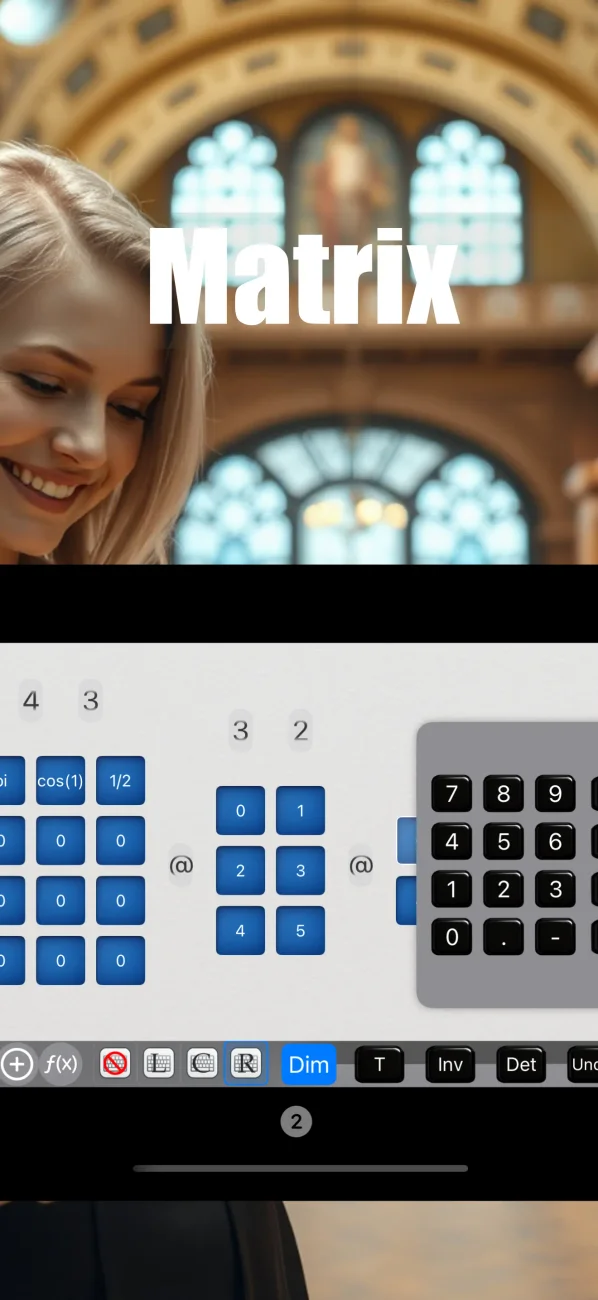
Easily perform and explore matrix operations on your iPhone or iPad. Work with 1, 2, or 3 matrices, each with custom dimensions up to 4×8, using an intuitive UI designed for clarity and speed.
Select the number of matrices, choose an operation from the picker, and input values using a built-in keyboard that supports numbers, letters, symbols, and functions. You can also enter full expressions like `1 + 1/2`, `pow(2, 3)`, or `sqrt(2)` directly into any matrix cell.
Need to fill a matrix quickly? Use dedicated buttons to initialize with zeroes, ones, random values, sequences, or the identity matrix. Perform essential tasks like transpose, determinant, and inverse with just a tap.
Whether you're a student, educator, or engineer, this app provides a powerful and flexible matrix interface right at your fingertips.
Key Features:
• Select 1, 2, or 3 matrices, each up to 4×8 in size
• Customize row and column count for each matrix
• Choose operations:
◦ Addition (+)
◦ Subtraction (−)
◦ Hadamard product (*)
◦ Element-wise division (/)
◦ Matrix multiplication (@)
• Scalar and matrix operations (e.g. multiply a matrix with a scalar)
• Echelon form, row-echelon form, reduced row-echelon form transformation
• QR factoring (QR decomposition)
• LU decomposition with or without pivoting, Crout's algorithm without pivoting
• Tap to edit any matrix cell using a built-in keyboard
• Keyboard positioning: no keyboard, left, center, right
• Keyboard modes: numbers, letters, symbols, functions
• Supports math expressions like `1 + 2/3`, `sqrt(2)`, `pow(2, 3)`
• Matrix initialization buttons:
◦ AC – All zeroes
◦ ONE – All ones
◦ RND – Random values
◦ SEQ – Sequential values
◦ EYE – Identity matrix
◦ AAC – Set all matrices to zero
• Special keys:
◦ BS – Backspace
◦ CLR – Clear selected element
◦ PST – Paste the computed result into a matrix
• One-tap actions for:
◦ Transpose (T)
◦ Determinant (Det)
◦ Inverse (Inv)
• Expression parser supports basic math and functions:
◦ sqrt, pow, log, exp, sin, cos, tan, and more
Designed to make matrix math approachable and efficient, with support for both numeric input and expressions.
Note
For 3-matrix computation, the multiplication and division operators take precedence over addition and subtraction.
You can enter fractions as input (e.g., 1 + 1/2), but the output is always displayed in decimal form.
What’s new
Version 3.1 · May 28, 2025
• Resolved an issue where entering values in the right columns of the rightmost matrix was difficult on the 3-matrix screen.
• Replaced the text edit field above matrices with a label field for displaying full element values, as direct text input using this field was not the primary method for editing and was cumbersome. The default popup keyboard already handles editing more effectively.
App privacy
What Hideyuki Inada declares on the App Store about how this app handles data.
-
Data not collected
The developer does not collect any data from this app.
Privacy practices may vary, for example with the features you use or your age.
Information
- Seller
- Hideyuki Inada
- Category
- Utilities
- Version
- 3.1
- Updated
- May 28, 2025
- Released
- May 18, 2025
- Size
- 5.6 MB
- Requires
- iOS 18.0 or later
- Age rating
- 4+
- Languages
- English
- Copyright
- © Hideyuki Inada
You might also like
-
 CalcBinCalc & Convert BIN,OCT,DEC,HEX
-
 Sarrus Calculator Matrix Det3x3 Method Determinant Solver
-
 Image CalculatorCalculator App
-
 iBaseBase converter
-
 MQTT CommanderWatch your MQTT broker live
-
 Math Type - Unit FormulasFormula-based unit calculation
-
 Formula Calculator #Complete calculations quickly
-
 Calculator: Simple & CleanNo Ads: Percent, Tip & Loan
-
 Background Remover - BgRemoverErase background with ease
-
 Unit Converter : FromToConvert Any Unit To Any Unit