
MinimalLauncher
Minimum required launcher
Designed for iPhone
Free · In-app purchases
- Age rating4+
- CategoryUtilities
- DeveloperAkihiro Usui
- LanguagesEnglish+ 1 more
- Size8.2 MB
Links to the official App Store page
Download.org hosts no file of MinimalLauncher. The button opens its official App Store page, published by Akihiro Usui. Listing last checked on Nov 17, 2026.
Screenshots
About
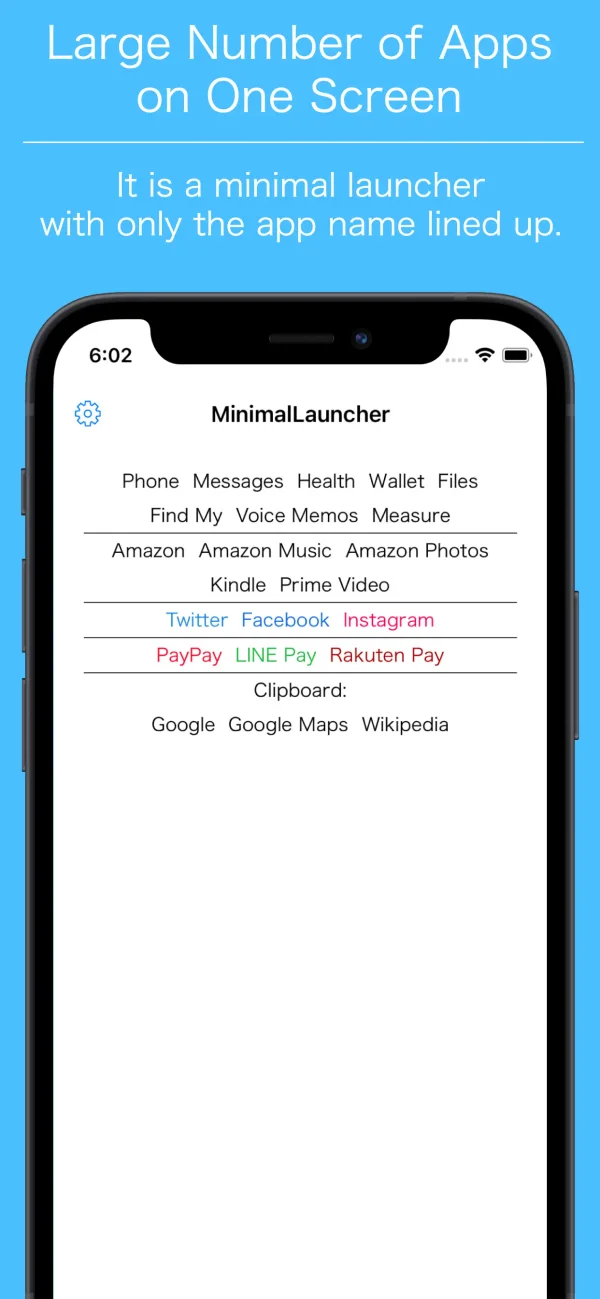
MinimalLauncher is a minimal launcher app that displays only app names.
There are many launcher apps available on the App Store, and most of them launch apps by tapping displayed icons.
With those launcher apps, when you register many apps, the screen quickly becomes filled with icons, and in some cases you need to scroll in order to launch apps located at the bottom.
Although the purpose of using a launcher app is to quickly launch apps, I personally found it bothersome that scrolling adds an extra step.
With this in mind, I thought it would be nice to have a launcher app that can display a large number of apps on one screen by listing only app names, and so I created MinimalLauncher.
The number varies depending on the device's screen size and the font size and spacing settings for app names, but it is possible to display around 100 apps on one screen.
*Please note that before removing the limitation via an in-app purchase, the number of apps that can be registered is limited to 10.
After checking the usability, you can make an in-app purchase to remove the limitation and register apps without restriction.
*Please note that this app does not have a feature that automatically sets a URL scheme when you select an app.
By using Apple's official "Shortcuts" app, you can launch apps that do not have a URL scheme or whose URL scheme is unknown.
For details, please refer to the following URL:
https://broad-connect.net/2020/03/01/minimallaunchershortcut/
◆Main Features
・A set of three launchers-MainLauncher, LeftLauncher, and RightLauncher-that can be switched instantly by swiping left or right.
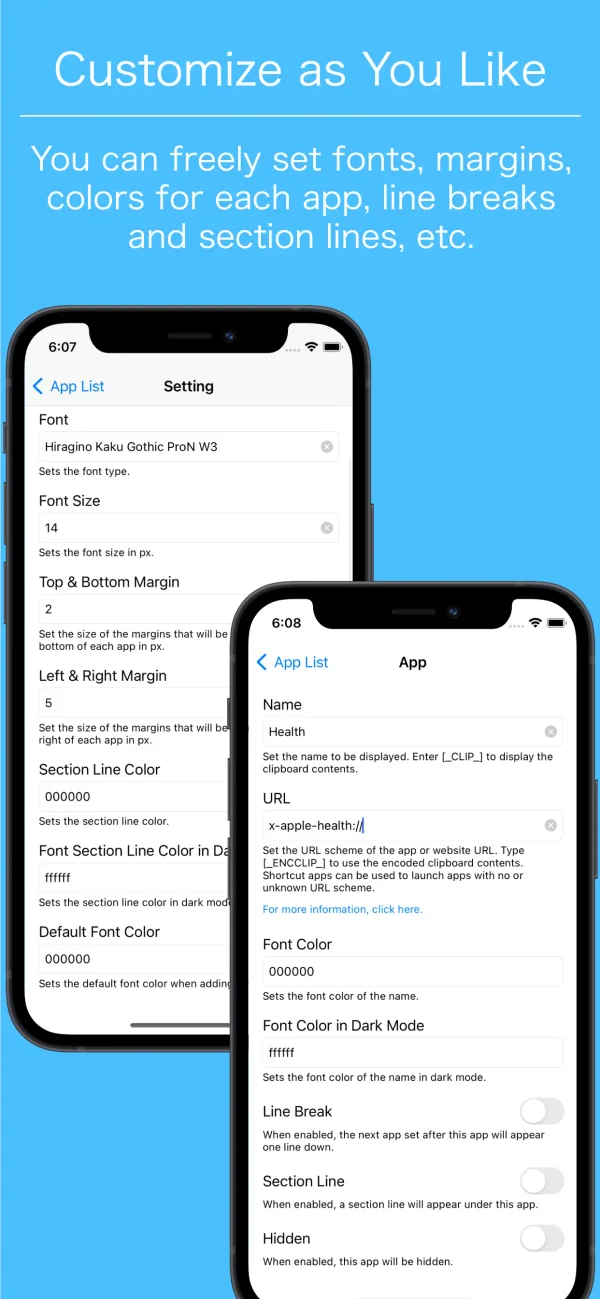
・Freely set the color of each app name (separate colors can be set for Light Mode and Dark Mode)
・Insert line breaks or separators at arbitrary positions
・Display clipboard contents (enter "_CLIP_" as the app name)
・Set URLs using clipboard contents (enter "_ENCCLIP_" in the URL; for example, if you set the URL to "http://www.google.com/search?q=_ENCCLIP_", you can search Google using the clipboard contents)
・Change app icons
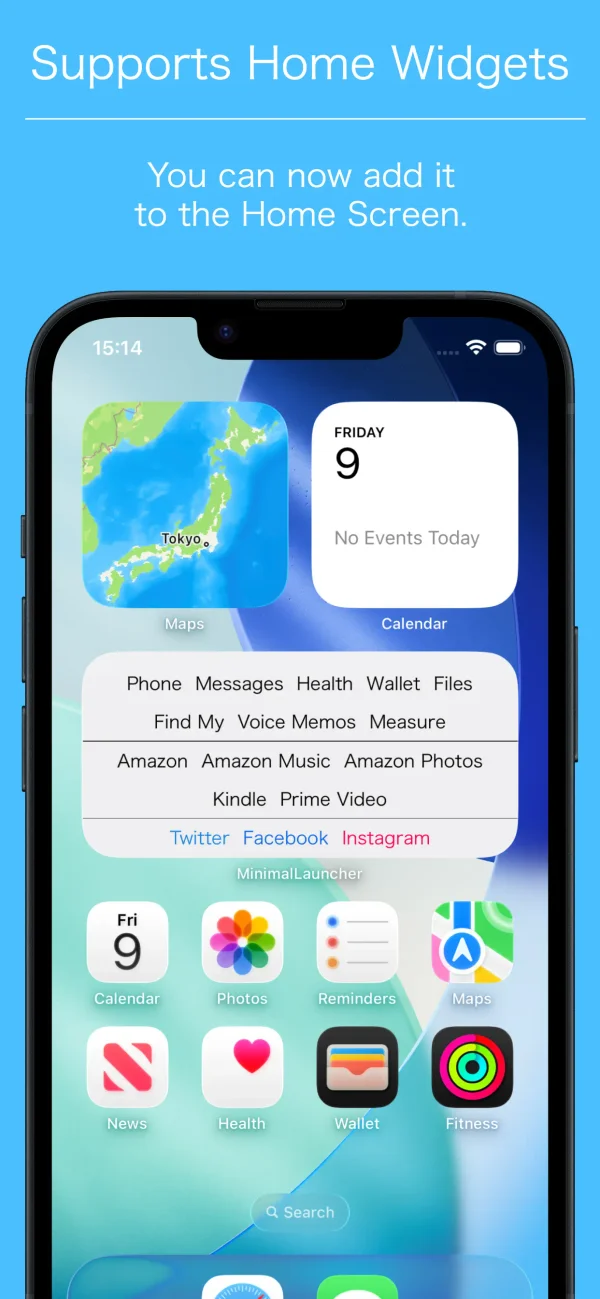
・Home widget support (there are limitations described below; please note that these apply)
・URL scheme support
Launch: minimallauncher://
Add app: minimallauncher://add/?name=[Name]&url=[URL]
*Please note that when using "_CLIP_" or "_ENCCLIP_", on iOS 16 and later, an alert related to pasting is displayed every time.
This issue can be avoided by updating the OS to iOS 16.1 or later and changing the following settings in the Settings app.
①In the Settings app, select "MinimalLauncher" and then select "Paste from Other Apps".
②Change the setting to "Allow".
*Please note that even after changing the setting to "Allow", notifications related to pasting will still be displayed. Due to iOS limitations, these notifications cannot be turned off.
◆Home Widget Limitations
・Since the home widget has a fixed size, it may not be able to display all registered apps.
In that case, please adjust the settings by reducing the font size in the MinimalLauncher app's settings screen or by moving apps you want to prioritize toward the top.
(If you tap the blank area of the home widget, the MinimalLauncher app itself will launch, so you can start apps that could not be displayed in the widget from there.)
・Due to iOS limitations, the home widget cannot access the clipboard.
Therefore, it does not support the feature that displays clipboard contents using "_CLIP_".
・Due to iOS limitations, the home widget cannot directly launch each registered app.
As a result, each registered app is launched after going through the MinimalLauncher app once.
・The launcher in the home widget is generated using a completely different mechanism from the launcher displayed in the MinimalLauncher app itself.
Please note that, as a result, the layout, fonts, and other aspects may not be 100% identical to those of the launcher displayed in the app itself.
What’s new
Version 1.83.1 · Nov 9, 2026
Updated SDKs.
App privacy
What Akihiro Usui declares on the App Store about how this app handles data.
-
Data used to track you
May be used to track you across apps and websites owned by other companies.
- Location
- Identifiers
- Usage data
- Diagnostics
-
Data linked to you
May be collected and linked to your identity.
- Location
- Identifiers
- Usage data
- Diagnostics
-
Data not linked to you
May be collected but is not linked to your identity.
- Diagnostics
Privacy practices may vary, for example with the features you use or your age.
Information
- Seller
- Akihiro Usui
- Category
- Utilities
- Version
- 1.83.1
- Updated
- Nov 9, 2026
- Released
- Mar 5, 2020
- Size
- 8.2 MB
- Requires
- iOS 17.0 or later
- Age rating
- 4+
- Price
- Free
- In-app purchases
- Yes
- Languages
- English, Japanese
- Copyright
- © 2020 Akihiro Usui
You might also like
-
 Oblivion LauncherOpen Apps with Custom Gestures
-
 Any Text · WidgetsPut text on Lock/Home Screen
-
 (Not Boring) TimerLoud, Readable & Not Boring
-
 (Not Boring) CalculatorBasic, Readable & Not Boring
-
 Arc Search — Find it, FasterA Simple, Clutter-Free Browser
-
 Private Browser DeluxeSecure VPN - Safe Web Browser
-
 DoCast: Screen Mirroring to TVCast,Stream,Share to Smart TV
-
 US MobileYour Mobile lines, simplified.
-
 NextDNSBlock Ads, Trackers & Malware
-
 Quike WidgetA lot of small widgets