Minimum Timer
Simple Digital Timer
Designed for iPhone, iPad, iPod touch
Free · In-app purchases
- Age rating4+
- CategoryUtilities
- DeveloperMihoko Araki
- LanguagesEnglish+ 36 more
- Size15.2 MB
Links to the official App Store page
Download.org hosts no file of Minimum Timer. The button opens its official App Store page, published by Mihoko Araki. Listing last checked on Nov 17, 2026.
Screenshots


About
This digital timer features a simple, unadorned, and serene design.
It is ideal for concentrating on study or work and has the minimum necessary functions.
// How to operate //
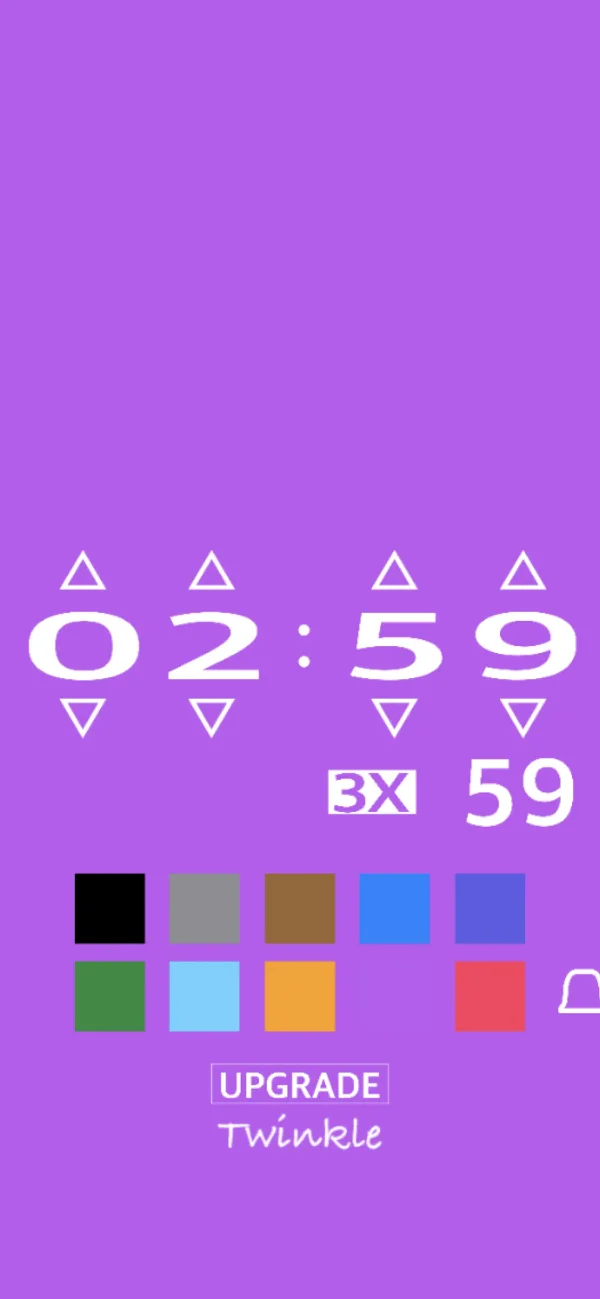
- Tap the remaining time display on the timer to switch to setting mode.
- Press the triangle marks above and below the time display to set the remaining time on the timer.
- Tap on an empty area of the screen to exit setting mode and start the timer.
// Other Functions //
- The timer time can be set up to 99 hours and 59 minutes in increments of 1 minute.
- The alarm tone can be selected from 78 different tones.
Touch the tone name or the tool button on the right to move to the selection screen.
- Tap the bell icon to turn the alarm ON/OFF.
- Tap the seconds display while the timer is in progress to toggle the seconds display on and off.
However, the seconds display will appear when there is less than one minute remaining, even if the seconds display is hidden.
- Tap the seconds display during setting to toggle the seconds setting in increments of 10 seconds.
- If you switch to setting mode while the timer is in progress or after it has ended, the set time will be displayed in the lower right corner.
Tap this to immediately repeat with the previous timer setting.
- The current time display in the lower left corner can be switched to "12 hours," "24 hours," or "not displayed" by tapping it.
- The display of the remaining time on the timer can be moved up, down, left, or right with a finger.
- Vertical and horizontal screen rotation is supported.
- The text size can be adjusted in steps by pressing buttons such as "2X" and "3X".
- Tap the color icon in the setting mode to select from 10 background colors.
These are the operations and main functions of this digital timer.
Please use this simple yet functional timer for more efficient time management.
What’s new
Version 1.3.6 · Jul 28, 2026
- Bug fixes and performance improvements.
App privacy
What Mihoko Araki declares on the App Store about how this app handles data.
-
Data used to track you
May be used to track you across apps and websites owned by other companies.
- Location
- Identifiers
- Usage data
- Diagnostics
-
Data linked to you
May be collected and linked to your identity.
- Location
- Identifiers
- Usage data
- Diagnostics
-
Data not linked to you
May be collected but is not linked to your identity.
- Diagnostics
Privacy practices may vary, for example with the features you use or your age.
Information
- Seller
- Mihoko Araki
- Category
- Utilities
- Version
- 1.3.6
- Updated
- Jul 28, 2026
- Released
- May 1, 2021
- Size
- 15.2 MB
- Requires
- iOS 12.0 or later
- Age rating
- 4+
- Price
- Free
- In-app purchases
- Yes
- Languages
- English, Arabic, Catalan, Croatian, Czech, Danish, Dutch, Estonian, Finnish, French, German, Greek + 25 more
- Copyright
- © 2021 Mihoko Araki
You might also like
-
 DecimaTime keeper app
-
 DsStopWatch10 Multi-StopWatches
-
 Smart Stopwatch and TimerUtilities
-
 Image Timer multiple timersMultiple timers and stopwatch
-
 Preset Timer ProVersatile Timer & Stopwatch.
-
 TimeSet: Multi Interval TimerSave workout & study routines
-
 Digital Clock - LED RetroNight stand clock
-
 MinSec - Multi TimerMultiple Timers Made Easy
-
 Big Colorful TimerUtilities
-
 Custom Digital ClockCustomizable digital clock