MiraiGrid
Dreams Goals and Actions
Designed for iPhone, iPod touch
In-app purchases
- Age rating4+
- CategoryProductivity
- DeveloperU-WORKS inc
- LanguagesJapanese+ 1 more
- Size39.9 MB
Links to the official App Store page
Download.org hosts no file of MiraiGrid. The button opens its official App Store page, published by U-WORKS inc. Listing last checked on Nov 23, 2026.
Screenshots
About
A goal-achievement app that turns "what you want to do" into daily action.
MiraiGrid combines the 9×9 grid's power to expand your thinking with the Roadmap's power to turn it into action — all in one goal-achievement app.
-- Expand your goal into 81 cells --
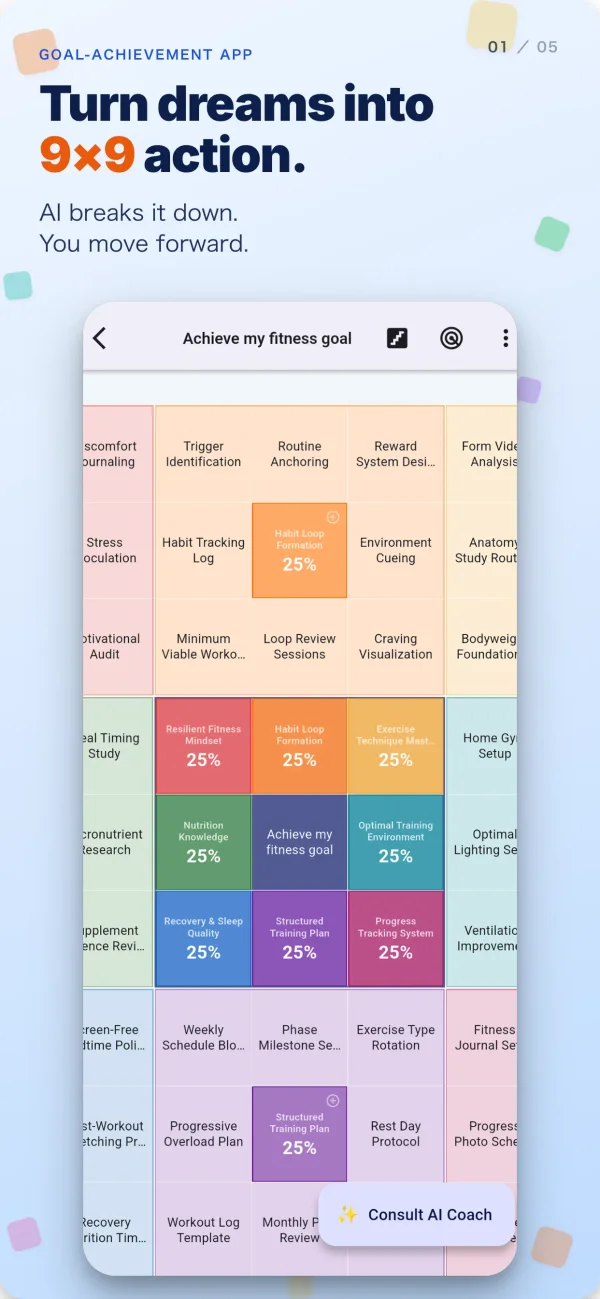
The 9×9 grid is a worksheet for planning your goals. Place your big dream or goal at the center, break it down into 8 categories and 8 actions each, and instantly see what you need to do.
With MiraiGrid, you can work with this 9×9 = 81-cell grid intuitively on your smartphone. Pinch and drag to zoom freely while writing out your thoughts.
-- No theme in mind yet? AI helps you find one --
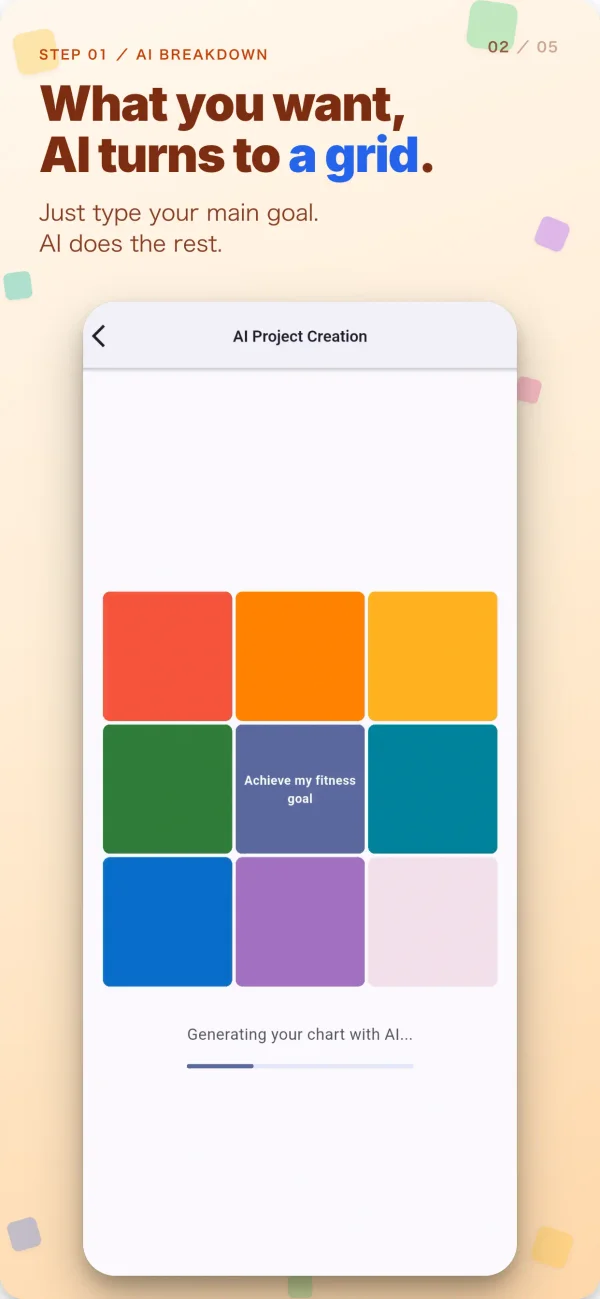
Not sure how to put your goal into words? No problem. Just enter a vague idea, and AI will suggest theme candidates tailored to you.
-- AI builds everything from theme to chart, instantly --
Once you have a theme, leave the rest to AI. It automatically generates 8 categories and 64 actions from your goal, completing the 81-cell grid in one go. AI removes that first hurdle of "I don't know what to write."
Each cell also shows the reasoning behind AI's suggestion, so you can see the thinking behind every action.
You can also ask AI for more suggestions on a filled-in grid ("What should I add to this category?") or get advice from an AI coach based on your progress.
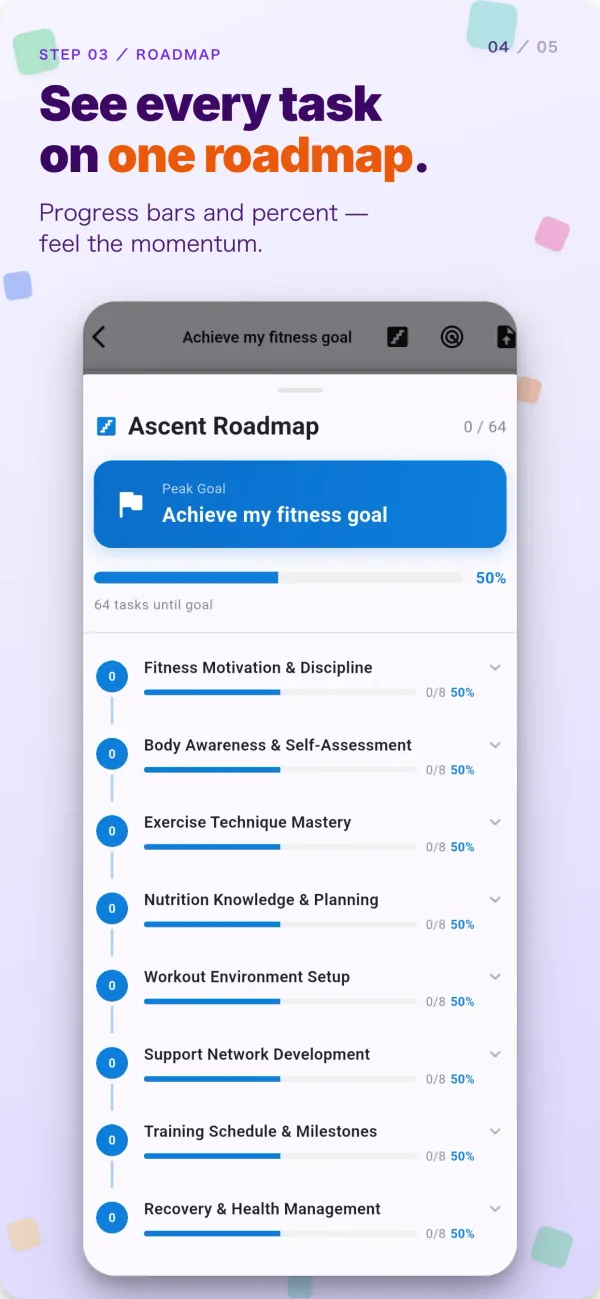
-- The Roadmap makes your next step clear --
Once you've filled in all 81 cells, just switch to Roadmap view. Actions are sorted by priority (high, medium, low) so you can see at a glance what to do today.
Track completion with checkboxes
Achievement rate updates in real time
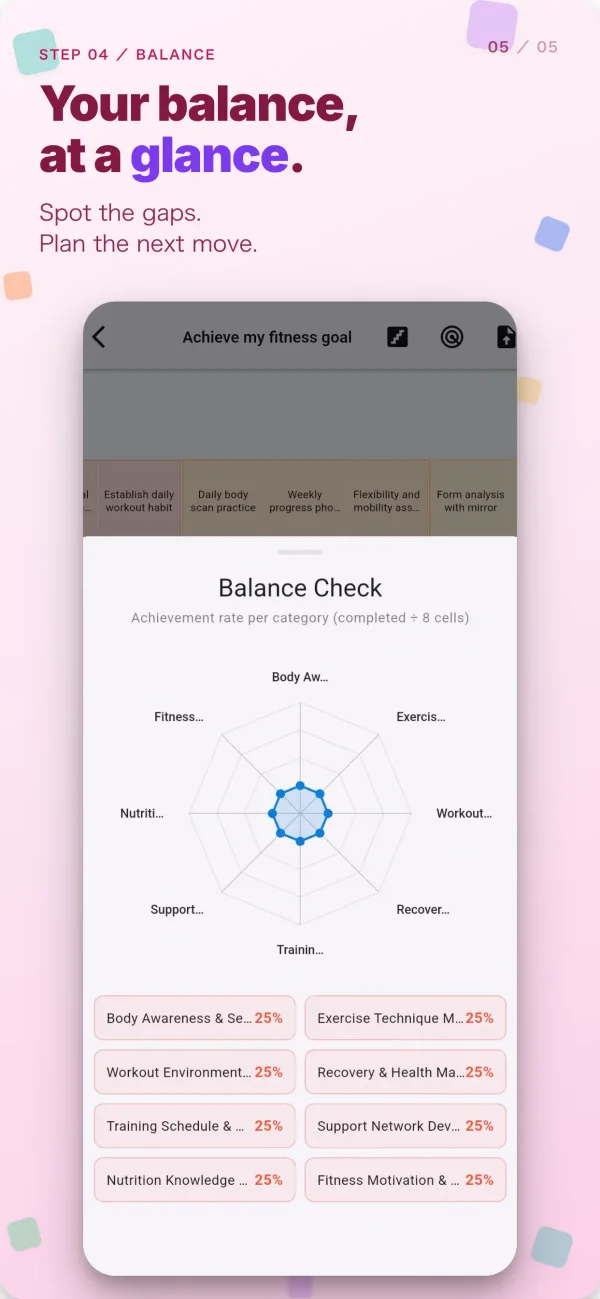
Check balanced progress across all categories
A system that keeps your dream from staying "just a plan," pushing you forward every day.
-- Notifications keep you going --
To stop your plan from fizzling out, you can set local notifications as reminders. The app nudges you to act at the times you choose, turning daily action into a habit.
-- Cheers from family and friends keep you going --
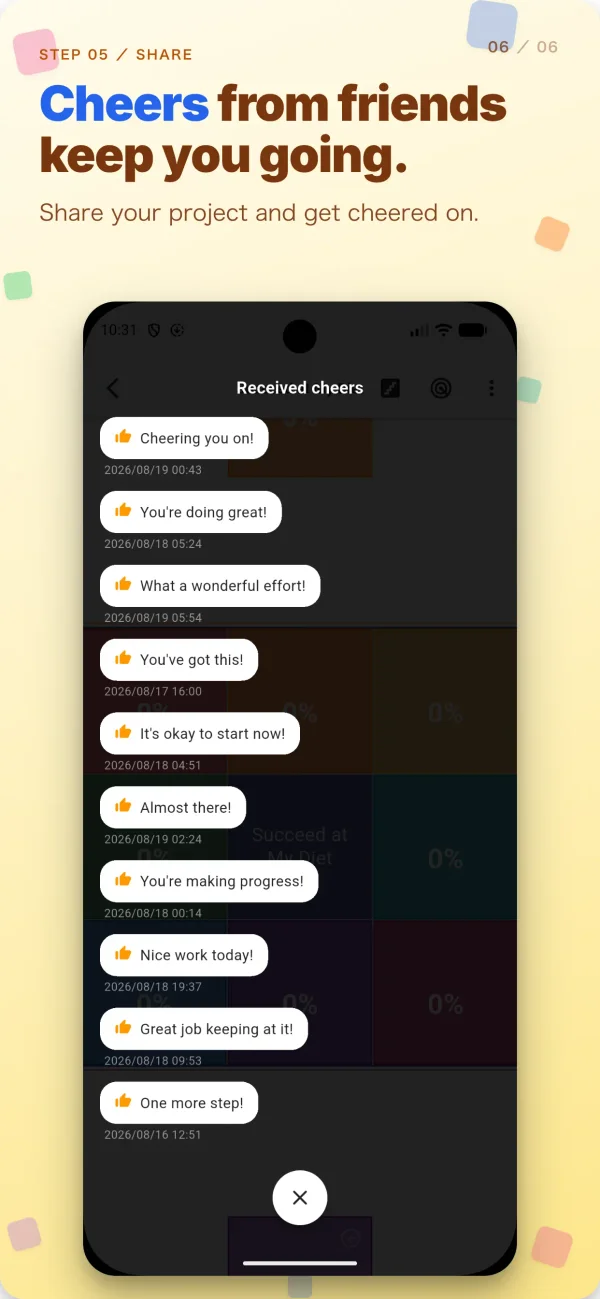
Publish your grid with a share link, and family or friends can see your goal and send you a cheer message. No need to think of the right words — just pick from ready-made messages.
Cheers you receive show up as push notifications. Open the app anytime to look back at your cheer timeline.
Goals can be a lonely pursuit, but a little encouragement makes them easier to keep going.
-- No sign-up, start right away --
No account, email address, or password required. Start using the app the moment you open it.
Switching devices? Just issue a "transfer code" to move your data straight to your new device.
-- What you can do for free --
Create and edit 9×9 grids (up to 2 projects)
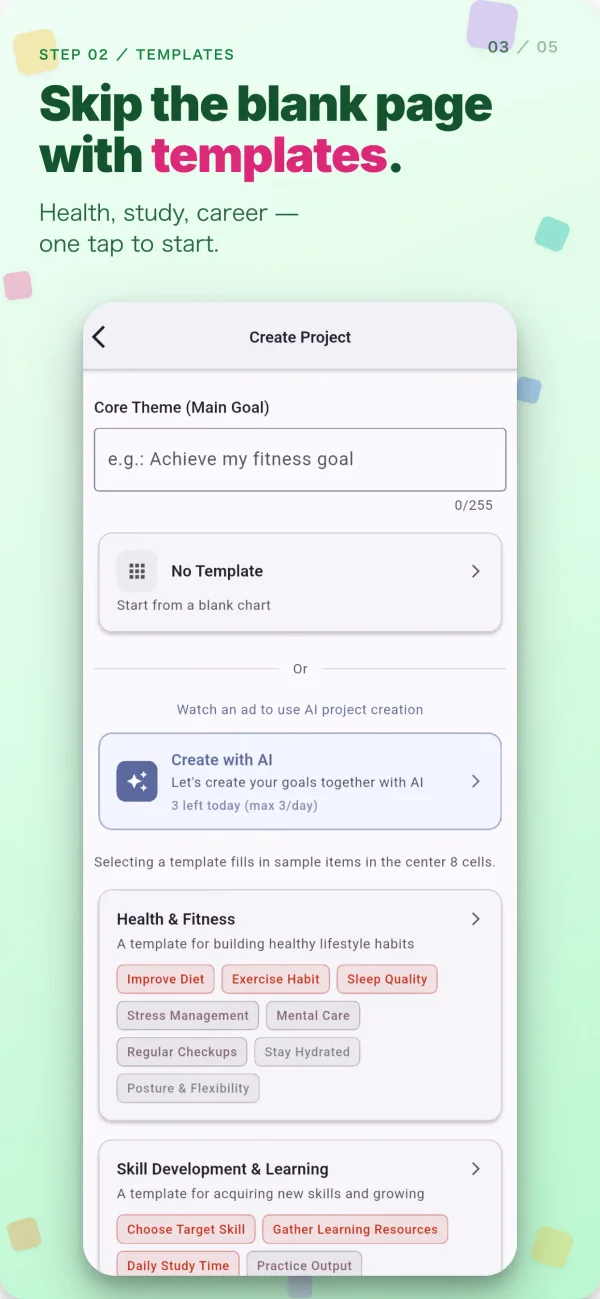
AI-generated grid (up to 3 times a day)
AI block suggestions & AI coach (up to 3 times a day)
Roadmap view & progress tracking
Grid sharing & cheer feature
Data transfer via transfer code
-- Upgrade to Pro for --
More projects — work on up to 5 projects at once
300 AI points every month — use AI with no daily limit
No ads — thinking-disrupting ads are completely removed
Data export — export your grid as text, Markdown, CSV, or JSON to use with other tools
Pro is available as a subscription.
Your AI points are reset to 300 pt with each purchase and renewal (unused points do not carry over to the next month).
Turn the dream you've always wanted into today's action. Get started with MiraiGrid.
Privacy Policy:
https://mirai-grid.com/privacy
Terms of Use:
https://mirai-grid.com/terms
What’s new
Version 2.0.1 · Nov 17, 2026
Minor fixes.
App privacy
What U-WORKS inc declares on the App Store about how this app handles data.
-
Data used to track you
May be used to track you across apps and websites owned by other companies.
- Usage data
-
Data linked to you
May be collected and linked to your identity.
- Purchases
- Usage data
- Diagnostics
-
Data not linked to you
May be collected but is not linked to your identity.
- Identifiers
Privacy practices may vary, for example with the features you use or your age.
Information
- Seller
- U-WORKS inc
- Category
- Productivity
- Version
- 2.0.1
- Updated
- Nov 17, 2026
- Released
- Jun 26, 2026
- Size
- 39.9 MB
- Requires
- iOS 15.6 or later
- Age rating
- 4+
- In-app purchases
- Yes
- Languages
- Japanese, English
- Copyright
- © 2026 U-WORKS Inc.
You might also like
-
 目標boxProductivity
-
 Thought Organizer - GoalGridDeep-dive Mandala Chart
-
 BUNKAi: Visual Goal PlannerTurn Goals Into Daily Actions
-
 QuestTodo: RPG Tasks & HabitsLevel up by finishing tasks
-
 QuestGoal – RPG Goal TrackerGamified Habit & To-Do Tracker
-
 Mandalist:マンダラチャート・目標管理Productivity
-
 TaskQuest RPGProductivity
-
 Rise: Habit & Pomodoro TimerDaily Planner & App Blocker
-
 Sabiowl - 習慣RPGProductivity
-
 LifeVision - 目標を毎日の一歩に変えるProductivity