
Modulo Calculator
Shows Quotient and Remainder
Designed for iPhone, iPad, iPod touch
Free
- Age rating4+
- CategoryUtilities
- DeveloperTakao Ichimura
- LanguagesEnglish+ 4 more
- Size10.4 MB
Links to the official App Store page
Download.org hosts no file of Modulo Calculator. The button opens its official App Store page, published by Takao Ichimura. Listing last checked on Nov 20, 2026.
Screenshots
About
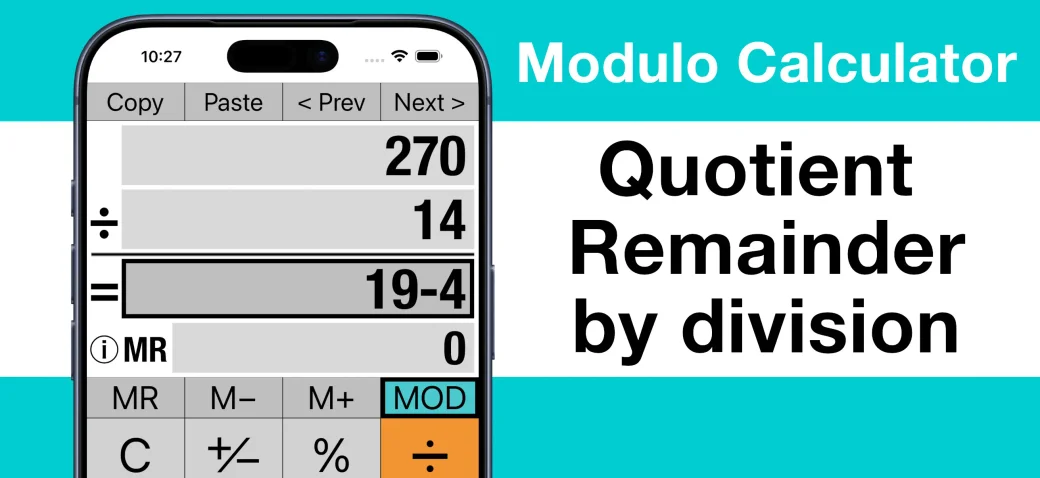
Modulo Calculator has a remainder calculation function that is convenient for dispensing work in pharmacies, shipping work in distribution warehouses and calculation of the number of patterns and the number of remaining stitches in knitting, etc.
Two input numbers and the result after calculation are shown so that the user can check input numbers with the result, therefore, the accuracy of calculation is greatly improved.
It has the set memory in addition to the general independent memory. The set memory automatically memorizes calculation history of all sets of calculated input numbers, an arithmetic operator and a result number.
(Instructions)
- When performing division by pressing [MOD] instead of [÷] to calculate, the quotient and remainder will be displayed. The remainder is calculated so that it is greater than or equal to 0.
- For example, when calculating the quotient and remainder of 30 ÷ 7, if you operate [3] [0] [MOD] [7] [=], the calculation result "4-2”, which means the quotient is 4 and the remainder is 2, will be displayed on the result display.
- For example in a dispensing work, a calculation when counting 3 tablets a day and 90 days with 14 tablets per sheet is [3] [×] [9] [0] [MOD] [1] [4] [=], the result “19-4”, which means 19 sheets and 4 tablets, is displayed. And ”270"(tablets) from 3×90 keeps displayed at 1st display and “14"(tablets per sheet) keeps displayed at 2nd display. So input numbers and the result can be checked at a glance.
- If the result of calculation with the [MOD] key is used for the next calculation, the value of the quotient will be used.
- It is easy to calculate by changing one input number after a calculation. For example after a remainder calculation, in the case you would like to change the tablet number per sheet of 2nd input number, tap the 2nd input number and input a new number and tap the result display(or tap [=]) to finish the calculation.
- To recall calculation history, tap [< Prev] key until you find the history you want. After you tapped [< Prev] key, if you want to recall a newer history, tap [Next >] key until you find it.
- To clear the calculator completely including calculation history, close Modulo Calculator.
- To clear the calculator except for the set memory and the independent memory on MR-line, tap [C] key and then tap [AC] key appeared, that is, double tap [C] key.
- To clear the independent memory on MR-line, tap MR key and then tap MC key appeared, or swipe on MR-line.
- To completely clear the number you have just input on 1st-line or 2nd-line, tap C key.
- To erase a right end number at 1st-line or 2nd-line framed in the input mode, swipe on the line.
- When using the [M+] key or [M-] key to calculate the remainder, only the quotient will be used for the memory calculation.
(Others)
- The calculation range is −999,999,999,999 ~ 999,999,999,999.
- The maximum number of digits is 12.
- The developer assumes no responsibility for any loss or claims by third parties which may arise from the use of this app.
Modulo Calculator
Ⓒ 2020 Takao Ichimura
What’s new
Version 3.2.1 · Nov 15, 2026
Updated screenshots.
App privacy
What Takao Ichimura declares on the App Store about how this app handles data.
-
Data used to track you
May be used to track you across apps and websites owned by other companies.
- Location
- Identifiers
- Usage data
-
Data not linked to you
May be collected but is not linked to your identity.
- Location
- Identifiers
- Usage data
Privacy practices may vary, for example with the features you use or your age.
Information
- Seller
- Takao Ichimura
- Category
- Utilities
- Version
- 3.2.1
- Updated
- Nov 15, 2026
- Released
- May 21, 2020
- Size
- 10.4 MB
- Requires
- iOS 15.0 or later
- Age rating
- 4+
- Price
- Free
- Languages
- English, Japanese, Spanish, Thai, Vietnamese
- Copyright
- © 2020 Takao Ichimura
You might also like
-
 Calculi: Scientific CalculatorUnit & Currency Conversion
-
 RemainderCalculator byNSDevcalculate remainder
-
 ヤクカル - 薬剤師電卓・調剤計算アプリUtilities
-
 Radix ConverteSimple Number Base Converter
-
 Calc+αSave Calculation/Recalculate
-
 Date & Time Calculator CounterDate & Time Counter, Countdown
-
 お祈り − 故人情報と法要日程の管理Utilities
-
 けいと管理Utilities
-
 Number of Days CalculatorUtilities
-
 Smart Digital & Analog ClockCustomizable Clock with Widget