
- Age rating4+
- CategoryPhoto & Video
- DeveloperShanghai Vision Quadrant Technology Co., Ltd
- LanguagesEnglish+ 4 more
- Size409.2 MB
Links to the official App Store page
Download.org hosts no file of Mola Cam. The button opens its official App Store page, published by Shanghai Vision Quadrant Technology Co., Ltd. Listing last checked on Nov 25, 2026.
Screenshots



About
AN AI PHOTOGRAPHER THAT TELLS YOU THE POSE
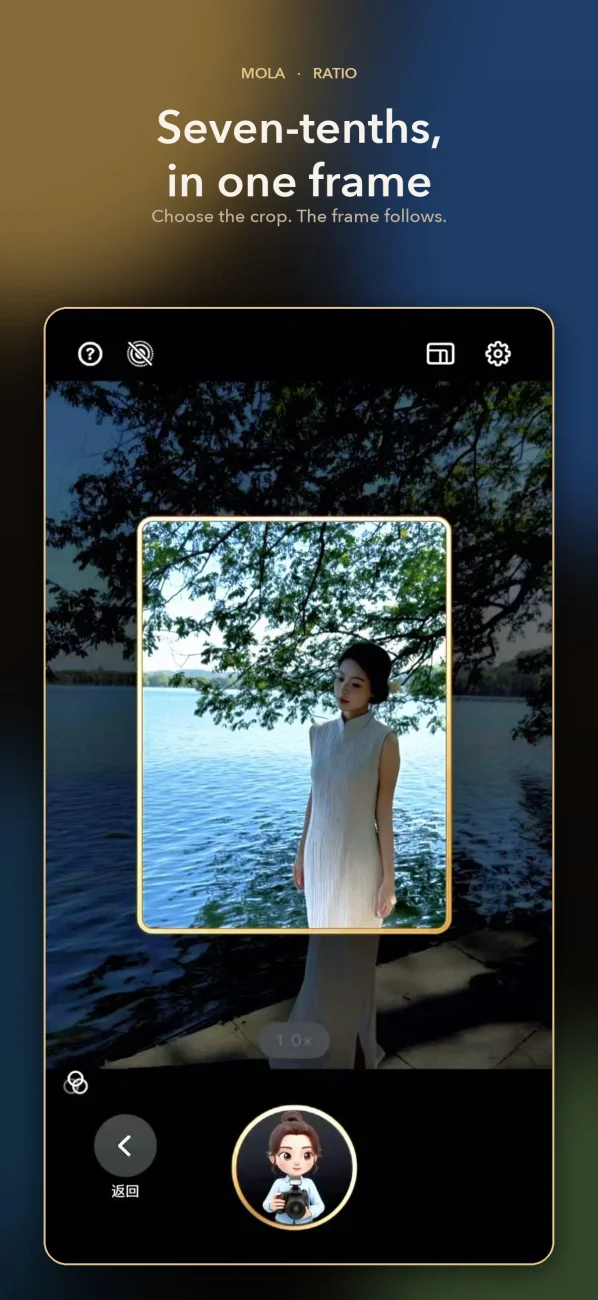
Not sure how to stand, how far to step back, or whether to crop at the knee or the ankle? Mola Camera does all three: it teaches the pose, measures the distance, and frames a full-body, nine-tenths, or seven-tenths shot.
■ IT TEACHES THE POSE
Tap the smiley and pick a pose. The screen shows what to do, and a voice says it with you: where your hands go, how your shoulders drop, where your eyes look. You follow it. You don't have to invent the pose.
■ IT MEASURES THE DISTANCE
It reads the person in the frame and estimates how many meters they are from the lens. Too close or too far, it says so. When you reach the distance that pose needs, it tells you to hold.
■ FULL BODY, NINE-TENTHS, SEVEN-TENTHS
Full body keeps the feet in frame. Nine-tenths crops at the lower calf, above the ankle. Seven-tenths crops above the knee. Once you pick a proportion, the framing follows that crop.
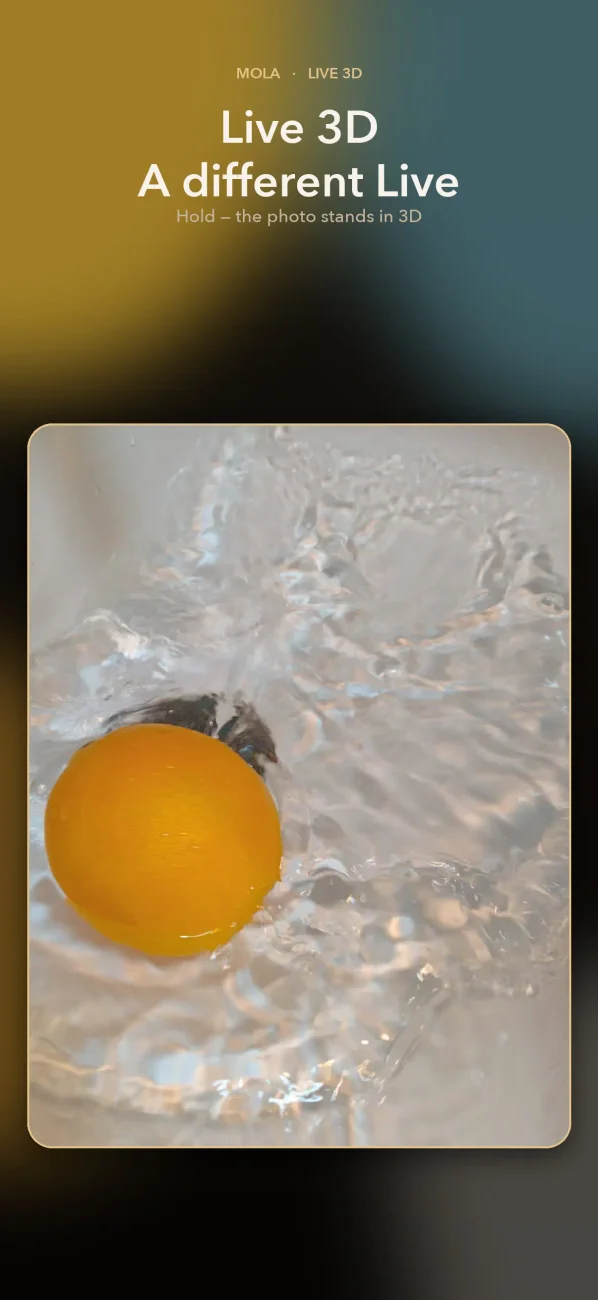
■ LIVE 3D: A DIFFERENT LIVE PHOTO
Live 3D turns a still into a Live Photo with real depth. Near and far pull apart — what is close comes forward, what is far stays back — so the photo stands up with thickness. No glasses. Not a simple zoom pan. By default the whole frame gets that 3D feel together; you can also tap a person or object and let it float off the background. The result is a standard Live Photo in your library. Hold to play.
■ FRAMING, TOO
A white dot and a target circle appear on screen. Move the phone until they meet, and the framing is set. A gold frame locks onto the subject and zooms as needed. Portraits and landscapes are judged differently. Prefer your own subject? Tap to choose it. It also works while recording.
■ THE PALETTE SETS THE COLOR
Seventeen palettes. Drag sideways for the tone, up and down for strength, and the viewfinder follows live. Shoot when it looks right. What you saw is what is saved. Standard, Pearl, Gold, Rose Gold, Amber, Cool Rose Gold, plus Cream Film, Japanese Airy, Teal Orange, Forest Green, Fuji Blue, Kodak Warm, Korean Pink, Cool White, China Red, Blossom Haze, and Natural Prime. Each palette remembers the strength you last used. Photos in the album can be graded again.
■ 150 REAL LUTS
Cinematic, Film, Fresh, Portrait, Street, Retro, Forest, Golden, Landscape, Night, Food, Cool, and Vivid. Built on real LUTs. Long-press to save a favorite. Or let AI pick one for the light in front of you and tell you why.
■ ALSO INCLUDED
A glass bar with your device, the time, aperture, shutter, ISO, and focal length. Frames: MOLA Brand, Journal Polaroid, Retro Film, Magazine Cover, Cinema Subtitle. Hold the shutter for light trails or silky water. Video at 720p / 1080p / 4K up to 60fps. 12/24/48MP. 3:4, 1:1, and 9:16. Low-light boost. Rule-of-thirds grid, level, timer, and date stamp.
FREE AND PRO
Everyone gets 6 free AI shots a day. After that, each shot uses credits. Pro removes the credit cost for AI shots and unlocks every exclusive palette and Pro filter.
SUBSCRIPTION
Monthly ($1.99) and Yearly ($9.99) renew automatically until you cancel. Manage or cancel anytime in Settings > Apple ID > Subscriptions. Lifetime ($15.99) is a one-time purchase and does not renew. Payment is charged to your Apple ID at confirmation of purchase.
PRIVACY
When you use an AI feature, the current viewfinder frame is sent to a cloud model for analysis. The first time, we explain this and ask for your consent. Photos stay in your own library.
Terms of Use (EULA): https://www.apple.com/legal/internet-services/itunes/dev/stdeula/
What’s new
Version 5.5 · Nov 24, 2026
Fix other known issues
App privacy
What Shanghai Vision Quadrant Technology Co., Ltd declares on the App Store about how this app handles data.
-
Data not collected
The developer does not collect any data from this app.
Privacy practices may vary, for example with the features you use or your age.
Information
- Seller
- Shanghai Vision Quadrant Technology Co., Ltd
- Category
- Photo & Video
- Version
- 5.5
- Updated
- Nov 24, 2026
- Released
- May 2, 2026
- Size
- 409.2 MB
- Requires
- iOS 16.0 or later
- Age rating
- 4+
- Price
- Free
- In-app purchases
- Yes
- Languages
- English, Japanese, Simplified Chinese, Spanish, Traditional Chinese
- Copyright
- © 2026 Wilson Peng
You might also like
-
 Sfuma: AI Cam &Photo CoachScore, Album, Master Mark
-
 Muse Cam-AI Composition CameraPhoto Editor,Film Filters,CCD
-
 PaletteCamera: AI PhotographyColor the mood, Shoot easy.
-
 Filmix CameraFilm Looks & Manual Controls
-
 Dula Auto ClipPhoto & Video
-
 DulaTrackPro AI X视频焦点跟踪稳定神器
-
 NokaCam-Vintage Film CameraRetro Photo Filters
-
 Doka CamAI Compose | Film Filters
-
 Swan Cam – AI Film CameraCinematic photos made easy
-
 ColorfulCamPhoto & Video