- Age rating4+
- CategoryUtilities
- DeveloperSOLILAB
- LanguagesEnglish
- Size2.1 MB
Links to the official App Store page
Download.org hosts no file of Moon Calendar Light. The button opens its official App Store page, published by SOLILAB. Listing last checked on Nov 18, 2026.
Screenshots

About
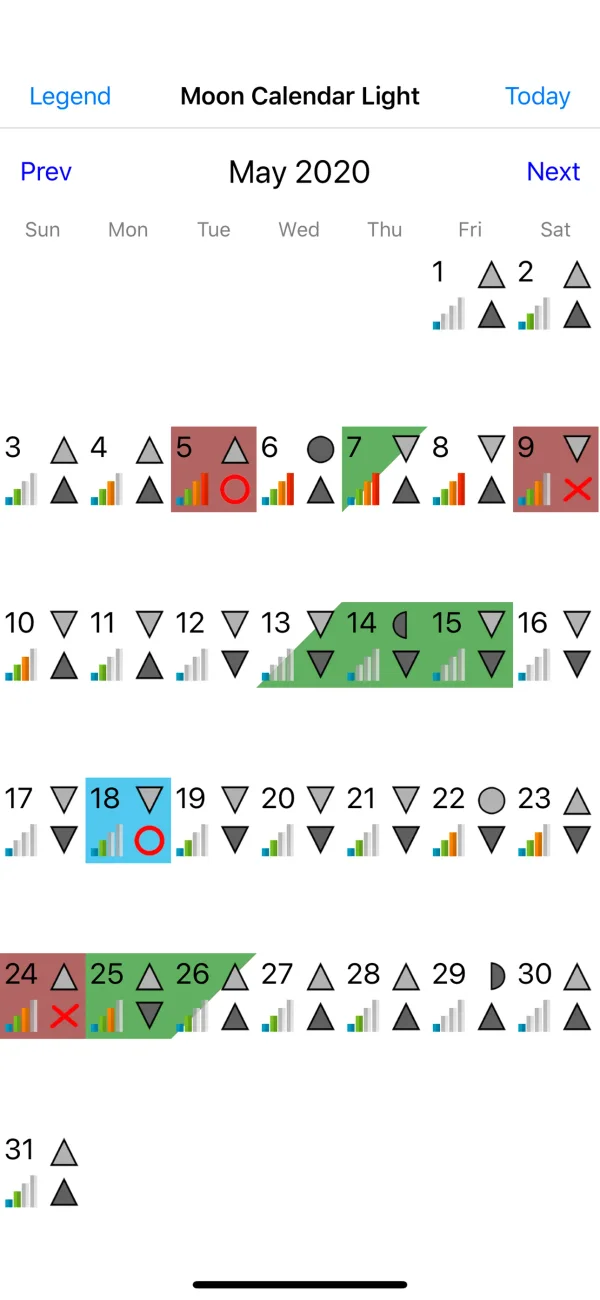
Moon Calendar Light is a lunar gardening calendar, computed precisely for your time zone. In a few seconds, see what the Moon brings to each day of the month.
EACH DAY AT A GLANCE
• Moon phases: new moon, first quarter, full moon, last quarter, or a waxing or waning moon
• Ascending or descending moon: by tradition, the ascending moon favours the aerial parts of the plants (leaves, fruits), the descending moon the underground parts (roots)
• Lunar nodes, perigee and apogee: red days, not advised for working in the garden
• Gravitational index from 1 (low) to 4 (high): the combined pull of the Moon and the Sun, strongest at new and full moon
• Days for the kind of plant you choose, root, leaf, flower or fruit, shown in green, or green for the morning or the afternoon only when the Moon changes constellation during the day. A red day keeps a green band when it is also a day for your plants
THE DAY SHEET
Tap a day to see the time of each event to the minute (phase, node, perigee or apogee, change of constellation), the illuminated fraction of the Moon, its constellation, and the gardening advice for your kind of plant.
ACCURATE
• All calculations are made on your device, from your local midnight to the next one, so each event falls on the right day wherever you live
• Moon phases checked against the U.S. Naval Observatory within 10 minutes, perigees and apogees within 20 minutes, the whole of 2026 compared day by day with the PyEphem astronomy library
• Constellations computed with their astronomical limits and the precession correction
AUDITED BY CLAUDE
The astronomical engine of this version was validated with Claude, the AI by Anthropic, then validated against the published references above.
MADE FOR YOU
• Northern or southern hemisphere
• Light or dark appearance
• VoiceOver support
• iPhone and iPad, portrait and landscape, swipe to change the month
• A built-in legend explains every symbol and color
PRIVATE
No account, no location, no tracking, no data collected. Works offline.
What’s new
Version 1.006 · Nov 12, 2026
New: tap a day for its event times to the minute, pick root, leaf, flower or fruit days, southern hemisphere, dark mode. Calculations audited by Claude (Anthropic).
App privacy
What SOLILAB declares on the App Store about how this app handles data.
-
Data not collected
The developer does not collect any data from this app.
Privacy practices may vary, for example with the features you use or your age.
Information
- Seller
- SOLILAB
- Category
- Utilities
- Version
- 1.006
- Updated
- Nov 12, 2026
- Released
- Mar 8, 2015
- Size
- 2.1 MB
- Requires
- iOS 13.0 or later
- Age rating
- 4+
- Price
- Free
- Languages
- English
- Copyright
- Copyrights © 2009-2026 SOLILAB
You might also like
-
 My Weight DataMonitor Your Body's Weight.
-
 Fidelio: Wallet ProAll your loyalty cards
-
 NasScaleYour NAS, always in hand
-
 Liberation - OCD RecoveryMorita & ERP Therapy Companion
-
 iAliveWellPersonal Safety &Activity Care
-
 Evir – Media ConverterVideo Compressor & Trimmer
-
 GPS Area Measure - FieldAcreGPS Land & Distance Calculator
-
 Simple CopySave AI prompts & Snippets
-
 LED Board - Banner & MarqueeScroll text on your screen!
-
 Smart Printer: HP Print & ScanPrint Documents, PDFs & Photos