
Mortarlink
Construction Trade Management
Designed for iPhone, iPad, iPod touch
Free
- Age rating4+
- CategoryBusiness
- DeveloperGriffin Labs LLC
- LanguagesEnglish
- Size49.4 MB
Links to the official App Store page
Download.org hosts no file of Mortarlink. The button opens its official App Store page, published by Griffin Labs LLC. Listing last checked on Nov 17, 2026.
Screenshots
About
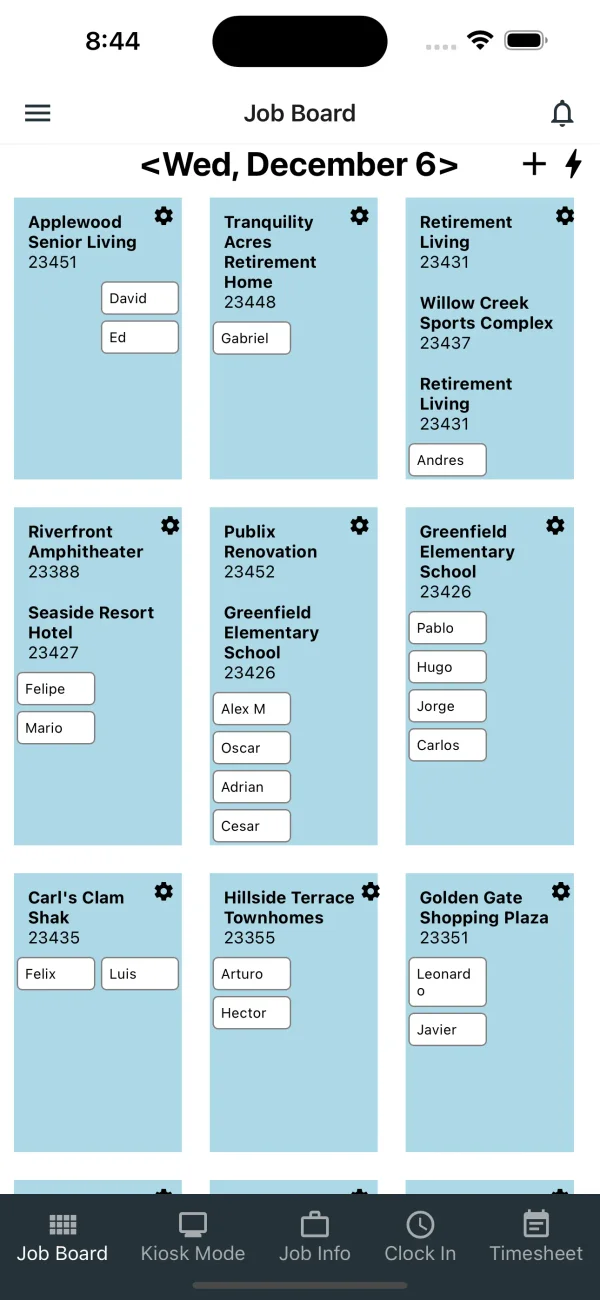
Mortarlink is a field app for construction crews. Clock in and out, fill out daily reports, check your schedule, and see where your crew and equipment are.
CREW MAP
See your crew, equipment, and today's job sites on one map. Turn layers on and off:
• My Routes: your own GPS route for any workday, so you can check mileage and confirm which sites you visited.
• Route Stops: tap + to log a pickup, delivery, or note at your current spot.
• Crew: where your clocked-in teammates are right now.
• Equipment and Vehicles: GPS positions from your chosen telematics providers.
• Job Sites: today's scheduled jobs and their geofence boundaries.
CLOCK IN AND OUT
Clock in to a job with your location attached. Your company can require you to be on site to clock in. While you're clocked in, the app records your route so you can look back at it later. Recording stops when you clock out.
FORMS
Fill out daily reports, safety checklists, inspections, and your company's own forms. Add photos, signatures, and notes. The office sees them as soon as you submit.
SCHEDULE
See your jobs for the day and week, who's on your crew, and where you need to be.
EQUIPMENT DISPATCH
Drivers can claim transport requests, set an ETA, and mark deliveries complete.
FILES AND PHOTOS
Upload jobsite photos and open plans, specs, and project documents.
SAFETY
Complete safety orientations, sign toolbox talks, and look up your company's safety documents.
MESSAGES
Message your team in threads tied to each job.
WORKS OFFLINE
Clock in, fill out forms, and take photos with no signal. Everything uploads when you're back in coverage.
What’s new
Version 2.80 · Nov 9, 2026
New: Crew Map
Your crew, equipment, and job sites on one map, with layers you can turn on and off:
• My Routes: your GPS route for any workday
• Crew: where your clocked-in teammates are right now
• Equipment: fleet GPS from your telematics provider
• Job Sites: today's jobs and their geofence boundaries
If your company turns on route tracking, the app records your route while you're clocked in. Open My Routes on the Crew Map to check your mileage and see which sites you visited. Recording stops when you clock out.
App privacy
What Griffin Labs LLC declares on the App Store about how this app handles data.
-
Data linked to you
May be collected and linked to your identity.
- Contact info
- Usage data
- Diagnostics
Privacy practices may vary, for example with the features you use or your age.
Information
- Seller
- Griffin Labs LLC
- Category
- Business
- Version
- 2.80
- Updated
- Nov 9, 2026
- Released
- Aug 22, 2023
- Size
- 49.4 MB
- Requires
- iOS 15.1 or later
- Age rating
- 4+
- Price
- Free
- Languages
- English
- Copyright
- © Griffin Labs LLC
You might also like
-
 Rapid Service RequestBusiness
-
 hh2 Field ReportsBusiness
-
 SecuriSyncBusiness
-
 Command Alkon Customer PortalTrack your material deliveries
-
 PourDayConcrete Pour Weather & Logs
-
 Amplus FormsBusiness
-
 Integrated Employer SolutionsBusiness
-
 COMMAND Center™ Concrete 4Monitor Concrete Temp/Strength
-
 FluidSecureBusiness
-
 Blue Stakes of Utah 811Productivity