
- Age rating4+
- CategoryPhoto & Video
- DeveloperJames Bridges
- LanguagesEnglish+ 16 more
- Size5.9 MB
Links to the official App Store page
Download.org hosts no file of MshUp. The button opens its official App Store page, published by James Bridges. Listing last checked on Nov 23, 2026.
Screenshots

About
Turn a few takes into a music video in seconds.
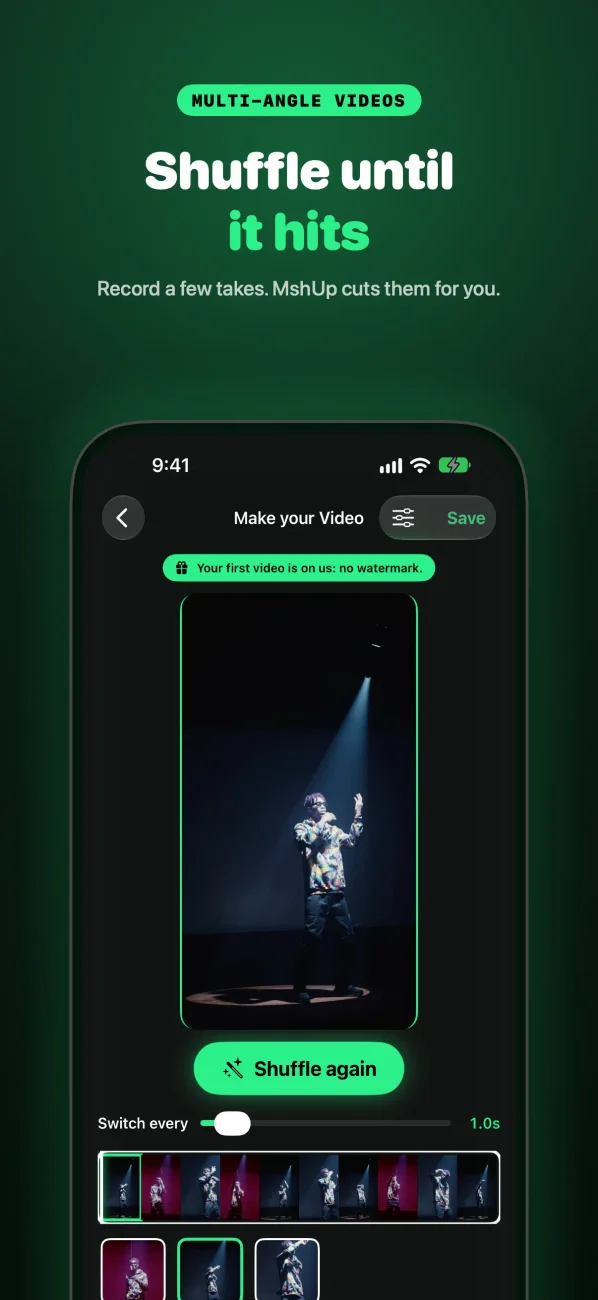
MshUp is the fastest way to make a lip-sync or rap video with multiple outfits, angles and spots. Perform your song a few times and MshUp cuts between your takes in sync with the music. Don't love the edit? Shuffle again.
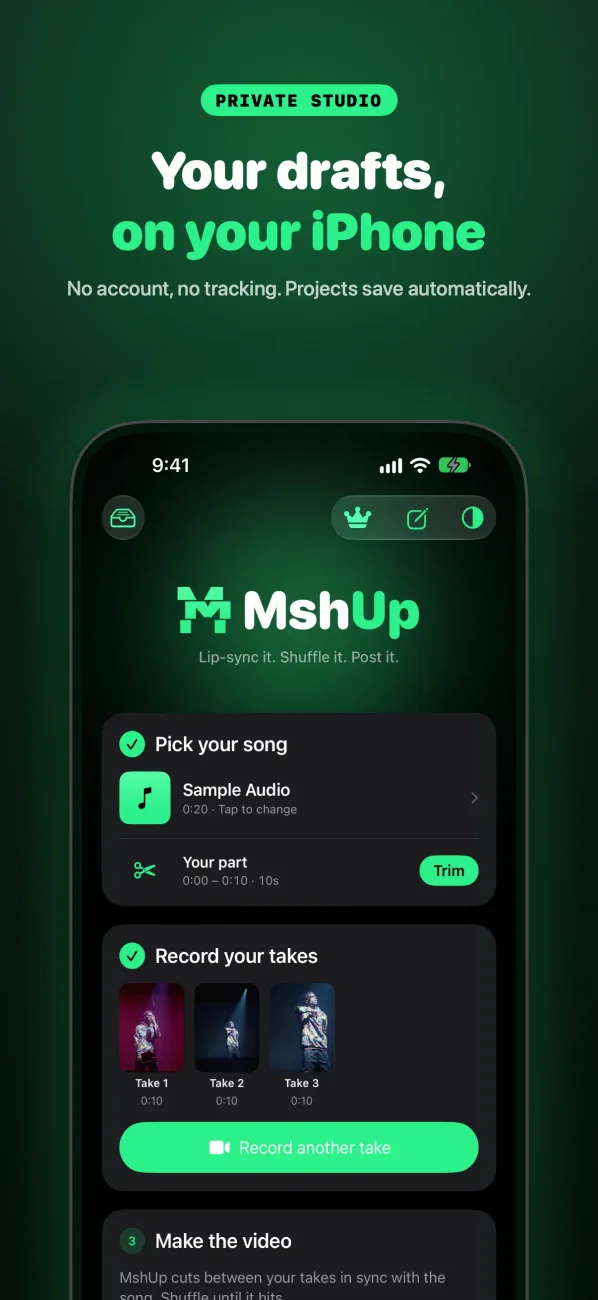
PICK YOUR PART
• Import your song and drag the waveform to the part you'll perform
• "Find the hook" jumps straight to the catchiest part
• Choose the length: 10, 15, 30, 45 seconds, or the whole song with Pro
RECORD YOUR TAKES
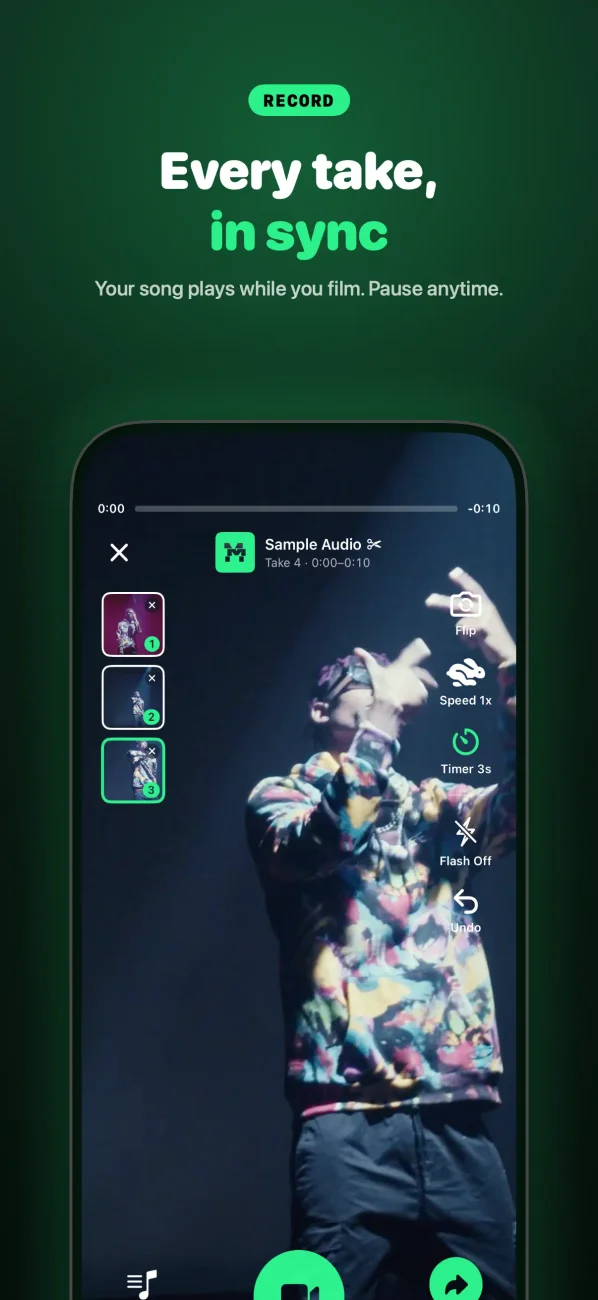
• The song plays while you record, so every take lines up
• Pause mid-take and pick up exactly where you left off
• Sped-up and slow-motion takes that stay in sync
• Zoom from 0.5x ultra-wide to close-up, dual camera, flash and countdown timer
• Use videos from your camera roll as takes
EFFECTS THAT FOLLOW YOU
• 40 moving effects built on on-device body tracking: Flames, Aura, Hologram, Laser eyes, Wings, Clones, Money rain, Glitch and more
• Stack up to 3 effects at once
• Green-screen backgrounds: Club, Synthwave, Aurora, Code rain, your own photo or video, and more
• See-through backgrounds that keep your real room and play the effect behind you: Storm, Lasers, Glitter, Matrix, Heat wave, Pool light, Cash storm
• Color filters, set for the whole video or one take at a time
• Every effect, filter and background is free
EDIT IN ONE TAP
• Shuffle until the cuts hit
• Choose how often it switches clips
• Tap any cut to swap in a different take or lock it in place
• Fine-tune lip-sync timing, with undo and redo
MSHUP PRO
Free videos include up to 3 takes, parts up to 45 seconds, and a small MshUp watermark (your first video is watermark-free). MshUp Pro unlocks unlimited takes, the whole song, and no watermark.
• Yearly: $39.99 per year
• Monthly: $4.99 per month
• Lifetime: $99.99 one-time purchase
Subscriptions renew automatically unless canceled at least 24 hours before the end of the current period. Manage or cancel anytime in MshUp (tap PRO) or in Settings → Apple Account → Subscriptions.
Terms of Use: https://www.apple.com/legal/internet-services/itunes/dev/stdeula/
Privacy Policy: https://candle-cylinder-efc.notion.site/MshUp-Privacy-Policy-3eeace4473b68099b7add4c6df2f92ca
INVITE FRIENDS
Share your invite code. A friend who uses it gets a free week of Pro when they save their first video, and you get a free week once 2 friends have, with more free weeks at 5, 10 and 20 friends.
PRIVATE BY DESIGN
• No account and no ads
• Your songs, takes and drafts stay on your iPhone
• Save finished videos straight to Photos, ready to post anywhere
What’s new
Version 2.0.2 · Nov 21, 2026
New: Boomerang
• Add a short clip from your camera roll and switch on Boomerang. It plays forward, then backward, then forward again, so it loops smoothly with no jump back to the start
• The trim screen previews it back and forth before you save
App privacy
What James Bridges declares on the App Store about how this app handles data.
-
Data not linked to you
May be collected but is not linked to your identity.
- Purchases
- Contact info
- User content
- Identifiers
- Usage data
Privacy practices may vary, for example with the features you use or your age.
Information
- Seller
- James Bridges
- Category
- Photo & Video
- Version
- 2.0.2
- Updated
- Nov 21, 2026
- Released
- Oct 13, 2026
- Size
- 5.9 MB
- Requires
- iOS 18.0 or later
- Age rating
- 4+
- Price
- Free
- In-app purchases
- Yes
- Languages
- English, Arabic, Bengali, French, German, Hindi, Indonesian, Italian, Japanese, Korean, Portuguese, Russian + 5 more
- Copyright
- © 2026 JAMES BRIDGES
You might also like
-
 Cutz - Reel Templates & TrendsReels maker. Edit story video.
-
 COVR - Album Cover Art MakerAI Mixtape & Playlist Creator
-
 Add music to videos!Add background music to videos
-
 AI Video Creator - BlinkCreate AI Fancam Videos
-
 Cover Art AICreate Album Art With AI
-
 CamJam: shoot to the beatVideos cut to the music
-
 Video Editor : Video Maker,CutMovie Maker, video crop, Clips
-
 Camuzo: Music CameraFilm with your music playing
-
 Cover Art StudioMake Your Own Album Artwork
-
 ArtsBreak: Photo effect editorDigital Art Glitch Maker & Fx