
- Age rating12+
- CategoryMusic
- DeveloperMathieu Martin
- LanguagesEnglish+ 2 more
- Size4.7 MB
Links to the official App Store page
Download.org hosts no file of MusicFollow. The button opens its official App Store page, published by Mathieu Martin. Listing last checked on Nov 26, 2026.
Screenshots


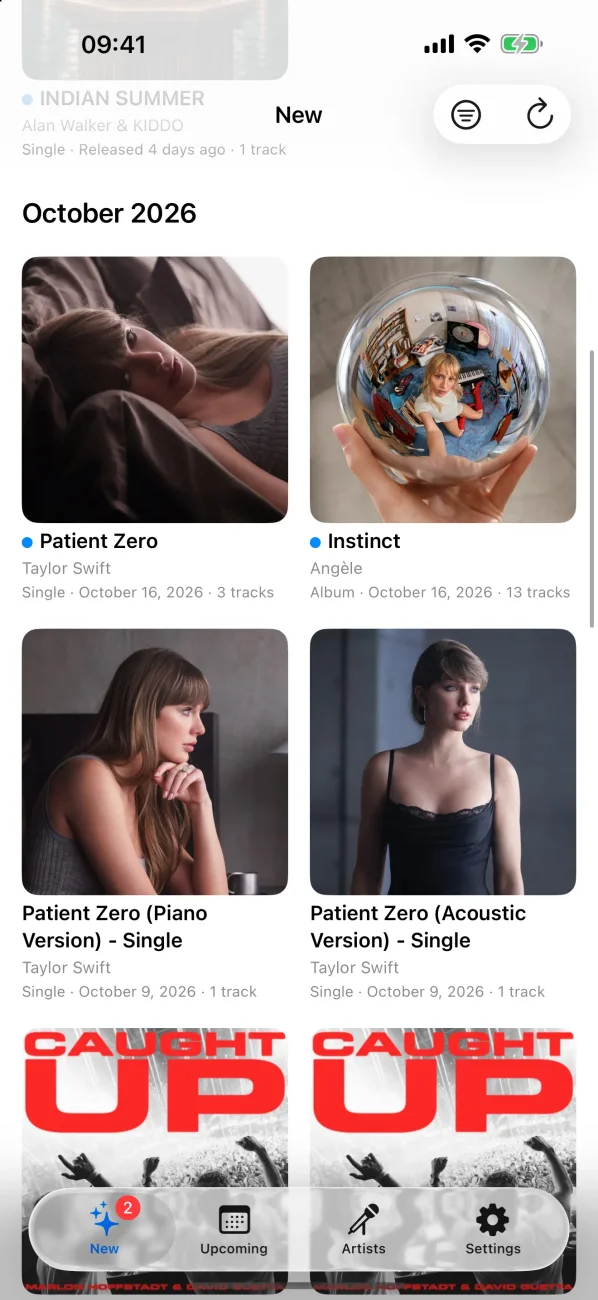


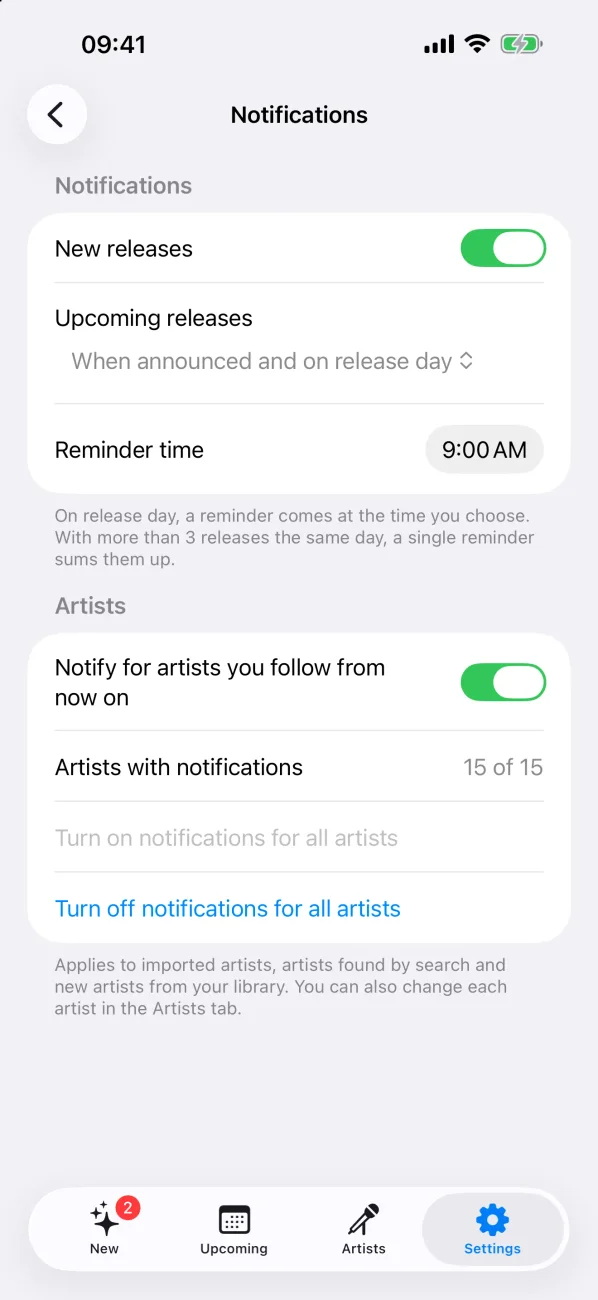
About
MusicFollow keeps track of the artists you love and lets you know as soon as they release an album, EP, or single. Designed first and foremost for VoiceOver, the app works on iPhone, iPad, and Mac.
YOUR LIBRARY, ALL AT ONCE
MusicFollow finds the artists in your Apple Music library, even if you have thousands of them. They’re identified from your albums, which keeps two artists with the same name from being mixed up. You can also follow the guest artists featured on collaborations, then sort your artists by name or by recently added.
“Check My Artists” points out an artist with the same name that you’re following by mistake, or an artist who’s missing, and never changes anything without your approval. Artists you add to your library later can be followed automatically or suggested to you.
NEW AND UPCOMING RELEASES
Your artists’ latest releases are sorted by date, and pre-orders have a tab of their own. You can filter by type (album, EP, or single) or by genre, hide explicit releases or those you’ve already read, and search for a title or an artist. Releases from your favorite artists stay visible whatever filters you use, and a collaboration appears under each of the artists you follow. A single from an upcoming album shows that album’s name and release date, and the album’s page lists the singles already released.
Just like a message in Mail, each release is either read or unread. It can be marked as read automatically when you open it, when VoiceOver reaches it, after a short delay, or when you add it to your library.
LISTEN AND ADD
Listen to an album’s previews back to back, play it in Music, or open it in Music. You can also add it to your library or to a playlist.
NOTIFICATIONS
MusicFollow notifies you when an artist you follow puts out something new, and on release day it reminds you about the albums you’ve been waiting for, at the time of your choice. You can set notifications separately for each artist.
DESIGNED FOR VOICEOVER
After every action, VoiceOver stays where you were instead of jumping back to the top of the list. Each release is spoken as a single, clear sentence, with the information and order you choose. Its actions are grouped in the rotor, and the Albums, EP, Singles, and Unread rotors move through the entire list. Text adapts to the largest type sizes. On Mac, you can also do everything from the keyboard, using the menu bar.
SIRI AND SHORTCUTS
Say “What are the new releases in MusicFollow” to hear your latest unread new releases, or “Refresh MusicFollow” to check for new ones.
ON IPHONE, IPAD, AND MAC
Your artists, read releases, and settings stay in sync through iCloud. On iPad, the tabs can appear in a sidebar, and the app works in every orientation and in resizable windows. On Mac, MusicFollow keeps checking for releases while its window is closed, and it can appear in the menu bar.
YOUR PRIVACY
There are no ads or analytics, and no account to create. Your data stays on your devices and in your iCloud.
Access to Apple Music is required. Previews are available to everyone. On iPhone and iPad, playing an album in Music requires an Apple Music subscription. Adding to your library and to playlists requires a synced library (Apple Music or iTunes Match).
What’s new
Version 1.3 · Nov 25, 2026
This update includes the following enhancements and bug fixes:
- MusicFollow is available on iPad, with a sidebar, every orientation, and resizable windows
- Notifications for a release show its artwork and offer the actions Add to Library, Mark as Read, and Play in Music or Open in Music
- Weekly Summary, in Notifications settings, sums up the week’s unread new releases every Friday at the time you choose, naming those from your favorite artists
- When the date of an upcoming release changes, a notification gives you the new date; if a release comes out earlier than planned, you’re notified that it’s out
- The Add to Calendar action on an upcoming release creates an event on its release day, with its link to Apple Music; on iPhone and iPad, you can choose the calendar and alert before adding it, or add it directly to your default calendar (Settings, General)
- New Display settings hide remixes, live, acoustic, and instrumental versions, cover versions, sped-up and slowed versions, and your artists’ guest appearances; these releases, like hidden explicit releases, no longer send notifications
- Open in Music is available for an artist, in the Artists tab, on the artist’s page, and in Add an Artist
- MusicFollow checks your artists every two weeks and suggests replacing those that don’t match the albums in your library, such as another artist with the same name
- Unfollow Artist is available on every release
- Artists you unfollow or ignore are no longer imported or suggested; they’re listed in Ignored Artists and synced with iCloud
- With Show Warning Before Unfollowing turned off, you can unfollow an artist in one step, with Undo for a few seconds or Edit > Undo
- Notifications for releases that aren’t out yet are titled “Upcoming release,” so you can tell them apart from releases you can listen to now
- Summaries of several releases name the artists whose releases are out and count upcoming releases separately; a summary of upcoming releases opens the Upcoming tab
- With Siri, Refresh MusicFollow responds faster, sends the releases it finds to your other devices right away, and tells you why a refresh couldn’t be done
- Singles are linked to their album or EP whatever its release date, with “From the EP” for an EP
- On Mac, the Esc key takes you back from a release or artist page to the previous page
- The New tab badge shows the exact number of unread new releases on iPhone and iPad, instead of “99+”
- Fixes an issue where, on Mac, VoiceOver didn’t return to the release or artist you came from after leaving its page
- Fixes an issue where VoiceOver could say “selected” on Mark as Read and Mark All as Read
- Fixes an issue where a release that came out overnight was notified a second time at your reminder time
- Fixes an issue where tapping a notification while MusicFollow was in the background could cause the app to quit unexpectedly
- Fixes an issue where groups in Check My Artists couldn’t be expanded with VoiceOver on Mac
- Fixes an issue where an album didn’t appear if a single with the same name came out on the same day
- Fixes an issue where VoiceOver moved to the first release of the day after you hid a release from its page
- Fixes an issue where an artist could appear twice in the Artists tab
- Fixes an issue where Already Released also listed a single that wasn’t out yet
App privacy
What Mathieu Martin declares on the App Store about how this app handles data.
-
Data linked to you
May be collected and linked to your identity.
- Contact info
- User content
- Diagnostics
Privacy practices may vary, for example with the features you use or your age.
Information
- Seller
- Mathieu Martin
- Category
- Music
- Version
- 1.3
- Updated
- Nov 25, 2026
- Released
- Nov 3, 2026
- Size
- 4.7 MB
- Requires
- iOS 26.0 or later
- Age rating
- 12+
- Price
- Free
- Languages
- English, Dutch, French
- Copyright
- © 2026 Mathieu Martin
You might also like
-
 Vinyl RadarNew Music Release Alerts
-
 Svara - Navidrome ClientYour music on your fingertips
-
 ThyronLocal music, synced directly
-
 APlayer - Audio PlayerLocal Music, WebDAV & Radio
-
 MusikoMusic
-
 AudRigAudio player for creatives
-
 Faraday: Music PlayerYour music from your folder
-
 PhonoriaLocal Music Player • A-B Loop
-
 PulsePilot Live - Click TracksMetronome for Live Musicians
-
 Meow Music PlayerPure offline music