
My Shift Work Calendar
Rotating Schedule Planner
Designed for iPhone
Free · In-app purchases
- Age rating4+
- CategoryProductivity
- DeveloperVikas Mawasi
- LanguagesEnglish
- Size20.8 MB
Links to the official App Store page
Download.org hosts no file of My Shift Work Calendar. The button opens its official App Store page, published by Vikas Mawasi. Listing last checked on Nov 17, 2026.
Screenshots


About
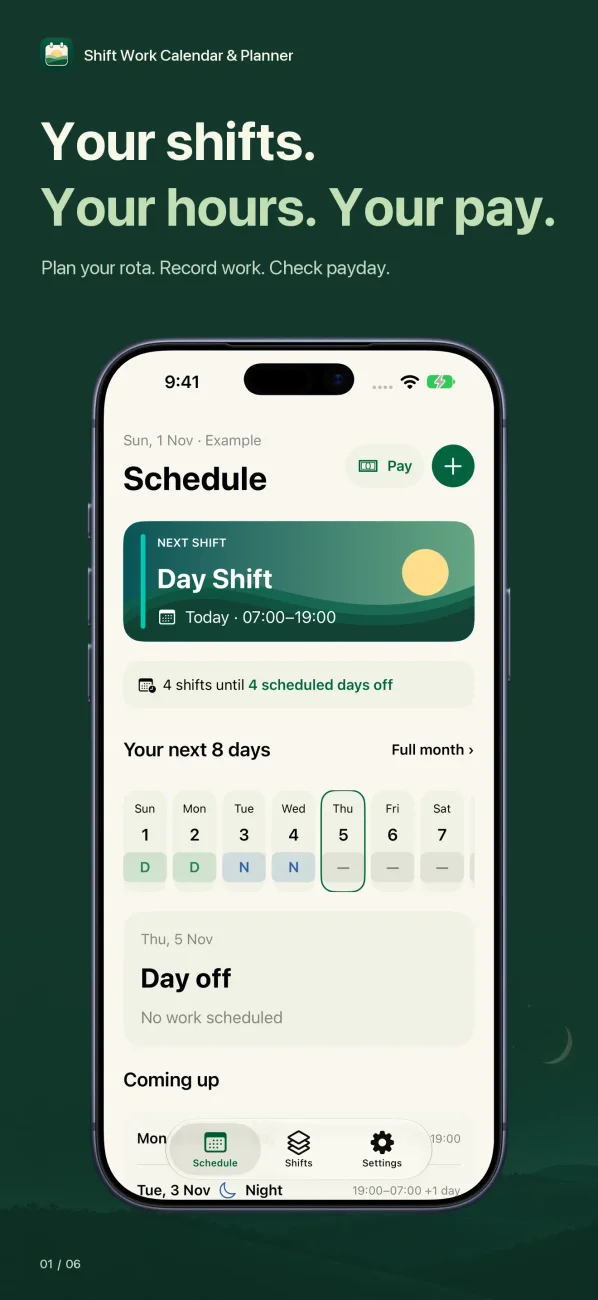
Know when you’re working—without rebuilding your schedule every week.
Shift Work Calendar is a personal schedule planner for people whose work does not fit a simple Monday-to-Friday routine. Create your shift types once, build a repeating rotation, and see the months ahead in a clear calendar.
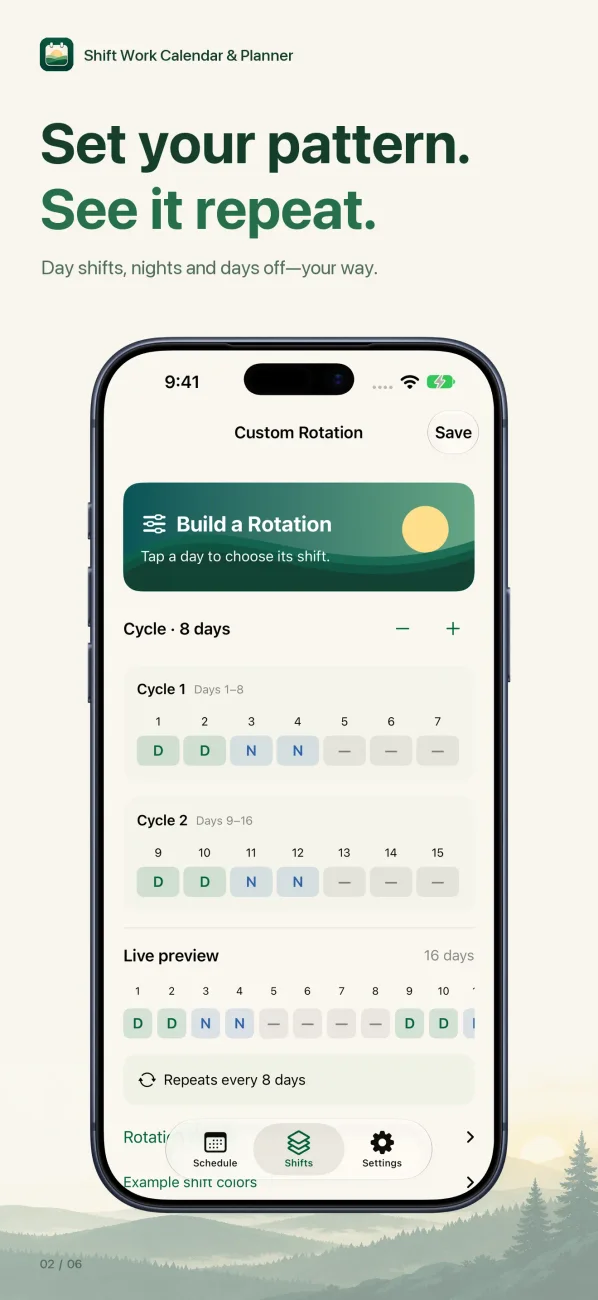
PLAN YOUR SHIFT PATTERN
• Create day, evening, night, split, or custom shifts
• Set start and end times, including overnight shifts
• Build repeating rotations in a simple day-by-day cycle
• Preview a rotation before adding it to your calendar
• Correct individual days without rebuilding the full pattern
SEE WHAT’S NEXT
• View your schedule month by month
• See your next shift at a glance
• Check the selected day’s shift details
• Use Next Shift and Week at a Glance Home Screen widgets
GET USEFUL REMINDERS
• Receive an alert before an upcoming shift
• Review tomorrow’s scheduled work
• Get an optional weekly preview
• Know when your planned schedule is about to end
• No unnecessary days-off reminders
MADE FOR REAL ROTATING WORK
Whether you work in healthcare, emergency services, manufacturing, security, transport, hospitality, or another rotating role, the app keeps your personal roster easy to understand.
YOUR SCHEDULE, YOUR DEVICE
No account is required. Your schedule is stored locally on your iPhone, and you can export your personal data as JSON from Settings.
FREE AND PRO
The free plan includes up to three active shift types, one active rotation, and 30-day rotation planning. Pro unlocks unlimited shift types, unlimited rotations, and longer-range planning. Monthly and annual subscriptions are available in the app. Prices are shown in your local App Store currency before purchase.
Subscriptions renew automatically unless canceled at least 24 hours before the end of the current period. You can manage or cancel subscriptions in your Apple Account settings. Restore Purchases is available in the app.
Terms of Use: https://www.apple.com/legal/internet-services/itunes/dev/stdeula/
Privacy Policy: https://sweet-berry-b1e.notion.site/Privacy-Policy-39dce85045c280e49f76d0420187e3a9
What’s new
Version 1.0.4 · Nov 4, 2026
Your shifts. Your hours. Your pay.
This update brings a refreshed design and Paycheck Check:
• Plan rotations and see upcoming shifts more clearly.
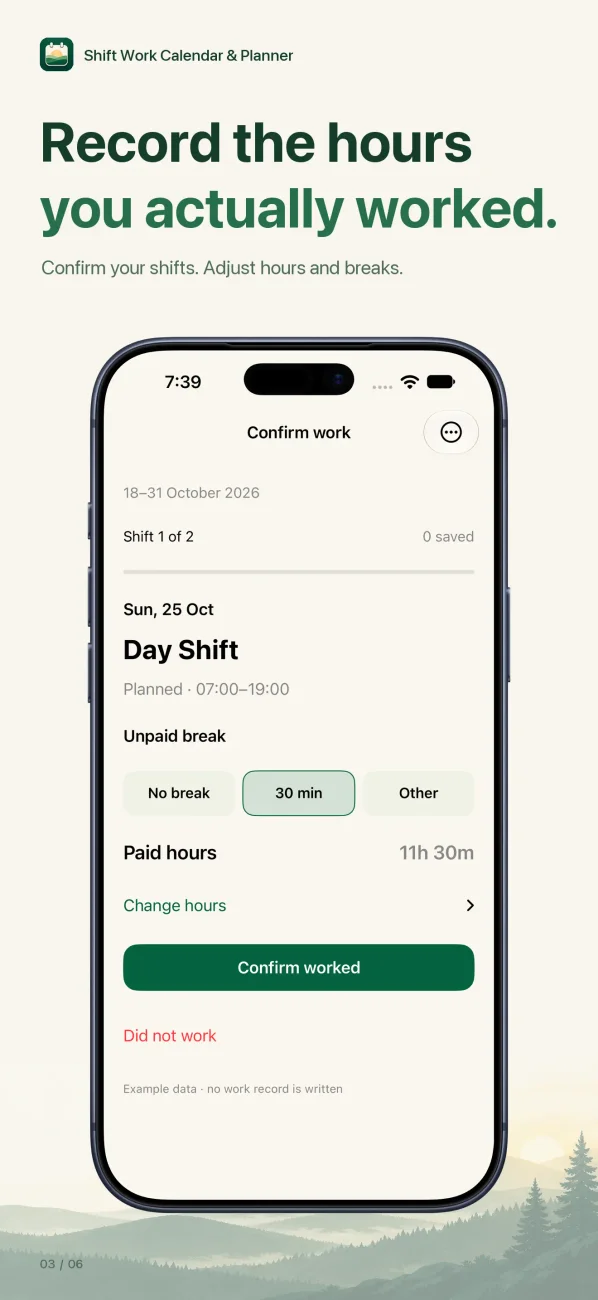
• Confirm worked shifts, record unpaid breaks and correct actual hours.
• Estimate gross earnings for your pay period.
• Compare recorded hours and estimated gross with your pay stub, with separate differences to review.
• Save comparisons and update saved pay stub details.
• Enjoy redesigned Next Shift and Week at a Glance widgets, free for everyone, including Clear and Tinted support.
Your first saved comparison is free. Pro unlocks more comparisons. Estimates are gross pay, not take-home pay; differences do not prove underpayment.
App privacy
What Vikas Mawasi declares on the App Store about how this app handles data.
-
Data not linked to you
May be collected but is not linked to your identity.
- Purchases
- Usage data
Privacy practices may vary, for example with the features you use or your age.
Information
- Seller
- Vikas Mawasi
- Category
- Productivity
- Version
- 1.0.4
- Updated
- Nov 4, 2026
- Released
- Jul 24, 2026
- Size
- 20.8 MB
- Requires
- iOS 26.0 or later
- Age rating
- 4+
- Price
- Free
- In-app purchases
- Yes
- Languages
- English
- Copyright
- © 2026 Vikas Mawasi
You might also like
-
 Easy Work Shift CalendarTrack Work Shifts & Schedule
-
 ShiftScan: Shift Work CalendarYour shifts, in your calendar
-
 Hitchspan: Rotation CalendarRotation & Crew Change Tracker
-
 Shift Planner - Rota & HoursPlan rotas, hours & earnings
-
 ShiftLog - Track work shiftsHours, earnings & history
-
 Smart-Shift-PlannerSmart shift schedule planner.
-
 SShift — Shift CalendarPlan shifts, rest & leave
-
 Rotaro: Shift Work CalendarRota, cycles and reminders
-
 GeoPunch: Geofence Time ClockAutomatic Clock In & Clock Out
-
 Unit Conversion - ProConvert anything, anywhere