
myFlights.me: Travel Log & Map
Flights, countries & stats
Designed for iPhone, iPad
Free
- Age rating4+
- CategoryTravel
- DeveloperChristian Au
- LanguagesEnglish
- Size58.9 MB
Links to the official App Store page
Download.org hosts no file of myFlights.me: Travel Log & Map. The button opens its official App Store page, published by Christian Au. Listing last checked on Nov 21, 2026.
Screenshots



About
Every flight you've taken, on one map. myFlights turns your travels into a map, statistics and milestones, and tells the story of where you've been.
YOUR TRAVELS ON A MAP
• Every airport and route you've flown, on a world map you can explore and filter
• Six map themes for light and dark mode
• Color your routes by airline, and draw the ones you fly often wider
THE STORY OF YOUR TRAVELS
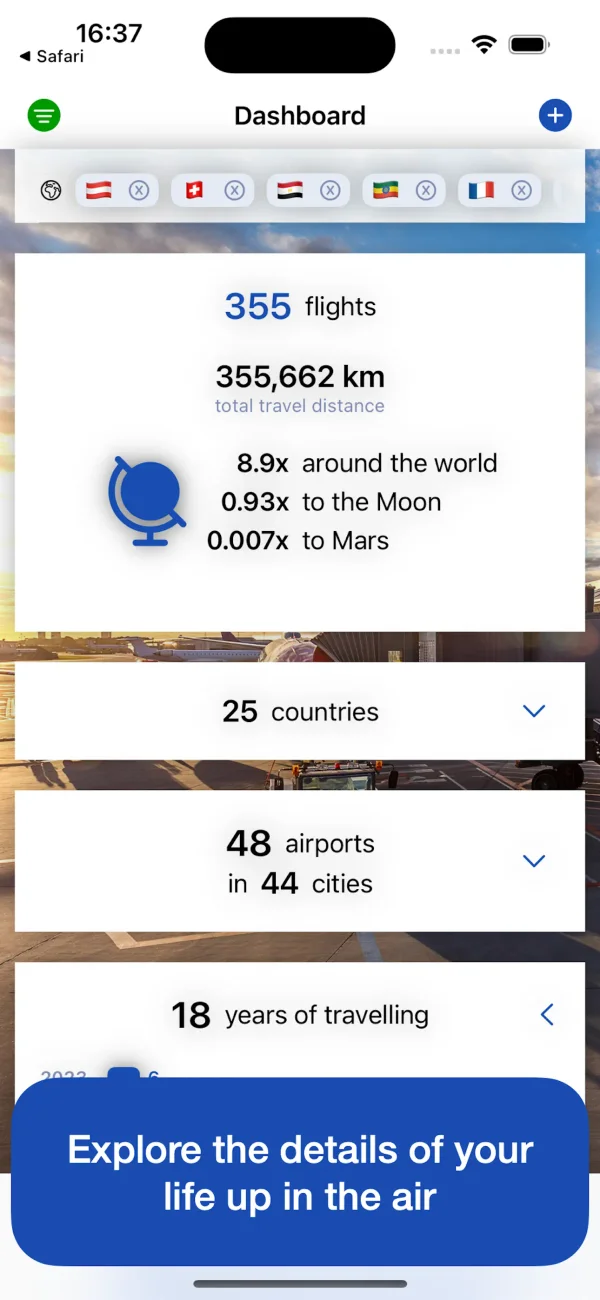
• Every year at a glance: flights, distance, and the countries, cities and airports you visited, including the new ones
• Milestones as they happen: your 100th flight, your first time in Japan, a new airline, once around the world
• Upcoming trips at the top, and "On this day" memories from earlier years
STATISTICS FOR EVERYTHING
• Flights, distance and time in the air, by year or all time
• Top airports, airlines, aircraft, countries, cities and routes
• A profile for every airport, airline, country and aircraft
• Filter by year, airline, route, tag and more
ADD FLIGHTS IN SECONDS
• Search by flight number, or by route and date, and myFlights fills in the rest
• Airport, airline and aircraft search as you type, even offline
• Bring in your booked trips from TripIt
YOURS, PRIVATELY
• Start right away, no sign-up needed
• Sign in with Apple, Google or email to keep your flights synced and backed up
• Free, with no ads and no tracking. We don't sell your data.
Made by an independent developer. Questions or ideas? Write to team@myflights.me.
What’s new
Version 2.4.0 · Nov 18, 2026
A new map:
• Six map themes, each designed for light and dark mode: myFlights, Monochrome, Classic, Satellite, Blueprint and Paper
• Pick a route color that suits the theme, or color your routes by airline in the airline's own colors, with a legend of their logos
• Routes you flew more often are wider: choose regular, wide or widest
• The small map on each flight follows your theme too
• Your previous map style carries over to the closest theme
A new way to add flights:
• One simple form: enter a flight number, or choose where you flew from and to, pick the date, and search
• Search by route to see the day's flights between two airports, and swap the airports with one tap
• No times to fill in: they come with the flight found, or you add them later
• Not among the results, or nothing found? Save the flight anyway with its airports and date
A new flight lookup:
• Finds more flights, now powered by AeroDataBox. Search by the airline's own flight number or a codeshare number.
• Shows who operates the flight, with terminals and the aircraft type, where available
• Flights with several stops under one number are listed in order
• Fixed: the lookup now searches the date the calendar shows, even when you're in another time zone than the departure airport
• Says so when you've reached the daily lookup limit
On this day:
• The "On this day" card now shows, for each earlier year, how long ago it was and the milestones you reached that day
• Tap a year to jump to it in your flights. The card is always at the top.
Also new:
• Profiles and Dashboard get the same full-screen look as your flights, with a large title, and Profiles shows each entry as its own card
• New background images throughout the app, with their own night versions in dark mode
• A new start screen, and the app's version at the bottom of Settings
• Filters show on the highlighted filter button, with a trash button next to it on every tab to clear them
Thank you for flying with myFlights!
App privacy
What Christian Au declares on the App Store about how this app handles data.
-
Data linked to you
May be collected and linked to your identity.
- Contact info
- User content
- Identifiers
- Diagnostics
-
Data not linked to you
May be collected but is not linked to your identity.
- Location
- Search history
Privacy practices may vary, for example with the features you use or your age.
Information
- Seller
- Christian Au
- Category
- Travel
- Version
- 2.4.0
- Updated
- Nov 18, 2026
- Released
- Dec 12, 2018
- Size
- 58.9 MB
- Requires
- iOS 17.0 or later
- Age rating
- 4+
- Price
- Free
- Languages
- English
- Copyright
- © 2026 Christian Au
You might also like
-
 MyFlight.lifeYour flight life story.
-
 myFlights - Flight DiaryKeep track of all your flights
-
 Air Travel LogLog all your flights
-
 YourFlights - Flight LogbookYour Flights on a 3D Globe
-
 Fly - Log and Share FlightsYour Personal Flight Journal
-
 hi.FlightsYour personal flight companion
-
 FlightVault: Flight Log & MapLive Tracker, Stats & History
-
 JetLovers - Flight statsTravel
-
 EveryPlace - Where I've been?Keep track of your travels!
-
 Been & Done Travel Journal MapTrip log country state counter