
- Age rating4+
- CategoryUtilities
- Developerkim juyoung
- LanguagesEnglish+ 2 more
- Size16.8 MB
Links to the official App Store page
Download.org hosts no file of MyPhotoWatch. The button opens its official App Store page, published by kim juyoung. Listing last checked on Nov 14, 2026.
Screenshots


About
Apps for viewing images on Apple Watch
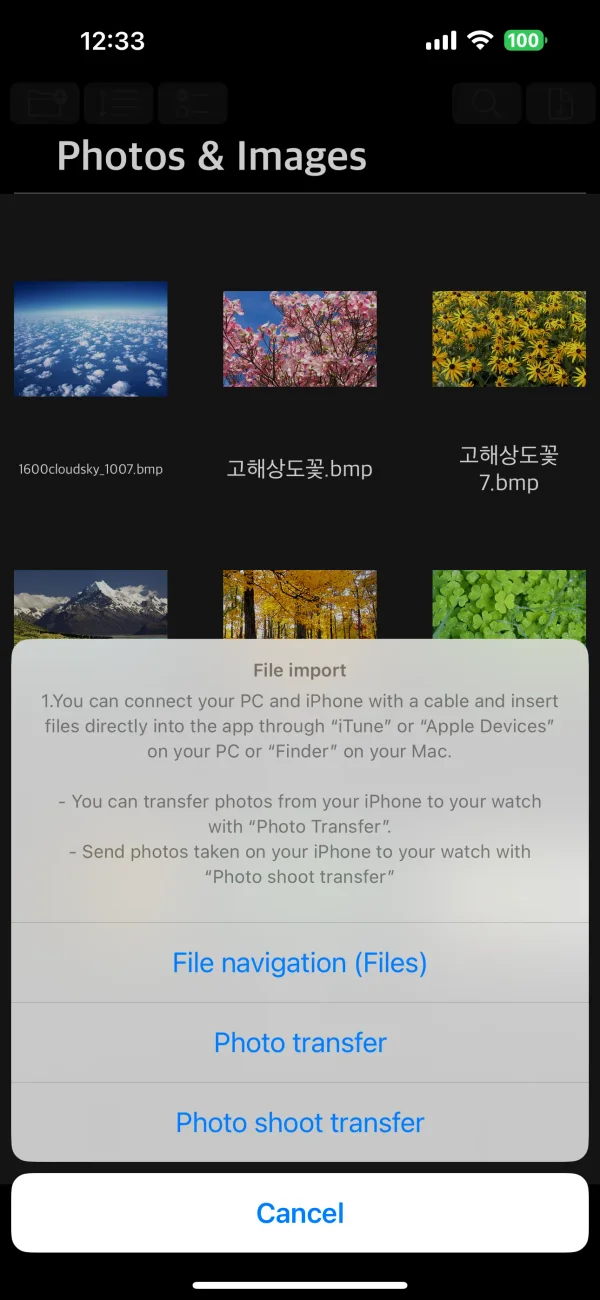
Transfer photos and videos from iPhone to Apple Watch
This app allows you to transfer photos from your iPhone to the Apple Watch and view them on the Apple Watch.
Send and view general image files
You can transfer and view the captured photos in Photos on your iPhone.
Supports zoom in and zoom out in the watch app (zoom in and out button)
Check photos while switching back and forth between pages.
You can transfer video recorded on your iPhone to your watch. (Video quality and capacity change)
Volume and navigation with Apple Watch's digital crown
The watch app can be run alone, but
An iPhone app is required to send image files to the Apple Watch.
Please make sure you have an Apple Watch before purchasing the app.
The iPhone app does not support viewing images or photos.
The iPhone app transfers image files and photos to a connected Apple Watch.
**Features**
- Device: Apple Watch (WatchOS 10+), iPhone (iOS 17+)
- Image files: jpg, jpeg, png, gif, bmp, tif, tiff
- webp and avif formats: Convert to jpg format and send (Apple Watch does not support this format)
- Zoom in and out: Zoom in and out of content using the zoom in/zoom out buttons.
- Page mode: Switch pages back and forth and go to a specific page
- Vertical mode: Navigate pages by scrolling up and down in the list
- Runs alone on Apple Watch, iPhone app required for file transfer
- Hide and display various menus and buttons by touching the content screen
- App screen brightness
- App Lock: Only possible when the watch is password-protected
- iPhone photo transfer: Transfer photos from iPhone to watch (convert to jpg format and transfer)
- iPhone photo transfer: Take photos on iPhone and transfer them to the watch (convert to jpg format and transfer)
- iPhone video transfer: Transfer video recorded on iPhone to watch (change video quality and capacity)
- GIF/Webp file animation effects are not currently supported.
** Supports ZIP/RAR/CBZ/CBR **
- Ability to view images in compressed files
- Browse and open compressed files on your iPhone on the watch without transferring files to the watch
- The paired iPhone and Apple Watch must be in close proximity, and the app must be installed and run on your iPhone
- Image quality will be adjusted.
** Direct Photo **
- Ability to view photos in iPhone Photos directly on Apple Watch
- Access, browse, and open iPhone Photos on Watch without transferring files to Watch
- Paired iPhone and Apple Watch must be in close proximity, and the app must be installed and run on iPhone
- Photo permission required on iPhone app
- Image quality is adjusted, and videos or moving images are not supported.
** Search "MyPhotoWatch" on YouTube to watch a simple usage video. **
Our app does not provide separate image files. Image files can be viewed by inserting the file stored by the app user into the app.
What’s new
Version 1.8 · Nov 17, 2025
- Fixed an issue where the app would crash after selecting a video from Photos.
App privacy
What kim juyoung declares on the App Store about how this app handles data.
-
Data not linked to you
May be collected but is not linked to your identity.
- Diagnostics
Privacy practices may vary, for example with the features you use or your age.
Information
- Seller
- kim juyoung
- Category
- Utilities
- Version
- 1.8
- Updated
- Nov 17, 2025
- Released
- May 10, 2024
- Size
- 16.8 MB
- Requires
- iOS 16.0 or later
- Age rating
- 4+
- Price
- $4.99
- Languages
- English, Japanese, Korean
- Copyright
- © Kim Ju Young
You might also like
-
 Foldmeter: Hinge Angle & RulerLevel, protractor & caliper
-
 Pot・AI Plant Identifier・GardenUtilities
-
 Picture CallUtilities
-
 TextwirlTranslate asian vertical comic
-
 Files on Watch - HandyFilesSend PDFs & Images to Watch
-
 DialAIPowered by GPT-3.5 & GPT-4
-
 LK 워치키보드Utilities
-
 VaultXT - Text File EditorLarge text editor
-
 StoneKey - Custom Keyboard3D Design and Color Themes
-
 Volante Trip Journal OrganizerMileage tracker, Manage Log