
NguyenKey
Vietnamese Syllable keyboard
Designed for iPhone, iPad, iPod touch
$2.99
- Age rating4+
- CategoryUtilities
- DeveloperTakayuki Imai
- LanguagesEnglish+ 2 more
- Size1.8 MB
Links to the official App Store page
Download.org hosts no file of NguyenKey. The button opens its official App Store page, published by Takayuki Imai. Listing last checked on Nov 14, 2026.
Screenshots



About
■ Background of the App
NguyenKey is a new Vietnamese keyboard app designed to overcome the challenges of traditional Telex and VNI methods — such as the hassle of memorizing key combinations and the number of taps required.
By separating the keyboard into dedicated Consonant and Vowel screens with automatic switching and multi-letter keys, NguyenKey enables a natural typing rhythm with significantly fewer taps.
■ Key Features
• Automatic Screen Switching for Rhythmic Typing
Consonant and vowel screens are separated and switch automatically as you type, allowing for a seamless, rhythmic input experience.
• Multi-Letter Keys to Reduce Taps
Consonant keys combining up to 3 letters and diphthongs available with a single tap greatly reduce the number of taps needed per word.
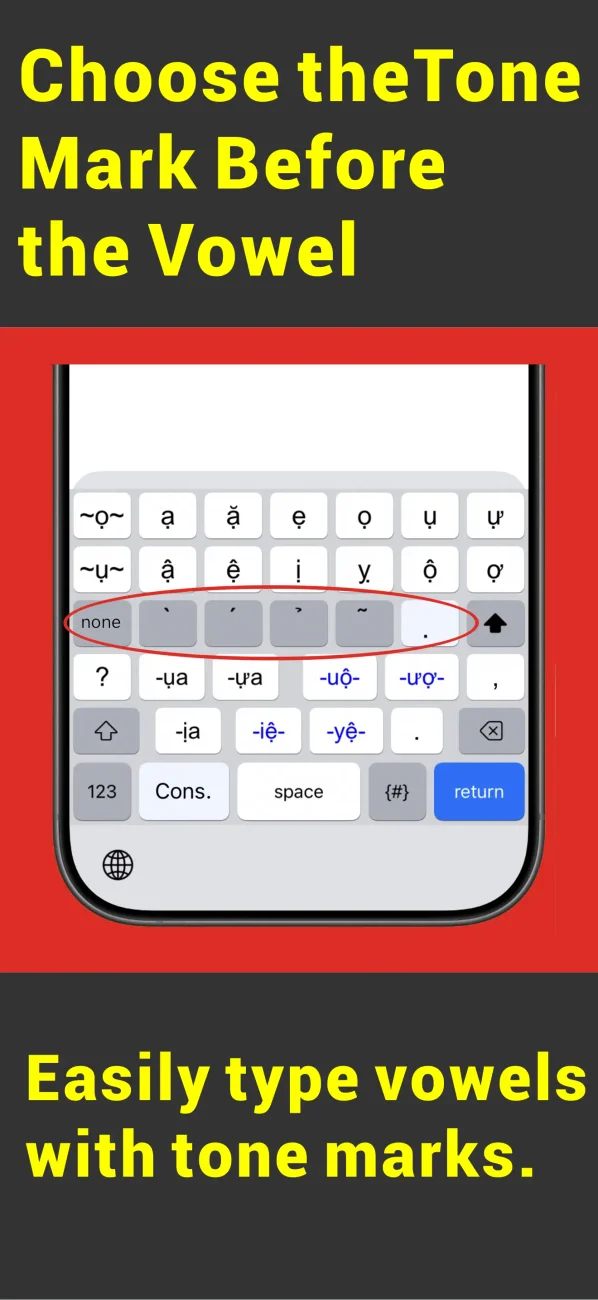
• Intuitive Tone Input — No Memorization Required
Simply select one of the 6 tone shift keys before choosing a vowel. There is no need to memorize complex key combinations.
• Compact 6×7 Layout Optimized for One-Handed Use
Specifically designed for smartphones, the compact 6×7 grid makes one-handed typing easy and comfortable.
• Convenient Shift Key Options
Includes a White Shift Key (capitalizes the next character) and a Black Shift Key (Caps Lock).
• Phonetic Symbols (IPA) Display
Optionally display International Phonetic Alphabet (IPA) symbols on consonant and vowel keys. Supports both Northern (Standard) and Southern dialects.
It can also display pronunciation conditions, such as when the mouth needs to be closed after a final consonant.
• 4 Typing Modes
Easily switch between Vietnamese, English, Numbers, and Symbols modes.
■ Typing Example: "Việt"
1. On the consonant screen, tap the White Shift Key to capitalize, then tap "V".
2. The app automatically switches to the vowel screen. Select the underdot tone.
3. Tap the tone-marked diphthong "iệ".
4. The screen automatically switches back to the consonant screen. Tap "t" to finish.
■ Initial Setup
1. Go to iOS "Settings" > "General" > "Keyboard" > "Keyboards" > "Add New Keyboard…".
2. Select "NguyenKey" to enable it.
3. While typing in any app, press and hold the Globe icon on the keyboard and select "NguyenKey".
■ Compatibility
• Requires iOS 15.6 or later / iPadOS 15.6 or later
• Compatible with iPhone and iPad
■ Privacy & Security
NguyenKey does not transmit or collect what you type through external servers.
■ Support & Contact
Support Site: https://superscript.sakura.ne.jp/
Email: [snowysap@gmail.com](mailto:snowysap@gmail.com)
Created by: Takayuki Imai
What’s new
Version 5.1 · Sep 24, 2026
■ What's New in Ver 5.1
Improved the keyboard layout by swapping the positions of the “t” and “th” keys.
App privacy
What Takayuki Imai declares on the App Store about how this app handles data.
-
Data not collected
The developer does not collect any data from this app.
Privacy practices may vary, for example with the features you use or your age.
Information
- Seller
- Takayuki Imai
- Category
- Utilities
- Version
- 5.1
- Updated
- Sep 24, 2026
- Released
- Mar 15, 2018
- Size
- 1.8 MB
- Requires
- iOS 15.6 or later
- Age rating
- 4+
- Price
- $2.99
- Languages
- English, Japanese, Vietnamese
- Copyright
- © 2018 Takayuki IMAI
You might also like
-
 Clear Speaker: WaveDryWater Eject & Clear Wave
-
 FlushWater - Speaker CleanerEject water & fix speaker
-
 VietSixKey: Gõ Tiếng ViệtUtilities
-
 Clear Speaker – Water EjectRemove Water Dust from Speaker
-
 Calunar - Vạn sự Bính Ngọ 2026Utilities
-
 Big Time Digital ClockLarge clock with many styles!
-
 SonicClear: Speaker CleanerWater Eject, Dust & Sound Test
-
 海の幸ルールブック全国の海釣りルールをすぐ確認
-
 Vikey - Vietnamese KeyboardSwitches EN/VI as you type
-
 Tu Dien Anh Viet V-DictionaryKim Từ điển đa ngôn ngữ 2020