- Age rating4+
- CategoryUtilities
- DeveloperTHOMAS L JANUS
- LanguagesEnglish
- Size12.1 MB
Links to the official App Store page
Download.org hosts no file of OBD Tally. The button opens its official App Store page, published by THOMAS L JANUS. Listing last checked on Nov 14, 2026.
Screenshots


About
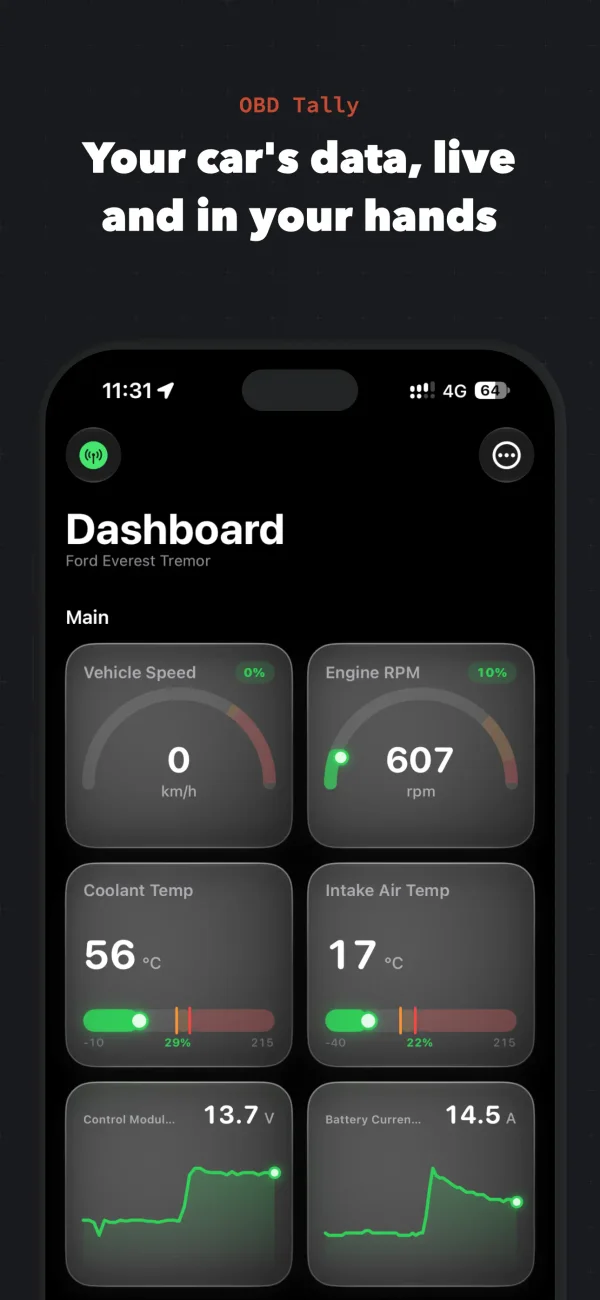
OBD Tally is a customisable OBD-II dashboard, data logger, and diagnostics companion created by a Ford Everest V6 owner and shared for other drivers and enthusiasts. A built-in browser for community vehicle profiles from the OBDb project now lets it work with a far wider range of makes and models.
Built for and tested with the Veepeak OBDCheck BLE+ scanner. It may also work with other ELM327-compatible Bluetooth Low Energy adapters, but compatibility cannot be guaranteed across every vehicle, adapter, or ECU.
Connect to your vehicle to view live sensor data, build personalised dashboards, monitor important values, investigate diagnostic trouble codes, and record drives for later review.
Make the dashboard your own
• Create multiple dashboard pages for different driving or diagnostic situations.
• Choose from gauges, graphs, bars, numeric readouts, temperature displays, and status indicators.
• Configure names, units, ranges, colours, warning levels, and critical thresholds.
• Add low-value alerts for parameters such as fuel level or pressure.
• Apply value smoothing to reduce noisy readings.
• Replace raw values with custom labels—for example, transmission positions.
• Choose compact or expanded tile layouts.
Choose from a large library of vehicle profiles
Browse and import profiles from the open-source OBDb repository, a community-maintained collection of signal definitions for a large variety of makes and models. Pick your vehicle, import its profile, and start viewing manufacturer-specific data without building anything by hand. Combine multiple profiles on one vehicle and edit any profile or PID afterwards. A default Ford Everest V6 3.0L profile is also included.
Manufacturer-specific data varies by model, year, engine, ECU calibration, and market, so review and validate imported PID definitions against your own vehicle. Community profiles may be incomplete.
Can't find your vehicle?
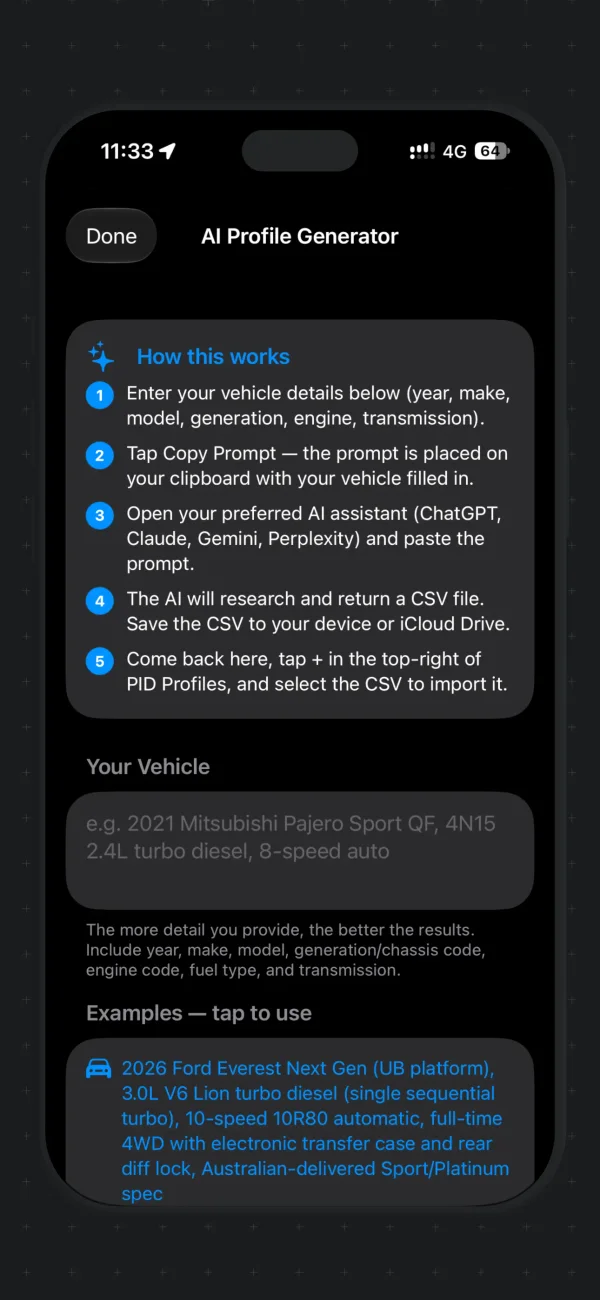
Use the AI prompt generator to prepare a detailed prompt for creating a vehicle-specific CSV template. Paste it into your preferred AI assistant, review the result, and import the CSV. You can also import profile files directly.
Record and review your drives
• Interactive charts and sparklines.
• Route and location information when location recording is enabled.
• Trip summaries and individual data-point inspection.
• Configurable recording intervals and PID selection.
• Session archiving, backup, restore, and optional iCloud synchronisation.
Alerts, diagnostics, and CarPlay
Create alert rules for the values you care about and see warning or critical conditions on your dashboard. Read and view diagnostic trouble codes reported by the vehicle. CarPlay provides a simplified view of selected live data, alerts, connection status, and recording controls where supported.
Built by an enthusiast
OBD Tally is not professional workshop software, a certified diagnostic platform, or a replacement for qualified mechanical advice. OBD-II values—particularly manufacturer-specific PIDs and calculated results—may be incomplete, unsupported, or inaccurate depending on the vehicle and adapter. Always validate important readings independently, and never configure or operate the app while driving.
Vehicle profile data courtesy of the OBDb community (CC BY-SA 4.0).
What’s new
Version 1.4 · Nov 11, 2026
OBD Tally 1.4
This update brings a redesigned Settings, an instrument-cluster dashboard on iPad, a fresh Sessions tab, a redesigned All Data screen, alerts on the CarPlay screen and many reliability fixes.
PROFILE UPDATES FROM GITHUB
• Check OBDb vehicle profiles and the built-in Ford Everest Default for updates on GitHub, and bring changes in without losing your setup.
• Each change shows your value beside GitHub's, and anything you edited yourself is flagged for you to decide.
• Tiles, CarPlay rows, alerts and thresholds stay attached. You choose which new signals to add, and removed signals are kept unless you choose to remove them.
• Nothing changes until you tap Apply, and nothing is downloaded until you tap Check for Updates.
INSTRUMENT CLUSTER ON IPAD
• On full-size iPads, dashboard tiles use a new instrument-style design: gauges with scale ticks and warning zones, segmented bars, and graphs with a grid, time axis and stats strip.
• In landscape, a 3 x 2 grid fits more of each page on screen.
A FRESH SESSIONS TAB
• An activity summary shows distance, drives, drive time, average speed and longest drive for the last 7 days, 30 days or all time, compared with the previous period.
• Recordings are listed route first, with a live timer while you record.
• Deleted sessions can be brought back with Undo for 5 seconds.
REDESIGNED SESSION GRAPHS
• Summary, detail and Compare charts now share one cleaner look.
• Smooth lines never overshoot the recorded values. Gear and on/off readings stay stepped.
• Lines turn orange or red only where they pass a warning or critical limit, and gaps in a recording are shaded so they read clearly as missing data.
• Save playback presets and choose one as the Playback Default for replaying routes.
A REDESIGNED ALL DATA
• An overview shows how many parameters are reporting, and how many are in warning or critical.
• Each row has a trend line, a range bar with this drive's low and high, and threshold colours.
• Filter by Live, Alerts, On Dashboard or PID source, and sort by name or most recently updated.
ALERTS ON THE CARPLAY SCREEN
• Alert banners now appear on the CarPlay screen even when another app, such as Maps, is in front.
A REDESIGNED SETTINGS
• A summary card shows your vehicle and connection at a glance.
• Search Settings to jump straight to the right page.
• A new Appearance page brings theme, design style, tile design, density, units and Min/Max together under a live preview.
• CarPlay settings now show a preview of every page, plus a live CarPlay-style mockup while you edit.
SAFER RANGE AND THRESHOLD EDITING
• A zones bar shows where each threshold sits, with the live value when connected.
• Thresholds in the wrong order are flagged as you type.
• A better number keyboard with next and previous arrows, a plus/minus key and a Done button.
• You're asked before unsaved changes are discarded.
MORE IMPROVEMENTS
• Reorder dashboard pages from the Page menu in edit mode.
• Recorded drives that couldn't be named when they finished are retried automatically on later launches.
FIXES
• Trouble code scans no longer show phantom codes when the vehicle sends a long multi-part reply.
• Clearing trouble codes shows its own progress, and old codes are removed from the screen once the clear succeeds.
• Min and max values no longer carry over from a previous drive after the car has been parked.
• The last readings before you stop a recording are no longer lost.
• Tiles no longer reset or replay their animation when you enter or leave edit mode, and delete badges on the top row are no longer clipped.
• Opening the keyboard in a sheet no longer rearranges the dashboard underneath.
• Graph tiles use a consistent scale, so small changes in a steady reading no longer look dramatic.
• Units, hex codes and formulas are no longer autocorrected or capitalised.
• Automatic alert names keep decimals, for example "below 11.8V".
• General stability and performance improvements.
App privacy
What THOMAS L JANUS declares on the App Store about how this app handles data.
-
Data not collected
The developer does not collect any data from this app.
Privacy practices may vary, for example with the features you use or your age.
Information
- Seller
- THOMAS L JANUS
- Category
- Utilities
- Version
- 1.4
- Updated
- Nov 11, 2026
- Released
- Oct 13, 2026
- Size
- 12.1 MB
- Requires
- iOS 26.4 or later
- Age rating
- 4+
- Price
- Free
- Languages
- English
- Copyright
- © Thomas Janus
You might also like
-
 LogMate - Service LogbookUtilities
-
 iQuadraticQuadratic equation solver
-
 Rego Reminder AustraliaUtilities
-
 KISKIS App
-
 loadmate: towing capacitytongue weight, payload, GVWR
-
 Flashlight: Strobe LightSOS, Bike, Run & Party Light
-
 Ocular SetupUtilities
-
 OpenOBD: OBD2 Car ScannerCheck Engine Light Code Reader
-
 TPMS ConnectTyre pressure & voice alerts
-
 TPMS AwareTire Pressure Management