- Age rating4+
- CategoryUtilities
- DeveloperHirofumi Matsuyama
- LanguagesEnglish+ 1 more
- Size1.9 MB
Links to the official App Store page
Download.org hosts no file of OBD2+. The button opens its official App Store page, published by Hirofumi Matsuyama. Listing last checked on Nov 12, 2026.
Screenshots

About
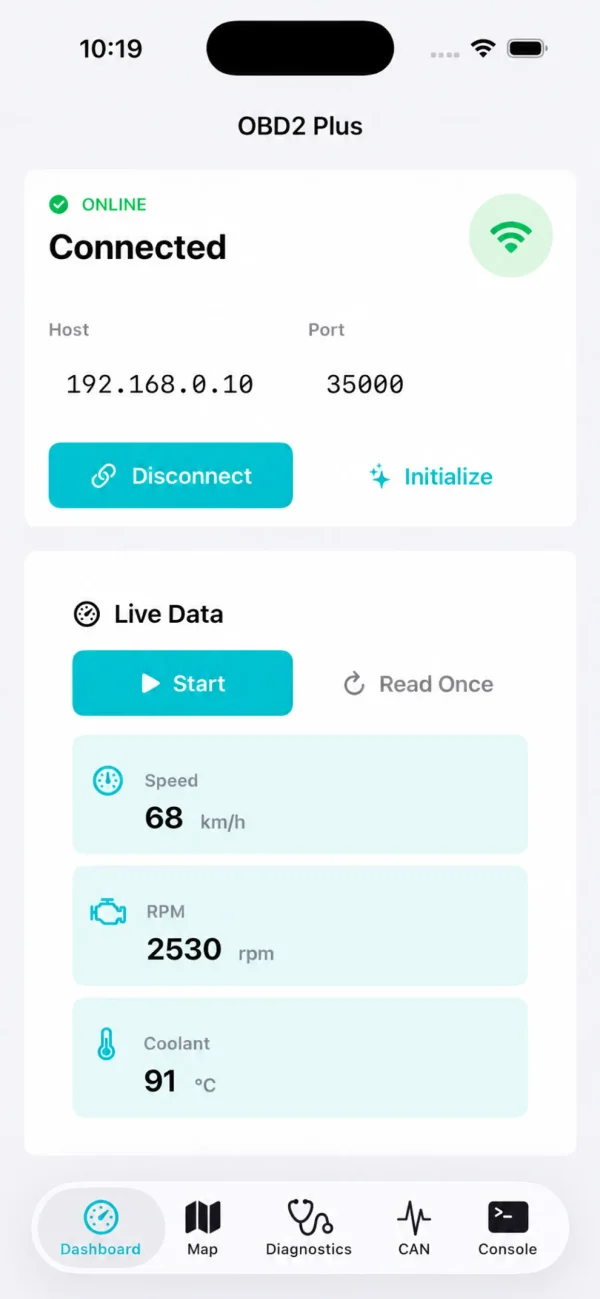
OBD2 Plus is a vehicle diagnostic app for iPhone that connects to a compatible Wi-Fi OBD2 / ELM327 adapter.
IMPORTANT:
A compatible Wi-Fi OBD2 adapter is required to obtain vehicle data. The adapter is not included with the app and must be purchased separately.
Connect the OBD2 adapter to your vehicle's OBD2 port, then connect your iPhone to the adapter's Wi-Fi network.
Main Features
• Real-time vehicle speed
• Engine RPM
• Coolant temperature
• Engine load
• Intake air temperature
• Intake manifold pressure
• MAF air flow
• Throttle position
• Fuel level
• Vehicle voltage
• Hybrid-related data on supported vehicles
• VIN reading
• Diagnostic Trouble Code (DTC) reading
• DTC clearing
• Real-time CAN communication monitoring
• CAN ID filtering
• RAW CAN data and bit-level display
• Manual OBD2 command transmission
• Advanced CAN frame transmission
• Communication log saving and sharing
• Driving location display using iPhone location services
Compatible Hardware
OBD2 Plus is designed for Wi-Fi-enabled OBD2 adapters, including compatible ELM327-based devices.
Requirements:
• iPhone
• Wi-Fi-enabled OBD2 / ELM327-compatible adapter
• Vehicle equipped with a compatible OBD2 port
Bluetooth-only OBD2 adapters are not supported.
Compatibility and available data may vary depending on the vehicle model, model year, ECU, vehicle specifications, and OBD2 adapter.
Location Services
If location access is permitted, OBD2 Plus can use the iPhone's location information to display the current or recorded driving position on a map.
Location access is optional. OBD2 diagnostic features that do not require location information can still be used without location permission.
Privacy
Vehicle data, VIN, DTCs, CAN data, OBD2 communication data, and location information are generally processed locally on the user's iPhone.
OBD2 Plus does not transmit this vehicle information or location information to external servers managed by the developer.
The app does not require user registration or login.
Safety
Use OBD2 Plus only when the vehicle is safely stopped.
Do not operate the app or your iPhone while driving.
Clearing DTCs does not repair the underlying cause of a vehicle fault. If the cause remains unresolved, the diagnostic trouble code or warning light may return.
CAN transmission features are intended for users who understand vehicle communication. Sending incorrect CAN frames may cause unexpected vehicle ECU behavior.
After use, disconnect the OBD2 adapter from the vehicle if appropriate to avoid unnecessary auxiliary battery drain.
App privacy
What Hirofumi Matsuyama declares on the App Store about how this app handles data.
-
Data not collected
The developer does not collect any data from this app.
Privacy practices may vary, for example with the features you use or your age.
Information
- Seller
- Hirofumi Matsuyama
- Category
- Utilities
- Version
- 1.0
- Updated
- Sep 16, 2026
- Released
- Sep 17, 2026
- Size
- 1.9 MB
- Requires
- iOS 17.0 or later
- Age rating
- 4+
- Languages
- English, Japanese
- Copyright
- © Hirofumi Cho
You might also like
-
 NeoOBD: Pro Car ScannerLive OBD2 diagnostics & gauges
-
 DTCTOOLTruck Fault & DPF Regen Tool
-
 OBD Vault: Diagnostics & MCPOBD2 scans, sensors and trips
-
 AIscanAutoOBD2 Scanner & Live Car Data
-
 MotorQue: Car Dashboard & ScanOBD-II scanner and gauges
-
 VibeScan - OBD2 Gauges ScannerLive ECU Data & DTC Scanner
-
 AI ELM: OBD2 Car ScannerFault codes explained by AI
-
 FaultScan: OBD2 Car ScannerCheck engine light decoded
-
 Fix It: Car Doctor AIScan codes, beat repair bills
-
 Axlyne: AI OBD2 Car ScannerCheck Engine Light Code Reader