Occasions: Wedding Planner
Guest list, seating & budget
Designed for iPhone, iPad
Free · In-app purchases
- Age rating4+
- CategoryLifestyle
- DeveloperCreateful Ltd
- LanguagesEnglish
- Size60.1 MB
Links to the official App Store page
Download.org hosts no file of Occasions: Wedding Planner. The button opens its official App Store page, published by Createful Ltd. Listing last checked on Nov 12, 2026.
Screenshots


About
Everything you are planning, in one place: who is coming, where they are sitting, what it costs, who you are paying, and what happens when. On your iPhone and iPad, from the engagement to the thank-you cards.
THE OVERVIEW
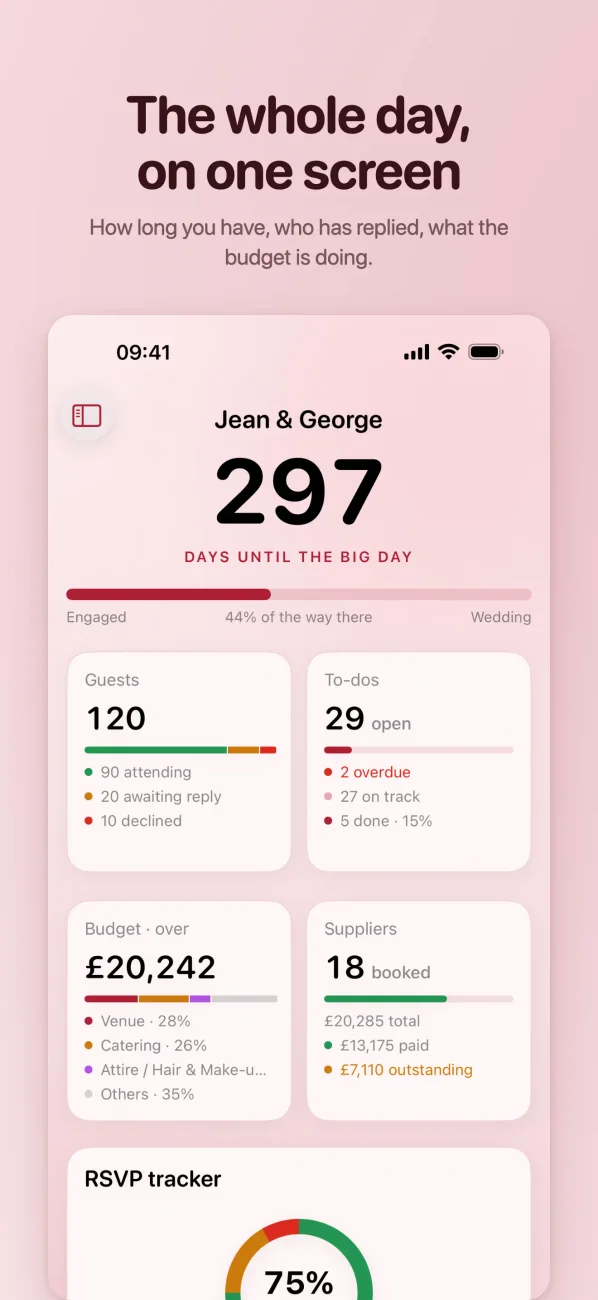
Open the app and the day is there. How long you have, how many have replied, what the budget is doing, which suppliers are still owed. Every number comes from your plan, and anything overdue rises to the top on its own.
THE GUEST LIST
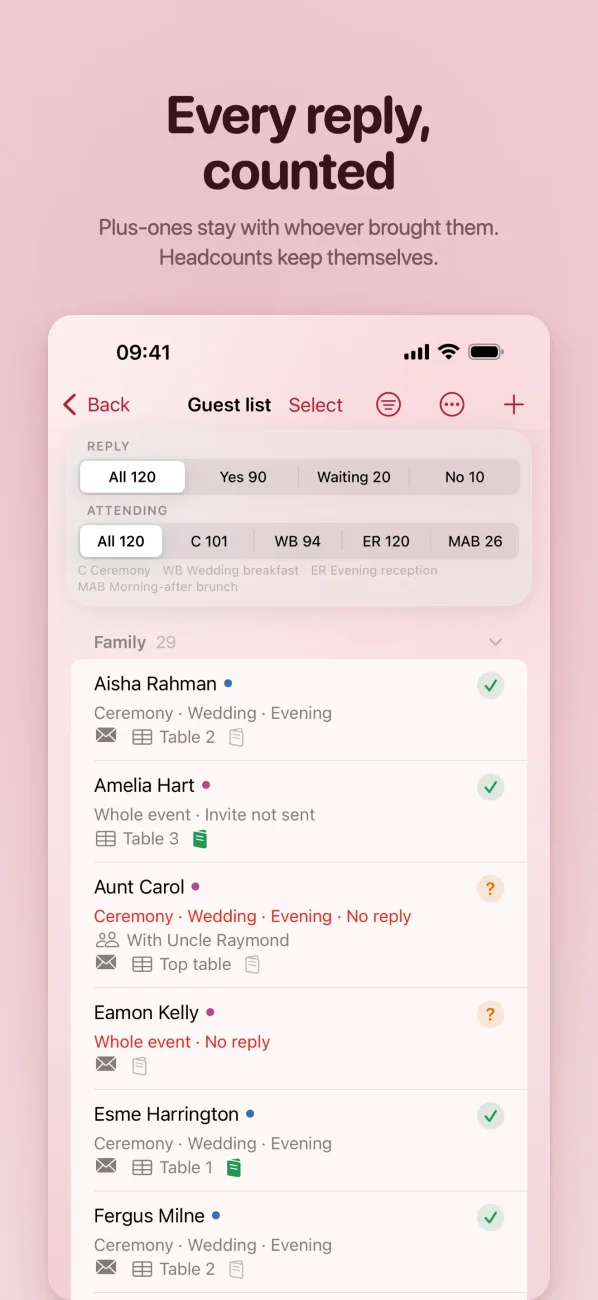
Invite people to the whole day or just the evening, track who has replied, and keep plus-ones attached to the person who brought them. Headcounts update themselves as replies come in, so the number you give the caterer is the number you actually have. Dietary and access needs sit on the guest, not in a note somewhere else.
SEATING
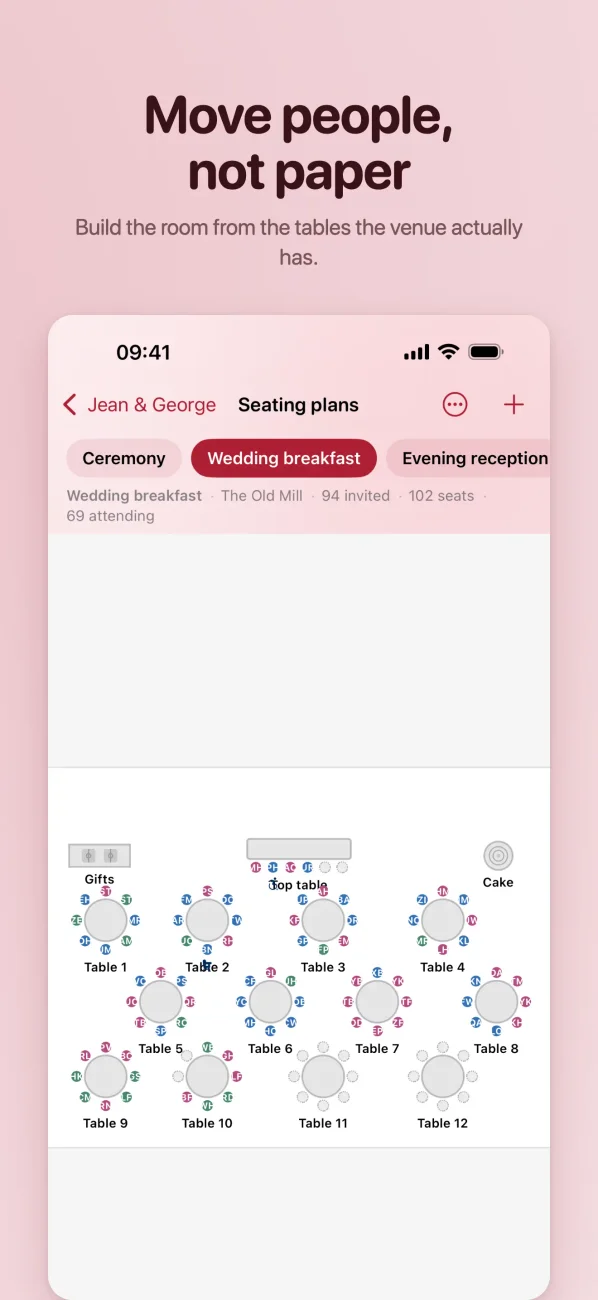
Lay the room out with the tables you actually have: round, long, a top table, a cake table, a dance floor. Drag guests into seats while the app counts who is still standing, and it flags a seat held by somebody who has since declined. Print it or send a PDF when the venue asks.
MONEY
Set what you expect to spend by category, and the app fills in what you have committed from the suppliers you have booked. Categories cannot out-promise the budget, and going over is reported rather than rewritten.
THE RUNNING ORDER
Hair at eight, photographer at ten, cars at half past one. Build the order for the day itself, and separate ones for the rehearsal and the morning after. The gaps show between the entries, because the free forty-five minutes matters as much as the things either side of it.
SUPPLIERS
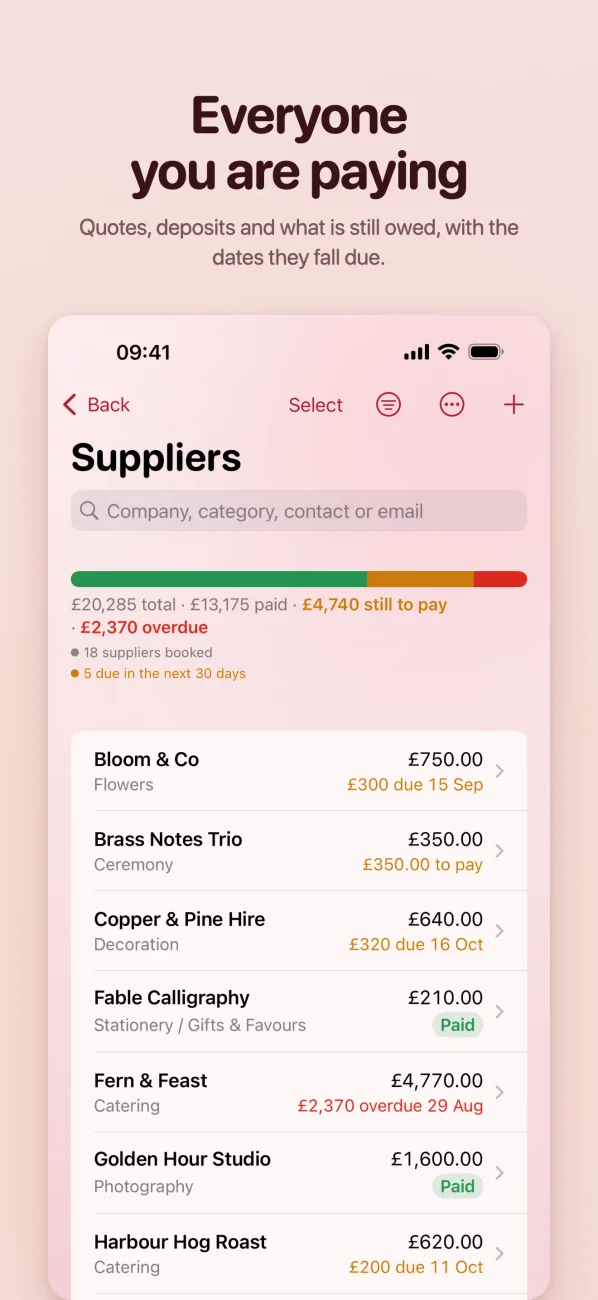
The venue, the florist, the photographer, the band. Contacts, quotes, what is agreed and what is still owed. Each supplier is filed under a budget category, so booking one updates the budget without you telling it twice. Deposits carry dates, so money due next month is visible this month.
TO-DOS
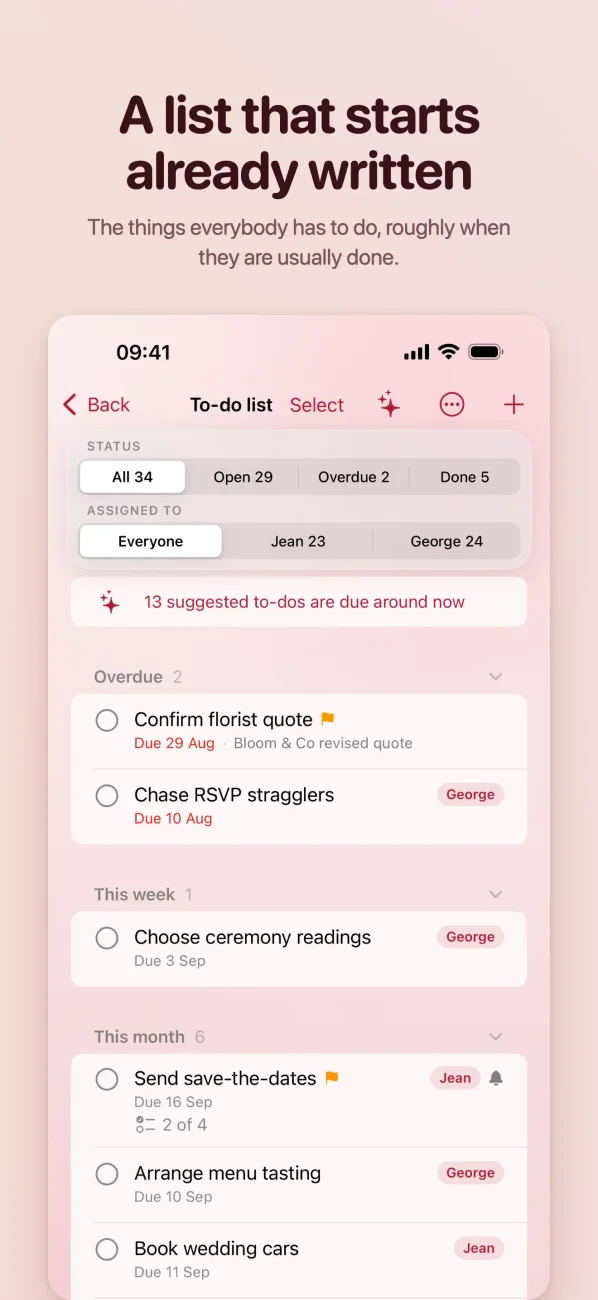
A new plan arrives with a wedding checklist already in it: the things everybody has to do, roughly when they are usually done. Take what you want, ignore the rest, and share the tasks out.
SCRAPBOOK
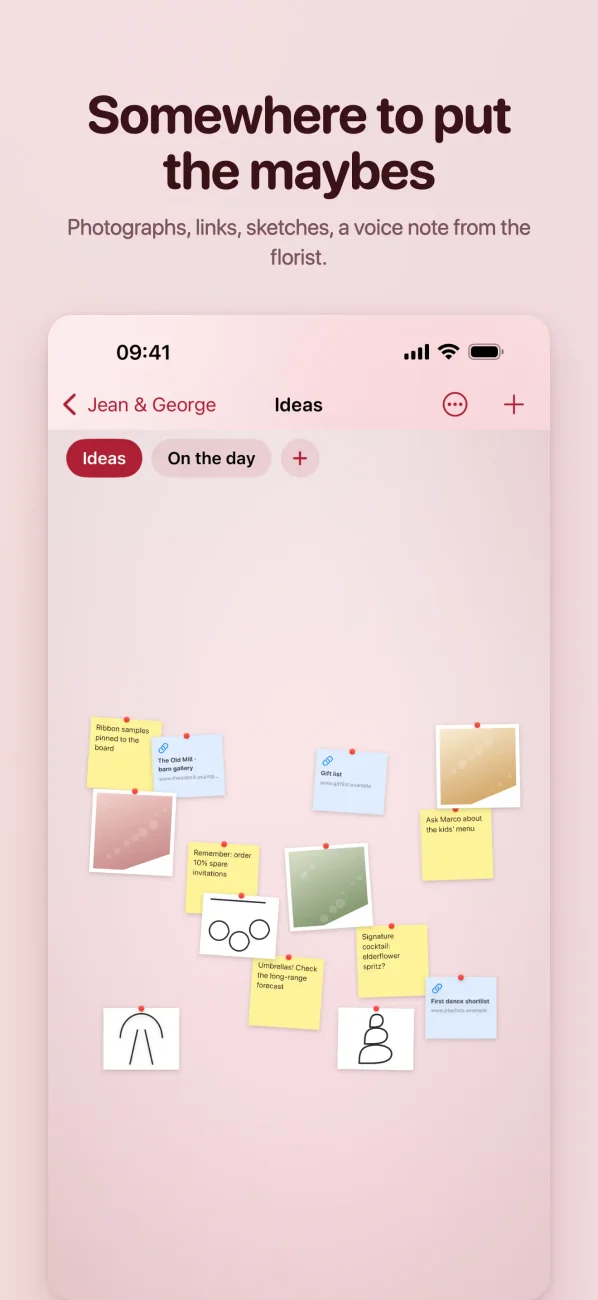
A wall you pin things to: photographs, a link to the venue you liked, a voice note from the florist. Keep several boards, one per thing still undecided.
ON THE HOME SCREEN
Three widgets in every size, plus Lock Screen countdowns and Control Centre buttons. Tick a task off from the Home Screen and it is done in the app. On the day itself a Live Activity holds the running order on the Lock Screen, with a button to move things on when something runs late.
NO ASSUMPTIONS
A new plan asks for partner one and partner two. If that is not what you call yourselves, set it to bride and groom, bride and bride, or groom and groom, and the app uses your words.
ALSO IN THERE
Catering by course. Colour palettes lifted from a photograph. Thank-you tracking. Spreadsheet import and PDF export. Fifteen accent themes and six app icons. A finished wedding is archived in full rather than deleted.
SYNC AND SHARING
With a subscription your wedding syncs through your own iCloud, so every device shows the same guest list and balance owing. Then share it with the person you are marrying. They open it on their own Apple Account and are in the same wedding, not a copy: they tick a task off and it is ticked for you. They do not need a subscription of their own.
PRIVACY
It all goes through Apple. No account to create with us, and no copy of your guest list on a server we control.
WHAT IT COSTS
Free to use for one wedding, with up to twenty-five items in each list. A subscription lifts the limits and adds sync and sharing, and covers Occasion Plans: Events too.
Personal covers one wedding, Planner up to ten, and Unlimited as many as you need. Each is sold monthly or yearly and starts with one month free. Personal Forever is a single payment for one wedding and does not renew.
Terms of Use: https://www.occasionplans.com/terms
Privacy Policy: https://www.occasionplans.com/privacy
What’s new
Version 2.1.0 · Oct 25, 2026
Ready for iPhone Duo. On the cover display, the seating plan and schedule tabs stay clear of the status bar. On the inner display, editors and the share sheet use its full width rather than rising from the bottom like a phone sheet.
App privacy
What Createful Ltd declares on the App Store about how this app handles data.
-
Data not collected
The developer does not collect any data from this app.
Privacy practices may vary, for example with the features you use or your age.
Information
- Seller
- Createful Ltd
- Category
- Lifestyle
- Version
- 2.1.0
- Updated
- Oct 25, 2026
- Released
- Jan 6, 2012
- Size
- 60.1 MB
- Requires
- iOS 18.0 or later
- Age rating
- 4+
- Price
- Free
- In-app purchases
- Yes
- Languages
- English
- Copyright
- © Createful Ltd 2026
You might also like
-
 Wedding Planner TrackerCountdown,Guestlist,Checklist
-
 Wedding ProgramBudget, Countdown & Todo List
-
 Wedding Planner : Your Big DayPlan Your Guest List,Checklist
-
 Simple Wedding PlannerPlan in Peace
-
 Wedding Planner Checklist, To-do, & Budget
-
 Wedding Planner & InvitationsRSVP, Guests, Budget & Website
-
 WedWise - Wedding Planning AppBudget, Checklist & Countdown
-
 thebigdays Wedding PlanningGuestlist,Seating,Checkin,Gift
-
 Wedding Seating Chart MakerPlan Tables & Manage Guests
-
 Wedding Planner: HarmonyCountdown, Budget & Guest List