
ODOS Records
Eyewear fitting sheets manager
Designed for iPhone, iPad
Free · In-app purchases
- Age rating17+
- CategoryBusiness
- Developer奇志 熊
- LanguagesEnglish+ 18 more
- Size7.9 MB
Links to the official App Store page
Download.org hosts no file of ODOS Records. The button opens its official App Store page, published by 奇志 熊. Listing last checked on Nov 23, 2026.
Screenshots



About
ODOS Records is a professional eyewear fitting-sheet app for opticians, optometrists, and optical shops. Create, search, print, and share prescriptions on iPhone and iPad — with your shop header, contact card, and a frame photo on every sheet.
QUICK Rx ENTRY
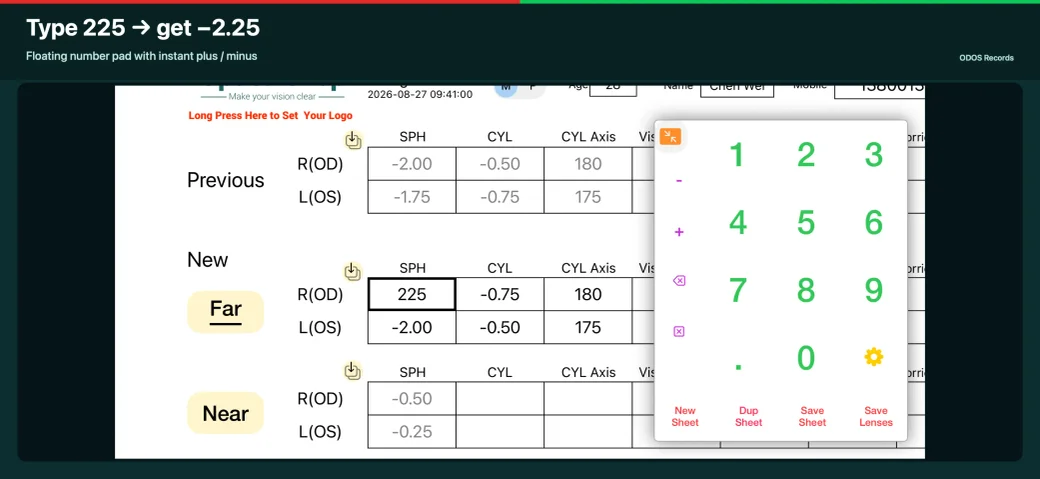
Tap a field, then use the floating number pad. Type 225 in SPH and it becomes −2.25 when the field loses focus. Tap + or − to flip the sign. Copy Previous to Far or Near, or copy MPMVA into far and near.
COMPLETE FITTING SHEET
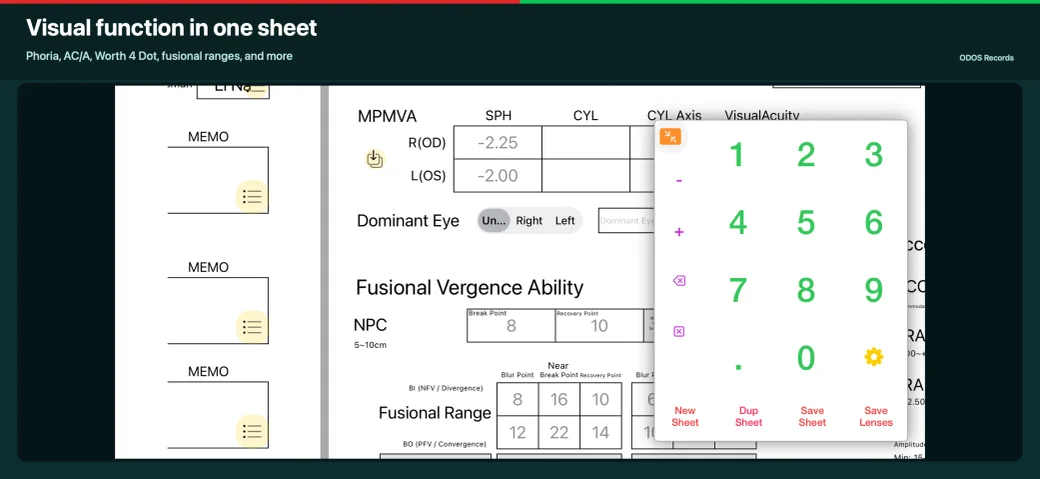
Record the customer name, mobile, frame, lenses, prices, and the Rx for previous glasses, distance, near, and contact lenses. Place a frame photo on the sheet. Expand the visual-function page for phoria, accommodation (BCC/NRA/PRA/AA), flipper, cover tests, AC/A, MPMVA, Worth 4 Dot, fusional ranges (BI/BO), NPC, and notes.
SEARCH ANY RECORD
Open Settings, then Search Record. Fill one or more fields, such as name, mobile, or both. Choose a time interval: last 6 months (the default), last year, all dates, or a custom month range. Tap a result to open that saved day.
YOUR BRANDING
Long-press the shop header or the contact card to use your own images. Search results keep that branding, and they keep the frame photo saved with the sheet.
SAVE, PRINT, SHARE
Save Record writes a print-ready image to Photos. You can find it later by customer name or mobile. Save Lenses stores lens parameters for reuse. New and Duplicate open or copy a sheet in one tap.
BUILT FOR THE SHOP FLOOR
• A floating number pad you can drag or collapse
• Optional external keyboard: hold Tab and press an arrow key to move to the nearest field
• The interface in 19 languages, or following the system language
• Custom labels in the UI Editor
• An optional in-app purchase that removes the advertisement on exported images
DATA YOU CONTROL
Sheets stay on the device. Back up the Optometry Settings folder with Finder File Sharing, or use a full iCloud device backup. Restore by dragging that folder back into the app.
What’s new
Version 3.1.0 · Nov 22, 2026
• Co-work with nearby devices on editing record
• Set reminders for records
App privacy
What 奇志 熊 declares on the App Store about how this app handles data.
-
Data not collected
The developer does not collect any data from this app.
Privacy practices may vary, for example with the features you use or your age.
Information
- Seller
- 奇志 熊
- Category
- Business
- Version
- 3.1.0
- Updated
- Nov 22, 2026
- Released
- May 15, 2025
- Size
- 7.9 MB
- Requires
- iOS 17.6 or later
- Age rating
- 17+
- Price
- Free
- In-app purchases
- Yes
- Languages
- English, Arabic, Dutch, French, German, Indonesian, Italian, Japanese, Korean, Polish, Portuguese, Russian + 7 more
- Copyright
- © MiniArtSoft
You might also like
-
 Eyes-Optical Management SystemEyes Clinic
-
 LensEasy – Optical ManagementBusiness
-
 NetraaNetraa Optical Manager
-
 Opty SlipOptical Shop Management
-
 Lenslinx AppBusiness
-
 TOWO - Translation KeyboardTranslate & Rewrite Naturally
-
 Optic ManagerOptical Store Management
-
 Mobi OpticalRetail Optical Shop Management
-
 OpticWizard: Gestion OptiqueBusiness
-
 MyAbonPlusEnlight your budget