
Odrid HMI
Industrial grade HMI/SCADA
Designed for iPhone, iPad, Mac, iPod touch
$14.99
- Age rating17+
- CategoryProductivity
- DeveloperJan Almqvist
- LanguagesEnglish
- Size919.0 KB
Links to the official App Store page
Download.org hosts no file of Odrid HMI. The button opens its official App Store page, published by Jan Almqvist. Listing last checked on Nov 12, 2026.
Screenshots
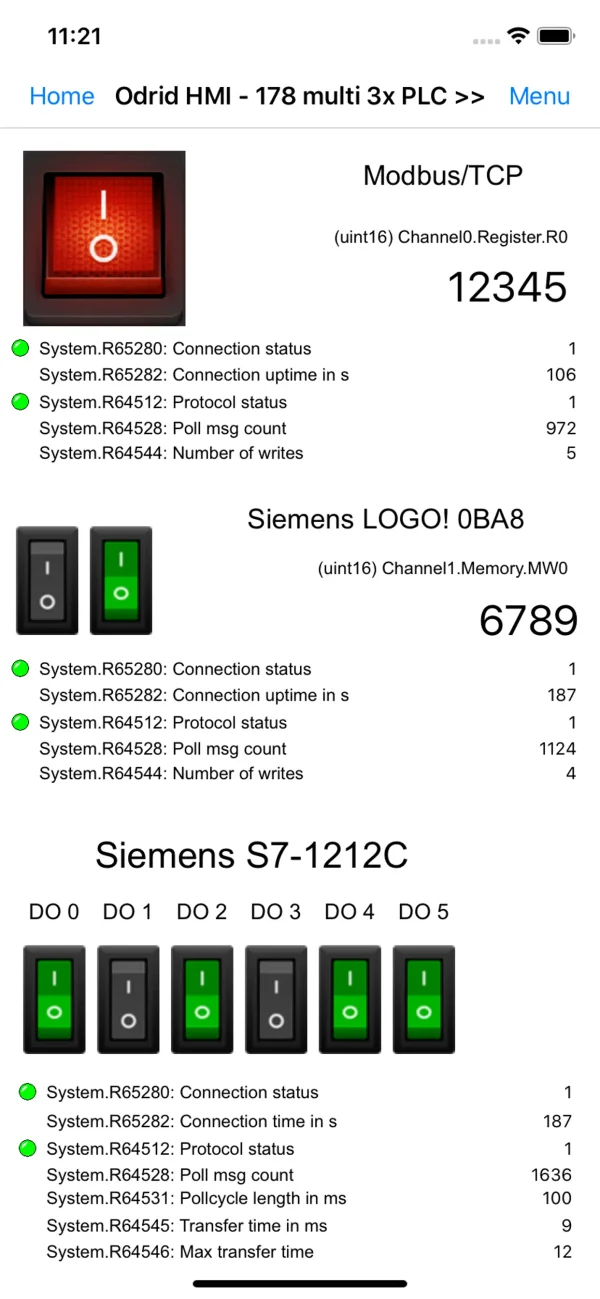
About
NOTE: Read the description CAREFULLY before downloading!
Operator panel for various industrial control system. Communication over Wi-Fi or mobile internet with the protocols Modbus/TCP (Class 0 and 1), Modbus RTU class 1 and Siemens S7 Communication (ISO-on-TCP).
Odrid HMI is an alternative to traditional SCADA systems and operator panels. The app supports multiple data types and has easy navigation between pages using swipe gestures or buttons.
Odrid HMI is also great to use for home automation with PLCs that have e.g. Modbus/TCP protocol is implemented to remotely control and monitor lighting, ventilation, heating etc in the residence or holiday home.
Advantages:
Excellent technical support.
Free updates.
Graphic HMIs with multi touch function can be created in minutes.
Free-of-charge development tool with test run feature.
Virtually unlimited number of pages, objects and variables.
Does not require any third-party services.
Genuine native app.
Features:
Parameters for communication such as IP address, port number, protocol, etc. can be specified per page.
Automatic polling of all variables displayed in the current page, no need for separate tag list.
Many formats for numeric variables such as 16 and 32 bit integer, unsigned, hex, ASCII, float (IEEE 754), etc.
Prioritized event-driven transfer to the controller.
Pages are edited in the measurement unit dp (Density Independent Pixels).
Life bit for monitoring the operator panel in the controller. (Function similar to coordination area in Siemens S7.)
Numeric variables can be displayed as predefined text for example alarms, sequence steps etc.
Detailed diagnostics of connection and communication.
Variable areas for system variables, local variables and constants.
Possibility of automatic return to the start page after some time of inactivity.
Selectable order for high and low words of 32-bit variables in the Modbus protocol.
Poll interval can be set do save data traffic or battery.
Support for Baltic, Central European, Chinese (GB2312, BIG5), Cyrillic, Eastern European, Greek, Hebrew, Japanese (Shift JIS), Turkish, Vietnamese and Western character sets.
Ability to test run pages in the development tool.
LED-objects can be displayed as rectangles and in any size e.g. for Andon-systems.
Background color for pages can be selected.
Modbus Device ID can be changed with GUI objects during operation.
Image buttons.
Password fields.
Floating point and hexadecimal number formatting.
Timestamp for page files.
Hyperlinks.
Document information in page files.
Implemented protocols in the current version:
Modbus/TCP: Class 0, Function 3 and 16. Reads and writes 64,512 holding registers.
Modbus/TCP: Class 1, Function 1, 2, 4 and 5. Reads 65,535 discrete inputs, 65,535 input registers and reads and writes 65,535 outputs (coils).
Modbus RTU: Class 0 and 1.
Siemens S7 Communication: Reads and writes 8192 bytes in datablock 1 to 4095 and in the Input, Memory and Output areas.
(Default value for highest Siemens S7 databock is 255.)
Free-of-charge development tool for creating the pages to be used by Odrid HMI:
https://www.idea-teknik.com/odrid_hmi_download.html
Manual:
https://www.idea-teknik.com/odrid_hmi_manual.html
Version history:
https://www.idea-teknik.com/odrid_hmi_version_history.html
Modbus and Modbus/TCP are registered trademarks of Schneider Automation Inc.
S7 and STEP 7 are trademarks of Siemens AG.
What’s new
Version 1.7.13 · Jan 22, 2026
Bug fix for an issue where text entered in the comment field in the GUI objects after a directive or a script could cause the app to stop responding.
Bug fix for the firstScan script property in the Button object not working.
App privacy
What Jan Almqvist declares on the App Store about how this app handles data.
-
Data not collected
The developer does not collect any data from this app.
Privacy practices may vary, for example with the features you use or your age.
Information
- Seller
- Jan Almqvist
- Category
- Productivity
- Version
- 1.7.13
- Updated
- Jan 22, 2026
- Released
- Dec 17, 2015
- Size
- 919.0 KB
- Requires
- iOS 12.0 or later
- Age rating
- 17+
- Price
- $14.99
- Languages
- English
- Copyright
- © 2007 - 2025. Jan Almqvist / IDEA-Teknik
You might also like
-
 irBoard LiteTouch panel display for PLC.
-
 Smartrise AirProductivity
-
 PLCLinkAutomatism supervision
-
 liftrexTask & Project Manager
-
 FlexEasyProductivity
-
 Visionify Workplace SafetyAI powered Safety App
-
 ioTouch2 LiteFor I/O checking of PLC
-
 irPanel LiteSimple touch panels for PLC
-
 SelfCloud DrivePrivate Seafile Cloud Client
-
 S711 ConnectSoft Starter Companion App