
- Age rating4+
- CategoryUtilities
- DeveloperAlexander Loth
- LanguagesEnglish
- Size51.4 MB
Links to the official App Store page
Download.org hosts no file of Origin Lens. The button opens its official App Store page, published by Alexander Loth. Listing last checked on Nov 23, 2026.
Screenshots
About
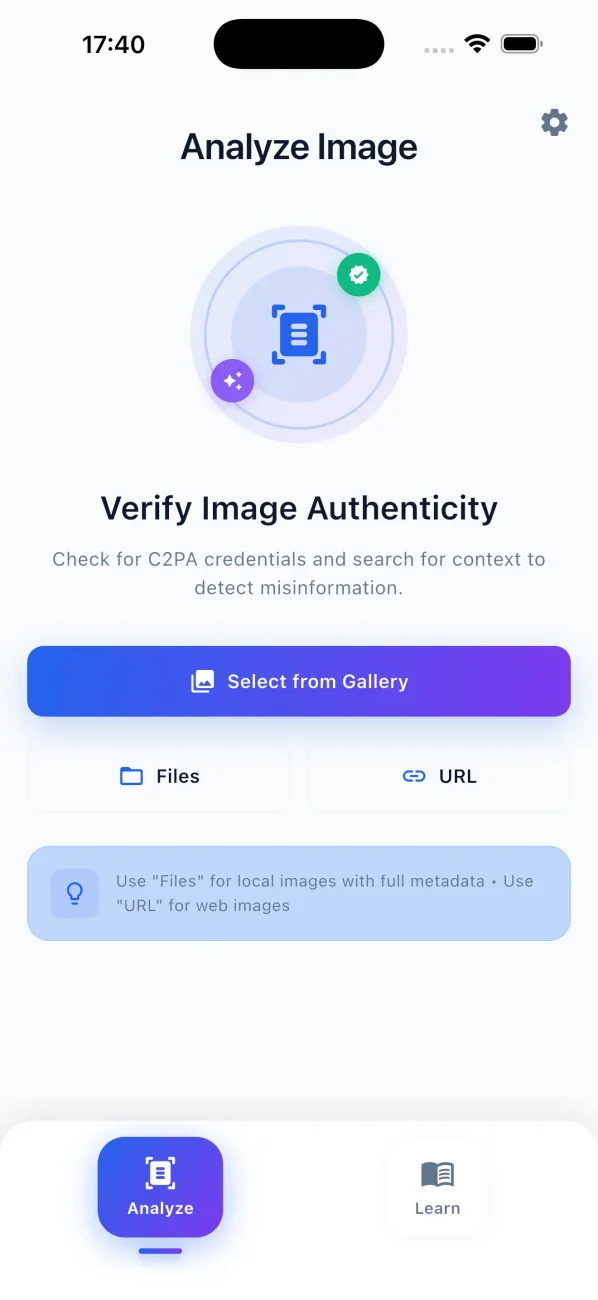
Is this photo real or AI-generated? Origin Lens shows what an image can prove about its own origin. It checks signed C2PA Content Credentials and EXIF data on your device and gives you a clear, color-coded verdict.
CLEAR VERDICTS
Every result opens with a colored band:
- Green, Content Credentials Valid: the signature is valid and the image is unchanged since signing.
- Purple, AI-Generated (Signed): valid, signed credentials declare the image as AI-generated.
- Red: the credentials fail validation, or the image was changed after it was signed.
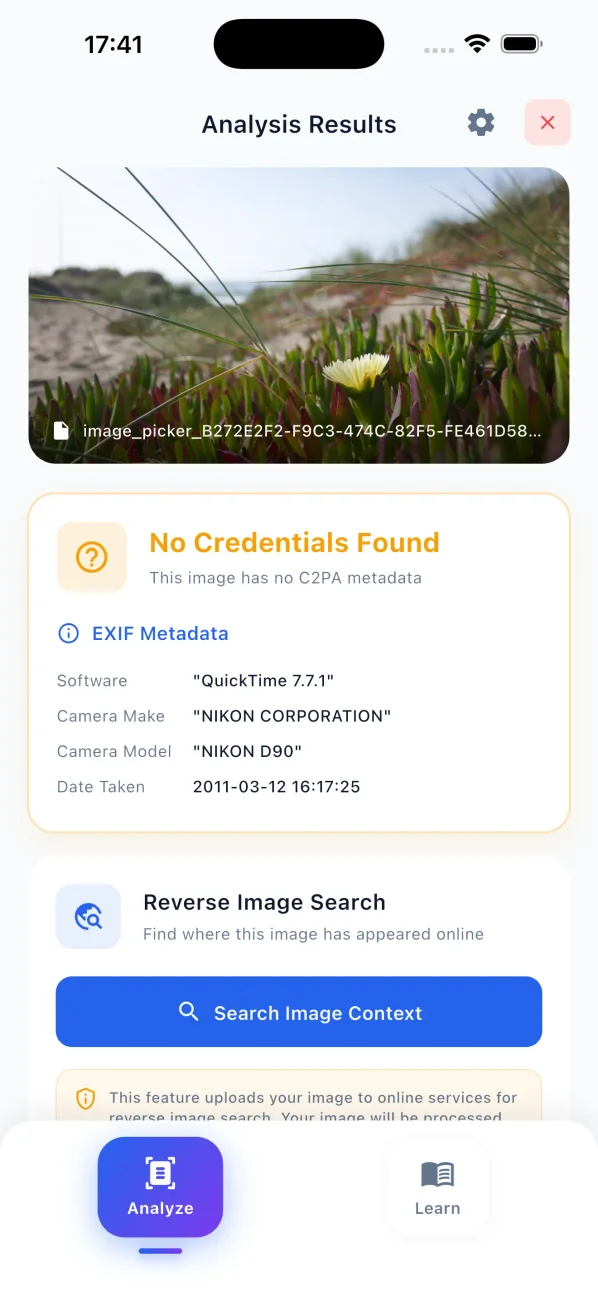
- Yellow: the image cannot be fully checked, for example because it has no Content Credentials, is a screenshot, or its signing certificate has expired.
C2PA VERIFICATION
Origin Lens reads the Content Credentials that cameras, editing apps and AI image tools embed in images. It checks the cryptographic signature on your device, checks whether the image was changed after signing, and shows the signer, the creator and the edit history the credentials record.
AI OPINION (OPTIONAL)
For images without Content Credentials, Origin Lens can ask Google's Gemini API whether the image carries a SynthID watermark. This sends the image to Google, so the app asks first. The answer appears as an experimental AI opinion, separate from the verdict, because it is not a cryptographic check.
CONTEXT CHECK
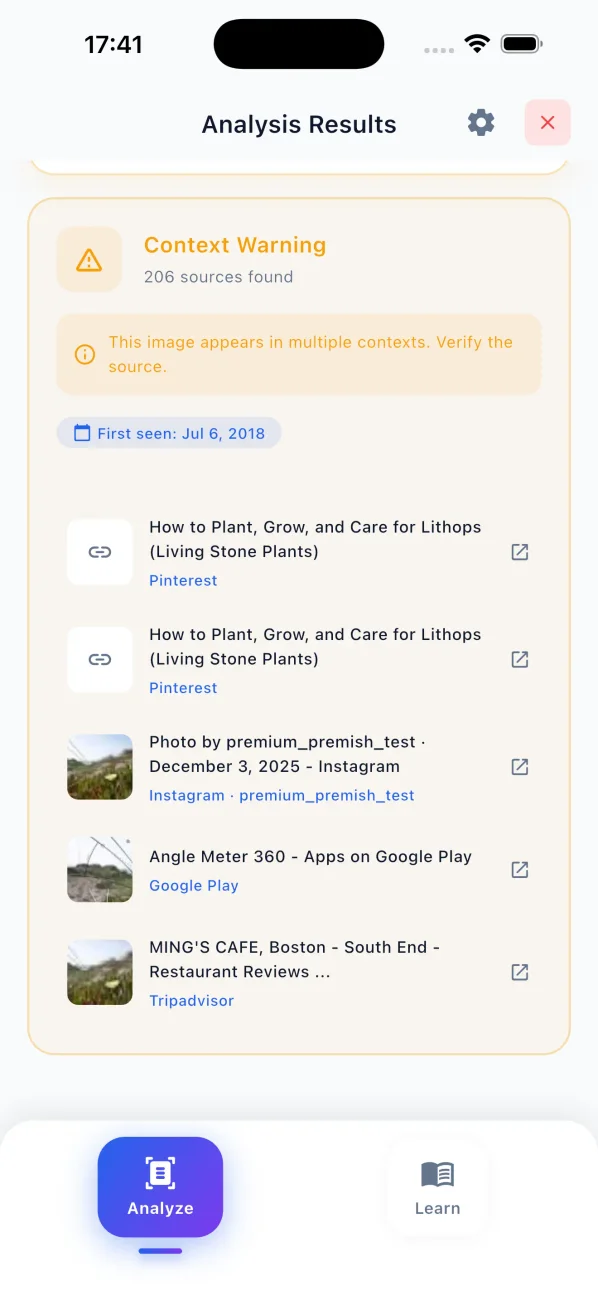
An optional reverse image search shows where an image has appeared online, which helps you spot out-of-context or misattributed images. Login pages and search result pages are filtered out.
PRIVACY FIRST
Content Credentials and EXIF data are read on your device. An image leaves your device only for the AI opinion or the reverse image search, and only after you confirm. Credentials stored on another server are fetched only after you approve that server. You can use your own SerpAPI and imgbb keys. No accounts, no ads, no tracking. Free and open source.
TOOLS
Supports JPG, PNG, HEIC, AVIF and WebP. Camera details (EXIF) are shown for every image that carries them, and screenshots are recognized by the marker iOS and macOS write into them. The Learn tab explains C2PA and lets you copy citation references.
PERFECT FOR
Journalists verifying sources. Researchers fact-checking visual content. Social media users who want to check an image before sharing it. Anyone who wants to know where an image comes from.
HOW IT WORKS
Pick an image from Photos or Files, or enter a URL. Origin Lens reads its Content Credentials and EXIF data on your device and shows a color-coded verdict. Optionally, run a reverse image search or ask for an AI opinion.
WHY ORIGIN LENS
Knowing where an image comes from matters. Origin Lens is a verification tool: it does not create or edit images. The verdict never rests on a guess from pixels. It shows what the image's signed credentials and metadata say, and how far that can be relied on.
IMPORTANT NOTE
Most images carry no Content Credentials, and that alone is not a sign of manipulation. Screenshots and many social media uploads remove them, so use the original file when you can. Signers are not checked against a trust list.
TERMS
https://www.apple.com/legal/internet-services/itunes/dev/stdeula/
What’s new
Version 1.4.2 · Nov 15, 2026
NEW: Color-coded verdicts. Every result opens with a colored band, so you see at a glance what an image's Content Credentials say:
- Content Credentials Valid (green): the signature is valid and the image is unchanged since signing. The signer is not checked against a trust list, and the result says so.
- AI-Generated (Signed) (purple): valid, signed credentials declare the image as AI-generated.
- Credentials Invalid (red): the credentials fail validation, so do not rely on their claims.
- Credentials Don't Match This Image (red): the image was changed after it was signed.
- Certificate Expired (yellow): the signing certificate has expired, so the signature could not be checked.
- Signer Not Verified (yellow): the signing certificate could not be validated.
- No Content Credentials (yellow): most images carry none, which alone is not a sign of manipulation.
- Screenshot (yellow): a screenshot never carries the original's credentials, so look for the original file.
IMPROVED: AI tool names found only in unsigned metadata appear as a note and never decide the verdict.
IMPROVED: Camera details (EXIF) are shown for every image that carries them, with or without Content Credentials, including images opened from a web address.
NEW: Cite Origin Lens in the Learn tab copies references to both research papers.
IMPROVED: The Gemini check is labeled as an experimental AI opinion and shown in neutral colors.
IMPROVED: The reverse image search prompt names every service your image is sent to.
IMPROVED: Updated FAQ answers.
IMPROVED: Clearer Learn tab.
App privacy
What Alexander Loth declares on the App Store about how this app handles data.
-
Data not collected
The developer does not collect any data from this app.
Privacy practices may vary, for example with the features you use or your age.
Information
- Seller
- Alexander Loth
- Category
- Utilities
- Version
- 1.4.2
- Updated
- Nov 15, 2026
- Released
- Dec 17, 2025
- Size
- 51.4 MB
- Requires
- iOS 13.0 or later
- Age rating
- 4+
- Price
- Free
- Languages
- English
- Copyright
- © 2026 Alexander Loth and Dominique Conceicao Rosario
You might also like
-
 SyverAuto Scroll & AI Summaries
-
 Bookmark Pro - Save LinksOrganize bookmarks with tags
-
 Decidr: Spin Wheel & Coin FlipDecision Maker: Yes, No, Maybe
-
 EXIF Chef, Edit Photo MetadataPhoto Metadata Made Simple
-
 Compress-sanCompress video & create SRTs
-
 Voice Recorder & Memos: VokmeeTranscribe Audio Notes to text
-
 SharkZip - Zip with PasswordArchive files with password
-
 Top NoteFlashcards & Notes Widget App
-
 PickerFull - Color ExtractorExtract a Color From Any Photo
-
 Recap - Transcribe VideosOffline, On-Device, Private