
OrthoGraph BLK360
Capture the world around you.
Designed for iPad
Free · In-app purchases
- Age rating4+
- CategoryProductivity
- DeveloperOrthoGraph Kft.
- LanguagesEnglish+ 2 more
- Size748.3 MB
Links to the official App Store page
Download.org hosts no file of OrthoGraph BLK360. The button opens its official App Store page, published by OrthoGraph Kft. Listing last checked on Nov 23, 2026.
Screenshots



About
OrthoGraph BLK360 helps you capture, organize, and process survey data from a Leica BLK360 G1 directly on your iPad.
Important: This app is compatible only with the Leica BLK360 G1 imaging laser scanner.
Free features:
- Control scan resolution and capture full-dome scans
- View 360° panoramic images
- Add labels, photos, and voice notes
- Transfer projects directly from the scanner
- Export colorized point clouds in E57 format
- Save and continue working with projects on your iPad
Subscription features:
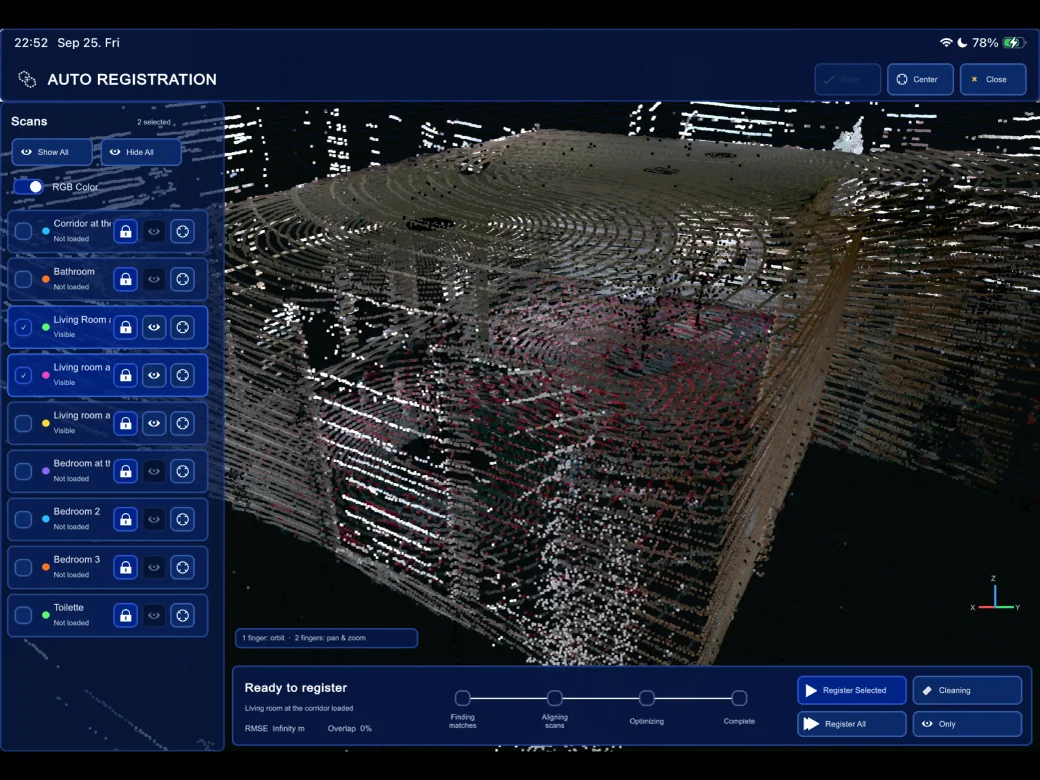
- Automatic point-cloud registration using wall geometry
- Advanced automatic registration for complex mechanical spaces with dense piping and limited wall surfaces
- User-assisted point-cloud registration
- Register All with final Bundle Optimization to refine all scan positions together and maximize overall point-cloud coherence
- Cut-plane view revealing floor-plan slices and pipe cross-sections for precise visual alignment
- Point-cloud cleanup with a resizable spherical brush for removing stray points and scanning noise
- Optimized point-cloud download performance
- Distance and surface measurements
- Freehand annotations
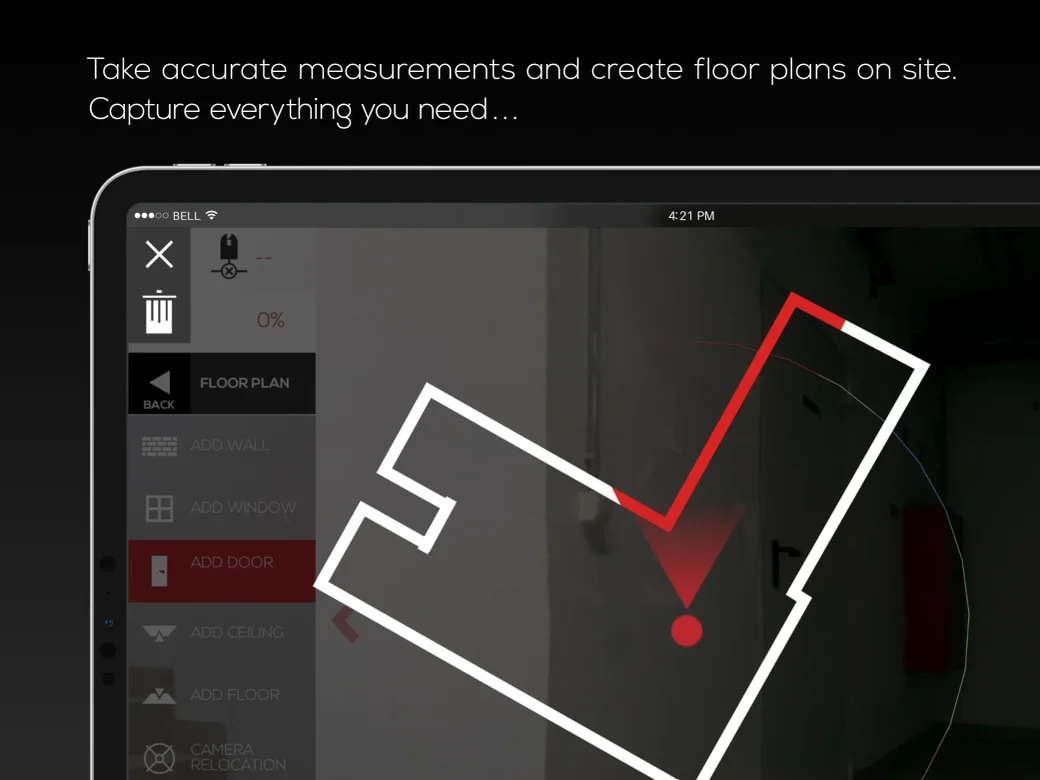
- Floor-plan creation from panoramic images and point-cloud data
- Multi-story Scan-to-BIM workflows
- Setup alignment
- IFC and DXF export
- On-site and off-site data processing
- Direct links from CAFM, CMMS, and BIM systems to spatial annotations in their point-cloud context
A CAFM, CMMS, or BIM system can open a specific spatial annotation directly together with its surrounding point-cloud context. This turns each project into an addressable 3D knowledge base that external systems can navigate directly.
Bring BLK360 G1 scan data into a practical, mobile workflow—from field capture to measurements, floor plans, point clouds, and BIM deliverables.
Terms of Use (EULA): https://www.apple.com/legal/internet-services/itunes/dev/stdeula/
What’s new
Version 3.1.1 · Nov 23, 2026
Fixes a critical startup crash on iPadOS 27.2.1.
Improves text editing with on-screen and external keyboards, including visible in-field cursors and text selection, double-tap word selection, easier cursor positioning, and copy/paste. The additional input field above the on-screen keyboard remains available when the keyboard covers the original field.
Annotation titles and descriptions now show the cursor and selection directly in the panorama popup. Drags starting inside an edited field no longer rotate the panorama; drags outside it remain available.
Also improves web panorama exports with annotations functionality.
From the recent days:
Measure distances and surfaces more easily with new horizontal and vertical measurement support. Enable the constraint mode to keep each new segment horizontal or vertical, with automatic snapping to help close surface measurements.
Introducing automatic and user-assisted point-cloud registration for BLK360 G1 projects. Standard automatic registration can align scans using wall geometry, while Advanced mode supports automatic registration in complex mechanical rooms with dense piping and limited wall surfaces. Register All now finishes with Bundle Optimization, refining all scan positions together to maximize overall point-cloud coherence. A new cut-plane view reveals clear floor-plan slices and pipe cross-sections to support precise visual alignment. A point-cloud cleanup tool uses a resizable spherical brush to remove stray points and scanning noise. This version also improves point-cloud download performance.
App privacy
What OrthoGraph Kft. declares on the App Store about how this app handles data.
-
Data linked to you
May be collected and linked to your identity.
- Contact info
-
Data not linked to you
May be collected but is not linked to your identity.
- Contact info
- Contacts
- User content
- Diagnostics
Privacy practices may vary, for example with the features you use or your age.
Information
- Seller
- OrthoGraph Szamitastechnikai Fejleszto Korlatolt Felelossegu Tarsasag
- Category
- Productivity
- Version
- 3.1.1
- Updated
- Nov 23, 2026
- Released
- Dec 13, 2017
- Size
- 748.3 MB
- Requires
- iOS 15.0 or later
- Age rating
- 4+
- Price
- Free
- In-app purchases
- Yes
- Languages
- English, Korean, Simplified Chinese
- Copyright
- © 2017-2026 OrthoGraph Kft.
You might also like
-
 Imerso CaptureBuild Better with Imerso
-
 Pointscape: Point Cloud ViewerLiDAR Scans: Measure & Report
-
 Leica ViewProductivity
-
 Do It AiProductivity
-
 3DskopeThe Advanced 3D Viewer
-
 STRUCINSPECTMobile Data Capturing
-
 Brand PromptBetter Prompts for AI Writing
-
 CapyDo - One thing at a timeTo-do widget for Reminders
-
 TREK!Productivity
-
 vSite ARAR and AI tools for Utilities