
Ownspend: Expense Tracker
Offline budget, no bank login
Designed for iPhone, iPad, Mac
In-app purchases
- Age rating4+
- CategoryFinance
- DeveloperMoaath Othman
- LanguagesEnglish+ 6 more
- Size31.3 MB
Links to the official App Store page
Download.org hosts no file of Ownspend: Expense Tracker. The button opens its official App Store page, published by Moaath Othman. Listing last checked on Nov 11, 2026.
Screenshots
About
Ownspend is the expense tracker for people who tried budgeting apps and quit. No bank password. No account. No three-hour setup weekend. Open it, tap plus, type what you spent, and watch your month take shape on the Money Map.
In 90 seconds you'll see the one thing you opened the app for: where your money actually goes — not where you think it goes.
SEE EVERYTHING AT A GLANCE
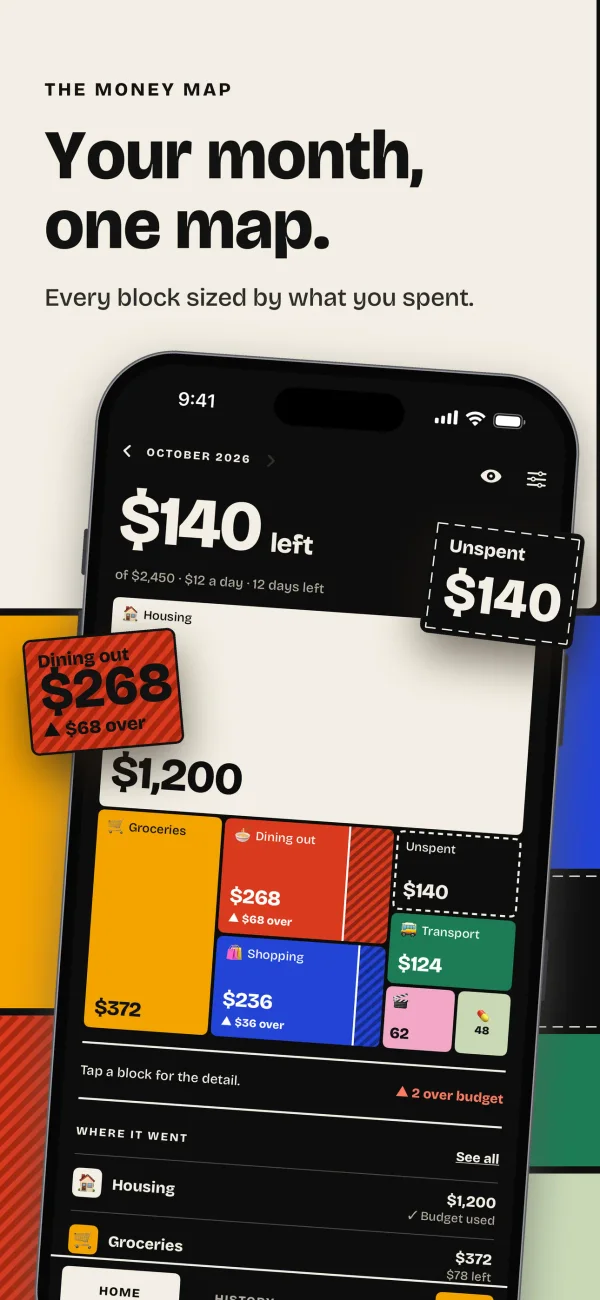
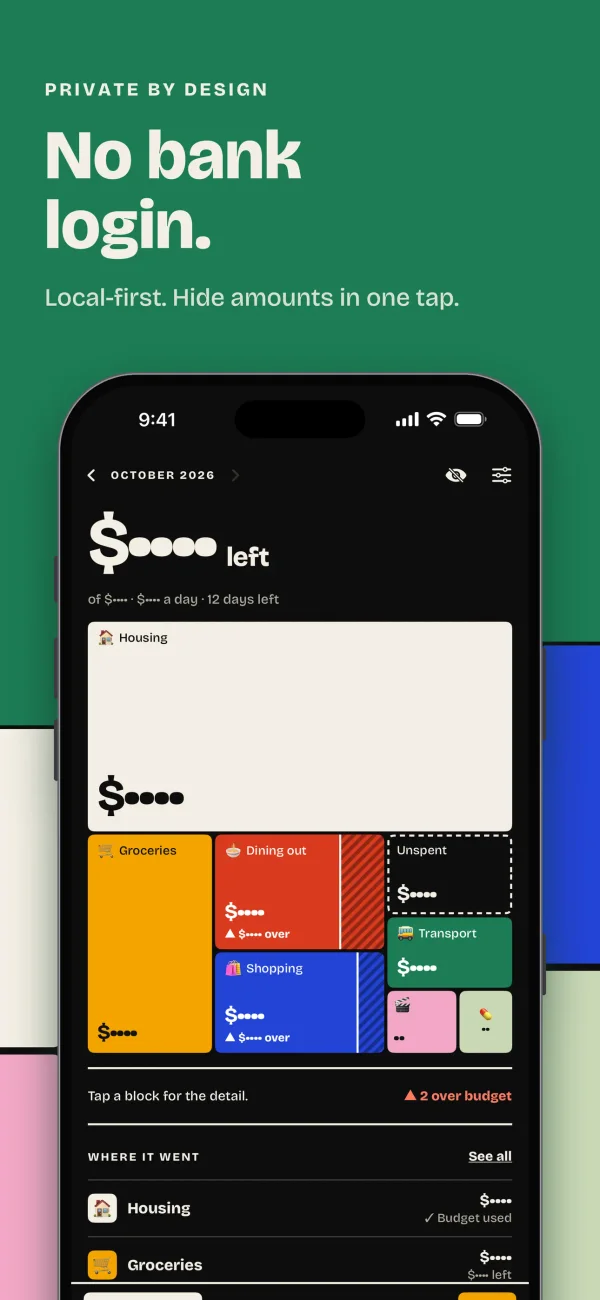
Your monthly budget is one rectangle — the Money Map. Each category is a block sized by what you've spent, the dashed block is what's left, and a striped band marks anything over budget. Tap a block for the detail. It redraws as you log, so you always know where you stand.
LOG IT IN 3 TAPS
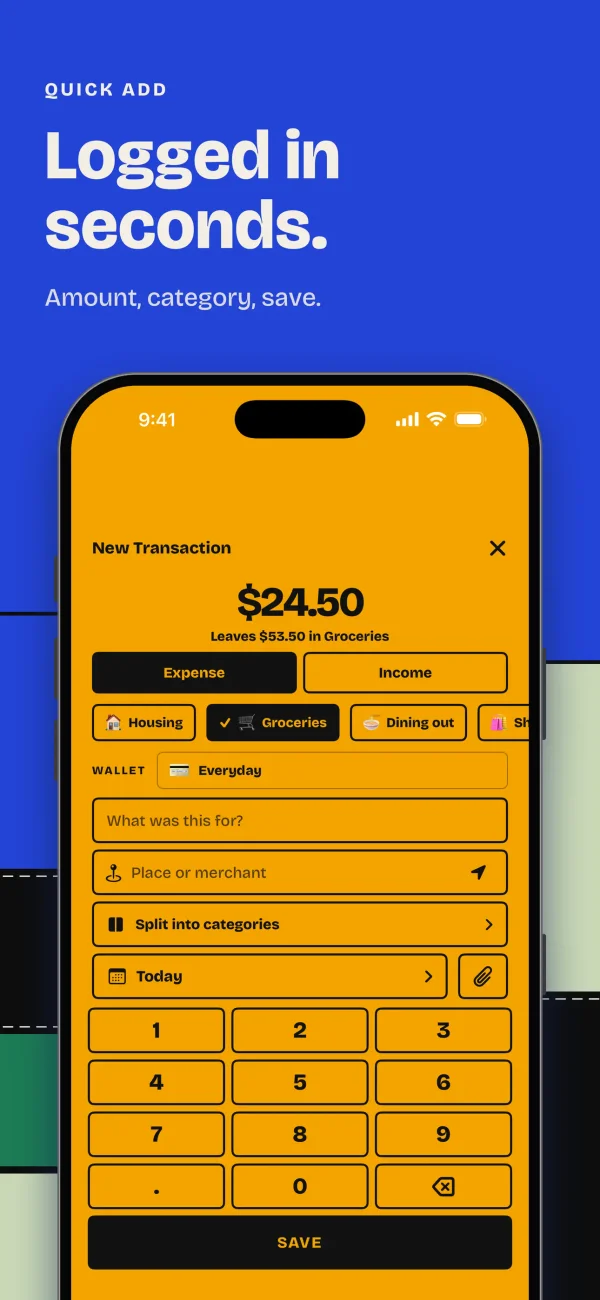
The numeric keypad is waiting the moment you tap add. Amount, category, done. Optional note. Ownspend remembers your recent amounts and categories, so logging that morning coffee takes seconds — before you forget.
BUDGETS THAT ACTUALLY HELP (PRO)
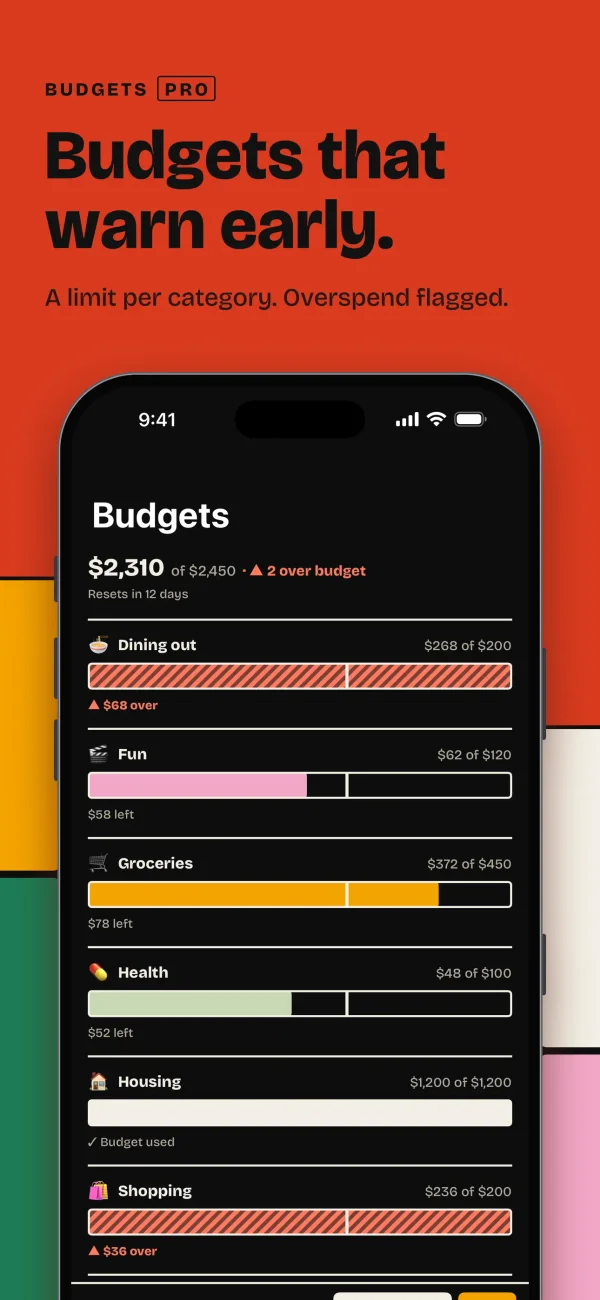
Set a monthly limit per category and watch your progress inline. Ownspend warns you as you near a limit and flags the ones you've gone over — no end-of-month surprises.
YOUR HISTORY, INSTANTLY SEARCHABLE
Every transaction, newest first. Search by keyword, filter by category or date, sort by amount. Record the cash spending no automatic tracker ever captures.
BRING YOUR OLD APP WITH YOU
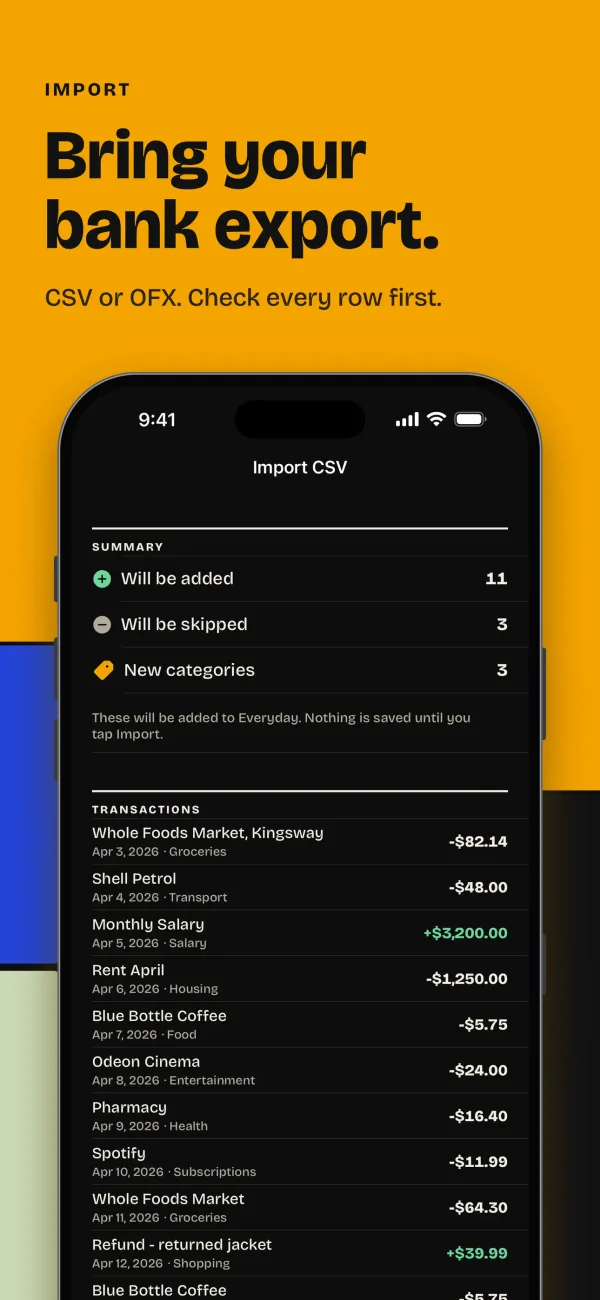
Switching trackers usually means starting from zero. Export a CSV from the app you're leaving and import it here instead — Ownspend shows you exactly what it will create, every row, before anything is written.
ON IPHONE AND IPAD
A real iPad layout — sidebar, dashboard and history side by side — not a stretched-up phone app. Attach a receipt photo to any expense, and record where you spent it.
PRIVATE BY DESIGN, NOT BY POLICY
Ownspend is local-first. Your expenses live on your device, and we never link to your bank or ask for a password. Use it solo and there is no account and no sign-in at all — nothing to leak, nothing to breach.
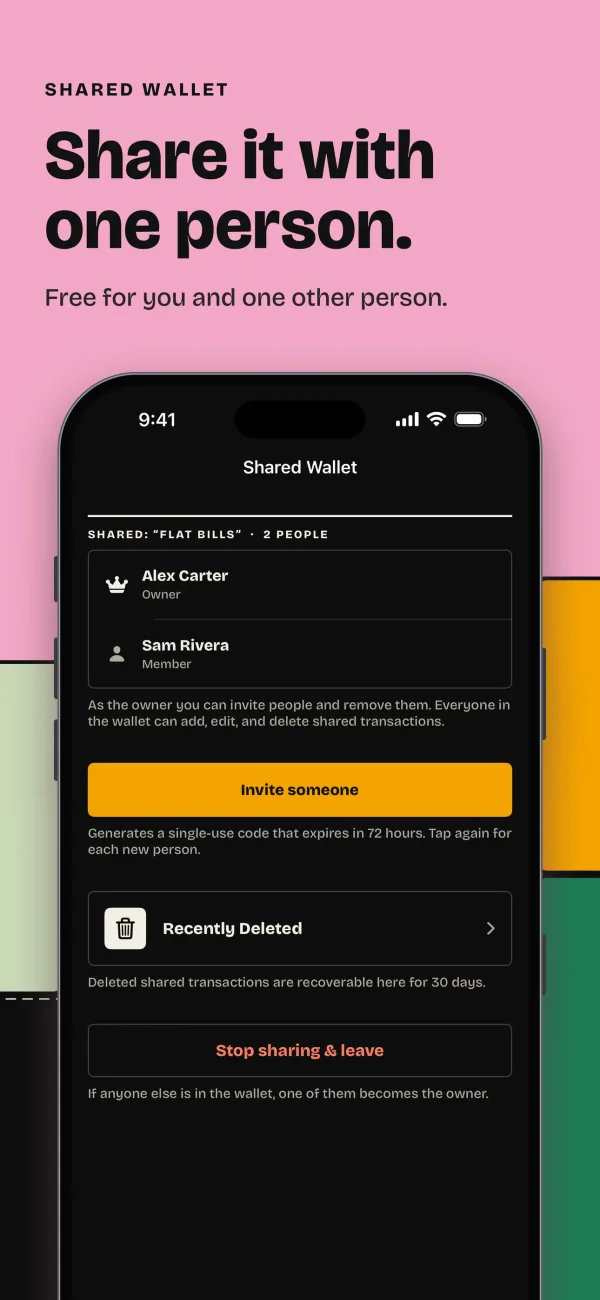
Shared Wallet is opt-in, and free. Share a wallet with one other person — a partner, a flatmate — and you both see every expense as it is added, and who added it. Only that wallet's expenses sync; everything else stays on your device. Sign in with Apple or Google, and delete your account whenever you want, right there in Settings.
WHAT YOU GET, FREE
- The Money Map and full category breakdown
- 3-tap Quick-Add logging
- Up to 3 categories, and every expense you have ever logged
- One savings goal
- Two wallets, say cash and card
- Home screen widgets
- CSV import, so switching costs you nothing
- Shared Wallet, with one other person
OWNSPEND PRO — YOUR CHOICE, NO GAMES
Pro removes the limits. Start with a 7-day free trial on the monthly or yearly plan — or skip subscriptions entirely, pay once for the lifetime unlock, and own it forever. Pro adds:
- Unlimited categories and wallets
- Per-category monthly budgets, alerts and spending trends
- Unlimited savings goals
- Unlimited recurring transactions and subscription tracking
- Export to CSV or JSON for tax time
The free tier is genuinely useful — it's the trial. Upgrade only when you outgrow it.
WHY OWNSPEND
Most budgeting apps want your bank credentials, charge you forever, or make you learn a methodology before you can log a coffee. Ownspend works offline, from the first tap, and keeps your financial life on your device. You own your spending — and you can own the app outright too.
---
Ownspend is a personal budgeting and expense-tracking tool, not financial, investment, or tax advice. For guidance specific to your situation, talk to a qualified financial professional.
Questions? Email kenz@kenzapps.com — we usually reply within a day or two.
—
Terms of Use (EULA): https://apps.puzzpics.com/clearspend/terms.html
Privacy Policy: https://apps.puzzpics.com/clearspend/privacy.html
What’s new
Version 1.4 · Nov 5, 2026
A new look, and you can import from your bank.
• The Money Map. Home is redesigned: your month's budget is one rectangle, each category a block sized by what you spent, with what's left and anything over budget visible at a glance. Tap a block for the detail.
• Edit your wallets — rename them, change their colour, or correct a balance. Deleting a wallet now moves its expenses to another of your wallets instead of losing track of them.
• OFX and QFX import — download the file your bank already offers and bring the transactions straight in. CSV import is still there, and still maps columns however your bank names them.
• Scan a receipt. Point the camera at it, or pick a photo, and Ownspend reads the total, the shop and the date and fills in the form. You check it before anything is saved — it never saves behind your back.
• Log Apple Pay payments automatically. Set up a Shortcuts automation once (Settings → Automatic logging) and each payment lands in Ownspend by itself. Your iPhone hands the payment straight to the app: no bank login, no aggregator, nothing sent to us.
• Notifications, if you want them. Ownspend now asks once: a reminder before a free trial ends and, if you share a wallet, a note when the other person adds something. Allowing them also turns on occasional App announcements — switch those off any time in Settings → Notifications. Announcements never mention your amounts, merchants or notes.
Fixed, from your reports
• You can now edit a saved expense — open it and tap Edit. Amount, type, note, place, category, date and wallet can all be changed, including moving it to another wallet.
• Delete now has a visible button in the expense detail and a menu on the row, instead of only a swipe — which was invisible if you use a trackpad.
• The note and place fields could not be typed into. They can now.
• Category pickers show YOUR categories, not just the built-in ones, and a default you deleted stays deleted.
• About is a real screen.
Thank you to the person who reported every one of these. We had no reply address to answer you with, so: they are all fixed here.
As always: your money stays on your device.
App privacy
What Moaath Othman declares on the App Store about how this app handles data.
-
Data linked to you
May be collected and linked to your identity.
- Purchases
- Financial info
- Location
- Contact info
- User content
- Identifiers
- Usage data
- Diagnostics
-
Data not linked to you
May be collected but is not linked to your identity.
- Diagnostics
Privacy practices may vary, for example with the features you use or your age.
Information
- Seller
- Moaath Othman
- Category
- Finance
- Version
- 1.4
- Updated
- Nov 5, 2026
- Released
- Jul 8, 2026
- Size
- 31.3 MB
- Requires
- iOS 17.0 or later
- Age rating
- 4+
- In-app purchases
- Yes
- Languages
- English, Arabic, French, German, Italian, Portuguese, Spanish
- Copyright
- © 2026 Moath Othman
You might also like
-
 Budge: Expense TrackerBudget, Expense, Money Tracker
-
 Spendex – Budget PlannerTrack bills & subscriptions
-
 FAPCOFinance
-
 Friendly Budget: FinanceTrack expenses & income
-
 Expense Tracker - ExpenseKitSmart Expense & Budget App
-
 Meteora Expense TrackerExpense Tracker & Budget
-
 DuoBalanceShared Expense Tracker
-
 Spendler - Expense TrackerManual Budget, No Bank Login
-
 Expense Manager & CalculatorDaily Expense & Budget Tracker
-
 Family Budget: Spend & SaveReal-time expense tracking