Paged Prompter
Record audio/video with script
Designed for iPhone, iPad
Free · In-app purchases
- Age rating4+
- CategoryProductivity
- DeveloperChan Jung
- LanguagesEnglish
- Size15.8 MB
Links to the official App Store page
Download.org hosts no file of Paged Prompter. The button opens its official App Store page, published by Chan Jung. Listing last checked on Nov 18, 2026.
Screenshots



About
Record video and audio at your own pace, without being rushed.
Must have for content creators! Have you ever ruined your video because you forgot what you wanted to say, or got sidetracked and end up talking about something completely irreverent? Or, tried other teleprompter app and the autoscroll was too fast/slow for you to make smooth video?
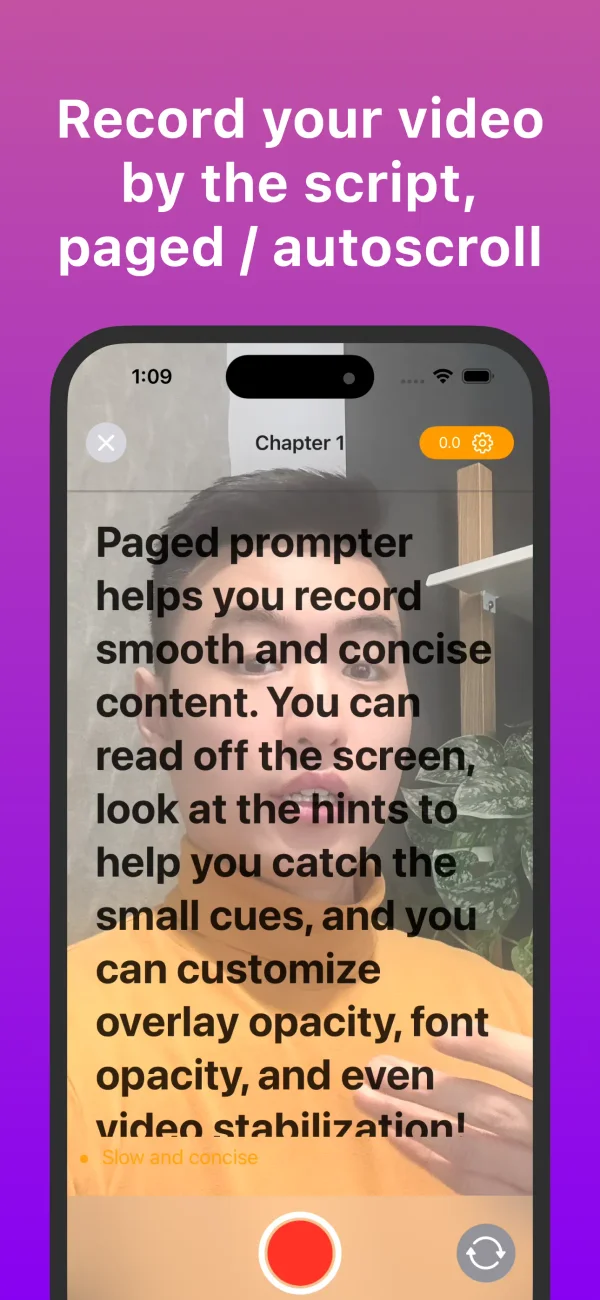
Paged Prompter allows you to read script off your screen on your pace.
It has two modes: paged and autoscroll, with real-time scroll speed adjustment.
You can set up to 3 hints for each slide to help you memorize small cues, choose video stabilization options, change font and overlay, and use external mic for audio recording! Enjoy all the great features for less. Paged Prompter is designed to be low-cost and promise to stay at low cost.
Key features:
- script overlay for video
- autoscroll script for video recording
- paged script mode for video / audio recording
- Change font and overlay
- Mirror mode for presentation
- Hints to memorize key points per slide
- Force dark/light mode
- scroll, tap tap navigation
- easy to use, intuitive UI
- use external mic for audio recording or force internal mic
- video stabilization setting
- left hand configuration
- choose sample rate
- And more coming!
Terms of Use:
Payment will be charged to your Apple account at confirmation of purchase. Subscriptions will automatically renew unless auto-renew is turned off at least 24 hours before the end of current period. Your account will be charged according to your plan for renewal within 24 hours prior to the end of the current period. You can manage or turn off auto-renew in your Apple ID account settings at any time after purchase.
What’s new
Version 2.1.0 · Mar 12, 2024
added height/location adjustments for autoscroll script
added terms of use in settings
added restore purchase on paywall view
App privacy
What Chan Jung declares on the App Store about how this app handles data.
-
Data not collected
The developer does not collect any data from this app.
Privacy practices may vary, for example with the features you use or your age.
Information
- Seller
- OPE Byte Sized Engineering LLC
- Category
- Productivity
- Version
- 2.1.0
- Updated
- Mar 12, 2024
- Released
- Feb 10, 2024
- Size
- 15.8 MB
- Requires
- iOS 17.0 or later
- Age rating
- 4+
- Price
- Free
- In-app purchases
- Yes
- Languages
- English
- Copyright
- © Chan Jung 2024
You might also like
-
 Prompter Pad TeleprompterRead and record yourself
-
 Ministry Margin PartnersSupporter care made simple
-
 Teleprompter for Video ScriptPrompter for Video Captions
-
 murmr voiceProductivity
-
 Focus PalsGamified Focus Timer
-
 Decision Maker: Smart ChoicesPros/Cons, SWOT, Matrix, Tree
-
 My Bedtime WidgetSleep on time more often
-
 XReading - Human Voice TTSOffline TTS:EPUB PDF MOBI AZW3
-
 Watchlist Manager: TubePocketOrganize & watch later easily
-
 StutterAISpeaking aid for stuttering