Parallèle Reader
Your books in two languages
Designed for iPhone, iPad
Free · In-app purchases
- Age rating4+
- CategoryBooks
- DeveloperTemirlan Abdyldaev
- LanguagesEnglish+ 10 more
- Size14.4 MB
Links to the official App Store page
Download.org hosts no file of Parallèle Reader. The button opens its official App Store page, published by Temirlan Abdyldaev. Listing last checked on Nov 16, 2026.
Screenshots




About
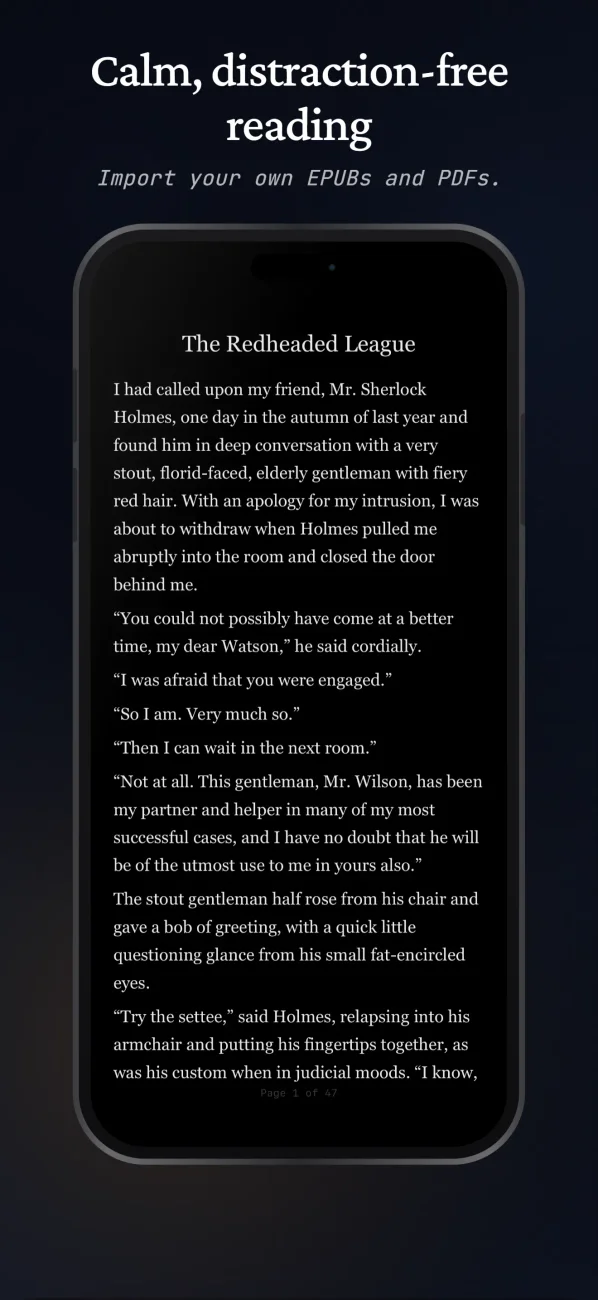
Read the books you love - and, whenever you like, read them in two languages, side by side.
Parallèle Reader is a calm, aesthetic everyday reader for your books. It also has a language companion built in: open a book in its original language and a clean translation appears right beside it - there when you need it, out of the way when you don't.
FEATURES
- Read your own EPUB, PDF, and text files (five timeless classics included free, in their original languages)
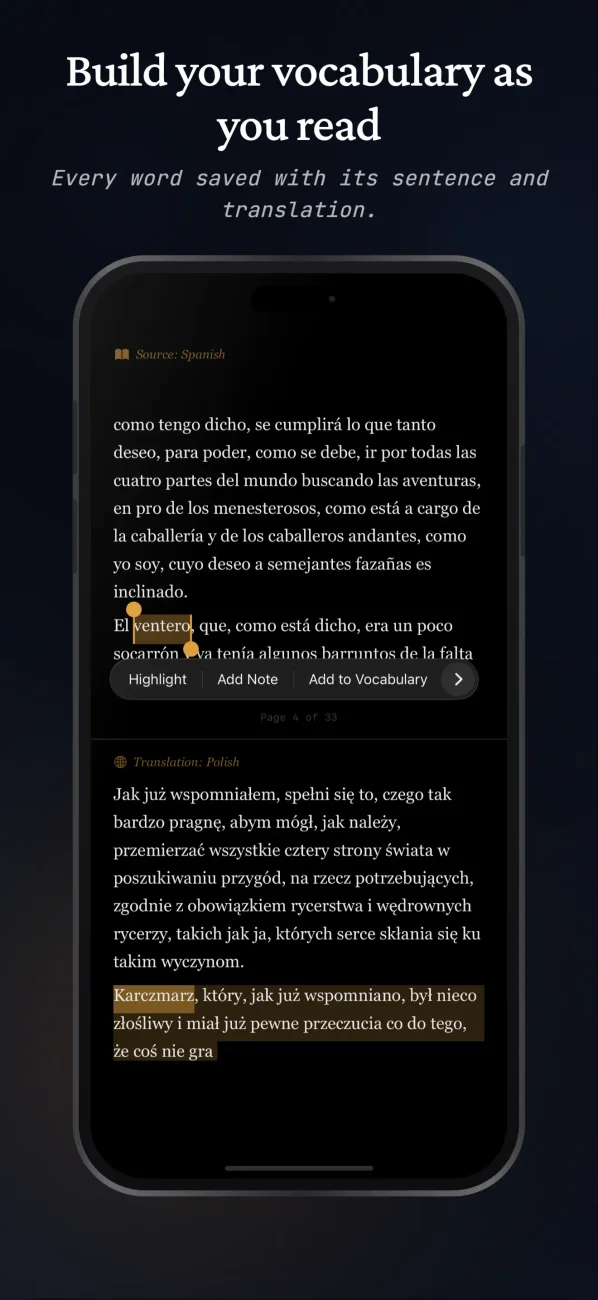
- Side-by-side bilingual reading in split screen — original and translation, page by page
- Translate offline with Apple's on-device engine — no internet needed once your languages are downloaded, or connect your own DeepL key
- Hide the translation and reveal it with a tap to test yourself
- Long-press any word or passage to look it up, highlight it, add a note, or save it
- A personal vocabulary that builds as you read — export it as a TSV file
- Highlight in five colors, add notes, and bookmark pages — all organized by book
- Reading stats with a heatmap that turns your daily progress into a streak — minutes read, books finished, and more
- iCloud sync keeps your reading position, highlights, and vocabulary together across iPhone and iPad
- Collections and smart shelves for Favorites and Finished, plus search by title, author, or language
- Four reading themes (Warm Paper, Sepia, Light, Dark)
- Classic serif fonts, adjustable size, spacing, and margins, and a focus mode
WHO IT'S FOR
You just love reading — a distraction-free reader for your own library, with stats that make the habit stick.
Language learners — read authentic books instead of exercises; reading in context teaches what flashcards can't.
Heritage and bilingual readers — move freely between both your languages on every page.
Anyone after a book that was never translated for sale — read the original with a translation alongside.
HOW IT WORKS
Open one of the included classics, or import your own EPUB, PDF, or text file.
In split screen, the original and a clean translation appear side by side, page by page — on your device with Apple Translate, or through your own DeepL key.
Long-press a word or passage to look it up, highlight it, add a note, or save it to your vocabulary. Prefer to test yourself? Hide the translation and reveal it with a tap.
PRICING
Try Parallèle Reader free for 7 days. After the trial, a single one-time purchase unlocks the full app.
PRIVACY
Your reading stays private. iCloud sync is optional and connects only your own devices through your Apple ID — your reading habits never reach our servers. Translate entirely on-device with Apple Translate, and if you add a DeepL key, it's stored securely on your device.
Whether you're rereading an old favorite or finally reading that novel in its original language, Parallèle Reader makes reading feel good — and quietly makes you better at it.
What’s new
Version 1.1 · Sep 18, 2026
New Features:
- Translate on Select. Turn it on and the translation panel opens the moment you finish selecting a passage - no menu, no extra tap. Translate now also sits in the first row of the selection menu, instead of behind "More".
- Share books straight to Parallèle. Long-press a file in Files, iCloud Drive, Google Drive or a Mail attachment, tap Share, and choose Parallèle.
- Read PDFs as their original pages, with a tap to switch to reflowed text for your own font and size. Highlights work in both views, on the same words.
- Four new reading fonts - Baskerville, STIX Two Text, EB Garamond and Literata - bringing the total to seven. Text goes much larger now, a given size looks the same whichever font you choose, and justified text is available on wider screens.
Improvements:
- Set a book's source language yourself in split view. If a book is labelled with the wrong language, you can correct it from the reader, and split view follows your choice instead of deciding for you.
- Typography that follows the book. Verse keeps its line breaks, quotations are set as quotations, lists are laid out as lists, and scene breaks are visible. Centring and small capitals now come from the book's own stylesheet rather than being guessed at.
- Library sorting is easier to reach and does more. It lives in the Library tab itself now - sort by Date Added, Title, Author, Last Opened or Type, in either direction, with an option to put books already on your device first. List and Grid views are both still there.
- More reading settings sync between your devices - font, size, theme, spacing and margins.
- Plus many smaller refinements to reading layout, typography and reliability.
App privacy
What Temirlan Abdyldaev declares on the App Store about how this app handles data.
-
Data not collected
The developer does not collect any data from this app.
Privacy practices may vary, for example with the features you use or your age.
Information
- Seller
- Temirlan Abdyldaev
- Category
- Books
- Version
- 1.1
- Updated
- Sep 18, 2026
- Released
- Jun 17, 2026
- Size
- 14.4 MB
- Requires
- iOS 18.6 or later
- Age rating
- 4+
- Price
- Free
- In-app purchases
- Yes
- Languages
- English, French, German, Italian, Japanese, Korean, Portuguese, Russian, Simplified Chinese, Spanish, Turkish
- Copyright
- © 2026 Temirlan Abdyldaev
You might also like
-
 FusionRead: EPUB PDF ReaderTranslate & Learn Any Language
-
 Parallel VerseDual Language Scripture Reader
-
 Twinread: Learn Turkish & ThaiBilingual EPUB & PDF Reader
-
 DualText ReaderRead novels in two languages
-
 LinguaReaderBooks
-
 ForeignReaderRead with instant translation
-
 Readlate: EPUB TranslatorBilingual Paper & Book Reader
-
 BookLight: EPUB TranslatorTap to Translate & Save Words.
-
 Fablium: AI Book TranslatorTranslate EPUBs naturally
-
 ReadGem: Read, Learn LanguagesCompare Translations with AI