
ParentalEdge: Parental Control
Screen Time, Family & Safety
Designed for iPhone, iPad
Free
- Age rating4+
- CategoryLifestyle
- DeveloperQrcall Pty Ltd
- LanguagesEnglish
- Size7.6 MB
Links to the official App Store page
Download.org hosts no file of ParentalEdge: Parental Control. The button opens its official App Store page, published by Qrcall Pty Ltd. Listing last checked on Nov 16, 2026.
Screenshots
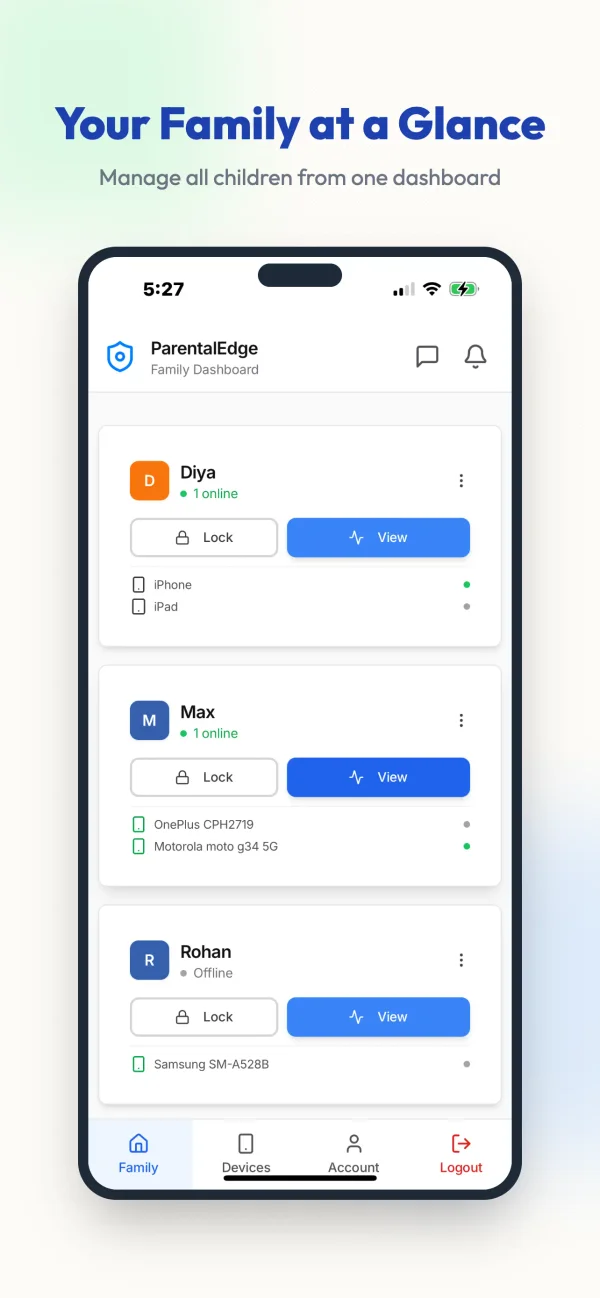


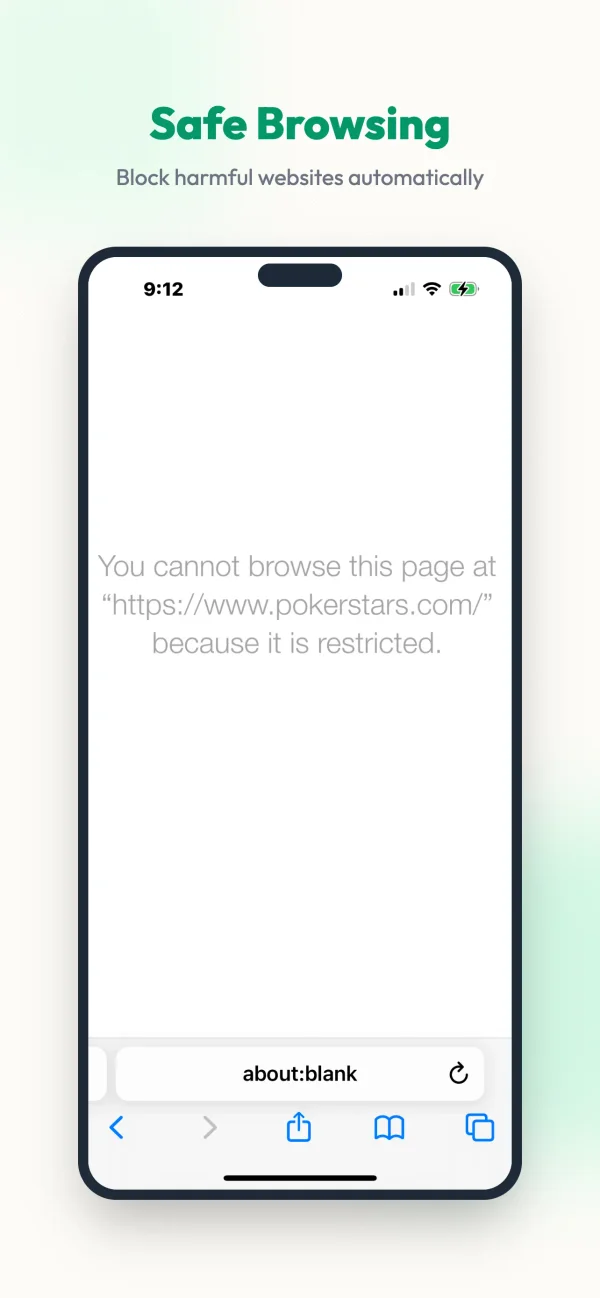

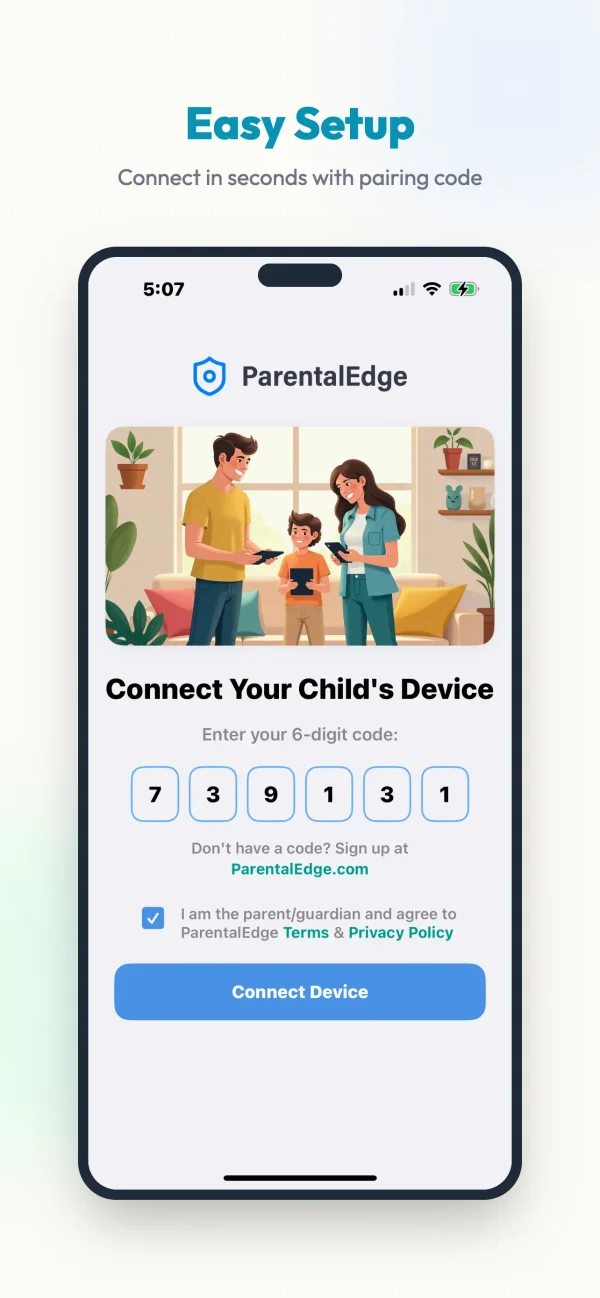
About
CONTENT FILTER + SCREEN TIME + LOCATION
Web filter, app blocking, screen time limits, and GPS tracking — all managed from your phone.
START FREE — 7-DAY TRIAL
Try all premium features free for 7 days.
Built on Apple's official Screen Time framework — real control, real insight, built around your family.
HOW IT WORKS
1. Set up on your phone
Open ParentalEdge and choose "My phone (parent)". Create your account and add your child.
2. Set up on your child's phone
Install ParentalEdge on the child's device, choose "My child's phone", and enter the 6-digit pairing code.
3. You're set
Manage rules and review activity right from your phone. Both devices sync in real-time — change a rule and it applies instantly.
WEB FILTER — BLOCK INAPPROPRIATE & UNSAFE SITES
• Block inappropriate content across Safari and every app
• Filter 25+ unsafe categories including gambling, dating, and more
• Real-time protection that updates automatically
• Age-appropriate filtering that grows with your child
• Custom block and allow lists for specific sites
• SafeSearch enforcement on Google, YouTube, and Bing
• Works even when kids try private/incognito mode
PARENT DASHBOARD — RIGHT ON YOUR PHONE
• See your child's screen time at a glance
• Approve or deny time extension requests with a tap
• Set and adjust rules from anywhere
• Get real-time notifications when your child needs you
• Secure biometric login (Face ID / Touch ID)
SCREEN TIME LIMITS & SCHEDULES
• Daily screen time limits per app or category
• Time Windows: YouTube 6–7 PM, social media weekends only
• Bedtime mode blocks apps during sleep hours
• Different limits for weekdays vs weekends
• Shield screen shows when apps are available next
• Kids can request more time — you approve or deny instantly
APP BLOCKER & CONTENT FILTERING
• Block any app instantly from the parent dashboard
• Category blocking: social media, games, entertainment, and more
• Age-based content filtering by rating (4+, 9+, 12+, 17+)
• Auto-lock apps when daily screen time limit is reached
LOCATION TRACKING & FAMILY SAFETY
• See your child's real-time location on a map
• Location history throughout the day
• Runs in the background with minimal battery impact
• Peace of mind for school commutes, activities, and playdates
ACTIVITY INSIGHTS & REPORTS
• 30-day activity history
• Every website visited and app used
• Daily and weekly screen time summaries
• Email reports delivered to your inbox
• Insights designed for family conversations, not surveillance
WHY FAMILIES CHOOSE PARENTALEDGE
• 7-day free trial
• Built on Apple's official Screen Time framework
• Supports multiple children and devices — iPhone and iPad
• Quick setup with intelligent age-based defaults
• Battery-friendly — runs efficiently in background
• Privacy-first: data encrypted, never sold
• Real-time notifications for time requests and activity alerts
SCREEN TIME API USAGE
Uses Apple's Family Controls (Screen Time API) to monitor and limit app usage, block apps and websites, enforce
schedules, and track location. Screen Time permissions required on the child's device during setup. Your child is
always aware that parental controls are active — the app cannot be hidden.
PRIVACY & SECURITY
Data encrypted in transit and at rest. Activity shared only with your linked parent account. Never sold to third parties.
Privacy policy: parentaledge.com/privacy-policy
Get started free — your 7-day trial begins after setup.
Support: support@parentaledge.com
What’s new
Version 1.7.0 · Sep 29, 2026
• Setup takes one permission at a time, starting with Screen Time, so nothing important gets skipped.
• Simpler help for your child's Apple Account: create a child account from your own iPhone, for any age under 18, with the exact steps on screen.
• No more "Screen Time didn't respond" while you're still signing in on Apple's approval screen.
• A new Home screen that shows web protection first, then today's screen time and what's coming up.
• App rules are grouped by what they do: blocked, daily limit, or allowed at set times.
• Turn on Location or Notifications later from Parent Controls › Settings if you skipped them during setup.
• Text fits properly when your iPhone uses larger text sizes.
App privacy
What Qrcall Pty Ltd declares on the App Store about how this app handles data.
-
Data linked to you
May be collected and linked to your identity.
- Browsing history
- Identifiers
Privacy practices may vary, for example with the features you use or your age.
Information
- Seller
- Qrcall Pty Ltd
- Category
- Lifestyle
- Version
- 1.7.0
- Updated
- Sep 29, 2026
- Released
- Jan 20, 2026
- Size
- 7.6 MB
- Requires
- iOS 16.0 or later
- Age rating
- 4+
- Price
- Free
- Languages
- English
- Copyright
- © 2026 Qrcall Pty Ltd
You might also like
-
 Ourlittlebird ParentLifestyle
-
 Kupola: Parental ControlFamily Locator & Screen Time
-
 OneLimit: My Screen TimeSee your screen time budget
-
 Parental Control: Screen TimeSocial Media & App Blocker
-
 Ourlittlebird Parent ControlLifestyle
-
 Monitor Kids Phone-Screen TimeParental Control App & Blocker
-
 Family Safe - Parental ControlScreen Time & Family Locator
-
 Device App KiddenLifestyle
-
 Vettly Companion: Teen SafetyScam, Link & Message Checker
-
 Kiddowall: Parental ControlScreen time, web filter & GPS