Password Zip
Encrypt and Share Files
Designed for iPhone, iPad, Mac
Free · In-app purchases
- Age rating4+
- CategoryUtilities
- DeveloperJames Trigg
- LanguagesEnglish+ 25 more
- Size12.0 MB
Links to the official App Store page
Download.org hosts no file of Password Zip. The button opens its official App Store page, published by James Trigg. Listing last checked on Nov 12, 2026.
Screenshots


About
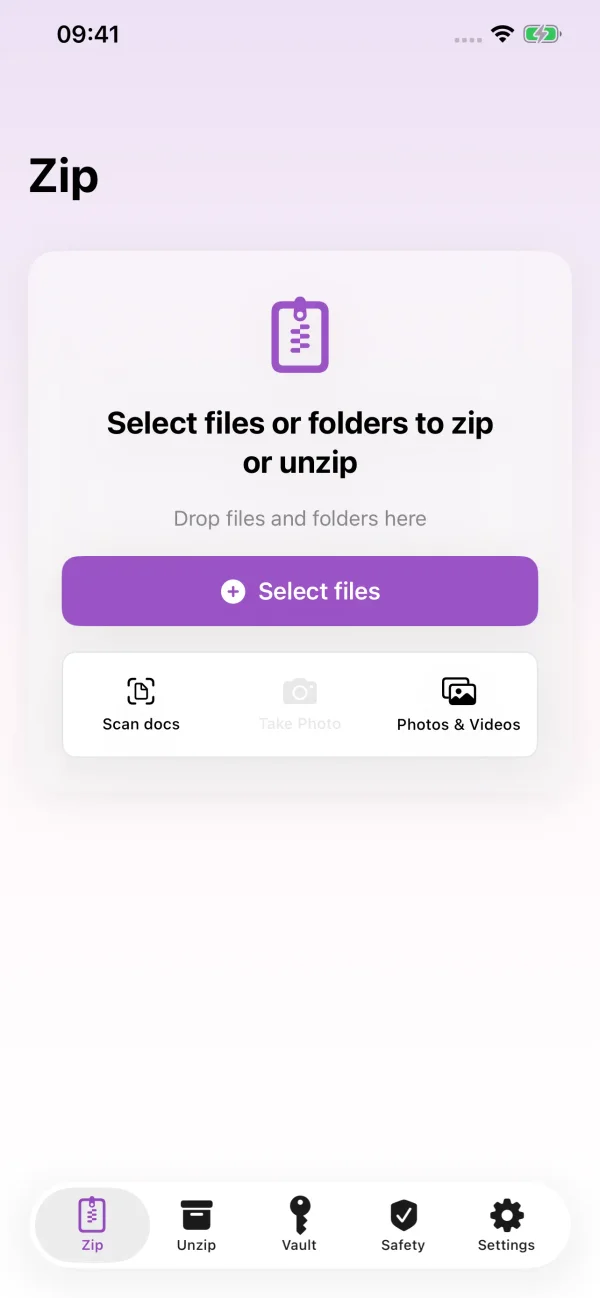
Password Zip helps you create, open, and share protected files on iPhone and iPad.
Use it when you need to send mortgage documents, tax records, legal forms, work files, client attachments, or personal paperwork in a password-protected zip. Password Zip can generate strong passwords for your encrypted zip files, save them in your private iCloud-synced vault, and make them available across your devices when you need to open the archive again.
That means you can use stronger zip passwords without relying on memory, notes, screenshots, or repeated weak passwords.
What you can do with Password Zip:
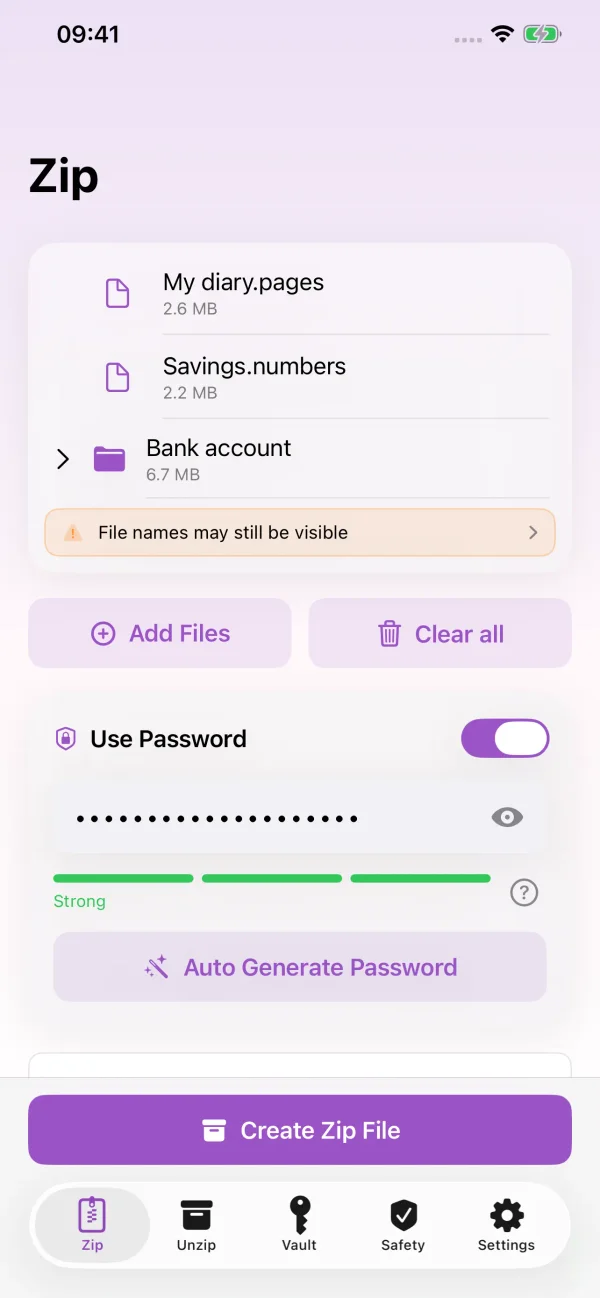
• Create password-protected zip files
• Use AES-256 encryption for protected zip files by default
• Save up to 10 ZIP passwords from this device in your private iCloud Vault
• Reuse saved passwords when opening matching zip files
• Zip and unzip files from Files, Share Sheet, and other apps
• Open zip, 7z, tar, tar.gz, tar.bz2, tar.xz, gz, bz2, and xz archives
• Preview the contents of zip files before extraction
• Get warned before sharing a zip file and its password through the same channel
• Convert HEIC/HEIF images to JPEG copies for easier cross-platform sharing
• Import photos and videos for free
Password Zip is built for practical file security: strong passwords, safer sharing habits, and a clean workflow for everyday sensitive documents.
Password Zip Pro (one-time purchase, no subscription) adds faster workflows and extra privacy tools:
• Shortcuts actions for creating zip files and unzipping archives
• Bulk unzip workflows
• Unlimited Vault entries, access to entries from your other devices, search and tags
• Longer generated passwords, up to 64 characters
• App lock with Face ID, Touch ID, or PIN
• Scan documents and take photos
• Save one file from a zip preview without extracting the whole archive
• Pull one file from an existing zip into a new zip
Whether you are sending documents to a lender, sharing sensitive attachments with a client, organizing records, or protecting personal files, Password Zip gives you a practical iOS workflow for safer compressed files.
What’s new
Version 2.3.1 · Oct 25, 2026
• Import photos and videos for free.
• Select several files at once for free, and organize your Pro Vault with tags and search.
• Clearer sharing guidance, including help with WhatsApp previews.
• Safer extraction keeps existing files instead of replacing them.
• Bug fixes and reliability improvements.
App privacy
What James Trigg declares on the App Store about how this app handles data.
-
Data not collected
The developer does not collect any data from this app.
Privacy practices may vary, for example with the features you use or your age.
Information
- Seller
- James Trigg
- Category
- Utilities
- Version
- 2.3.1
- Updated
- Oct 25, 2026
- Released
- Aug 7, 2024
- Size
- 12.0 MB
- Requires
- iOS 16.4 or later
- Age rating
- 4+
- Price
- Free
- In-app purchases
- Yes
- Languages
- English, Arabic, Danish, Dutch, Finnish, French, German, Greek, Hebrew, Hindi, Indonesian, Italian + 14 more
- Copyright
- © 2023 James Trigg. All rights reserved.
You might also like
-
 Archivr: Pack & Lock ArchivesZIP, 7z & RAR · PDF passwords
-
 ZIP password finderuse dictionary or brute force
-
 WinZip: #1 zip & unzip toolProfessional Zip File Manager
-
 Zip & RAR & 7z Extractor ZipoFile extractor, opener, viewer
-
 iZip – Zip Unzip UnrarThe Best Zip File Manager
-
 RAR Unzip: ZIP File Opener7Z Extractor & Unarchiver
-
 Zip & RAR File ExtractorUnzip, Compress & File Manager
-
 Zip & RAR & 7z File ExtractorUnzip, Unrar, Scan & Sign PDFs
-
 GephOpen-source, privacy-first VPN
-
 uBlock Origin LiteAn efficient content blocker