PastePlop — Mobile Companion
Desktop clipboard, on hand
Designed for iPhone, iPad
Free
- Age rating4+
- CategoryProductivity
- DeveloperBenjamin Dansby
- LanguagesEnglish+ 10 more
- Size5.7 MB
Links to the official App Store page
Download.org hosts no file of PastePlop — Mobile Companion. The button opens its official App Store page, published by Benjamin Dansby. Listing last checked on Nov 18, 2026.
Screenshots

About
PastePlop for iPhone and iPad shows you the clipboard history from PastePlop on your Mac. Copy something at your desk, and it's in your hand.
REQUIRES PASTEPLOP FOR MAC
This is a companion app. It has no clipboard of its own — everything it shows is synced from PastePlop on your Mac through your private iCloud account. Without the Mac app, and sync switched on there, this app has nothing to show you.
EVERYTHING YOU COPIED, ON YOUR PHONE
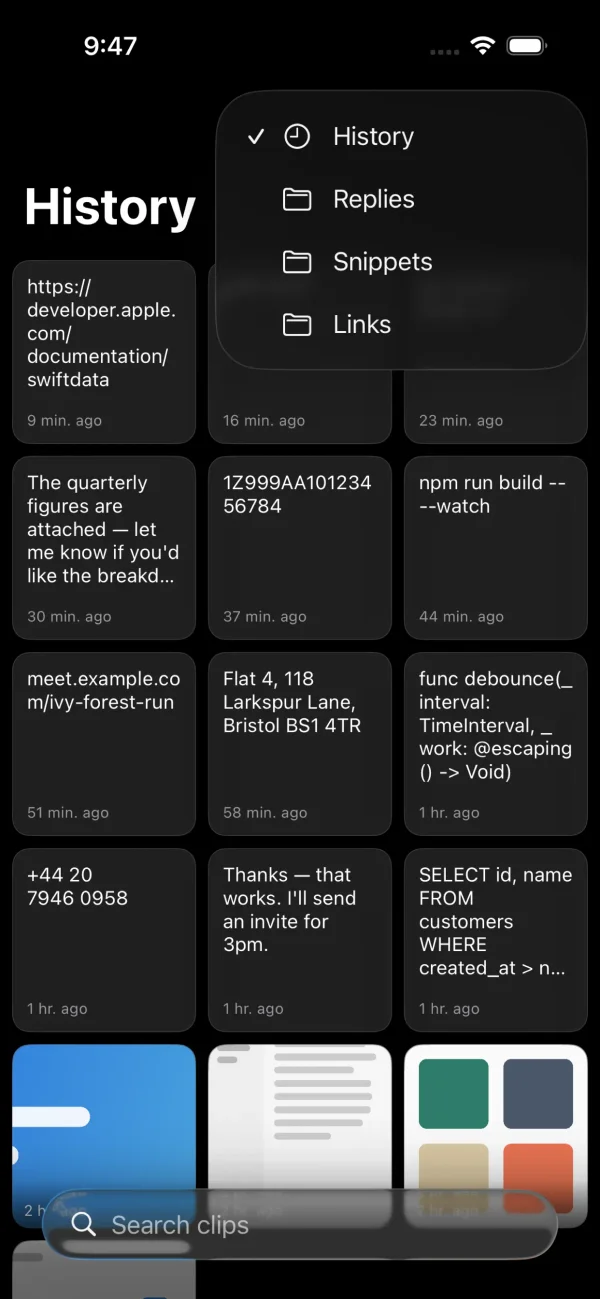
Your recent clips appear as a grid of tiles — text, links, screenshots, images. Tap one to copy it to your iPhone or iPad clipboard, then paste it wherever you're working.
YOUR SAVED CATEGORIES TRAVEL TOO
The categories you keep on the Mac — snippets, boilerplate, signatures, lookup links — come along in full, in the order you arranged them. On iPad they sit in a sidebar; on iPhone, a tap away in the toolbar.
SEARCH, INCLUDING INSIDE PICTURES
Search runs across your clips and across the text your Mac recognized inside screenshots, so a phrase you remember seeing on screen finds the picture it appeared in.
SYNC IS OFF UNTIL YOU TURN IT ON
Nothing leaves your Mac until you switch sync on in PastePlop's preferences there, and you choose what travels: text, images, and the text found inside images, each separately. Switching sync off removes everything PastePlop has put in iCloud.
ONE WAY, BY DESIGN
The Mac writes and this app reads. Nothing you do here changes your Mac's clipboard history, and your phone's own clipboard is never captured or uploaded.
YOUR DATA STAYS YOURS
Clips sync through your private iCloud database. There is no PastePlop account, no server of ours in the middle, and nothing is collected, analyzed, or shared.
FREE
This companion is free. PastePlop for Mac is sold separately.
What’s new
Version 1.1.1 · Nov 11, 2026
Clips copied on your Mac now appear while PastePlop is open, without quitting and reopening the app.
App privacy
What Benjamin Dansby declares on the App Store about how this app handles data.
-
Data not collected
The developer does not collect any data from this app.
Privacy practices may vary, for example with the features you use or your age.
Information
- Seller
- Benjamin Dansby
- Category
- Productivity
- Version
- 1.1.1
- Updated
- Nov 11, 2026
- Released
- Sep 21, 2026
- Size
- 5.7 MB
- Requires
- iOS 17.0 or later
- Age rating
- 4+
- Price
- Free
- Languages
- English, French, German, Italian, Japanese, Korean, Portuguese, Russian, Simplified Chinese, Spanish, Ukrainian
- Copyright
- © 2026 Ben Dansby
You might also like
-
 AegisClipClipboard History & Search
-
 SafienceA browser for desktop web apps
-
 Clipboard: Multi Copy & PasteCopy & paste without switching
-
 Clicker Counter - Simple TallyCount & Track Easily, Clean UI
-
 Ephemera: Expiring BookmarksRead before they disappear.
-
 Clipboard Keyboard SnippetsPaste Saved Text in Any App
-
 Litho: Screenshot to ObsidianOn-device OCR, two taps, done
-
 Copy Paste Keyboard - copipiClipboard & Text Snippets
-
 Clipster - Clipboard ManagerQuick copy, paste & save text
-
 ShinyboxSave, organize, and rediscover