
- Age rating4+
- CategoryPhoto & Video
- Developer北京尊师重道科技有限公司
- LanguagesEnglish+ 47 more
- Size76.1 MB
Links to the official App Store page
Download.org hosts no file of Perfilm. The button opens its official App Store page, published by 北京尊师重道科技有限公司. Listing last checked on Nov 27, 2026.
Screenshots


About
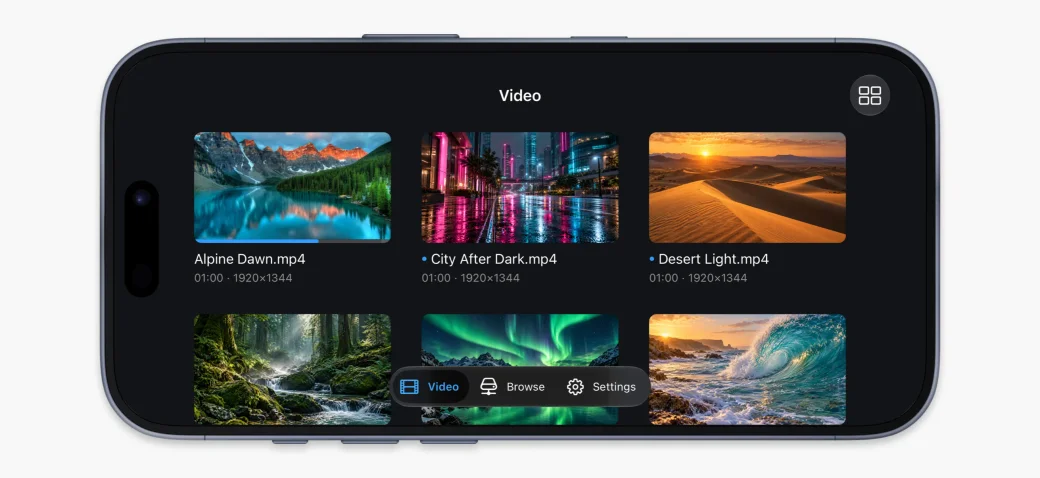
Perfilm is a media player built for iPhone and iPad. Easily browse and play movies, TV shows and music stored on your device or on your home NAS. Optimized for the inner and outer displays of iPhone Duo, it makes viewing and controls feel at home on either screen.
Powered by VLC, Perfilm supports a wide range of video, audio and subtitle formats, including popular formats such as MKV, MP4, MOV, AVI, MP3, FLAC, AAC and WAV, reducing the need to convert your files.
Before you travel, copy movies, TV shows or music to your phone and enjoy them offline whenever you like. Whether you're on a plane, aboard a ship or traveling through an area with poor reception, your media is ready to play.
• Browse real folders in grid, list or detailed view.
• Search your entire local library, sort, batch rename, move, delete and share files.
• Access your NAS over SMB and other local network protocols to stream or download files.
• Transfer files from a computer's web browser, with drag-and-drop uploads of entire folders.
• Find and download subtitles online, with dual-subtitle display, caching and timing adjustment.
• Switch audio tracks and remember manually selected tracks or audio being turned off.
• Enjoy music with a separate playback queue, mini player, shuffle, repeat and a sleep timer.
• Adjust playback speed and aspect ratio, use Picture in Picture and view playback statistics.
Perfilm is an independently maintained app based on VideoLAN's open-source VLC project, focused on improving the native interaction experience on iOS. It complies with the applicable open-source licenses and retains license texts, copyright notices and acknowledgments.
What’s new
Version 1.6 · Nov 26, 2026
• Redesigned the audio player. Expand the queue from the bottom of the screen, or browse folders and the queue side by side on iPad and the Duo inner display.
• Improved the Duo inner layout. The hinge gap stays consistent in stacked mode, and playback statistics appear inside the video area in tabletop mode.
• Smart Black Bar Removal compares several points in the video to reduce incorrect cropping during dark scenes or opening ads. Detection is faster and shows a progress bar.
• Audio folders and SMB listings show actual filenames by default. Fixed duplicate or missing SMB shares and a brightness slider shift when advancing to the next SMB video on the Duo outer screen in portrait.
• Updated the VLC playback engine for better compatibility.
App privacy
What 北京尊师重道科技有限公司 declares on the App Store about how this app handles data.
-
Data not collected
The developer does not collect any data from this app.
Privacy practices may vary, for example with the features you use or your age.
Information
- Seller
- Beijing Zunshi Zhongdao Technology Co., Ltd
- Category
- Photo & Video
- Version
- 1.6
- Updated
- Nov 26, 2026
- Released
- Nov 2, 2026
- Size
- 76.1 MB
- Requires
- iOS 17.0 or later
- Age rating
- 4+
- Price
- Free
- Languages
- English, Afrikaans, Arabic, Basque, Belarusian, Bosnian, Breton, Cambodian, Catalan, Corsican, Czech, Danish + 36 more
- Copyright
- © 2026 Beijing Zunshi Zhongdao Technology Co., Ltd
You might also like
-
 LumiereCamFilm Camera & Photo Editor
-
 SideReaderDual Camera & Teleprompter
-
 Screenoir - Video PlayerMKV, subtitles and playlists
-
 LAN PlayerStream Media from Your LAN
-
 Tiny Twin: Photo to 3D ModelAI Figurine & STL Print Maker
-
 SHOOTS: Self Timer CameraHands-Free Pose & Photo Remote
-
 Video Compressor - Shrink MBSave Storage, Trim & Crop 4K
-
 Plain PlayerSimple video & audio player
-
 Tilus: Media Player4K HDR video: MKV, NAS, cloud
-
 XClipper - Save & Sort VideosPaste a URL, keep it offline