- Age rating4+
- CategoryPhoto & Video
- DeveloperStephen Denham
- LanguagesEnglish
- Size1.9 MB
Links to the official App Store page
Download.org hosts no file of PhotoGlyph. The button opens its official App Store page, published by Stephen Denham. Listing last checked on Nov 12, 2026.
Screenshots



About
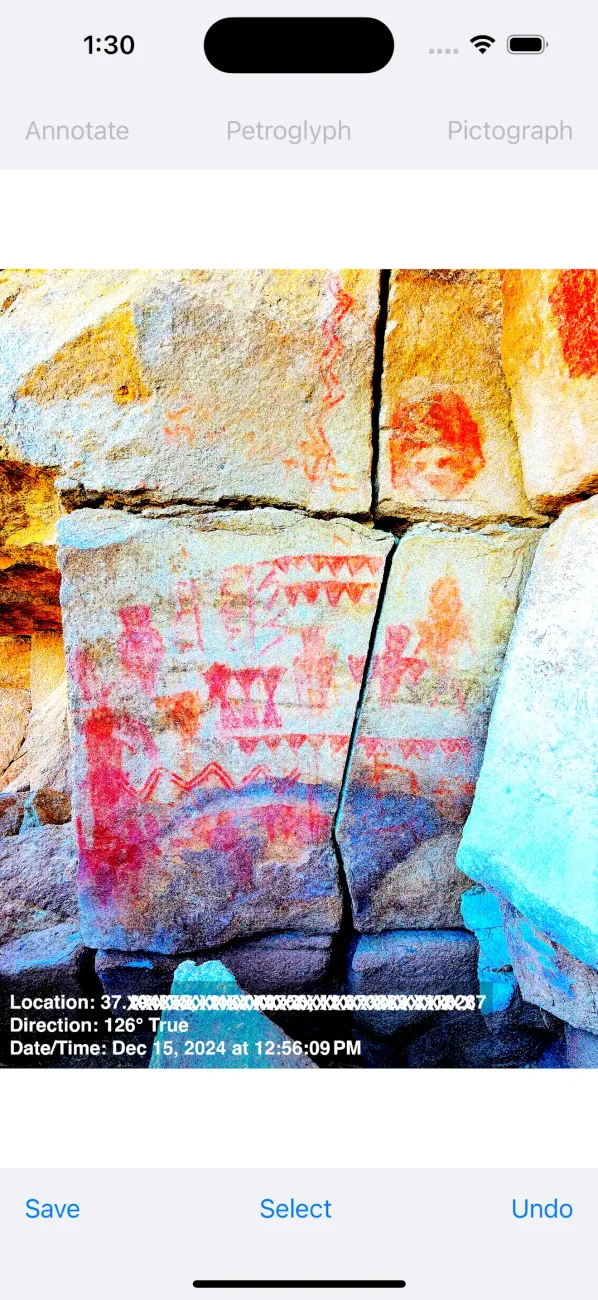
Press the 'Select' button to choose a photo from your library. If the photo has metadata, then you can press the 'Annotate' button to superimpose the location, direction and date/time on the bottom left of the image (note: when you save to the Photo Library, you can copy and paste this text from the image). Double tap or pinch to zoom in and out.
Select either the 'Pictograph' or 'Petroglyph' depending on the subject of your photo to enhance its features. Press the 'Undo' button to revert changes.
When finished, you can save the new image to your Photo Library.
Note, depending on the color composition of pictographs, the 'Petroglyph' option might yield better results.
What’s new
Version 1.3.3 · Oct 1, 2026
Improved image filters.
App privacy
What Stephen Denham declares on the App Store about how this app handles data.
-
Data not collected
The developer does not collect any data from this app.
Privacy practices may vary, for example with the features you use or your age.
Information
- Seller
- Stephen Denham
- Category
- Photo & Video
- Version
- 1.3.3
- Updated
- Oct 1, 2026
- Released
- Dec 24, 2024
- Size
- 1.9 MB
- Requires
- iOS 17.6 or later
- Age rating
- 4+
- Price
- $4.99
- Languages
- English
- Copyright
- © Stephen Denham 2024-2025
You might also like
-
 ChromaLensExplore Subtle Color Patterns
-
 Video Frame GrabberㆍStillFrameSave video frame to HQ image
-
 Add Logo Watermark on PhotosCopyright Camera & Gallery Pic
-
 TryTats – AI Tattoo Try-OnRealistic Tattoo Preview
-
 iContrastContrast/brightness adjust
-
 Engraver handmade etchingThe world of engraving art
-
 Milky Way TonightAstrophotography Forecast
-
 +FramesAstro planner, sky atlas
-
 ThrivestoneTrippiest. App. Ever?
-
 Tinge - Glow CamDark color filters