- Age rating4+
- CategoryMusic
- DeveloperRoland Corporation
- LanguagesEnglish
- Size13.8 MB
Links to the official App Store page
Download.org hosts no file of Piano Designer. The button opens its official App Store page, published by Roland Corporation. Listing last checked on Nov 15, 2026.
Screenshots


About
Compatible Models:
LX708, LX706, LX705, HP704, HP702, RP701, F701, FP-90X, FP-60X, FP-30X, HP701(Region Limited Model), RCP800(Region Limited Model), GP-9M, GP-9, GP-6, GP609, GP607, LX-17, LX-7, HP605, HP603, HP603A, HP601, KF-10, LX-15e, HP508, HP506, HP504, DP603, DP90Se, DP90e, FP-90, FP-80, FP-60
Introduction:
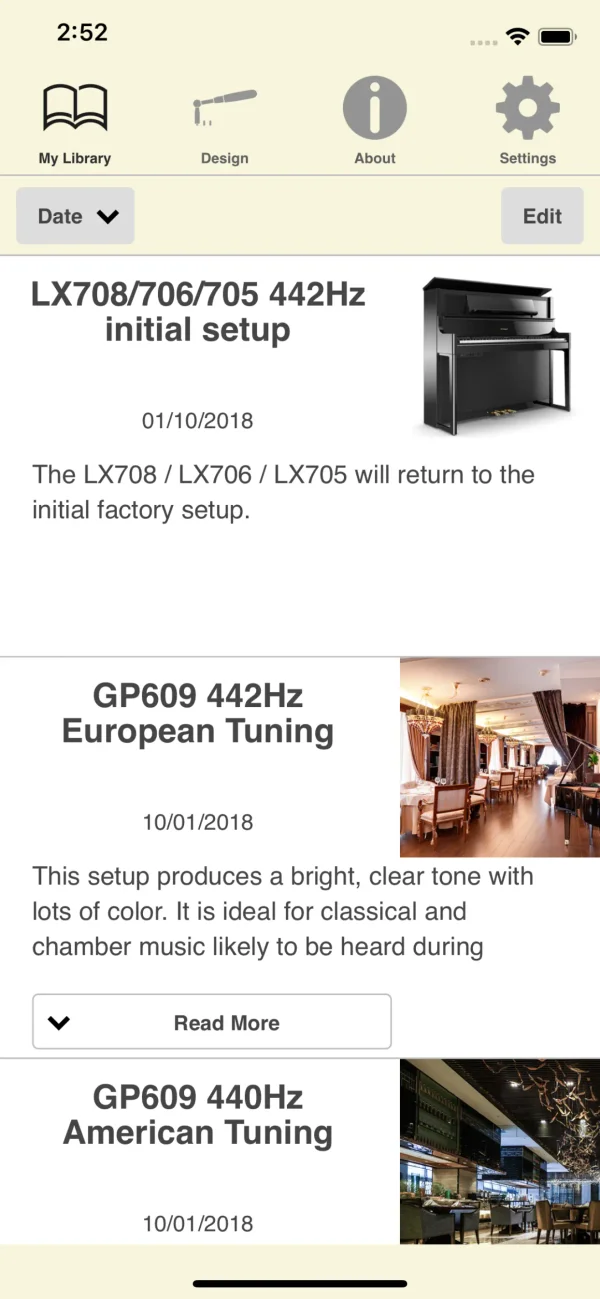
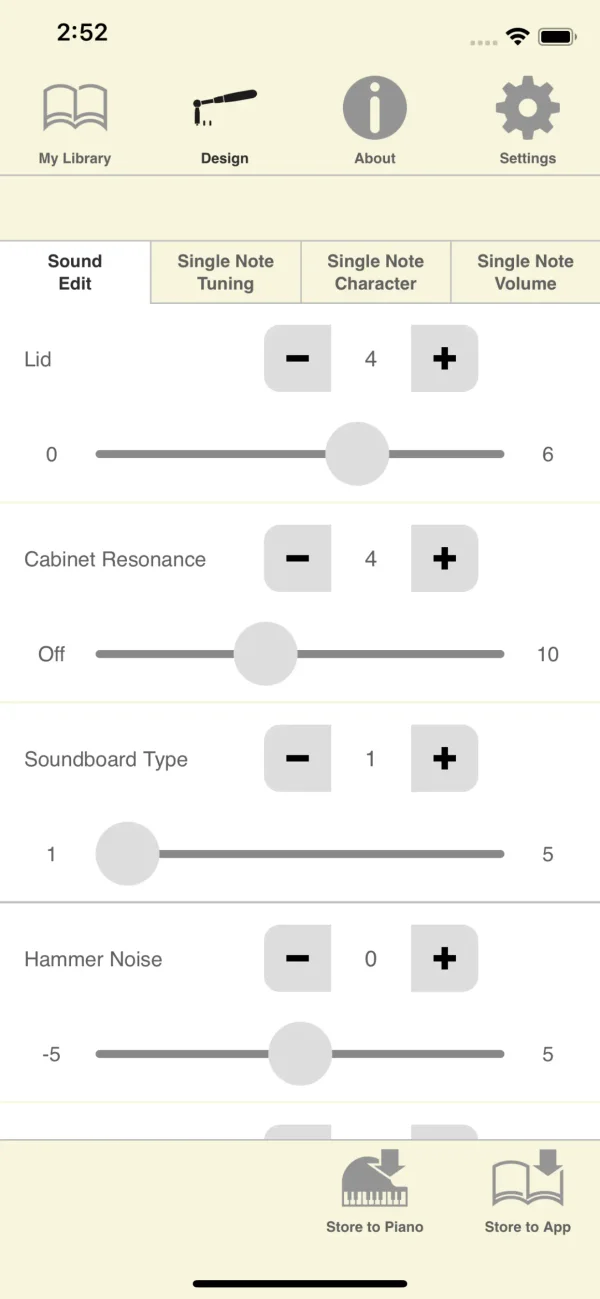
The Piano Designer app helps you to personalize the sound of your Roland piano. Inside the instrument are many parameters that allow you to finely adjust the sound elements of the piano, much in the same way that an experienced piano technician fine-tunes an acoustic piano for a particular artist or musical style. These parameters include pitch, volume, tonal characteristics, the extent to which the virtual “lid” is open, states of resonance from the strings and cabinet, and so on.
With the Piano Designer app, you can easily control these many elements from the graphical touchscreen on your mobile device. In addition, the app includes many ready-to-play settings, allowing you to enjoy custom sounds created by world-class piano technicians.
- Parameters related to lid position, strings, and hammers are listed at a glance, and can be edited and transferred to the piano easily.
- Enjoy playing your Roland piano with sounds fine-tuned by famous piano technicians.
- Graphically adjust the pitch, level, and tonal character independently for each of the piano’s 88 notes.
Notes:
* Make sure your Roland piano model is updated with the most current system program. The latest system program and setup instructions can be found at the support pages at www.roland.com.
* You can connect your iPad/iPhone to your piano via following connecting ways. :
・Connection via Bluetooth. (Compatible model : LX708, LX706, LX705, HP704, HP702, HP701(Region Limited Model), GP609, GP607, LX-17, LX-7, HP605, HP603, HP603A, HP601, KF-10, DP603, FP-90, FP-60)
・Connection via Wireless LAN, by inserting the WNA1100-RL Wireless USB Adapter (sold separately) or Onkyo UWF-1 into the USB Memory port. (Compatible model: LX-15e, HP508, HP506, HP504, DP90Se, DP90e, FP-80)
・Connection via USB Cable. Lightning-USB Camera Adaptor or Apple iPad Camera Connection Kit for your iPhone/iPad and USB cable are required. (Compatible model: LX708, LX706, LX705, HP704, HP702, HP701(Region Limited Model), GP609, GP607, LX-17, LX-7, HP605, HP603, HP603A, HP601, KF-10, LX-15e, HP508, HP506, HP504, DP603, DP90Se, DP90e, FP-90, FP-80, FP-60)
What’s new
Version 1.3.13 · May 23, 2024
Fixed a bug that some parameters could not be operated while connected to a specific model
App privacy
What Roland Corporation declares on the App Store about how this app handles data.
-
Data not collected
The developer does not collect any data from this app.
Privacy practices may vary, for example with the features you use or your age.
Information
- Seller
- Roland Corporation
- Category
- Music
- Version
- 1.3.13
- Updated
- May 23, 2024
- Released
- Aug 4, 2014
- Size
- 13.8 MB
- Requires
- iOS 9.3 or later
- Age rating
- 4+
- Price
- Free
- Languages
- English
- Copyright
- © 2024 Roland Corporation
You might also like
-
 PianoRemoteMusic
-
 Piano Adventures® PlayerPlay along and learn music
-
 Piano Chords and ScalesLearn, play and compose songs
-
 iGrand Piano CSMusic
-
 Piano Companion: chords,scalesChord Finder, Jazz Dictionary
-
 Numa PlayerMulti-Core. Multizone
-
 Smart Pianist - USMusic
-
 KORG ModuleProfessional Piano & Keyboard
-
 iGrand Piano CS for iPadMusic
-
 Piano2NotesConvert Piano Music to Notes