
pictoMap
Map your places and moments
Designed for iPhone, iPad
Free · In-app purchases
- Age rating4+
- CategoryTravel
- DeveloperRYUICHIROU SHIMONO
- LanguagesEnglish+ 1 more
- Size2.1 MB
Links to the official App Store page
Download.org hosts no file of pictoMap. The button opens its official App Store page, published by RYUICHIROU SHIMONO. Listing last checked on Nov 14, 2026.
Screenshots




About
A notebook written in places and times.
Save what you found, where you found it: a location, a time, a photo, a note. Later, retrace it on the map and along the timeline, in the order it happened. That is all pictoMap does.
■ Save it on the spot
Three ways in: take a photo on the spot, save the location only, or bring photos in from your library. When a photo from your library carries its location and the time it was taken, pictoMap uses them, so there is nothing to type. If a photo has no location, you can place it on the map afterwards.
Choose how the camera saves: review each photo and add a note before saving, or save the moment you press the shutter and add details later. The camera has zoom, flash, and front and back cameras. After recording, you can rotate or crop a photo.
■ The map and the list move together
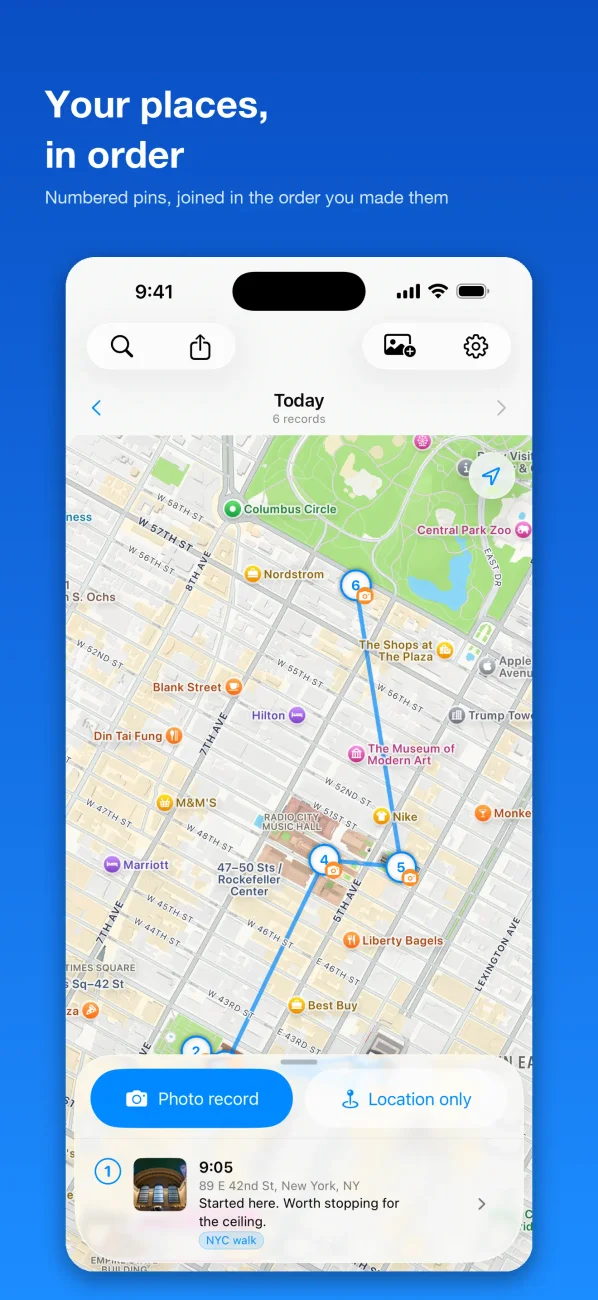
A day's records line up on the map as numbered pins, joined in time order. Pick a pin and the list follows; pick a row and the map follows. On iPad the map and the list sit side by side.
■ Group with tags
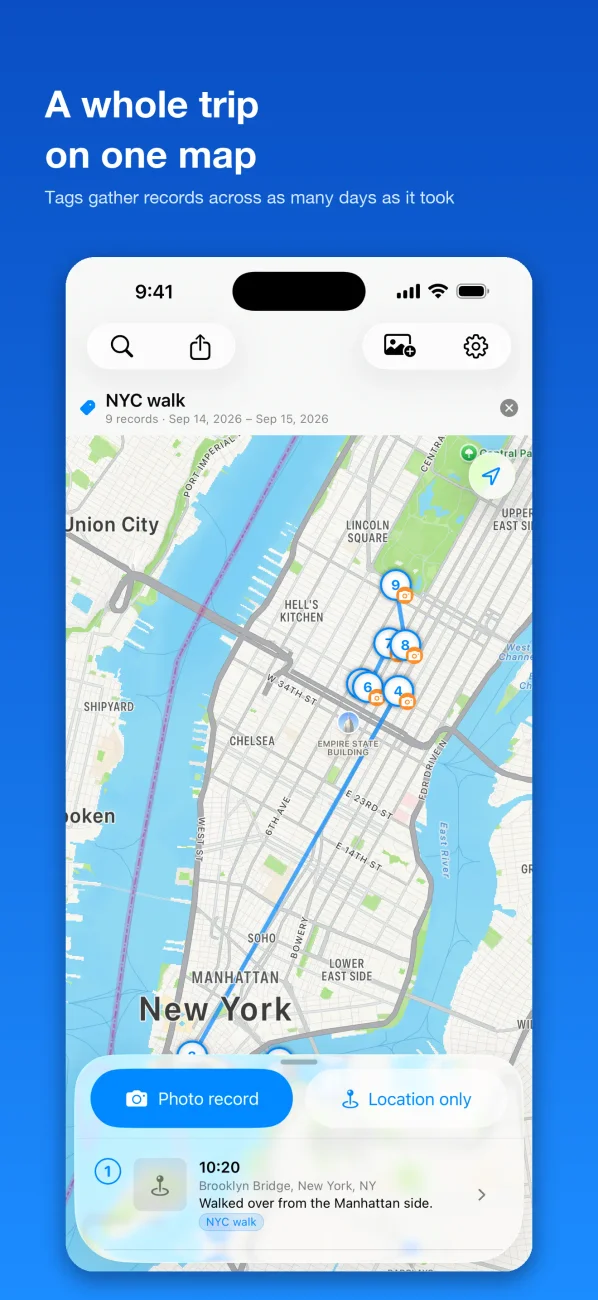
Tag records "Kyoto trip" or "October inspection" and everything under that tag is drawn on one map, across as many days as it took. A three-day trip or a week of site visits becomes a single route you can follow.
■ Find it again
Search by the text of your notes, by place name, by tag, or by date range.
■ Material for a report (Premium)
Export any range of records as a PDF, plain text, or CSV, laid out in time order. The PDF can include a cover page, page numbers, and a route map that joins your records in order, giving you a starting point for a site report or a training write-up. (Creating the route map requires an internet connection.) Photos can be exported all at once, named in record order. You can preview the finished PDF before buying.
■ Camera modes for site visits (Premium)
Continuous keeps the camera open and saves each photo as its own record, for going from place to place. Batch gathers the photos you take while the camera is open into a single record, for taking several shots in one place.
■ Your data stays yours
Records are kept on this device and, if you use iCloud, in your own iCloud. There is no account and no sign-in. You can also export a backup file and keep it yourself.
■ Also
- A single record can hold several photos
- Choose a standard map, satellite imagery, or both together
- Pick location accuracy and photo quality from three levels each
- New photos are saved as HEIC when that makes them smaller, and Settings shows how much space pictoMap uses on this device
- When you share a photo, its time and note are written into it; you choose whether the location is too
- Works with VoiceOver, larger text sizes, and Dark Mode
No ads. Recording, the map, search, iCloud sync, and backups are free. Exporting reports and the Continuous and Batch camera modes are unlocked with a one-time in-app purchase, pictoMap Premium (included at no cost if you downloaded pictoMap before version 3.1).
What’s new
Version 3.2 · Oct 13, 2026
Version 3.2 adds new ways to take photos and lets you edit them.
- Choose a capture method in Settings > Capture method, or at the bottom of the camera screen:
- Review first: check the photo and add a note or tags before saving
- Instant (the new default): the record is saved as soon as you press the shutter. Add a note or tags later from the record
- Continuous (Premium): the camera stays open, and each photo becomes its own record
- Batch (Premium): photos taken while the camera is open become a single record when you close it
- A new camera screen with zoom, flash, and switching between the front and back cameras
- Rotate or crop a photo from the full-screen photo view. The edited photo replaces the original
- New photos are saved as HEIC when that makes them smaller than JPEG, to save space. Shared and exported photos are still JPEG
- Settings now shows how much space pictoMap uses on this device
- With Premium, Settings now shows what Premium includes and how to use it
- Fixed: importing a backup while iCloud was still syncing could leave some records duplicated. Duplicates are now merged automatically
- Fixed: when one record in a backup could not be imported, some other records could be left out even though they were counted as added
App privacy
What RYUICHIROU SHIMONO declares on the App Store about how this app handles data.
-
Data not collected
The developer does not collect any data from this app.
Privacy practices may vary, for example with the features you use or your age.
Information
- Seller
- RYUICHIROU SHIMONO
- Category
- Travel
- Version
- 3.2
- Updated
- Oct 13, 2026
- Released
- Dec 29, 2018
- Size
- 2.1 MB
- Requires
- iOS 18.0 or later
- Age rating
- 4+
- Price
- Free
- In-app purchases
- Yes
- Languages
- English, Japanese
- Copyright
- © 2018 Ryuichirou Shimono
You might also like
-
 GeoTravelsSave places worth remembering
-
 旅跡(タビアト)Travel
-
 Travel Photo Map: Trip AlbumTravel
-
 Collectibles: Explore & UnlockDiscover. Experience. Collect.
-
 City Walk: Audio Walking ToursOffline GPS sightseeing guide
-
 mapic - 地図SNSTravel
-
 Riva del SoleTravel
-
 訪れ記録Travel
-
 おさんぽ記録 -地図に写真やメモなど旅行の思い出を記録-Travel
-
 invia PickMeUpOn-demand transit in Davos