
- Age rating4+
- CategoryDeveloper Tools
- DeveloperChun-Wei Hsu
- LanguagesEnglish
- Size1.7 MB
Links to the official App Store page
Download.org hosts no file of PixelHQ. The button opens its official App Store page, published by Chun-Wei Hsu. Listing last checked on Nov 7, 2026.
Screenshots


About
Watch your coding agents come to life.
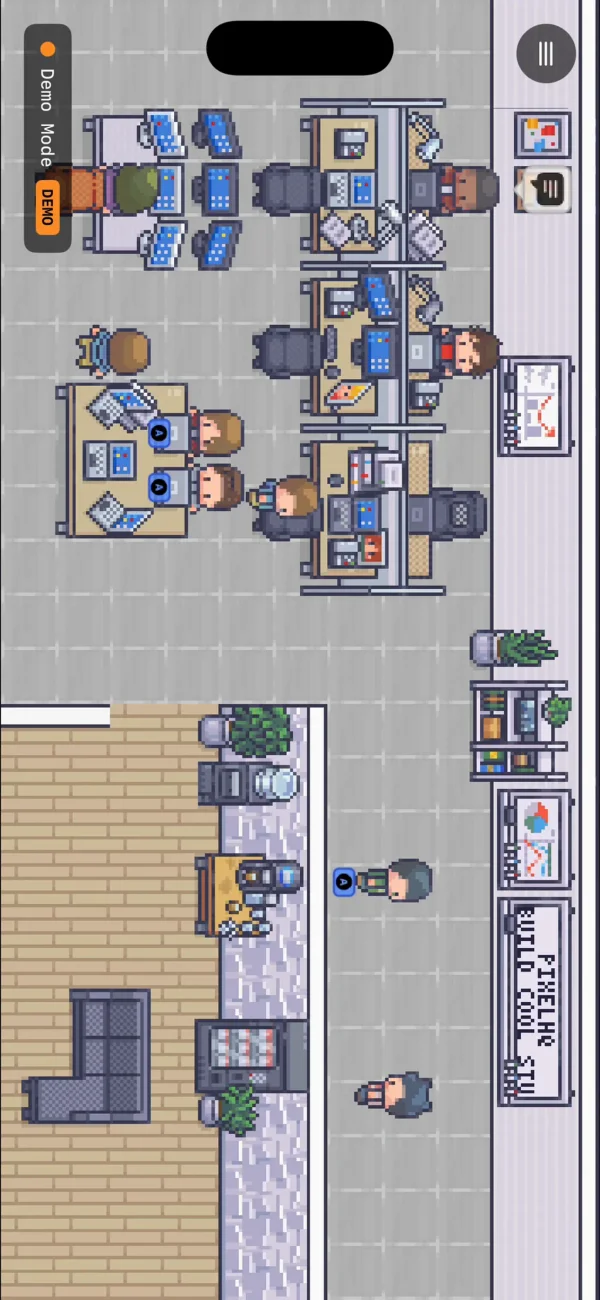
PixelHQ transforms your Claude Code sessions into a real-time pixel art office. Every file read, every
terminal command, every search — animated as tiny characters working away at their desks in a retro
startup office. It's the most fun way to see what your AI coding agent is actually doing.
Connect PixelHQ to the lightweight bridge server running on your laptop, and your coding sessions
instantly appear as live office activity. Characters read files at their desks, run to the terminal,
huddle up for planning sessions, and head to the whiteboard when exploring your codebase. The busier
your agent, the busier your office.
How it works
1. Run the bridge server on your laptop (`npx pixelhq`).
2. Pair your iPhone with a one-time 6-digit code.
3. Start a Claude Code session and watch your office come alive.
The bridge watches your Claude Code session files, extracts only the metadata needed for animations
(like event type and tool category), and streams it to the app over your local Wi-Fi. Auto-discovery
via Bonjour means no IP addresses to type in — just pair and go.
Your code stays on your machine. Period.
We take privacy seriously. Here's exactly what happens to your data:
- The bridge strips everything sensitive before it ever reaches the app. No source code, no prompts, no
AI responses, no file contents, no full file paths — none of it is transmitted.
- File paths are reduced to just the filename (e.g. "auth.ts", never the full path).
- All communication happens entirely over your local network. Nothing is sent to the cloud or to us.
- Pairing is protected with a one-time passcode, and reconnection uses a secure token stored in your
device's Keychain.
- The only data that leaves your device is anonymous, aggregate usage analytics (app opened, session
duration) through TelemetryDeck, a GDPR-compliant, privacy-first analytics provider that collects no
personal identifiers.
We built PixelHQ local-first by design, not as an afterthought. Your code is your business.
Features
- Real-time pixel art visualization of Claude Code activity
- Automatic bridge discovery on your local network — no manual setup
- Secure pairing with passcode protection
- Multiple animation states driven by live coding events: file reads, writes, terminal commands,
searches, planning, and more
- Demo mode to preview the office without connecting to a live session
Terms of Use: https://www.apple.com/legal/internet-services/itunes/dev/stdeula/
Privacy Policy: https://paper-swallow-130.notion.site/Privacy-Policy-2f7b6873ae248098b7ead558245be0bf
App privacy
What Chun-Wei Hsu declares on the App Store about how this app handles data.
-
Data not linked to you
May be collected but is not linked to your identity.
- Usage data
Privacy practices may vary, for example with the features you use or your age.
Information
- Seller
- Chun-Wei Hsu
- Category
- Developer Tools
- Version
- 1.0
- Updated
- Feb 5, 2026
- Released
- Feb 3, 2026
- Size
- 1.7 MB
- Requires
- iOS 17.6 or later
- Age rating
- 4+
- Price
- Free
- Languages
- English
- Copyright
- © 2026 Wayne Hsu ltd.
You might also like
-
 AgentsRoom: Dev Remote Controlfor Claude Code, Codex & more
-
 Mobile IDE for Antigravity AIVibecode Remote Code Helper
-
 Vicoa: Claude Code & Codex IDEVibe Code Anywhere, AI Agents
-
 Moshi: herdr/tmux on SSH/MOSHAgent terminal for Codex CLI
-
 Nano AI - for OllamaModern AI Chat Client
-
 HermexA Hermes Agent Client
-
 Happy: Codex & Claude Code AppAI coding agents for your team
-
 Reins: for Ollama & LM StudioPrivate, Local AI Chat
-
 Orca IDEManage Coding Agents Remotely
-
 Blink Shell, Build & CodeThe Pro tool for developers