
PlanetLoopTimer
Launch-a-planet visual timer
Designed for iPhone, iPad, iPod touch
- Age rating4+
- CategoryUtilities
- DeveloperTatsuro Saito
- LanguagesEnglish
- Size31.1 MB
Links to the official App Store page
Download.org hosts no file of PlanetLoopTimer. The button opens its official App Store page, published by Tatsuro Saito. Listing last checked on Nov 15, 2026.
Screenshots

About
■ "Break, break, always break." gets things moving
"Just a quick break"—and 30 minutes are gone.
Open a comic, and the rest of the day is over.
The harder you say "do it," the more they freeze.
PlanetLoopTimer is a visual timer that turns the break itself into your child's "next motivation switch."
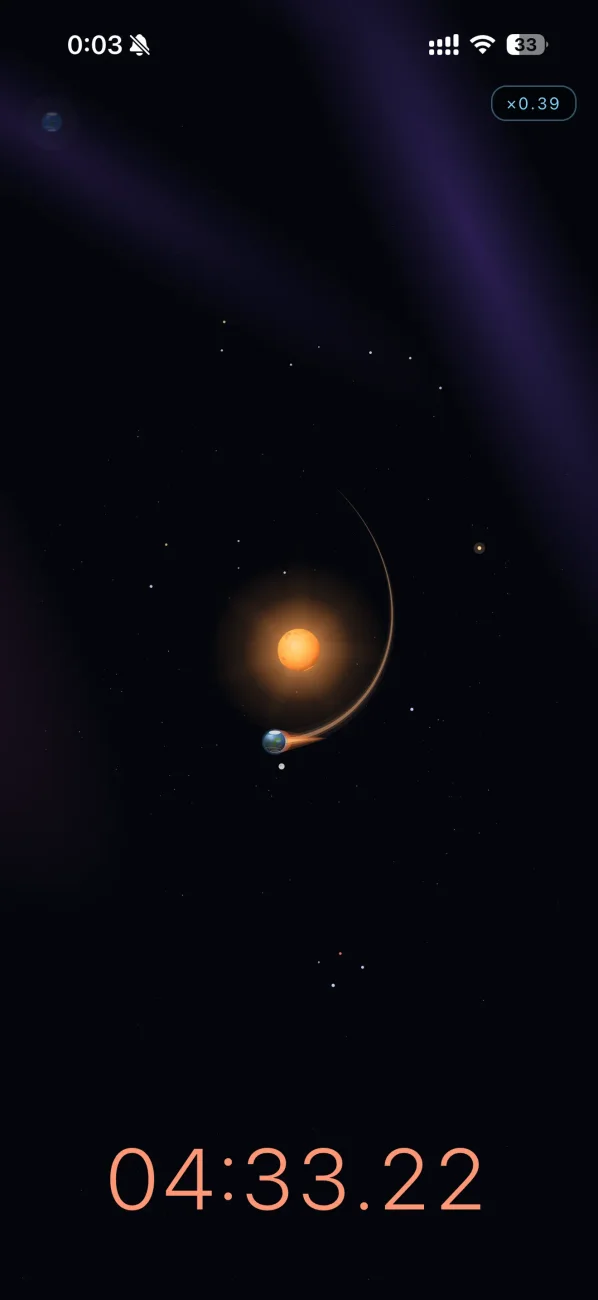
Launch a planet, orbit the sun—the orbit is the break time.
Pulled into the sun, it ends.
"I want another shot, and a better one"—that feeling pulls the next small step out of them.
■ Not "5 minutes ticking by," but "you launch your own break"
A normal timer starts counting down the second you press the button.
For a kid, time is leaving without their say—it just feels unfair.
That's why "just a little more!" never stops.
In PlanetLoopTimer, the break length is decided by your launch.
Eye the angle and power on the guide line, then release at the right moment.
Launch well: longer orbit. Miss: much shorter.
Because they made the time themselves, the end feels easier to accept too.
■ Planets, around the sun, round and round
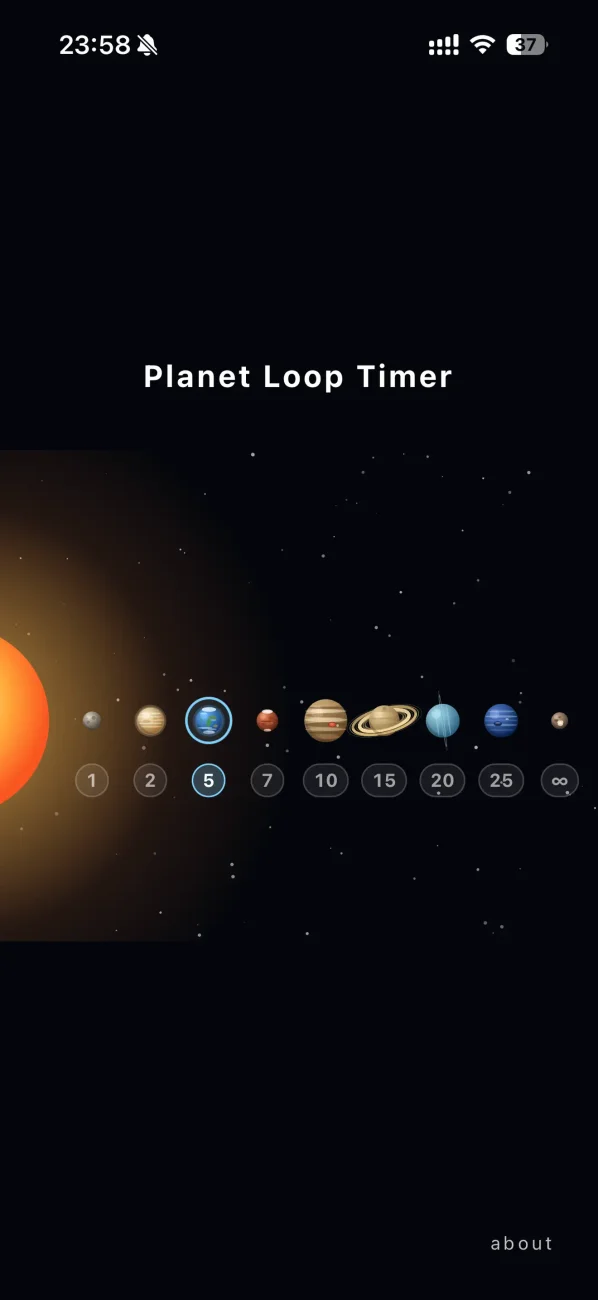
Each planet has a different break length.
The farther from the sun, the longer it orbits.
"It's far, so it goes longer"—that's intuitive for kids.
As the target time gets closer, the sun's gravity slowly grows, and the planet spirals in.
Watching a planet stay in orbit feels nothing like a forced 5-minute countdown.
It's a timer, but it plays a bit like a game. That's how "fun breaks" are born.
■ Three easy steps
① Pick a planet
The number on each planet on the start screen is the break time guide.
② Look at the guide line, and launch
Picture the angle and power, then fire.
A clean launch orbits long, a miss falls short—
it's a timer, but you'll find yourself wanting to get better.
③ When it's pulled into the sun, the break ends
The moment it's swallowed up, "what's next?" rises naturally.
■ Pluto only: ∞ Challenge mode
Pluto has no rising-gravity setup.
With a clean enough launch, it just keeps orbiting.
Use it as a "personal record" treat for your kid.
■ A great fit for these kids and families
[For kids who…]
· "5 more minutes" stretches on forever
· Open a comic or a game and can't put it down
· Have a strong sense of their own pace
· Move on "I want to try" more than on reasons
· Love breaks, but can't quite catch the cue to end one
· Have ADHD, ASD, or time blindness traits
[For families where…]
· "Do it!" has become a daily refrain
· You want kids to move because they're convinced, not because they're told
· Timers tend to turn into arguments
· You'd like a fun mechanism for daily routines
"Launch" instead of "scold."
Change the word that moves them, and the day gets a little lighter.
■ About ads
To avoid disturbing the timer, the main planet modes (Mercury through Neptune) show no ads at all.
Ads appear only once, at the end of the Pluto (∞ Challenge) bonus mode.
· Regular planet modes are fully ad-free — during and after the timer
· One ad only at the end of Pluto ∞ mode
· No ads during the timer or while you're operating the screen
· We configure AdMob not to receive the advertising identifier (IDFA)
· Data stays on your device, never sent externally
May your daily breaks become a little space adventure.
■ Sister apps
"LastDays" — counts down the time left with your kid, in "how many more times."
"TodoGatya" — for slow mornings — kids draw the next task from a gacha and start with a surprise.
What’s new
Version 1.0.3 · Aug 9, 2026
Improved the user experience.
App privacy
What Tatsuro Saito declares on the App Store about how this app handles data.
-
Data not collected
The developer does not collect any data from this app.
Privacy practices may vary, for example with the features you use or your age.
Information
- Seller
- Tatsuro Saito
- Category
- Utilities
- Version
- 1.0.3
- Updated
- Aug 9, 2026
- Released
- May 17, 2026
- Size
- 31.1 MB
- Requires
- iOS 15.1 or later
- Age rating
- 4+
- Languages
- English
- Copyright
- © 2026 Lyco App.
You might also like
-
 Ad Free Calculator AppWith History & Custom Themes
-
 Speak On TimeUtilities
-
 Solar System ClockKnow the time on every planet
-
 Dice Roller — Tap & RollTap to roll. Fair 1-6 dice.
-
 Hunt ProUtilities
-
 MemoRemote™Manage routines remotely
-
 Visual Timer - Focus & SimpleFast setup. See time left.
-
 Super Simple Timer - No AdsNo Setup, Quick Count Up
-
 TimeGrow: Pomodoro Timer FocusBuild Habits, Garden & Daily
-
 Big Timer: Countdown & RepeatLarge Display, Simple Repeat