
- Age rating4+
- CategoryPhoto & Video
- DeveloperYUUSUKE HARASAWA
- LanguagesJapanese+ 9 more
- Size12.2 MB
Links to the official App Store page
Download.org hosts no file of PuchiScreen. The button opens its official App Store page, published by YUUSUKE HARASAWA. Listing last checked on Nov 12, 2026.
Screenshots


About
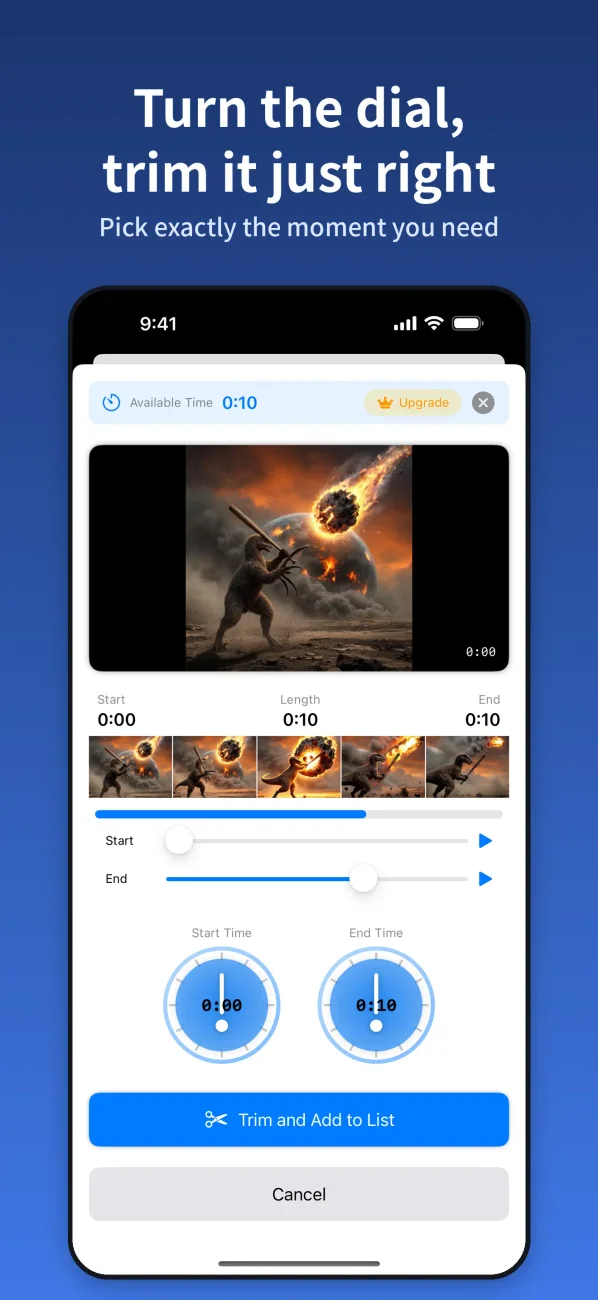
PuchiScreen trims the moment you want from a video on your iPhone and sends it to your Apple Watch, so you can enjoy it on your wrist. Version 3.0 adds Talking Photo: type a sentence and the face in a photo speaks it.
Videos on your Apple Watch
• Pick a video from Photos or Files, set the start and end by turning a dial, and keep only the part you need
• Trimmed clips appear in your list and go to your Apple Watch with one tap
• See the elapsed time, whether the app is waiting for your Watch, and whether it is connected
• Six sample videos built in — no download needed
• Open stock-video sites in the built-in browser and import a clip you like
Talking Photo (new)
• Choose a photo or illustration of a person and type a sentence. Faces are found automatically; if none is found, place frames over the mouth and eyes
• Lips follow every sound, with expressions, blinks and subtle head movement
• 60+ languages detected automatically. Enhanced and Premium voices, or your Personal Voice
• The video is added to the top of your list, ready to send to your Watch
On the Apple Watch
• Tap to play, double-tap to switch display mode, swipe in a circle to seek, turn the Digital Crown for volume
• Pick from your list, play with the standard player or delete, right on the Watch
Privacy
Trimming, transfer, face detection and speech synthesis all happen on your iPhone and Apple Watch. Your videos and photos are never sent anywhere. No ads.
Pricing
All features are free. In the free version, each video sent to the Watch can be up to 10 seconds long, and talking videos include a small "PuchiScreen" mark. The one-time "PuchiScreen Pro Upgrade" removes the length limit, unlocks five quality options and removes the watermark — not a subscription.
Requires iOS 17.0 or later; the Apple Watch app requires watchOS 9.0 or later (the Watch is optional).
Languages: Japanese, English, Chinese (Simplified/Traditional), Korean, Spanish, French, German, Portuguese, Italian.
When making someone else's photo talk, always get their consent.
What’s new
Version 3.0.1 · Nov 4, 2026
Sending videos to Apple Watch is now more reliable and comfortable.
• Large videos (4K, HEVC, 60 fps and more) are now automatically converted to an Apple Watch-friendly quality before sending. Converted videos are reused when you send them again
• The Apple Watch list now shows the most recently received videos first
• Fixed issues when sending the same video twice in a row or deleting a video while it is being sent
• Fixed an issue where a previous video could be lost when the Apple Watch received the same video again
• The display language you choose on iPhone now also applies to Apple Watch
• Improved the export settings for the Watch Compact and Minimal Size qualities
• Fixed an issue when downloading several videos in a row in the built-in browser
App privacy
What YUUSUKE HARASAWA declares on the App Store about how this app handles data.
-
Data not collected
The developer does not collect any data from this app.
Privacy practices may vary, for example with the features you use or your age.
Information
- Seller
- YUUSUKE HARASAWA
- Category
- Photo & Video
- Version
- 3.0.1
- Updated
- Nov 4, 2026
- Released
- Mar 14, 2025
- Size
- 12.2 MB
- Requires
- iOS 17.0 or later
- Age rating
- 4+
- In-app purchases
- Yes
- Languages
- Japanese, Italian, Spanish, German, French, Portuguese, Simplified Chinese, Traditional Chinese, English, Korean
- Copyright
- © 2026 Makibishi apps
You might also like
-
 Lumen: Video PlayerYour Videos, Your Way
-
 Revive AI - Image AnimatorAnimate & Bring Photos to Life
-
 AI Apparel StudioAI Model Try-On for Designers
-
 CharaTalk: Talking Photo AIMake any photo talk, on-device
-
 WatchVideo PlayerOffline video on your watch
-
 Video Compressor - MEGASQUEEZEShrink Files & Save Storage
-
 Clip Looper: Video Loop MakerBoomerang, GIF & Live Photo
-
 AI Outfit Try On: Dress ChangeTry On Clothes & Virtual Fit
-
 Loop Video Maker - LoopiqVideo Looper & Reverser
-
 AI Photo Editor - ImaginatiImage Generator & Video Maker