Q BIT Crusher
Bit Crusher with Time Hold
Designed for iPhone, iPad, iPod touch
Free
- Age rating4+
- CategoryMusic
- DeveloperPulsar Modular
- Size19.7 MB
Links to the official App Store page
Download.org hosts no file of Q BIT Crusher. The button opens its official App Store page, published by Pulsar Modular. Listing last checked on Nov 26, 2026.
Screenshots


About
Q BIT is a bit crusher with a time hold, now on your iPhone and iPad. The crusher gives your sound its grit. HOLD grabs slices of your track and holds them, on your song's tempo or at its own pace.
Q BIT does more than lower the quality of a sound. It reshapes the signal itself, giving it the character and musicality of a retro sound chip while keeping it relevant to modern production: a way to make digital reduction playable.
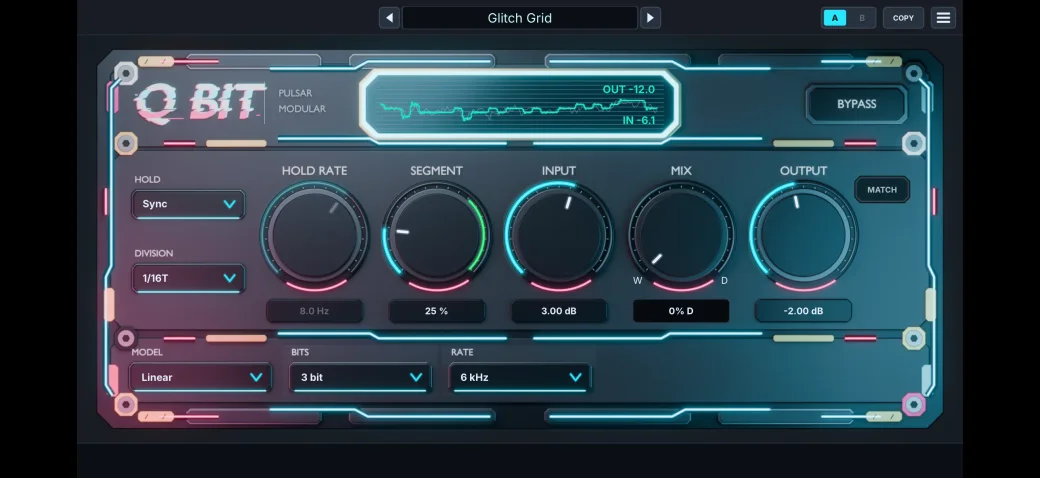
HOLD is the heart of Q BIT. At every grab, a slice of your track plays as it is; then the hold freezes its end and sustains it until the next grab. On a held note it sounds like a tremolo or a pulse; on drums, like a rhythm of short hits and held tones. SEGMENT sets how much of each slice plays before the hold takes over, and in Sync a green arc on its ring shows the settings that keep every hit of the last bars intact.
Use it as an AUv3 plug-in in your favorite host (Logic Pro for iPad, GarageBand, AUM, Cubasis and more) or as a standalone app processing live sound from your microphone or an audio interface.
KEY FEATURES:
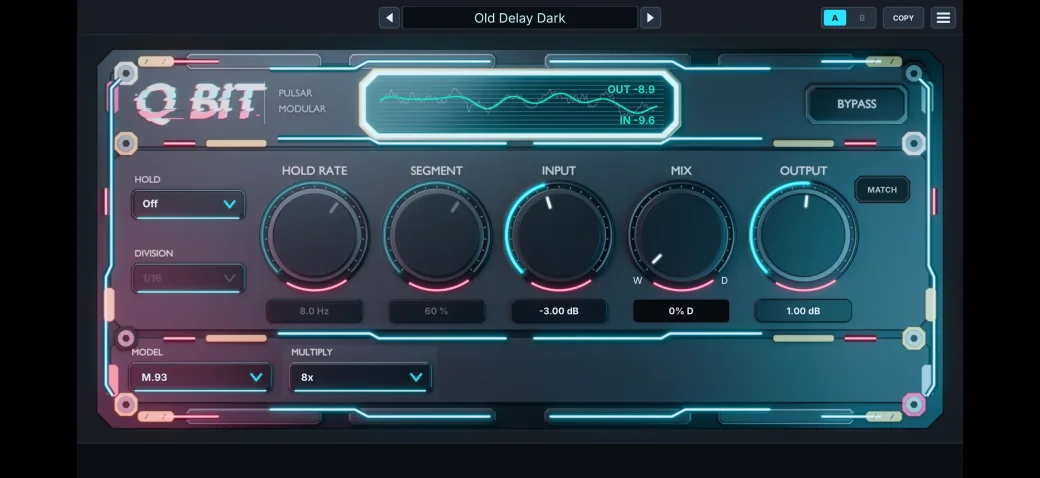
- Four crusher models, each showing only its own controls: Linear, flexible bit crushing where you set the bit depth and the sample rate; SP-1200, a punchy, gritty drum-sampler character with a softer top end; M.93, a vintage digital-delay character, clean on quiet sounds and gritty on loud ones; ZX Spectrum 128, a coarse, retro home-computer character
- BITS from 24 down to 2 bit and RATE from your session rate down to 2 kHz (Linear)
- MULTIPLY 1x, 2x, 4x or 8x (M.93): each step darker and grainier
- CHANNELS (ZX Spectrum 128): Mono, like the original, or Stereo, a chip for each side
- HOLD: Off, Free (1 to 16 grabs a second) or Sync (1/4 to 1/32, straight, dotted or triplet, on your host's tempo)
- INPUT drives the crusher, MIX blends your dry track back in, OUTPUT sets the final level, and the INPUT / OUTPUT Link switch in the menu changes the drive while keeping the level
- MATCH holds the output at the loudness of bypass while you adjust the controls, so you judge the sound, not the volume
- The display shows your sound as it plays, the sound going in and the stepped sound coming out, with the OUT and IN peak levels one above the other
- Type a value: tap the readout of HOLD RATE, SEGMENT, INPUT, MIX or OUTPUT
- Mono and stereo
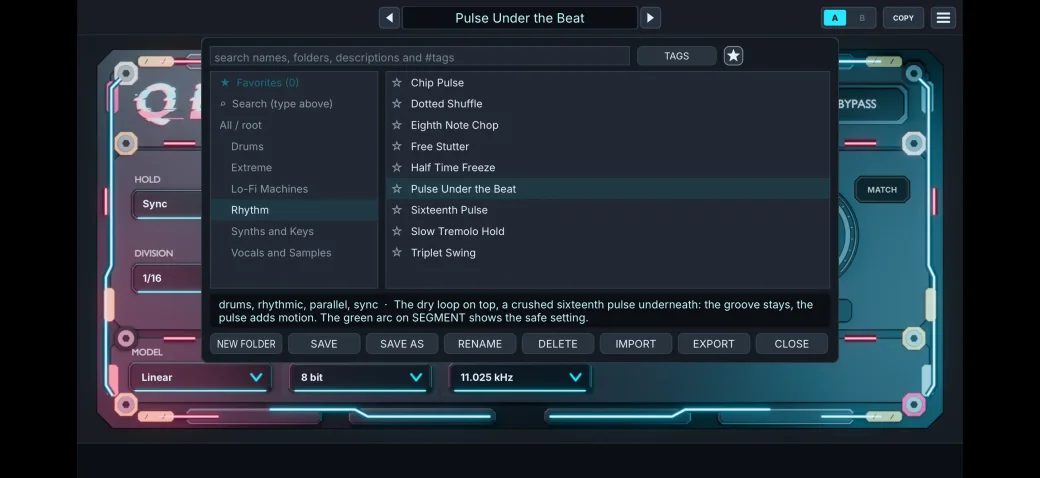
- 33 factory presets in six folders (Drums, Extreme, Lo-Fi Machines, Rhythm, Synths and Keys, Vocals and Samples), with descriptions, tags, search and favorites
- A/B slots with copy
- Made for touch: the help shows while you touch a control, and a long press opens the preset and folder menus
- Preset import and export through Files
- Full parameter automation in AUv3 hosts
All audio is processed on your device. No account, no data collection, no internet connection required.
Q BIT is not affiliated with, and is not endorsed by, the makers of the machines its models follow. All trademarks belong to their respective owners.
What’s new
Version 1.2.1 · Nov 25, 2026
What's new in Q BIT 1.2.1:
- The crusher now sits between two transformers, as in a hardware unit: the input one adds a touch of air, the output one gives kicks and basses more weight the louder they play. A new Q BIT starts with them on. A Q BIT saved with an earlier version opens with them off, so it sounds as it did. Switch them in the menu: Transformers are ON / OFF.
- DIVISION now reaches a whole bar: 1/1, 1/2, 1/2. and 1/2T join the list. Sessions and presets from earlier versions keep their setting.
- Every knob glides to its new value, so turning it makes no steps in the sound.
- In BYPASS the panel rests: the display stops, MATCH holds still and the SEGMENT arc goes dark.
- The A/B copy button shows the direction of the copy: A→B or B→A.
- The preset arrows step through the whole bank.
- The preset browser opens where you left it, and a save that cannot be done says why in the save panel.
- All help texts share one size, and the help strip fades from one to the next.
App privacy
What Pulsar Modular declares on the App Store about how this app handles data.
-
Data not collected
The developer does not collect any data from this app.
Privacy practices may vary, for example with the features you use or your age.
Information
- Seller
- ZIAD AL SIDAWI INVESTMENT
- Category
- Music
- Version
- 1.2.1
- Updated
- Nov 25, 2026
- Released
- Oct 31, 2026
- Size
- 19.7 MB
- Requires
- iOS 15.0 or later
- Age rating
- 4+
- Price
- Free
- Copyright
- © 2026 Pulsar Modular
You might also like
-
 Airwindows Consolidated AUv3500+ audio effects
-
 OR-2 Granular MachineEvolving ambient soundscapes
-
 Oxo Synth2Virtual Analog Synth
-
 DJFX Looper (AUv3)Free loop effect for audio
-
 M/S Processor 2AUv3 mid/side stereo processor
-
 OFX-1 Texture ReverbTexture and ambient reverb
-
 UN/T-01808 and sample drum machine
-
 Signal Rack - Audio MixerHost AUv3, Connect, Route, Mix
-
 OneMove AirFree AUv3 high-end enhancer
-
 GrasswhistleSequenced arpeggiator