Laptimer : QUAD-G ForceMeter
4-wheel load, G and telemetry
Designed for iPhone, iPad, iPod touch
In-app purchases
- Age rating4+
- CategorySports
- DeveloperSYNSETECH LTD
- LanguagesEnglish
- Size49.5 MB
Links to the official App Store page
Download.org hosts no file of Laptimer : QUAD-G ForceMeter. The button opens its official App Store page, published by SYNSETECH LTD. Listing last checked on Nov 23, 2026.
Screenshots
About
A GPS lap timer that works anywhere on Earth, and an integrated vehicle-dynamics G-force meter.
Using nothing but your phone's sensors and GPS, it times laps and sectors while showing four-wheel weight transfer, G-forces and chassis attitude in real time. No extra sensors.
■ GPS lap timer
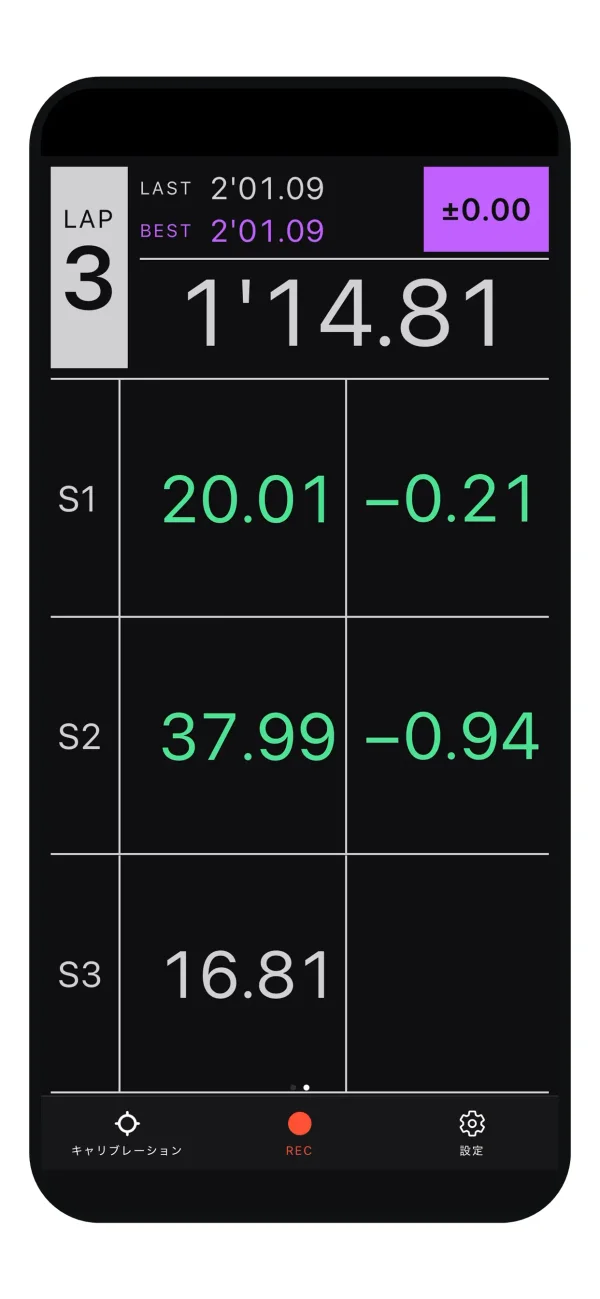
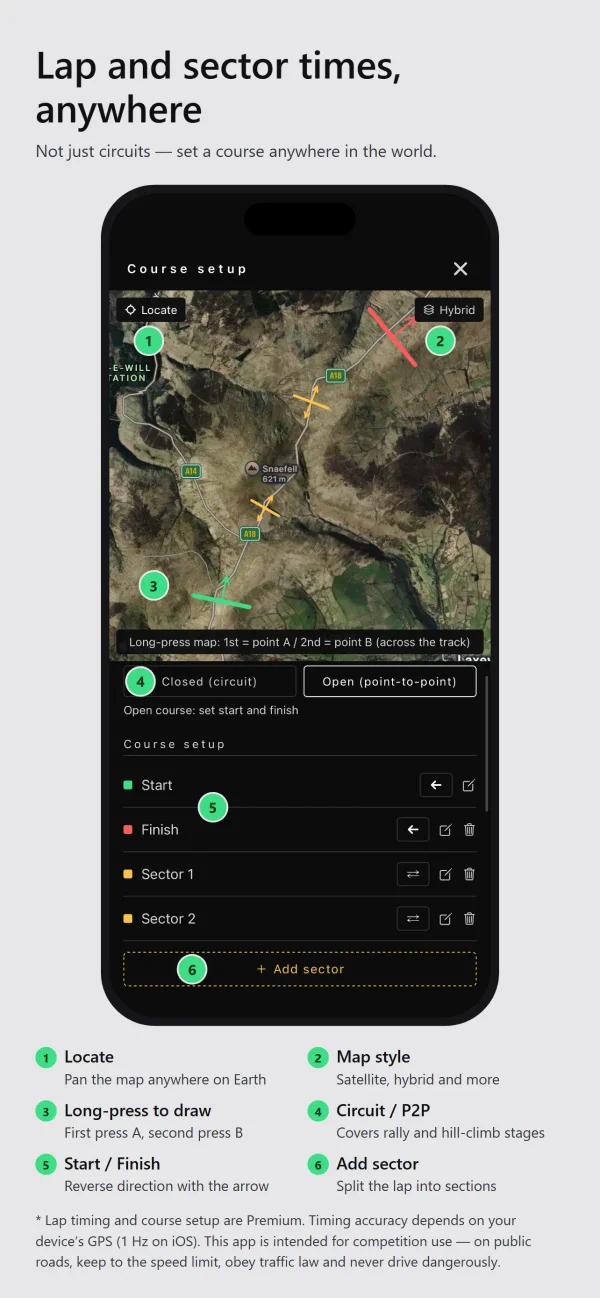
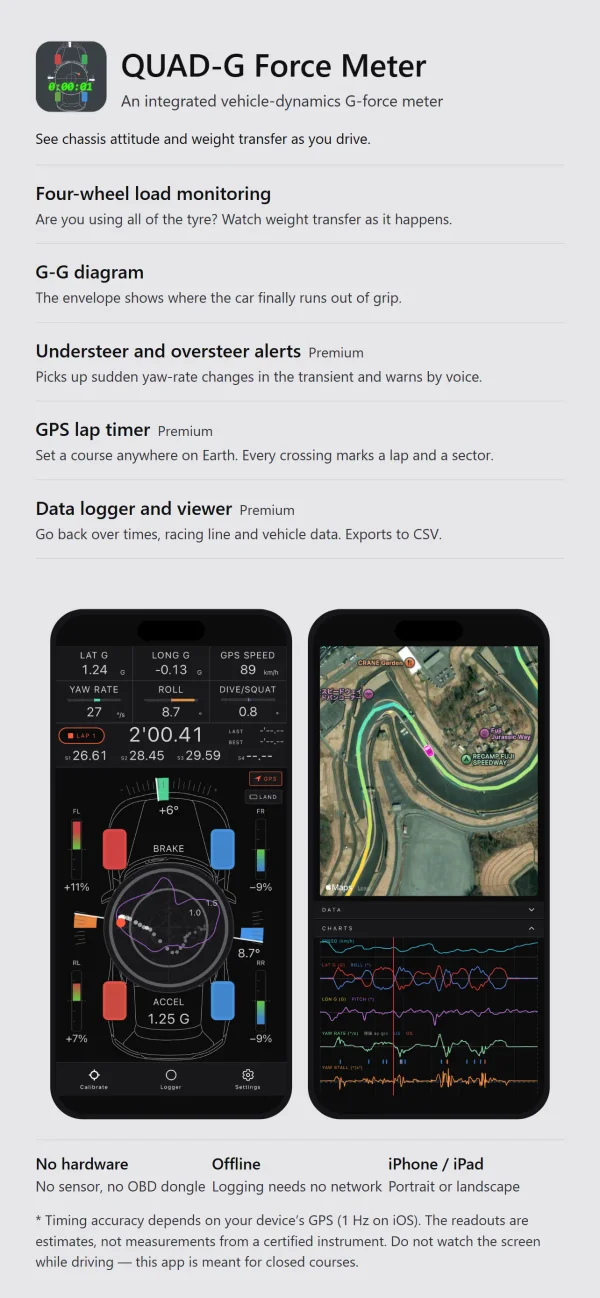
Circuits, of course — but you can set a course anywhere in the world. Long-press the map to place start, finish and sector lines, and every crossing splits a lap and a sector automatically. Best lap, last lap and every sector time stay on the main screen, so you can see where you are finding time while you drive.
Closed circuits and open point-to-point courses are both supported, so rally and hill-climb stages work too. Save as many courses as you like, set which direction counts as a crossing, and add as many sectors as you need. With no course set, the LAP button still times from where you stand.
■ One integrated meter
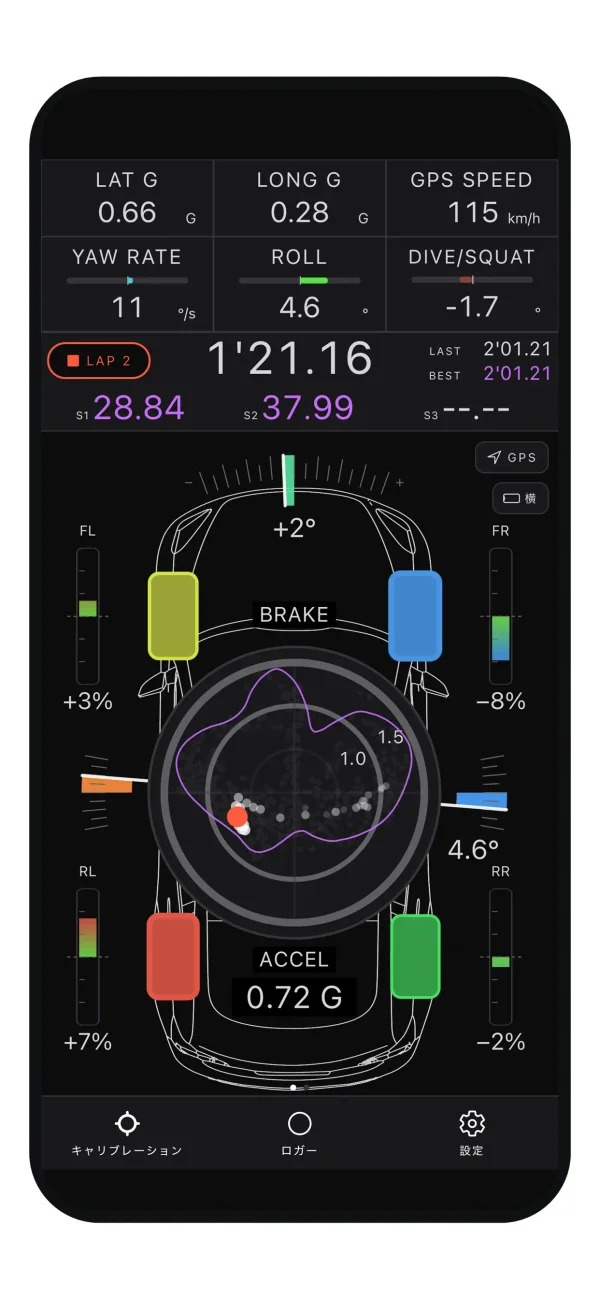
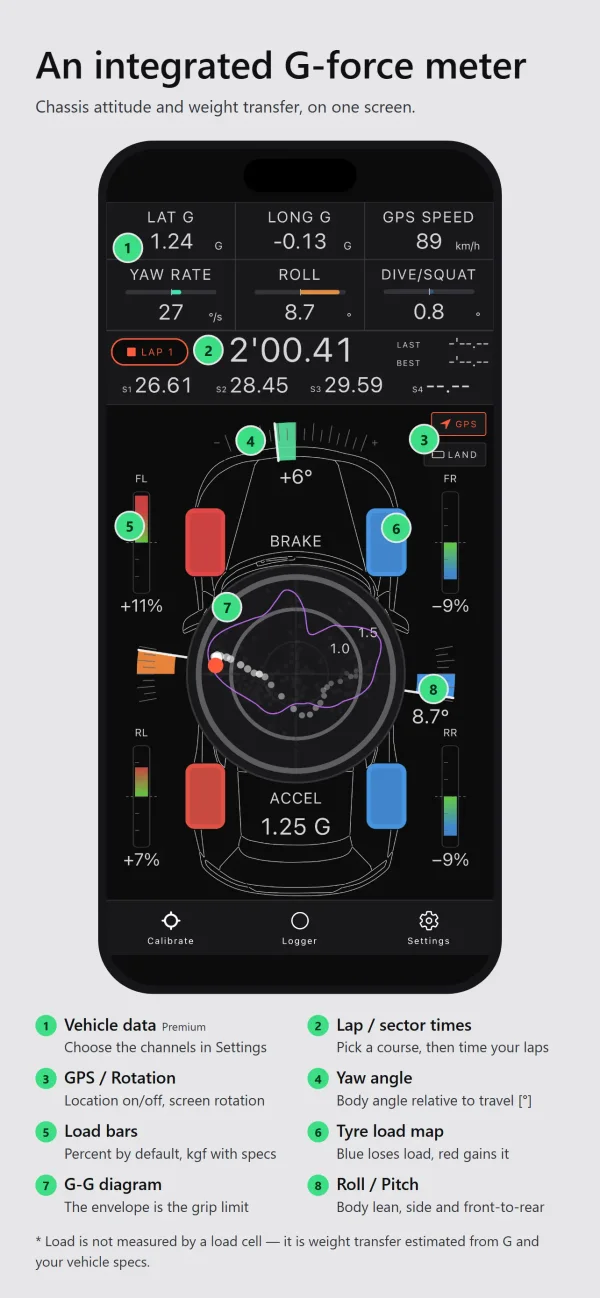
Four-wheel load, the G-G diagram, yaw rate and roll/pitch on a single screen, right alongside the lap display. Everything you need while driving, in one place.
■ Four-wheel load monitoring
Weight transfer is computed from G-forces and your vehicle specs, then shown at each corner as colour and numbers, so you can see whether you are using all of the tyre. Load falling shifts blue, load building shifts red. Delta/absolute and %/kgf are both switchable.
■ G-G diagram
Lateral against longitudinal G, with the trail you actually drove and the envelope of the limit you reached. The envelope is where your car's grip runs out, drawn for you.
■ Understeer and oversteer alerts
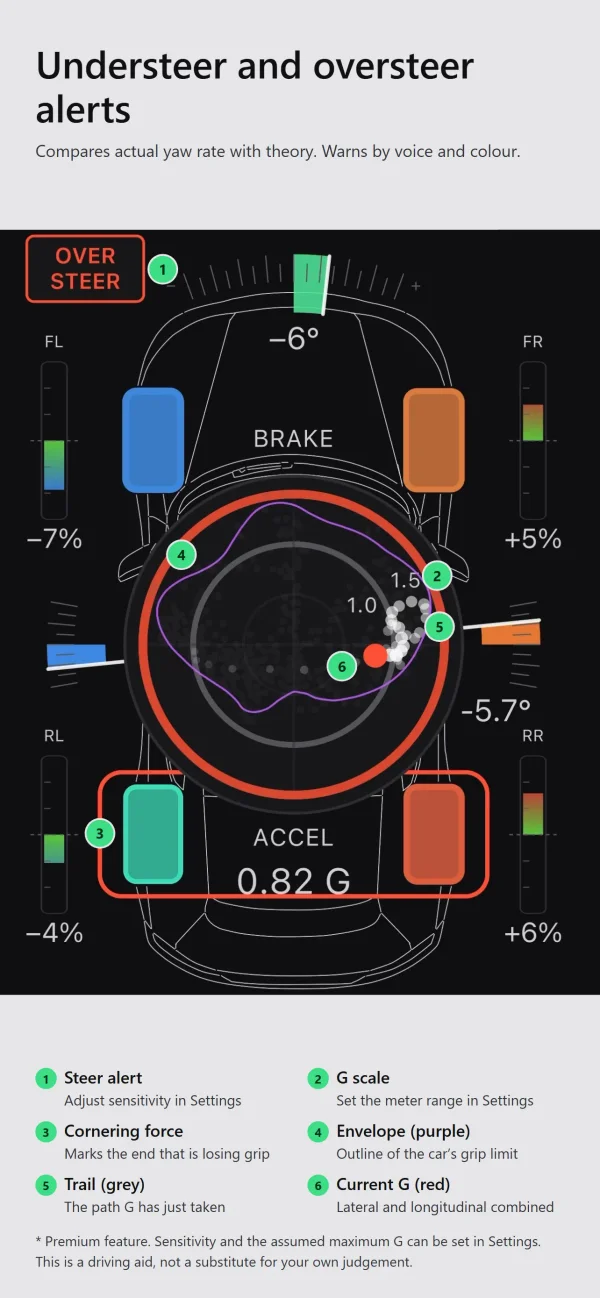
Measured yaw rate is compared against the theoretical neutral-steer reference to catch sharp yaw-rate changes in the transient, and the app calls them out by voice and colour. The axle that is losing cornering force is boxed, so you can tell instantly which end is going. Tune it with a scene (circuit / winding road) × sensitivity profile.
■ Data logger and viewer
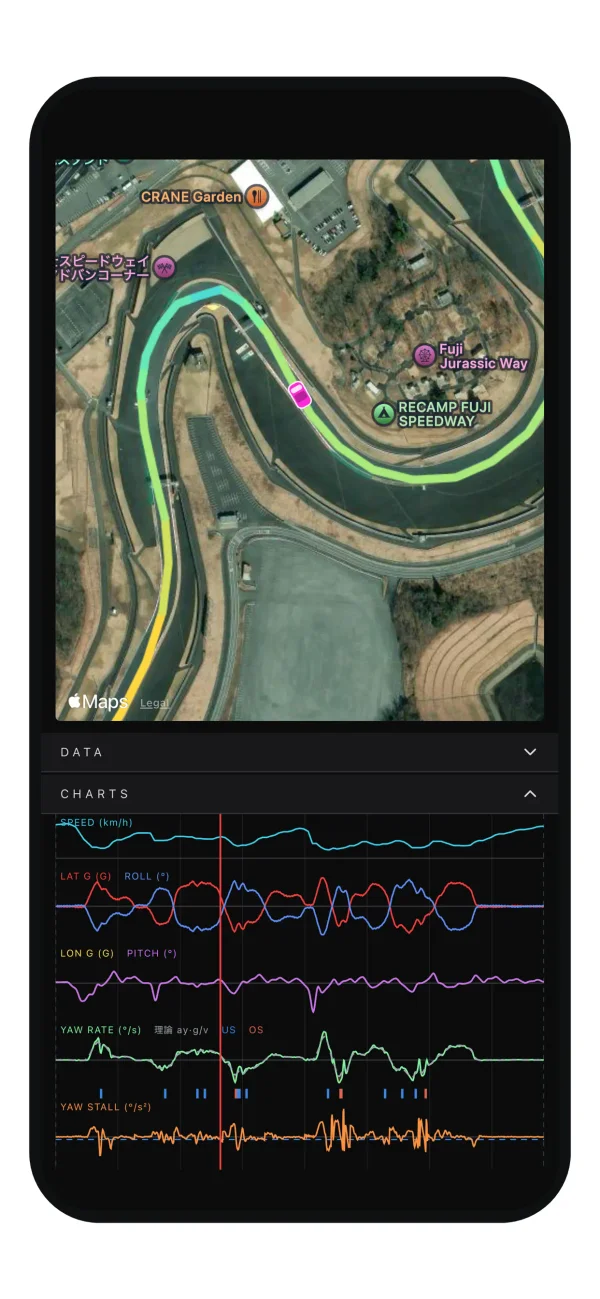
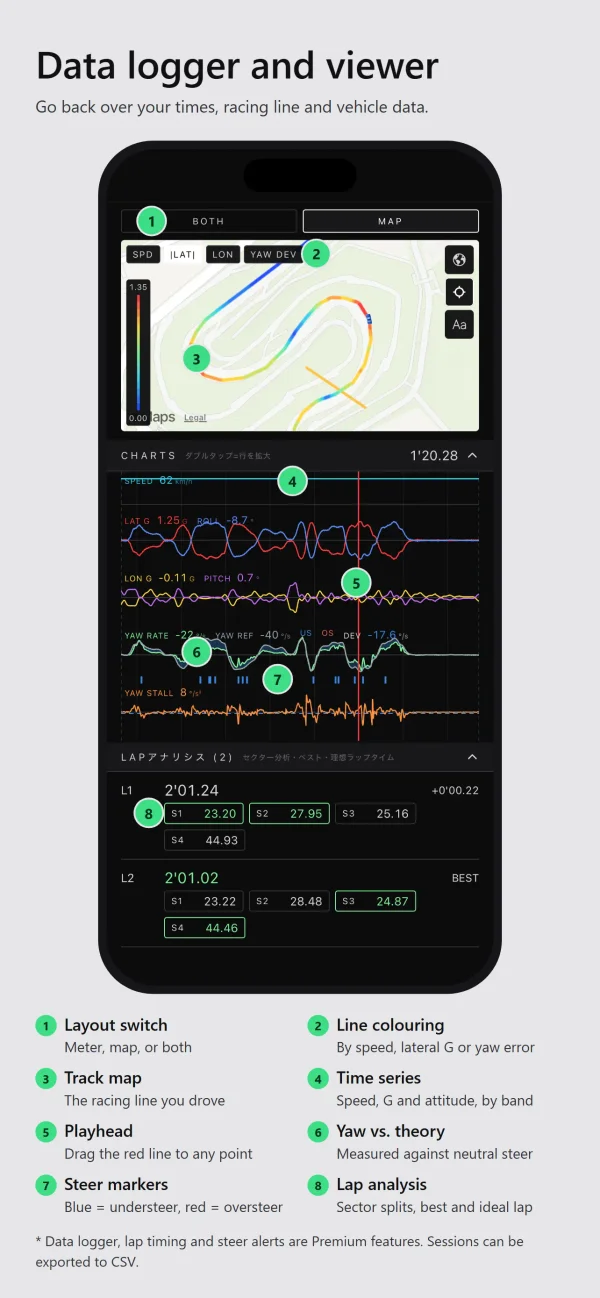
Record a session and review times, racing line and vehicle data afterwards. A track map coloured by speed, time-series charts of G, yaw rate and attitude, and the G-G diagram all follow one playhead. Understeer and oversteer segments are marked on the charts. Export to CSV to analyse the data in external tools.
■ Customisation
Theme (dark / light) and accent colour, which channels appear in the readout column, the range of each meter, load display units, render rate and more.
■ Three steps to start
1. Enter your vehicle info (weight, CG height, wheelbase, track, weight distribution). It works on the defaults, but the more accurate you are, the closer the load readout gets to your real car.
2. Mount the phone rigidly, screen upright.
3. Run calibration once before you drive.
No sensors handy? Settings has a "Play demo" mode that replays real recorded track data through every feature.
■ About the in-app purchase
Lap timing, the data logger and viewer, understeer/oversteer alerts and UI customisation are Premium features, unlocked with a single payment. There is no subscription and nothing auto-renews.
■ Please read
This app is a simulated monitor that estimates and displays vehicle attitude, load, G-forces and understeer/oversteer tendency from phone sensors and GPS. It is not a certified measuring instrument or a safety device. All values shown are approximate and are not guaranteed to be accurate real-world measurements. Load is not a load-cell reading; it is a computed estimate. Timing accuracy depends on your device's.
This app is intended for competition use in closed environments such as race circuits. Watching the screen while driving is distracted driving and is illegal and punishable under applicable traffic laws. Never watch the screen while driving on public roads. If you use it on public roads you must comply with all applicable laws and do so entirely at your own risk.
What’s new
Version 1.2.3 · Nov 20, 2026
Added best time sharing feature
App privacy
What SYNSETECH LTD declares on the App Store about how this app handles data.
-
Data not collected
The developer does not collect any data from this app.
Privacy practices may vary, for example with the features you use or your age.
Information
- Seller
- SYNSETECH LTD
- Category
- Sports
- Version
- 1.2.3
- Updated
- Nov 20, 2026
- Released
- Aug 5, 2026
- Size
- 49.5 MB
- Requires
- iOS 15.1 or later
- Age rating
- 4+
- In-app purchases
- Yes
- Languages
- English
- Copyright
- © 2026 SYNSETECH LTD
You might also like
-
 Analyzer For GymkhanaSports
-
 GNSS Circuit LoggerGPS Logger Circuit Lap Timer
-
 GPS Lap TimerTrack Your Lap Times with GPS
-
 DigSpice Circuit Timer ProSports
-
 Race Now!Sports
-
 どこどこネットSports
-
 ApexLap: Lap Timer & TelemetryTrack Day Lap Times & Video
-
 Trakiolaps timer for your track days
-
 ひまわりサーキット ラップタイマーSports
-
 Autopolis Live MonitorSports