
QVault Assessments
Secure Classroom Quizzes
Designed for iPhone, iPad, iPod touch
In-app purchases
- Age rating4+
- CategoryEducation
- DeveloperDishant Mukeshchandra Pandya
- LanguagesEnglish
- Size123.6 MB
Links to the official App Store page
Download.org hosts no file of QVault Assessments. The button opens its official App Store page, published by Dishant Mukeshchandra Pandya. Listing last checked on Nov 28, 2026.
Screenshots

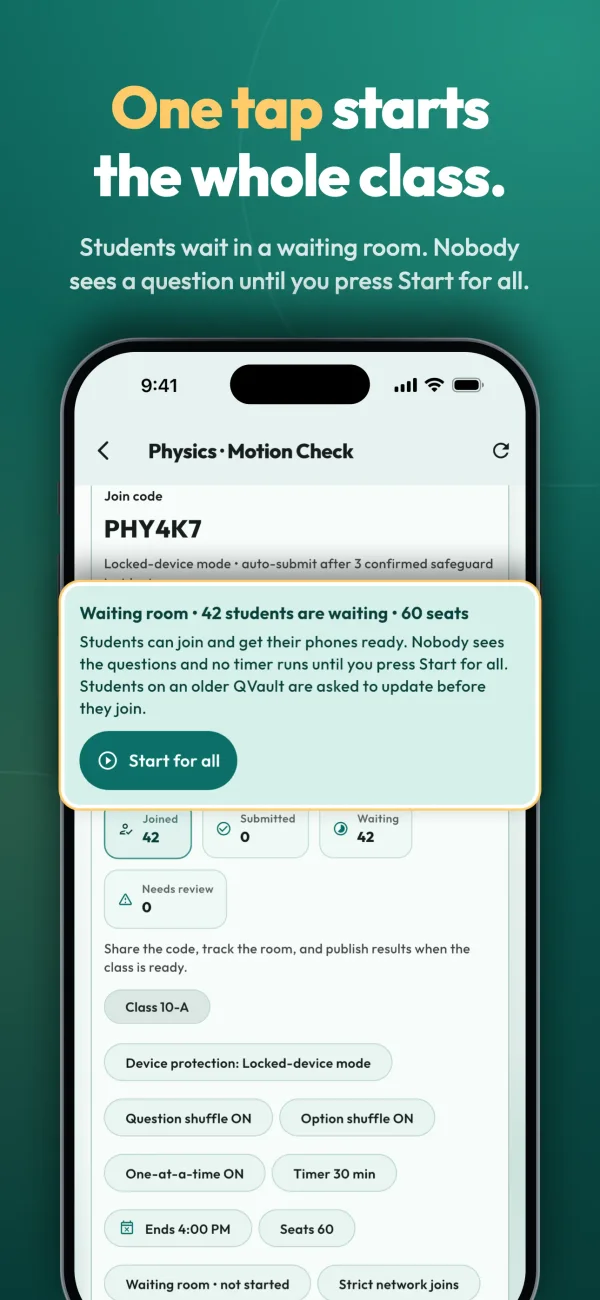

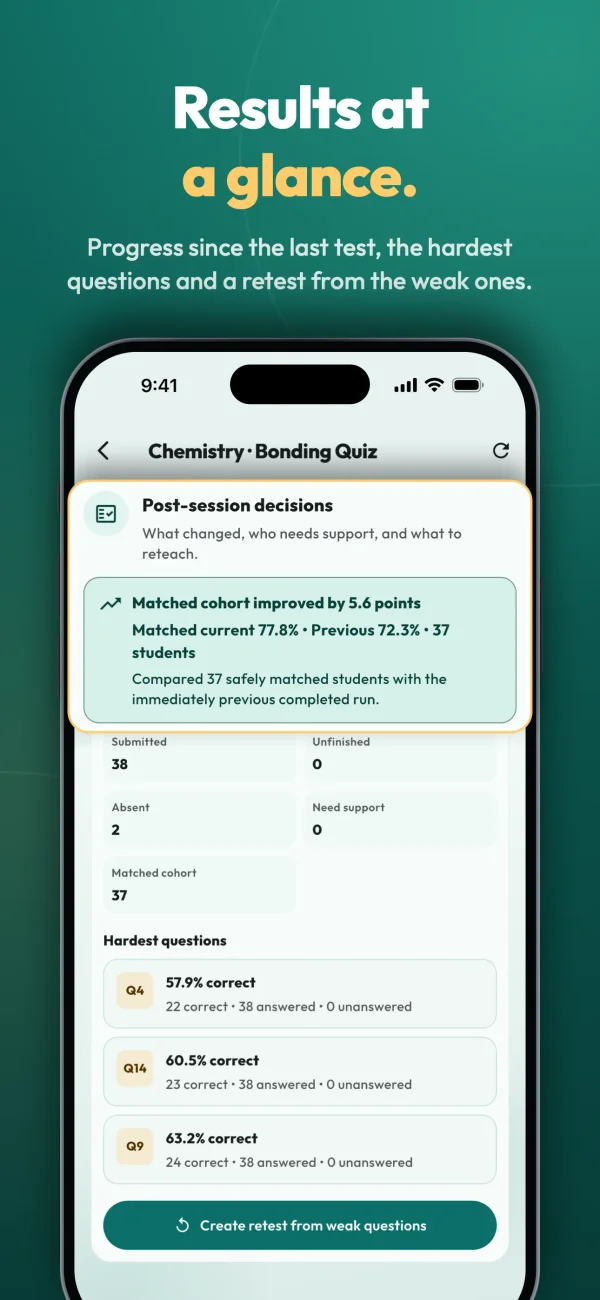

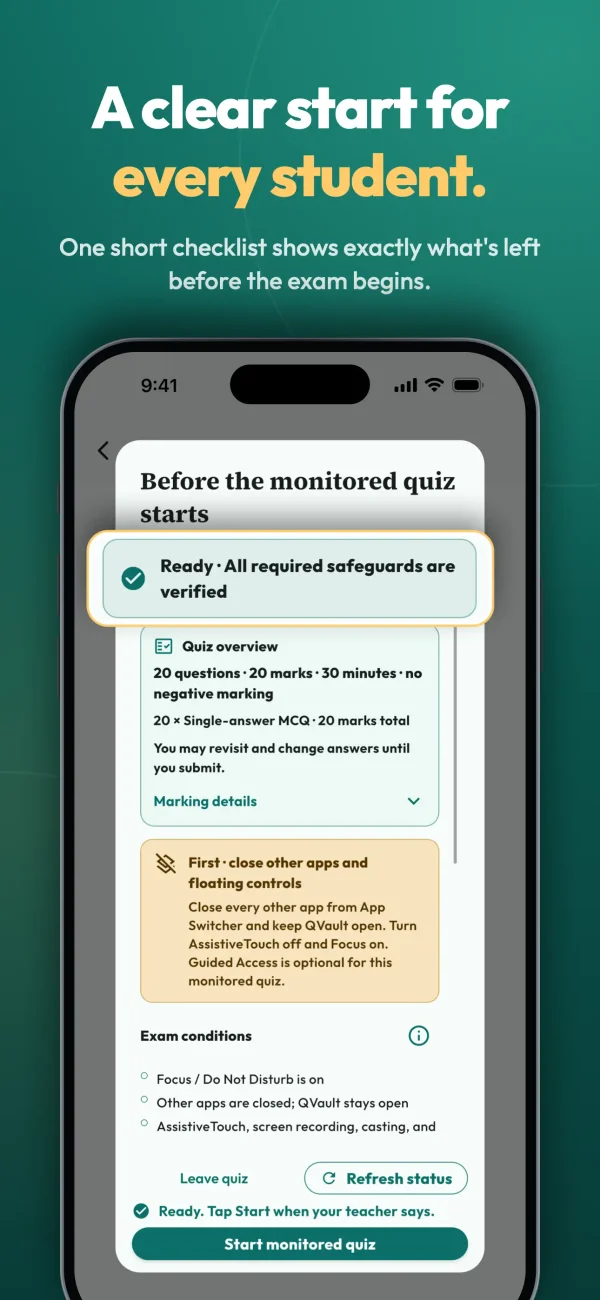
About
QVault-Assessments is a teacher-first classroom assessment app for secure quizzes, live sessions, and clear result workflows.
Create quizzes, run monitored assessments, and review results with calmer classroom control. Whether you are teaching in a school, coaching class, tuition setup, or training environment, QVault helps you move from quiz creation to live delivery without messy workflows.
What teachers can do with QVault-Assessments:
• Create and edit quizzes from the app
• Import questions from PDF, Excel, Markdown, OCR/photo input, and copied text
• Run live assessments with join codes
• Monitor student participation during active sessions
• Review results, attempts, and item-level insights
• Export evidence files like results CSV, item analysis CSV, quiz PDF, live snapshot CSV, and proctor incident CSV
• Preview exports on-device before saving
• Back up important work with teacher-controlled restore paths
Built for real classroom use
QVault is designed for serious teaching workflows, not just casual quizzes. Teachers can draft quietly on-device, use the hosted web builder when working from a laptop, and switch into live sessions when the real class is ready.
Students can join with a class code, complete assessments on their own device, and check results through a guided in-app flow.
Integrity and focus features
QVault includes anti-cheating and exam-readiness features designed for monitored assessments:
• Join-code based live sessions
• App-switch and integrity visibility during live assessments
• Proctor alerts for important integrity events
• Screenshot and screen-capture protection where supported by the platform
• Result access flows designed for individual student privacy
• Device readiness guidance before high-stakes attempts
Why teachers like it
• Cleaner route from drafting to live use
• Better control during real assessments
• Easier result review and export workflows
• Teacher-first design with fewer distracting surfaces
• Strong support for mobile-first classroom operations
QVault-Assessments is built by TeachVault as part of a broader educator-focused ecosystem designed to make classroom technology more practical, more secure, and easier to trust.
If you teach with live quizzes, class tests, practice assessments, or monitored student responses, QVault-Assessments gives you a more focused way to run them.
---
Terms of Use (EULA): https://www.apple.com/legal/internet-services/itunes/dev/stdeula/
Privacy Policy: https://drdishantpandya.com/qvault-assessments-privacy-policy
What’s new
Version 3.0.11 · Nov 26, 2026
QVault 3.0.11 (183)
- Diagrams from Web Builder stay with the saved quiz after the original upload expires.
- If a diagram has already expired, Save tells you which question needs the image again.
- Export saved quizzes to ZIP and reimport them with their diagrams.
- Students can see diagrams in full answer review after results are released.
- Confirm your password when creating a teacher account to catch typing errors.
App privacy
What Dishant Mukeshchandra Pandya declares on the App Store about how this app handles data.
-
Data linked to you
May be collected and linked to your identity.
- Contact info
- Identifiers
-
Data not linked to you
May be collected but is not linked to your identity.
- Identifiers
- Diagnostics
Privacy practices may vary, for example with the features you use or your age.
Information
- Seller
- Dishant Mukeshchandra Pandya
- Category
- Education
- Version
- 3.0.11
- Updated
- Nov 26, 2026
- Released
- Apr 22, 2026
- Size
- 123.6 MB
- Requires
- iOS 15.5 or later
- Age rating
- 4+
- In-app purchases
- Yes
- Languages
- English
- Copyright
- © 2026 Dr. Dishant Pandya, All rights reserved.
You might also like
-
 GTU Laurentian ConnectThis app is made for IEP
-
 GUJCET MCQEducation
-
 BrushUpQuizEducation
-
 ListenDocs: PDF to AudiobookTurn Any Document into Audio
-
 Pramukh AcademyBAPS Pramukh Academy
-
 Nonna ItalianOptimized for Conversation
-
 Gujarat Engineering AdmissionEducation
-
 Priyeshsir VidhyapeethPriyeshsir Vidhyapeeth
-
 AI Notebook: Note TakerDigital & Smart Notebooks