
- Age rating4+
- CategoryUtilities
- Developerhon wai law
- LanguagesEnglish
- Size13.3 MB
Links to the official App Store page
Download.org hosts no file of ReaperMarkerMateCyber. The button opens its official App Store page, published by hon wai law. Listing last checked on Nov 12, 2026.
Screenshots
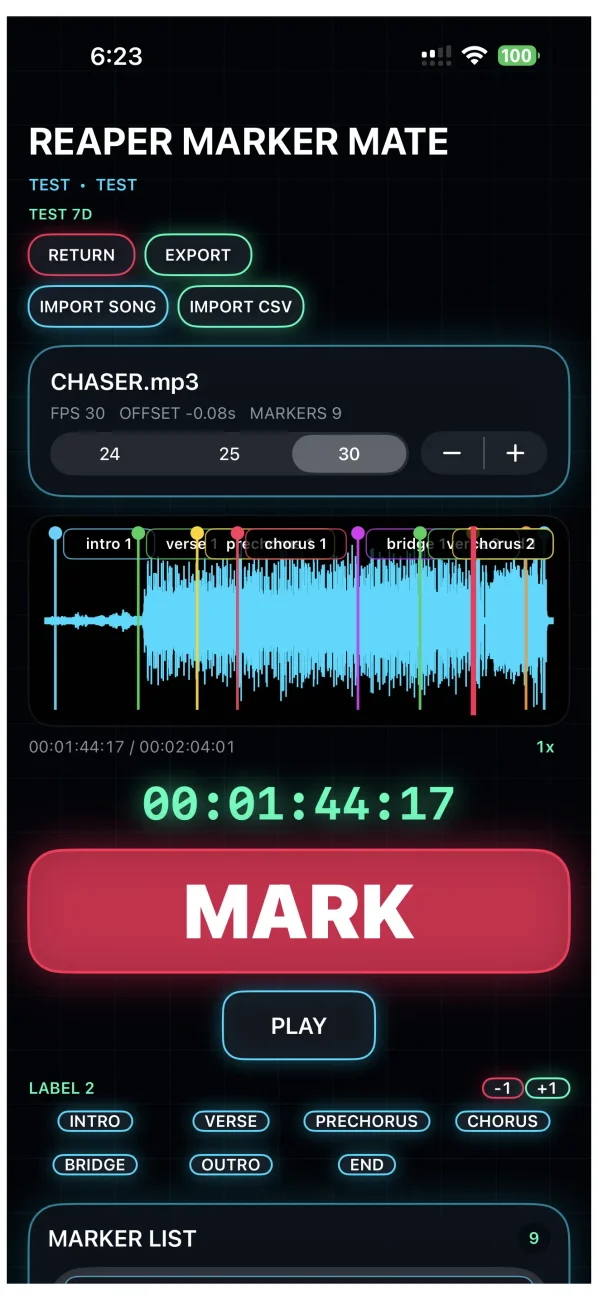


About
# Marker Flow
Marker Flow is an iPhone and iPad app designed for audio production, live performance, lighting programming, and timecode workflows.
Load audio, view its waveform, create and edit markers, and transfer marker data directly between Marker Flow, REAPER, grandMA2, and grandMA3—reducing repetitive cue naming and timing work.
## Two-Way REAPER Marker Sync
Marker Flow connects to REAPER over the same local network and supports two initial synchronization directions:
- Sync App → REAPER
- Sync REAPER → App
After the initial synchronization, Marker Flow and REAPER enter real-time two-way Marker Sync. Adding, renaming, moving, or deleting a marker on either side keeps both systems aligned.
Markers are automatically sorted by time and continuously renumbered. Before the initial mirror operation, Marker Flow saves a snapshot of the destination markers, allowing the previous marker state to be restored when needed.
## One-Way Import to grandMA2
Marker Flow can import the current Event’s markers into a grandMA2 console or grandMA2 onPC.
The import automatically creates:
- A Sequence
- Cues
- Executor assignment
- A Timecode object
- Timecode Events linked to the corresponding Cues
Marker names become Cue names, while marker positions are converted into Timecode Event timings. You can select the Sequence, Timecode and Executor destinations and define the starting timecode for the import.
The connection closes automatically when the import is complete. No unnecessary live synchronization remains active.
The verified compatibility baseline is grandMA2 `3.9.60.x`. Marker Flow is intended for grandMA2 `3.9.60.x` or later, provided the installed software remains compatible with the validated native command and XML import workflow.
## One-Way Import to grandMA3
Marker Flow also supports one-way import to a grandMA3 console or grandMA3 onPC.
Using the selected Data Pool, Page and Executor, Marker Flow can create or merge:
- A Sequence
- Cues
- Executor assignment
- A Timecode object
- Goto Timecode Events linked to the correct Cues
Each Timecode Event references the correct Sequence and Cue. Event timing is calculated from the selected Start Timecode without changing the original markers in the App.
The verified compatibility baseline is grandMA3 `2.4.2.2`. Marker Flow is intended for grandMA3 `2.4.2.2` or later, provided the installed software remains compatible with the validated command and native `2.4.2.2` XML import workflow.
## Built for Real Show Workflows
Marker Flow is suitable for:
- Music production and post-production
- Theatre and live performance
- Concert lighting programming
- Timecode show programming
- REAPER marker management
- grandMA2 and grandMA3 Sequence creation
- Cue and Timecode preparation
- Audio marker and CSV workflows
From editing audio markers and synchronizing them with REAPER to creating Sequences and Timecode shows on grandMA2 and grandMA3, Marker Flow brings multiple production workflows together in one clear and efficient tool.
What’s new
Version 5.0 · Aug 23, 2026
What’s New:
• Two-Way REAPER Marker Sync
Choose either Marker Flow or REAPER as the initial sync source, then keep marker additions, renames, moves, and deletions synchronized in both directions.
• One-Way grandMA2 Import
Create a Sequence, Cues, Executor assignment, Timecode, and linked Timecode Events directly from Marker Flow. The verified compatibility baseline is grandMA2 3.9.60.x.
• One-Way grandMA3 Import
Create or merge Sequences, Cues, Timecode, and Goto Timecode Events in the selected Data Pool, Page, and Executor. The verified compatibility baseline is grandMA3 2.4.2.2.
• Custom Start Timecode
Set the starting time for grandMA2 and grandMA3 imports using the hh:mm:ss:ff format.
• Safer Sync Workflows
Added connection checks, destination validation, temporary-file cleanup, fail-safe error handling, and clearer error messages.
• Test and Diagnostic Tools
Sync Reports and Advanced Diagnostics are available in Debug and TestFlight builds and remain hidden in the public App Store release.
• Performance and Stability Improvements
Improved grandMA2 and grandMA3 import workflows, keyboard handling, connection cleanup, and overall synchronization stability.
App privacy
What hon wai law declares on the App Store about how this app handles data.
-
Data not collected
The developer does not collect any data from this app.
Privacy practices may vary, for example with the features you use or your age.
Information
- Seller
- hon wai law
- Category
- Utilities
- Version
- 5.0
- Updated
- Aug 23, 2026
- Released
- Jun 15, 2026
- Size
- 13.3 MB
- Requires
- iOS 18.6 or later
- Age rating
- 4+
- Price
- Free
- Languages
- English
- Copyright
- Copyright © 2026 ESCT. All rights reserved.
You might also like
-
 NetGuard: Zero-Trust FirewallBlock All Traffic by Default
-
 M12R Digital MixerMixer monitor and controller
-
 LANFinder: Ping & Port ScanDiscover LAN devices via scan
-
 HondysUtilities
-
 Megapixel CalculatorGreat tool to calculate pixels
-
 Elation NFCUtilities
-
 Music Editor & Audio EditorEdit, Cut & Merge Music
-
 BlowUp & Go Viral AI - ViralyAI Video Analyzer: Grow Views
-
 Audio Editor - MultitrackMultitrack editing
-
 MaizeDMXlighting control on the go