
Remarkify for reMarkable
Web pages in your handwriting
Designed for iPhone, iPad
Free · In-app purchases
- Age rating4+
- CategoryProductivity
- DeveloperEsmanur Kuru
- LanguagesEnglish
- Size9.3 MB
Links to the official App Store page
Download.org hosts no file of Remarkify for reMarkable. The button opens its official App Store page, published by Esmanur Kuru. Listing last checked on Nov 23, 2026.
Screenshots

About
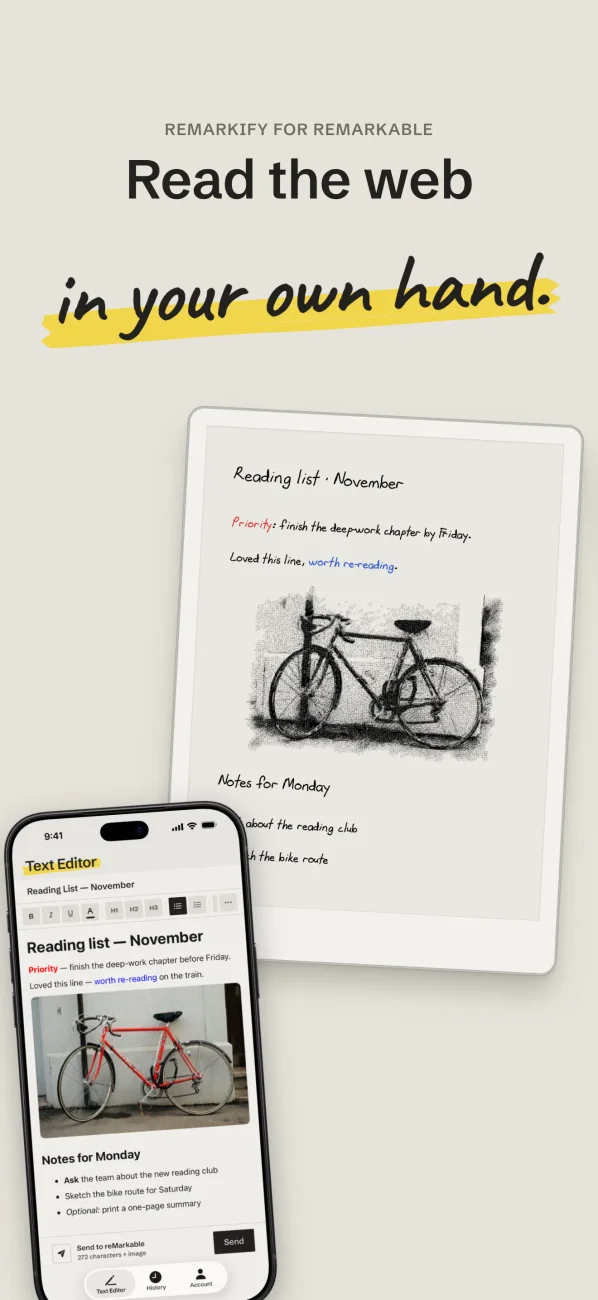
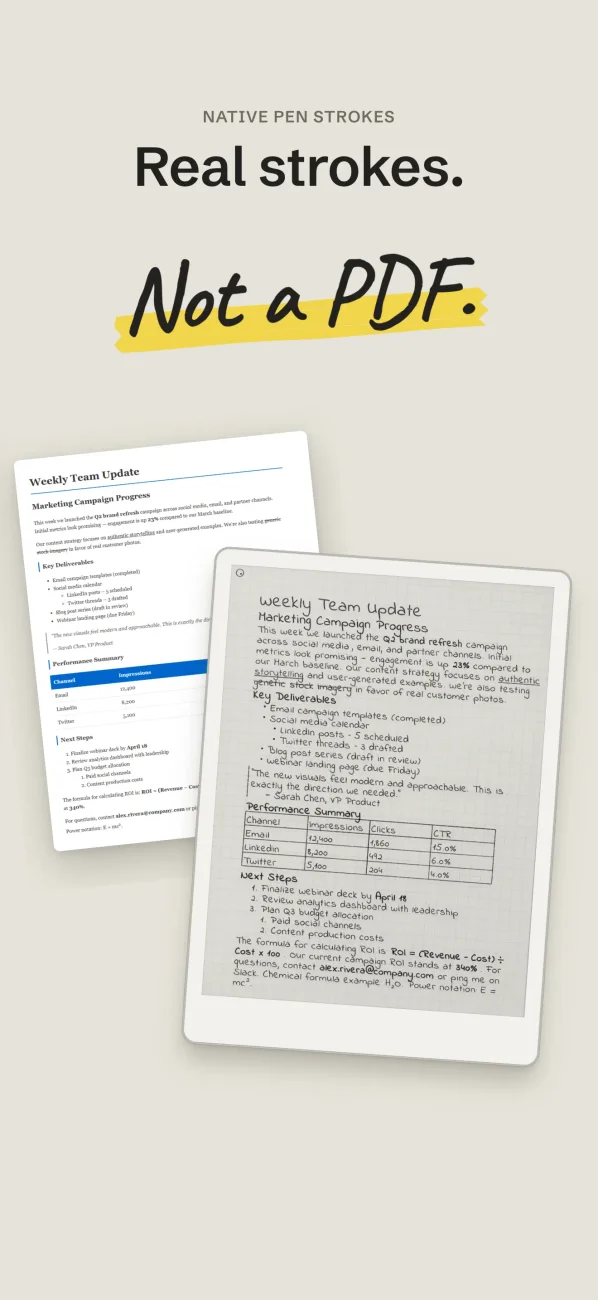
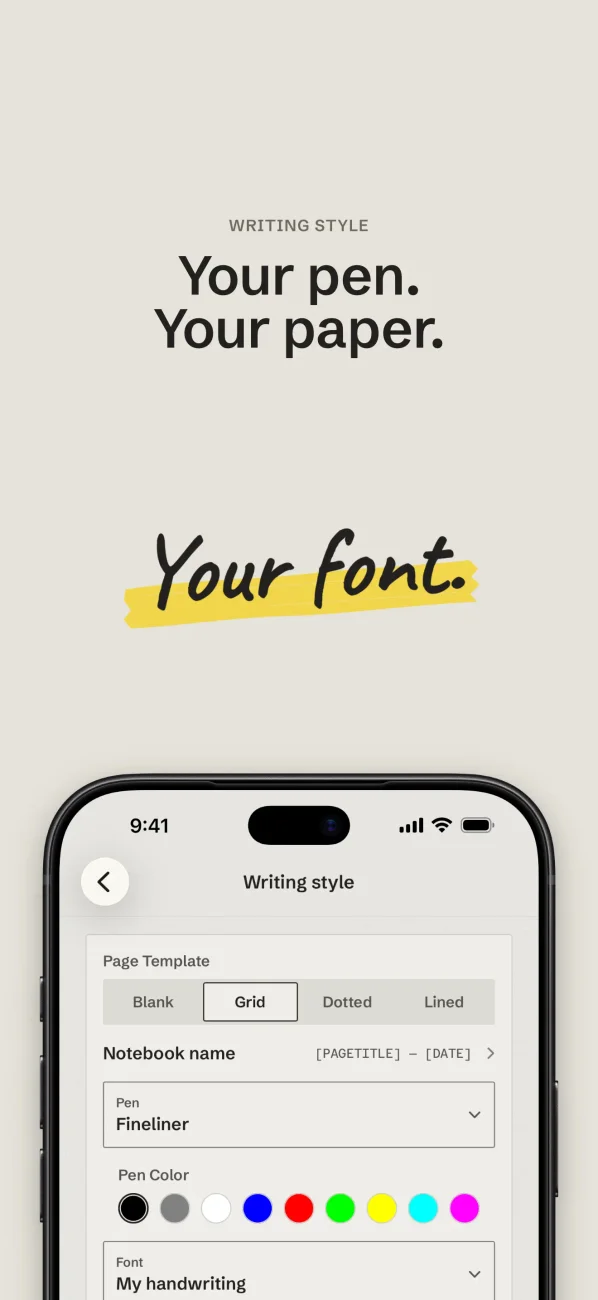
Turn what you read on the web into real handwritten notes on your reMarkable — not a PDF, not a screenshot. Native pen strokes, in a built-in handwriting font or in your own hand.
Remarkify pairs with the free Chrome extension and lets you send text straight from Safari, Chrome or any app on your iPhone or iPad to your reMarkable tablet, formatted and ready to read.
YOUR OWN HANDWRITING
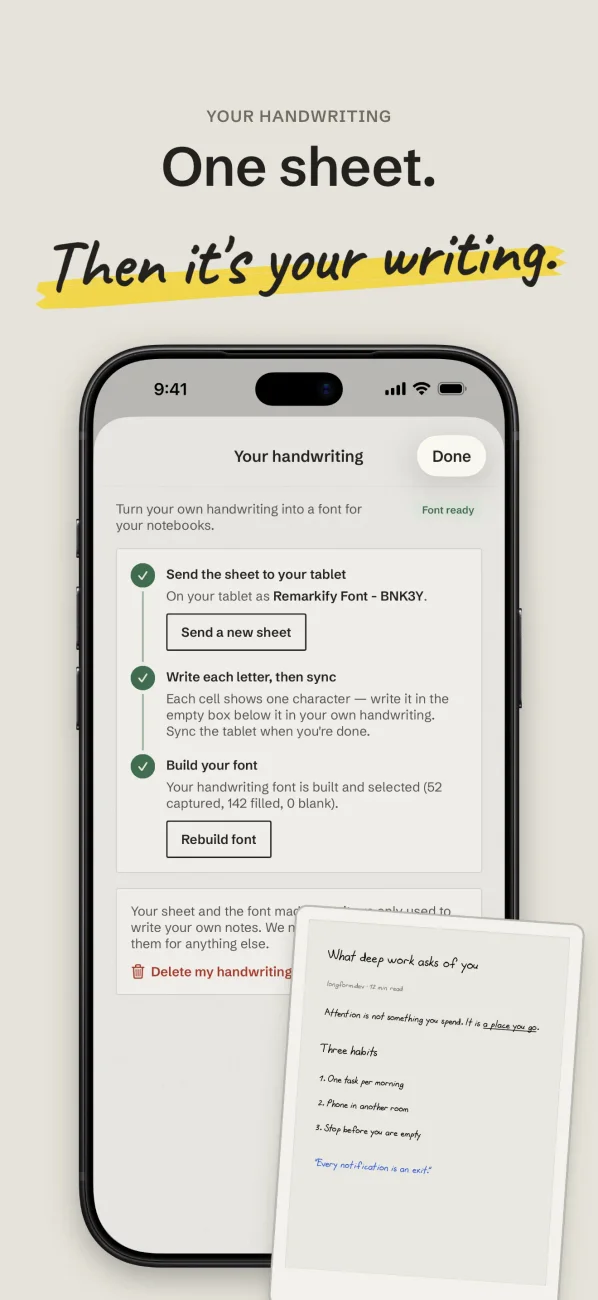
Remarkify can write in your hand, not just in a handwriting font. Fill in one alphabet sheet on your tablet and it builds a personal font from your strokes.
1. Send the sheet to your tablet — it appears in your reMarkable library
2. Write each letter with your Marker (about a minute), then sync
3. Tap Build my font
From then on every article, note and highlight you send is written in your letters. Skip a character and the built-in font fills it in. Redo the sheet whenever you like. Free on every plan, no credits used, and your sheet is never shared or used for anything else.
IMAGES, REDRAWN AS INK
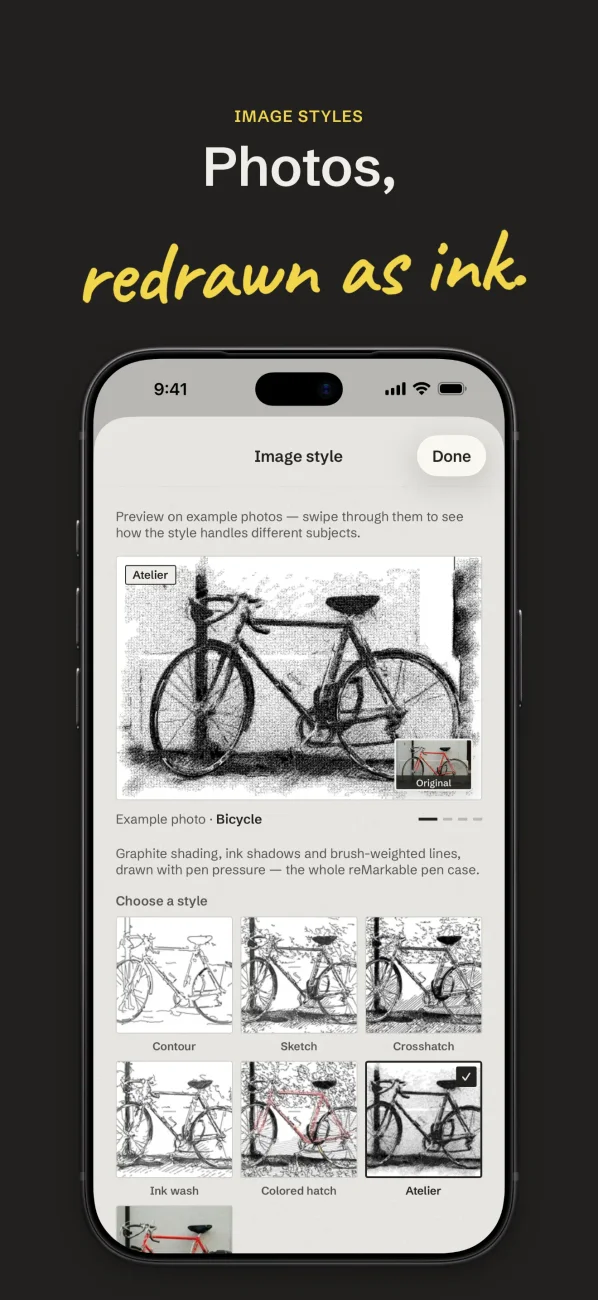
Photos and figures in what you send come along, drawn as pen strokes beside your notes. Preview the look on example photos before you send:
• Contour — clean single-weight outlines, the lightest read on paper
• Sketch — outlines plus loose shading, like a quick pencil study
• Crosshatch — layered hatching for tone and depth, like an engraving
• Ink wash — a few strong lines over soft grey fills
• Colored hatch — dense hatching in muted colour ink, closest to the original
• Atelier — graphite shading, ink in the shadows and lines that swell and fade, drawn with real pen pressure across the whole reMarkable pen case
• Native — embed the untouched photo at full detail
Image styles are in beta.
WRITE AND FORMAT
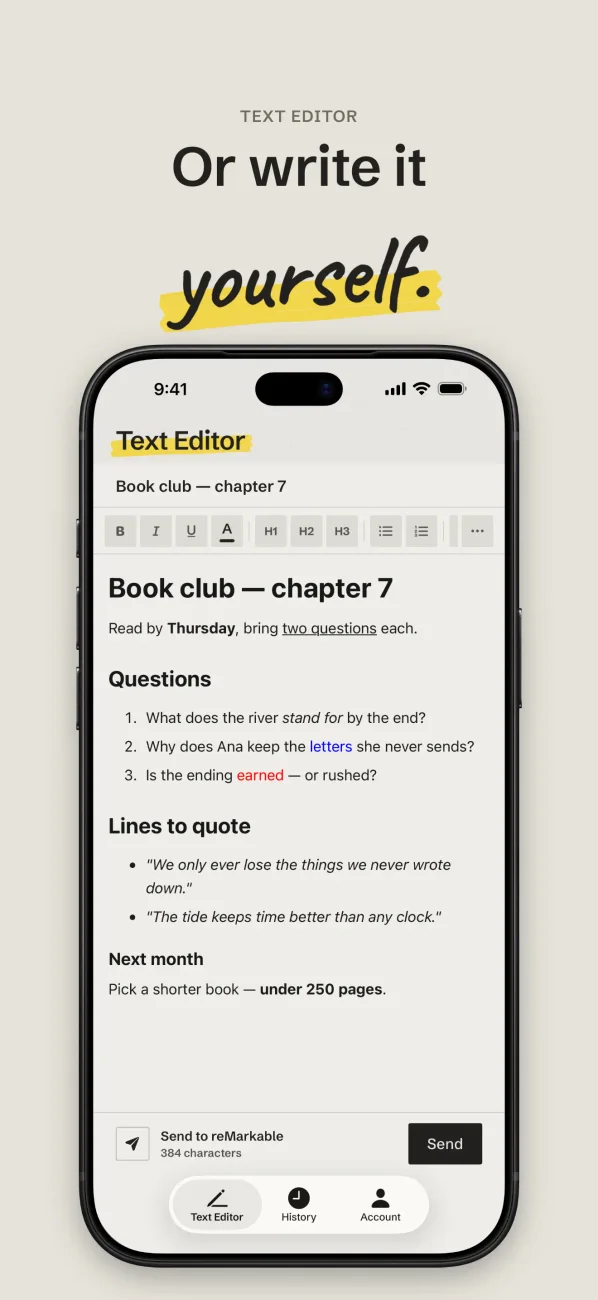
• A full rich-text editor built for reMarkable: bold, italic, underline, headings, bullet and numbered lists, tables and quotes
• Nine ink colours, right in the text
• Add photos from your library, then crop, resize and align them
• Left, centre and right alignment for text and images
SEND FROM ANYWHERE
• Select text in Safari or any app, tap Share → Send to reMarkable
• Photos on the page come with it
• Every conversion is saved in History with its status — open one to review it, edit it or send it again
MADE FOR THE TABLET
• Real strokes, not a PDF import — erase a word, lasso and move a paragraph, highlight a line
• Choose the pen, ink colour, font, size, line spacing and page template
• Name notebooks your way with a template (site name, page title, date)
• Works with reMarkable 1, reMarkable 2, Paper Pro and Paper Pro Move
A COMPANION FOR YOUR CHROME EXTENSION
Already using the Remarkify Chrome extension on your laptop? The app keeps your account, credits, reMarkable pairing and handwriting font in sync — right-click to send on desktop, Share sheet on iPhone and iPad.
FREE TO TRY
Every account starts with 5 free conversions — no credit card required. Capturing your handwriting is free.
REMARKIFY PLUS
100 conversions every month, every font, pen size and ink colour, bold/italic/table formatting, cloud sync, full history and priority support:
• Monthly auto-renewing subscription
• Yearly auto-renewing subscription (better value than paying monthly)
Payment will be charged to your Apple ID account at confirmation of purchase. Subscriptions automatically renew unless auto-renew is turned off at least 24 hours before the end of the current period. Your account will be charged for renewal within 24 hours prior to the end of the current period. You can manage or cancel your subscription anytime in your Apple ID account settings. Any unused portion of a free trial, if offered, is forfeited when a subscription is purchased.
Privacy Policy: https://remarkify.app/privacy
Terms of Use: https://remarkify.app/terms
Questions? support@remarkify.app
What’s new
Version 1.7.4 · Nov 18, 2026
• Image styles: two new ways to redraw your photos. Atelier Colour is the Atelier drawing in coloured pencil; Pastel Chalk draws short strokes of colour chalk with cool blue shadows. Pick one in Account > Image style.
• Bug fixes and improvements.
App privacy
What Esmanur Kuru declares on the App Store about how this app handles data.
-
Data not linked to you
May be collected but is not linked to your identity.
- Location
- Identifiers
- Usage data
- Diagnostics
Privacy practices may vary, for example with the features you use or your age.
Information
- Seller
- Esmanur Kuru
- Category
- Productivity
- Version
- 1.7.4
- Updated
- Nov 18, 2026
- Released
- Sep 7, 2026
- Size
- 9.3 MB
- Requires
- iOS 16.0 or later
- Age rating
- 4+
- Price
- Free
- In-app purchases
- Yes
- Languages
- English
- Copyright
- © Remarkify 2026
You might also like
-
 Quick reMarkCapture now. Send anywhere.
-
 VerseCraft AIProductivity
-
 Dayhive - Planner & To-Do ListDaily Routines & Shared Plans
-
 TouchTips: Remember EveryoneRemember when and where
-
 Scribe RecorderOffline Voice to Text
-
 Passion Planner by AaeshaA Planner Designed Around You
-
 Deep Notes AI: Meeting & NotesRecord, Transcribe, Summarize
-
 SendPaperSave web pages to reMarkable
-
 Original: pro tools for NotesMarkdown editor & two-way sync
-
 Ditto: Meeting NotesPrivate meeting recorder