
RemoCue Player
Gallery Player with Web Remote
Designed for iPhone, iPad, iPod touch
Free
- Age rating12+
- CategoryPhoto & Video
- DeveloperS&T Soft
- LanguagesEnglish
- Size49.3 MB
Links to the official App Store page
Download.org hosts no file of RemoCue Player. The button opens its official App Store page, published by S&T Soft. Listing last checked on Nov 20, 2026.
Screenshots

About
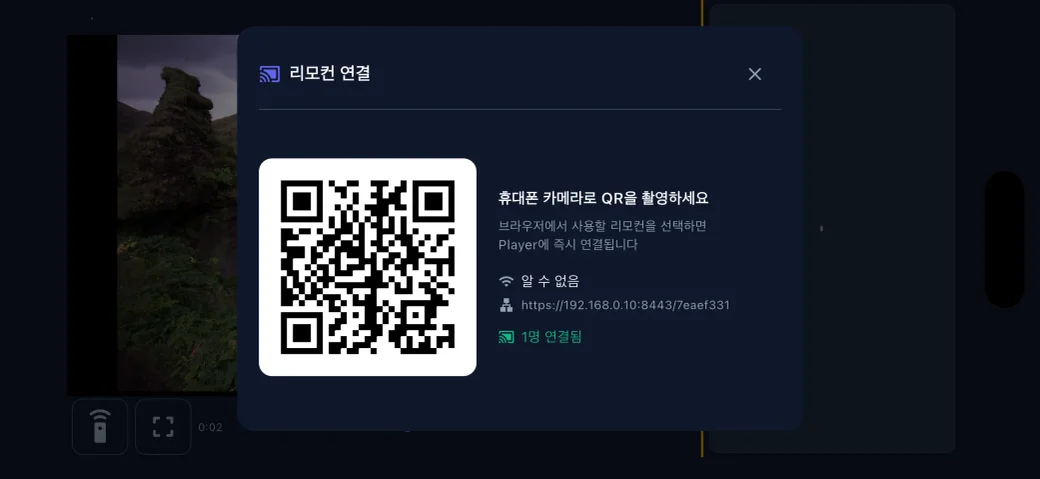
RemoCue Player turns your iPhone or iPad into a powerful media player you can control from any other device on the same Wi-Fi. Browse your gallery, queue up videos and photos, and drive playback from any browser — no apps required on the controller side.
Use your phone as a living-room TV, your tablet as a digital picture frame, or your old tablet as a karaoke stage. Scan a QR code and the phone in your hand instantly becomes a remote — with a full web UI, no installation.
◆ Key features
• Browser-based remote control
Instant connection by scanning one QR code. Works in Chrome, Safari, Firefox, and Samsung Internet. Multiple people can control the same player simultaneously over Wi-Fi.
• Gallery-native playback
Automatic indexing of all photos and videos on the device with an album-filtered thumbnail grid browser. Wide codec support: H.264, H.265, VP9, AV1, MP3, AAC, FLAC and more.
• Photo slideshow
Adjustable duration from 1 to 60 seconds. Pause, resume, and seek during slideshow — all from the remote.
• Powerful playback controls
Pitch control from -6 to +6 semitones (great for karaoke or instrument practice)
Speed control from 0.5x to 2.0x
A-B section repeat
Queue management: add, remove, reorder, shuffle, loop
• Open protocol
Full HTTP/HTTPS REST API published. Automatic self-signed HTTPS certificate to satisfy browser secure-context requirements. Anyone can build a compatible remote and submit it to the catalog.
• Full Korean / English support
Both the app UI and the web remotes ship with KO / EN localization. Switch language any time from settings.
◆ Use cases
• Tablet in the living room, phone as remote from the couch
• Phone as a digital photo frame on the dinner table
• Share travel photos with friends — each person adds to the queue
• Karaoke and instrument practice — adjust pitch and speed to match your key
• Presentations — drive a tablet or TV from your phone
◆ Privacy
All communication stays on your local Wi-Fi. RemoCue Player does not send any personal data to external servers, and the Photos permission is used only to play back media you explicitly select.
Full privacy policy:
https://www.sntsoft.co.kr/remocueplayerweb/privacy-policy.html
◆ Contact
Email: sntsoftdev@gmail.com
Developer channel: https://t.me/+HOWCzZmQGb9iZGVl
What’s new
Version 1.8.11 · May 22, 2026
• Improved ad reliability
Ad refresh now pauses automatically when the app is in the
background or the screen is locked, saving battery and data.
• Fixed ad sizing on iOS
Ads now render at the correct size to fit the allocated slot.
• Other stability improvements.
App privacy
What S&T Soft declares on the App Store about how this app handles data.
-
Data used to track you
May be used to track you across apps and websites owned by other companies.
- Identifiers
- Usage data
- Other data
-
Data not linked to you
May be collected but is not linked to your identity.
- Identifiers
- Usage data
- Other data
Privacy practices may vary, for example with the features you use or your age.
Information
- Seller
- S&T Soft
- Category
- Photo & Video
- Version
- 1.8.11
- Updated
- May 22, 2026
- Released
- Apr 28, 2026
- Size
- 49.3 MB
- Requires
- iOS 13.0 or later
- Age rating
- 12+
- Price
- Free
- Languages
- English
- Copyright
- © 2026 S&T Soft
You might also like
-
 yCam AI CameraAI looks. Real photos.
-
 GuerinReimagining media
-
 myTV - Cast Web Videos to TVCast browser videos to your TV
-
 SubOut - Subtitle ExtractorExtract Hardcoded Subs to SRT
-
 Kataly - Fit Any Size For SNSAdjust Aspect Ratio w/ Margins
-
 Stream to StudioEasy way for stream to Studio
-
 Photo Sharing -transfer photosimage size reduce and send
-
 Nu-Movie ~ Export Video/AudioExport with effect settings
-
 Screen Casting - CastMasterMobile screen cast to mobile
-
 Funmera - Amusing Photo EditorChange Weight,Cartoon & Effect