
- Age rating4+
- CategoryMusic
- DeveloperSimon Edwardsson
- LanguagesEnglish
- Size185.2 MB
Links to the official App Store page
Download.org hosts no file of RollTab. The button opens its official App Store page, published by Simon Edwardsson. Listing last checked on Nov 13, 2026.
Screenshots
About
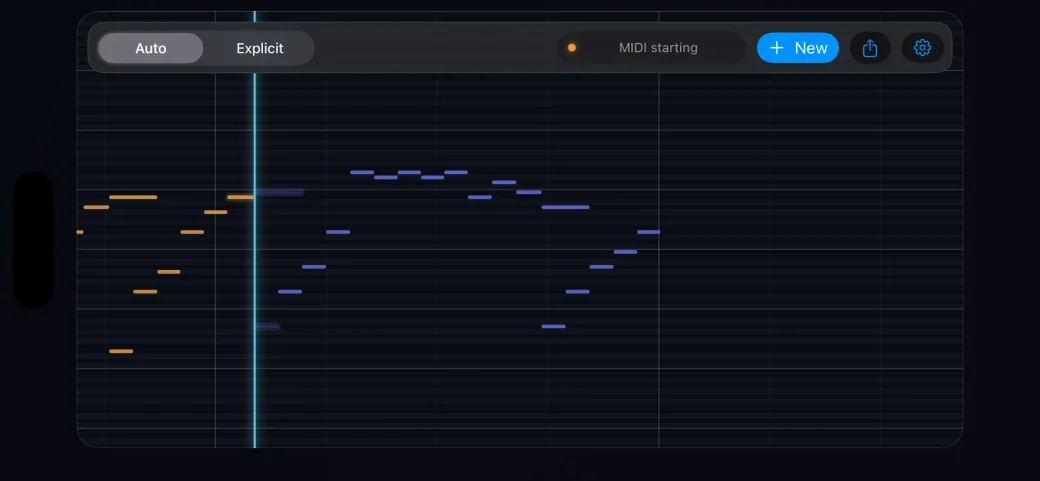
RollTab turns your iPhone or iPad into an AI piano partner.
Connect a USB or Bluetooth MIDI keyboard, play a phrase, and pause. RollTab continues your performance in real time with a 125M-parameter music model running entirely on your device.
• Automatic mode answers after you pause
• Explicit mode lets you decide when to generate
• Live piano-roll view separates your notes from the AI’s continuation
• Adjust temperature, continuation length, timing, and pitch range
• Pause, continue, start a new session, and export the result as a MIDI file
• No account, cloud processing, or internet connection required
A MIDI keyboard is required for live input. You can also generate from silence in Explicit mode.
Created by Simon Edwardsson — simedw.com
What’s new
Version 1.0.2 · Aug 27, 2026
Added MIDI output. Send AI performances to a connected MIDI device or another music app, or keep using the built-in iPhone piano. The main screen now shows both MIDI input and playback output. Also includes reliability improvements for note handling and playback routing.
App privacy
What Simon Edwardsson declares on the App Store about how this app handles data.
-
Data not collected
The developer does not collect any data from this app.
Privacy practices may vary, for example with the features you use or your age.
Information
- Seller
- Simon Edwardsson
- Category
- Music
- Version
- 1.0.2
- Updated
- Aug 27, 2026
- Released
- Aug 20, 2026
- Size
- 185.2 MB
- Requires
- iOS 18.0 or later
- Age rating
- 4+
- Price
- Free
- Languages
- English
- Copyright
- © 2026 Simon Edwardsson
You might also like
-
 Billie TrackerGroovebox, sampler & synths
-
 Rithmatic: FM SynthSynthesizer & vocal harmonizer
-
 Strange Loop: Chaos MelodyChaos Theory + Music Theory
-
 Ispin SaturatorAUv3 Saturation Effect
-
 MIDI MagnetMIDI Device Preset Manager
-
 VMEGAfmCharacterful 4-Operator FM
-
 Tresse Polyphonic Synthesizer39-engine AUv3 & Sequencer
-
 DelayScaperDual Dynamic Delay
-
 Caesura Guitar Effects & NAMPedals, amp player & tuner
-
 Limn Audio Generatorcreate, play and export