
Roomo: Shared Calendar
For family, partners & friends
Designed for iPhone, iPad, iPod touch
In-app purchases
- Age rating4+
- CategoryLifestyle
- DeveloperROOMO
- LanguagesJapanese+ 7 more
- Size73.1 MB
Links to the official App Store page
Download.org hosts no file of Roomo: Shared Calendar. The button opens its official App Store page, published by ROOMO. Listing last checked on Nov 24, 2026.
Screenshots


About
Just you, your family, or your partner.
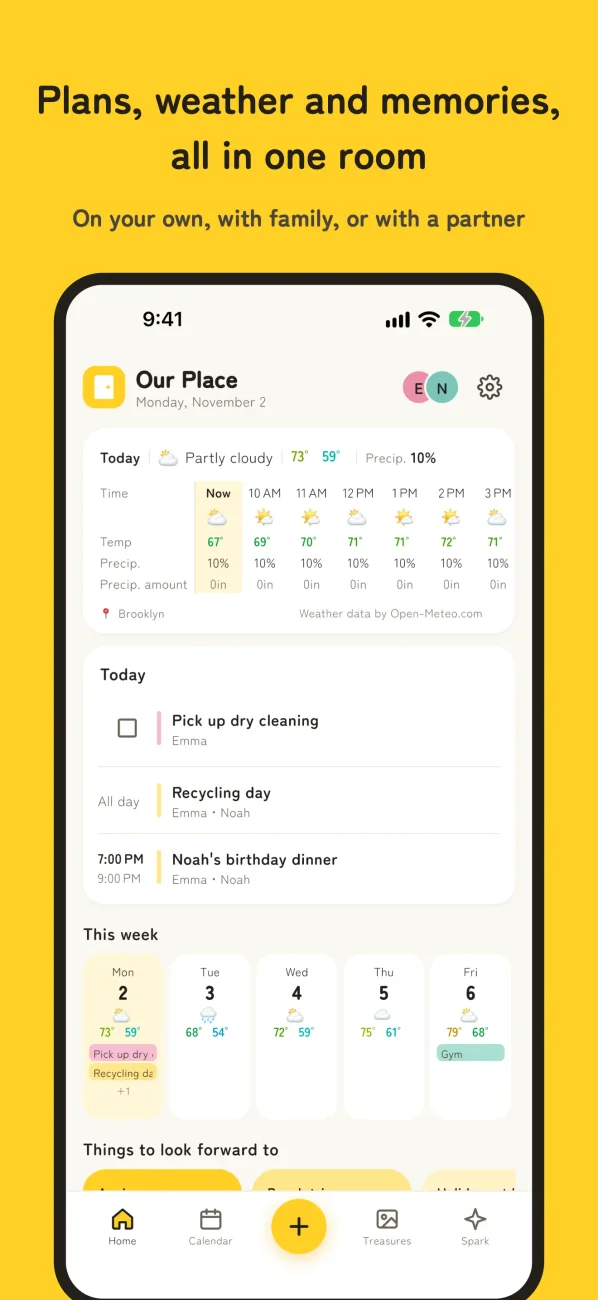
Plans, weather and memories, all in one room.
Create a "room" with the people you share your days with, and keep your plans, photos and the things you want to do in one place.
■ Home — open it and see your day
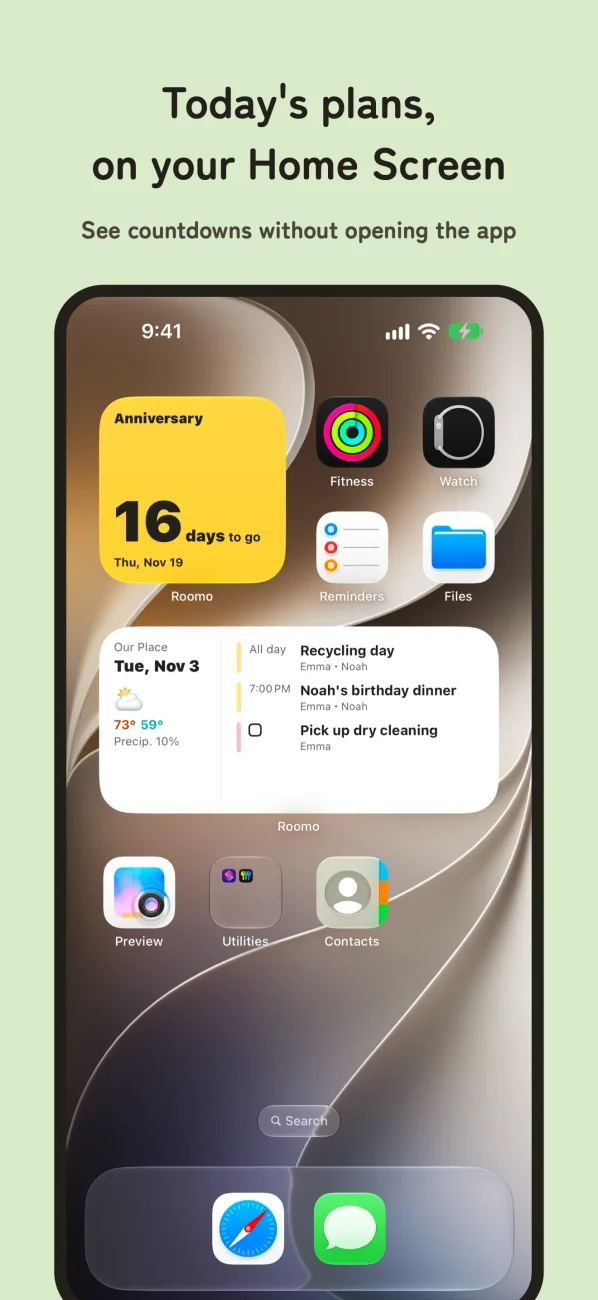
Today's plans and weather, countdowns, to-dos, new photos and Today's question, all on one screen.
■ Calendar — see whose plan it is by color
Each member has their own color, so you can tell whose plan it is right away.
Repeating events, reminders, and public holidays from countries around the world.
Show your phone's calendar alongside, and see the weather up to 14 days ahead.
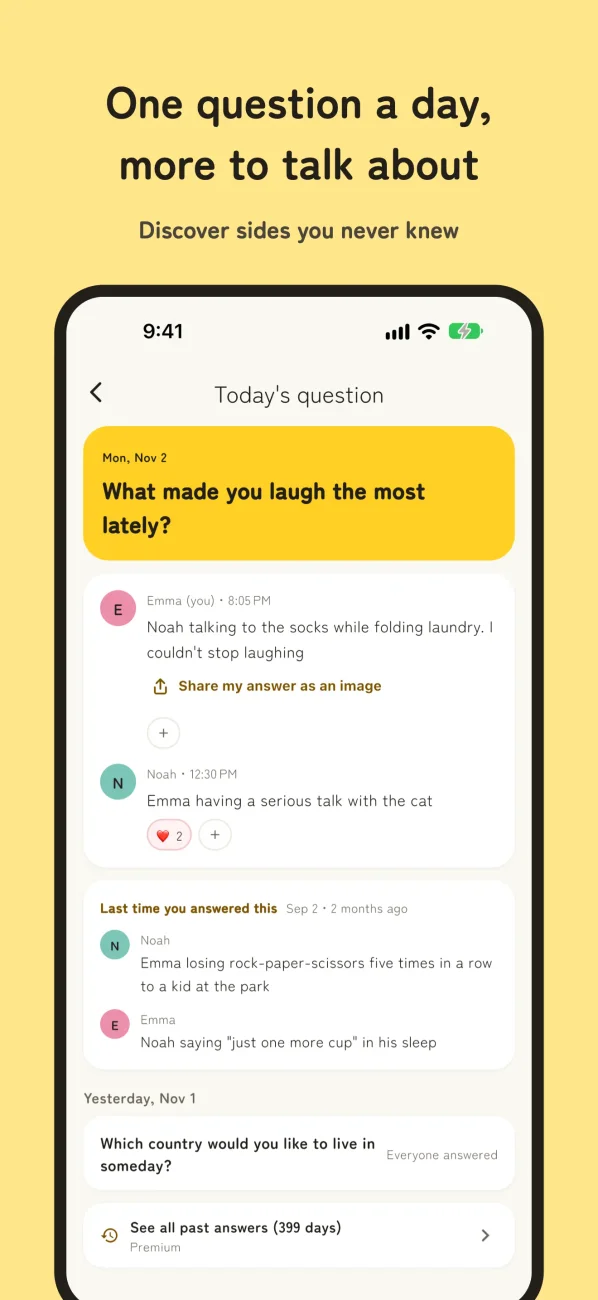
■ Today's question — a conversation starter every day
"What made you happy recently?"
A new question arrives every day. Answer it, and you can read what the others in your room said.
You can also look back at your last answer and at this day a year ago.
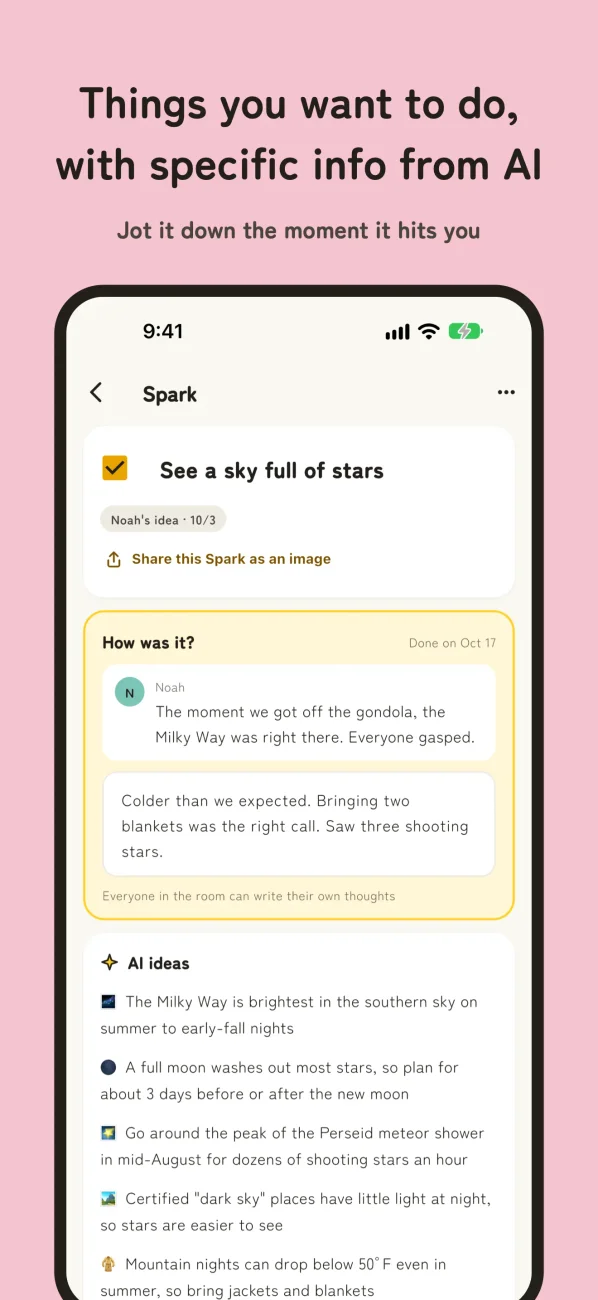
■ Spark — jot down the things you want to do
"I want to see a sky full of stars someday"
Note down ideas the moment they come to you, and AI gives you specific information that fits (places, timing, handy tips).
Add to-dos too, so "someday" doesn't stay someday.
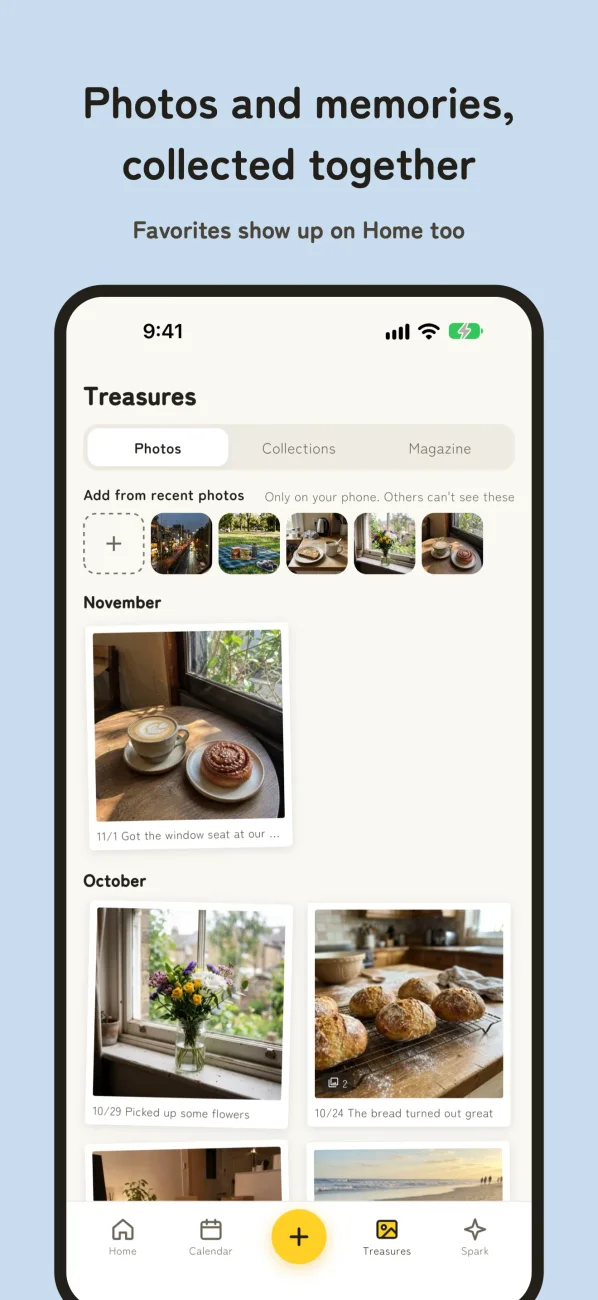
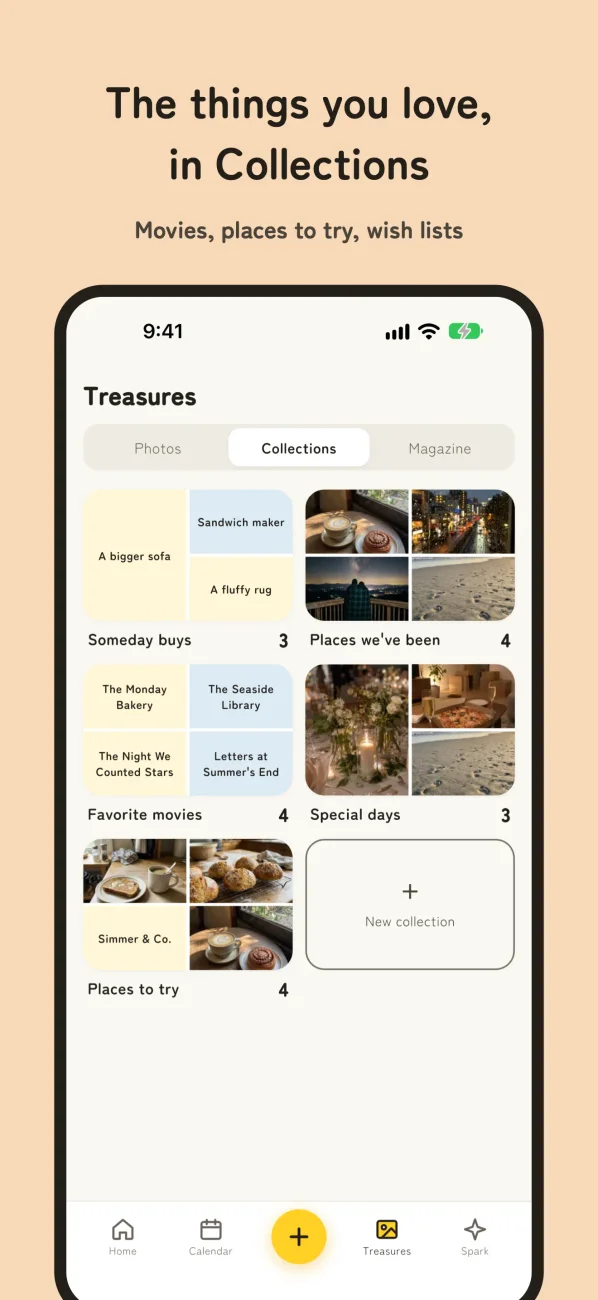
■ Treasures — collect photos and memories together
Everyone in the room can save photos and short videos, with comments and reactions.
Make collections of your own, too: favorite movies, places you've been, books you've read.
■ Magazine — last month in your room, as a magazine
On the 1st of every month, a magazine made just for your room arrives, based on last month's posts. Read your own month as a set of stories.
■ Widgets and Evening summary
Widgets show today's plans and countdowns on your home screen.
The Evening summary brings Today's question and tomorrow's plans (and weather). Choose which notifications you get, by type and by room.
■ Make it yours
Create as many rooms as you like, such as "Family" and "Friends".
Dark mode and 8 languages.
-- Roomo is for you if you want to --
・share your family's plans so everyone can see them
・stay loosely connected with a partner or family who live far away
・plan trips and get-togethers with friends
・keep your plans and photos like a diary, just for yourself
・bring together photos and ideas that are scattered everywhere
-- Peace of mind --
Only the members of a room can see what's inside it.
When we use AI for Spark ideas and the Magazine, we only use providers that have promised not to use what we send to train AI.
-- Premium --
Calendar, weather and Today's question are all free.
With Premium, you can also:
・save plenty of photos and videos (including longer videos)
・write as many Sparks as you like, with AI ideas every day
・get the Magazine every month and read every past issue
・look back at all your past answers to Today's question, anytime
・use Roomo without ads
Premium works per room. When one person in a room subscribes, every member of that room can use it (up to 3 rooms per subscription).
First-time subscribers can try it free for 1 week.
[About subscriptions]
Premium is an auto-renewing subscription, billed monthly or yearly.
Payment is charged to your Apple ID when you confirm the purchase.
The subscription renews automatically unless auto-renew is turned off at least 24 hours before the end of the current period.
You can manage or cancel it anytime in your App Store account settings.
Privacy Policy: https://roomo-web.com/privacyPolicy
Terms of Service: https://roomo-web.com/termsOfService
What’s new
Version 6.0.1 · Nov 23, 2026
・Creating another room is easier (your name and color from your current room are filled in)
・Today's question now shows how many past answers there are
・Heavy rain now shows an umbrella icon
・Show your phone’s calendar events in Roomo (Settings > “Connect phone calendars”)
・Other small fixes
App privacy
What ROOMO declares on the App Store about how this app handles data.
-
Data linked to you
May be collected and linked to your identity.
- Purchases
- Location
- Contact info
- User content
- Identifiers
- Usage data
- Diagnostics
- Other data
-
Data not linked to you
May be collected but is not linked to your identity.
- Diagnostics
Privacy practices may vary, for example with the features you use or your age.
Information
- Seller
- ROOMO
- Category
- Lifestyle
- Version
- 6.0.1
- Updated
- Nov 23, 2026
- Released
- Jan 22, 2025
- Size
- 73.1 MB
- Requires
- iOS 15.0 or later
- Age rating
- 4+
- In-app purchases
- Yes
- Languages
- Japanese, Indonesian, Spanish, Hindi, Portuguese, Simplified Chinese, Traditional Chinese, English
- Copyright
- © 2026 Roomo
You might also like
-
 EVDIG - Date PlannerLog, Sort, Do
-
 ナリタイドLifestyle
-
 ConfeliLifestyle
-
 カナエボシ やりたいことリストLifestyle
-
 シンプル習慣管理:syukaaaaaan!!!Lifestyle
-
 LifePocket - NotebookJournal for trips, food & more
-
 Quruli - 暮らしをまわす、ちいさな習慣 -Lifestyle
-
 ラブワン (LoveOne) カップル・恋人質問・日記アプリLifestyle
-
 ムーンステップサーガ - 月夜の歩数計Lifestyle
-
 やりたい百景 - やりたいことリスト100Lifestyle