
RouteMeasure
Measure distance with map pins
Designed for iPhone, iPad
In-app purchases
- Age rating4+
- CategoryUtilities
- DeveloperAIビジョンテクノロジー株式会社
- LanguagesEnglish+ 1 more
- Size4.1 MB
Links to the official App Store page
Download.org hosts no file of RouteMeasure. The button opens its official App Store page, published by AIビジョンテクノロジー株式会社. Listing last checked on Nov 12, 2026.
Screenshots

About
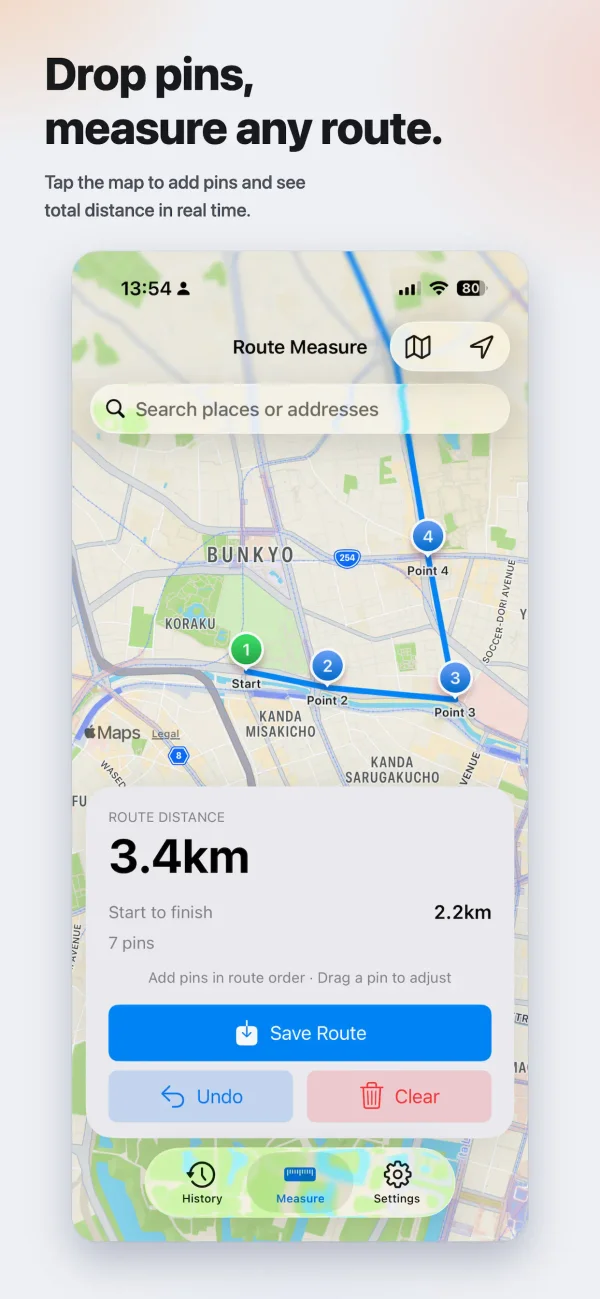
Route Measure makes it easy to measure and save distances between points by placing pins on a map.
Use it to plan a walk, running route, cycling course, hike, or trip; estimate distances before you set out; or check the spacing between places and properties directly on the map.
EASY DISTANCE MEASUREMENT
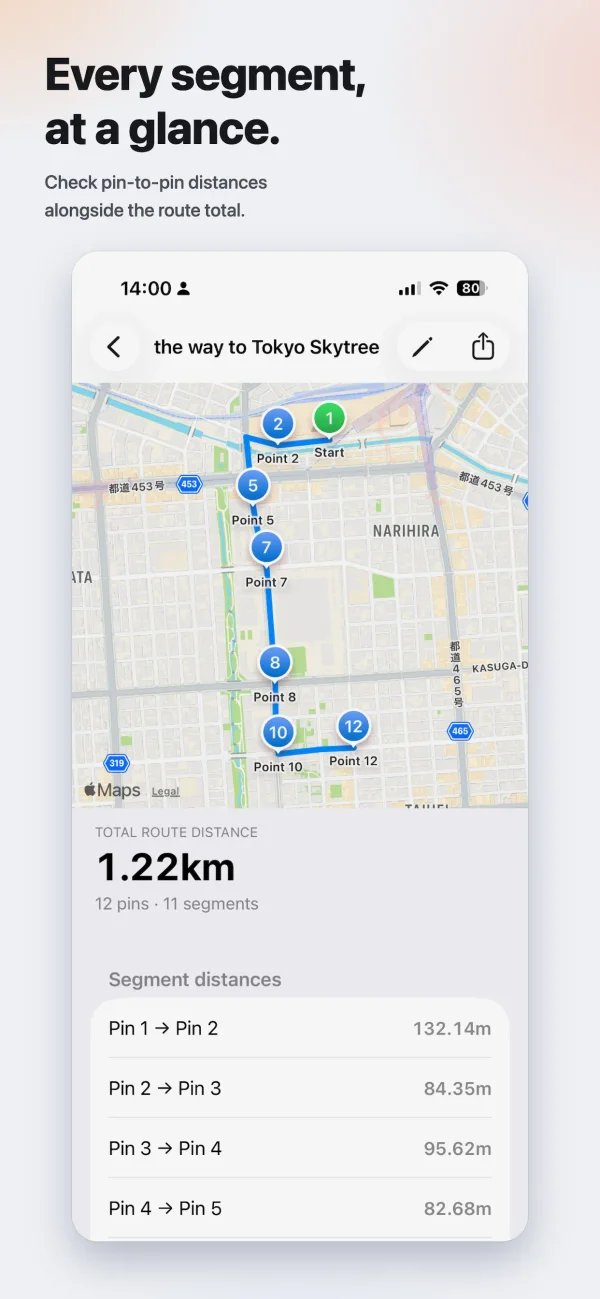
Press and hold the map to add pins. Route Measure connects them in sequence and shows the total distance across all segments. You can also check each segment and the straight-line distance from the first pin to the last. Drag any pin to fine-tune its position.
QUICK PLACE SEARCH
Search by place name, facility, or address. Switch between standard and satellite maps, and allow location access if you want to show your current position. Measuring distances does not require location access.
SAVE AND REVIEW
Name and save each measurement, then reopen it later with its map and distance details. Pins from an unfinished measurement are saved on your device automatically, so you can continue after closing the app.
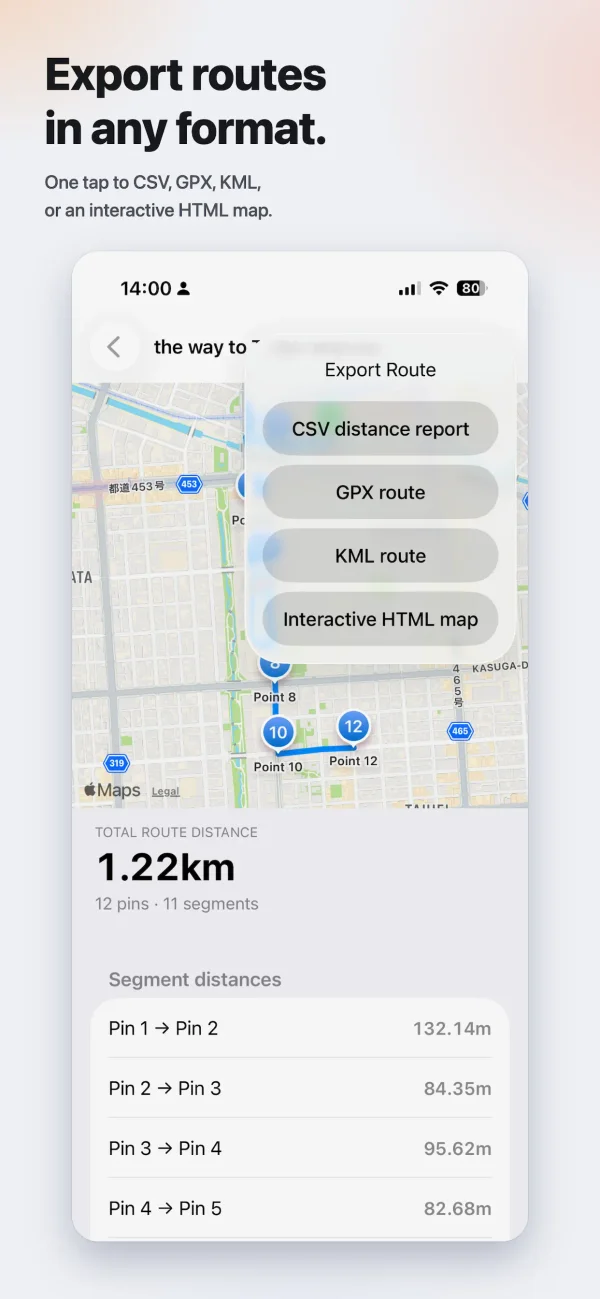
EXPORT IN FOUR FORMATS
Export a saved route as CSV, GPX, KML, or HTML. Use your data in spreadsheets, compatible map apps, Google Earth, or a web browser.
BACKUP AND PRIVACY
Back up and restore all your saved routes in one file. Route Measure does not send your measurement history or location data to an app-operated server.
The free version lets you save one route at a time. A one-time Full Access purchase unlocks unlimited saved routes. Distance measurement, exporting, backup, and restore remain available in the free version.
KEY FEATURES
• Add pins with a long press
• View total route, individual segment, and start-to-end straight-line distances
• Drag pins for precise placement
• Search for places, facilities, and addresses
• Switch between standard and satellite maps
• Save, rename, review, and delete measurements
• Export CSV, GPX, KML, and HTML files
• Back up and restore route history
• Available in English and Japanese
Route Measure is not a directions or navigation app. Distances are calculated along geodesic lines between the pins you place on the map.
What’s new
Version 1.0.1 · Sep 1, 2026
v1.0.1 - Added the new Distance Circle feature.
• Draw a circle with a specified radius centered on your current location, first pin, or last pin
• Update the radius or hide the circle at any time
• Improved usability and interface details
App privacy
What AIビジョンテクノロジー株式会社 declares on the App Store about how this app handles data.
-
Data not collected
The developer does not collect any data from this app.
Privacy practices may vary, for example with the features you use or your age.
Information
- Seller
- AI Vision Technology Ltd.
- Category
- Utilities
- Version
- 1.0.1
- Updated
- Sep 1, 2026
- Released
- Jul 22, 2026
- Size
- 4.1 MB
- Requires
- iOS 17.0 or later
- Age rating
- 4+
- In-app purchases
- Yes
- Languages
- English, Japanese
- Copyright
- © AI Vision Technology Ltd.
You might also like
-
 忌引きの手引きUtilities
-
 Chimer - Voice Time AnnouncerInterval Chime & Talking Clock
-
 法要カウントUtilities
-
 Time TalksUtilities
-
 FDFly3Swellpro
-
 みちびき - ドライブルート生成アプリUtilities
-
 Disco Lights - Party StrobeMusic visualizer & color flash
-
 Simple Measure -GPS & Map AreaMeasure Field Distance & Area
-
 EntryComUtilities
-
 Route Tracking Tape MeasureRecord trace & distance + area