
- Age rating4+
- CategoryEducation
- Developerkoji kamogawa
- LanguagesEnglish
- Size9.4 MB
Links to the official App Store page
Download.org hosts no file of RST SEAL. The button opens its official App Store page, published by koji kamogawa. Listing last checked on Nov 12, 2026.
Screenshots




About
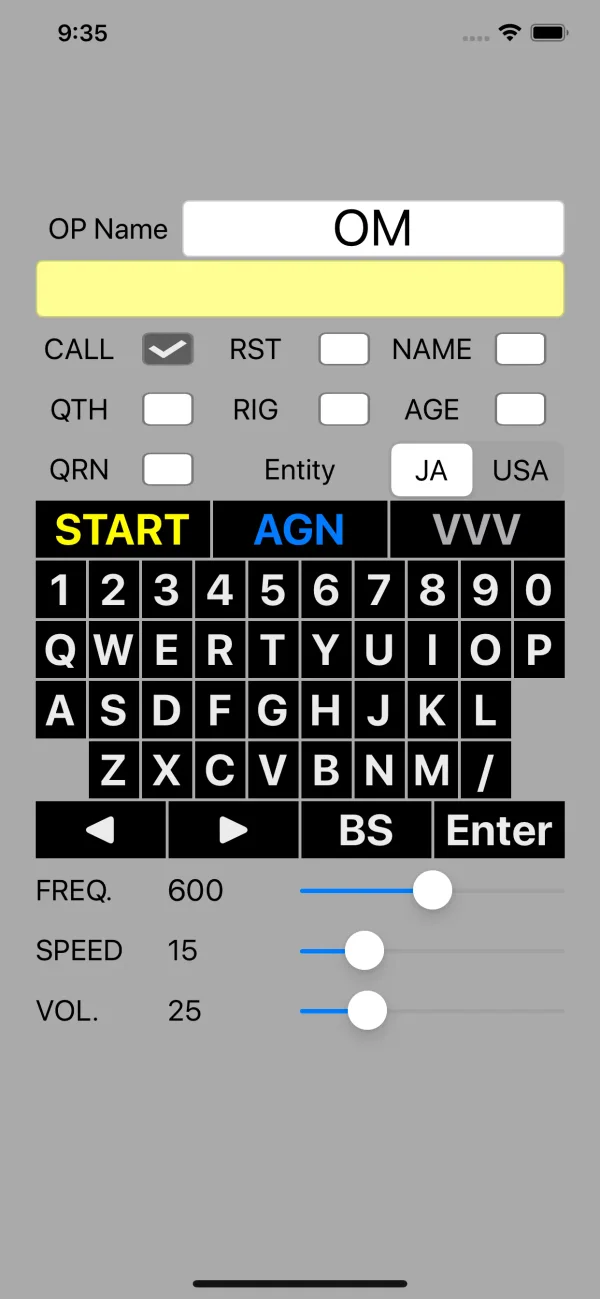
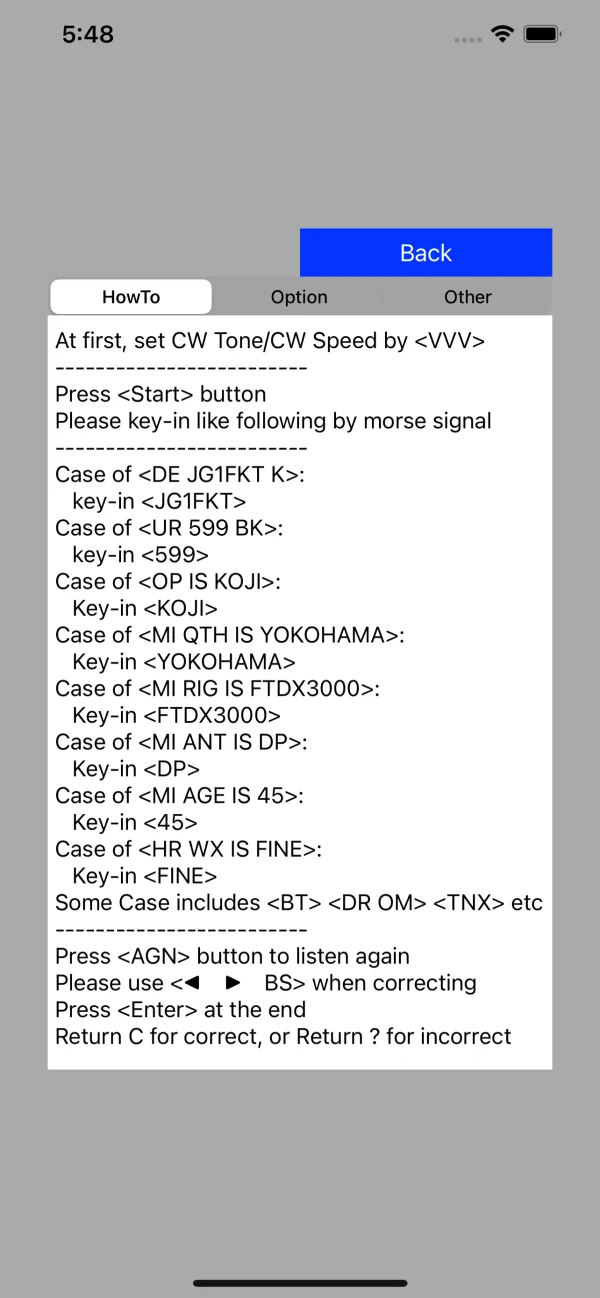
This app is a CW QSO Trainer App for CW beginner of Ham Radio.
You can select various information from CALL, RST, Name, QTH, Rig/Ant and Age/WX by random.
This allows you to experience the actual QSO communication content in a simulated manner.
Default OP Name is "OM", please touch/input your Name by software keyboard.
Start with the "START" button.
Repeat the previous with the "AGAIN" button.
Check the FREQ SPEED and VOL the "VVV" button.
[CheckBox]
CALL:
You will hear a Callsign, enter the callsign and press Enter.
RST:
You will hear the RST Report, enter the Report and press Enter.
NAME:
You will hear the OP Name, enter the Name and press Enter.
QTH:
You will hear the QTH of OP, enter the QTH and press Enter.
RIG/ANT:
You will hear the Rig or Antenna of OP, enter the Rig/Antenna and press Enter.
AGE/WX:
You will hear the Age or WX(Weather) of OP, enter the Age/WX and press Enter.
QRN:
GRN is ON/OFF of the background Signal Noise.
Entity:
You can choose W/W, JA or US.
FuzKey:
Fuzzy Keying like a Straight Key.
[Slider]
FREQ.:
You can choose the tone of CW.
SPEED:
You can choose the speed of CW.
VOL.:
You can choose the sound level of CW.
[Demo Video URL]
https://youtu.be/fcRPz94sga8
Supported keyboard input from Apple Silicon Mac.
[Support Key]
A-Z, 0-9, /
Enter:return
BS:delete
START:UpArrow
AGN:DownArrow
LEFT:LeftArrow
RIGHT:RightArrow
What’s new
Version 3.3.0 · Jan 22, 2024
Supported keyboard input from Apple Silicon Mac. (Not compatible with iOS)
[Support Key]
A-Z, 0-9, /
Enter:return
BS:delete
START:UpArrow
AGN:DownArrow
LEFT:LeftArrow
RIGHT:RightArrow
App privacy
What koji kamogawa declares on the App Store about how this app handles data.
-
Data used to track you
May be used to track you across apps and websites owned by other companies.
- Location
- Identifiers
- Usage data
- Diagnostics
- Other data
-
Data linked to you
May be collected and linked to your identity.
- Location
- Identifiers
- Usage data
- Diagnostics
- Other data
Privacy practices may vary, for example with the features you use or your age.
Information
- Seller
- koji kamogawa
- Category
- Education
- Version
- 3.3.0
- Updated
- Jan 22, 2024
- Released
- Oct 13, 2020
- Size
- 9.4 MB
- Requires
- iOS 13.0 or later
- Age rating
- 4+
- Price
- Free
- Languages
- English
- Copyright
- © 2024, Koji Kamogawa
You might also like
-
 HamOperatorsReference
-
 Morse ICRInstant Character Recognition
-
 Dit - Practice Morse CodeLearn Morse code by ear
-
 QRQ CWImprove your Morse Code speed!
-
 HamExam+Amateur Radio Practice Exams
-
 Ham Radio ExamEducation
-
 SatNOGSNetwork of sat ground-stations
-
 DX SpotsDX Cluster Amateur radio
-
 Head CopyMaster Morse Code Like a Pro
-
 HAM Test Prep Lite: TechnicianEducation