RTL Fixer
Right-to-left for AI chats
Designed for iPhone, iPad, Mac, iPod touch
Free
- Age rating4+
- CategoryProductivity
- DeveloperSHAHAB ALAMI
- LanguagesEnglish
- Size805.0 KB
Links to the official App Store page
Download.org hosts no file of RTL Fixer. The button opens its official App Store page, published by SHAHAB ALAMI. Listing last checked on Nov 12, 2026.
Screenshots
About
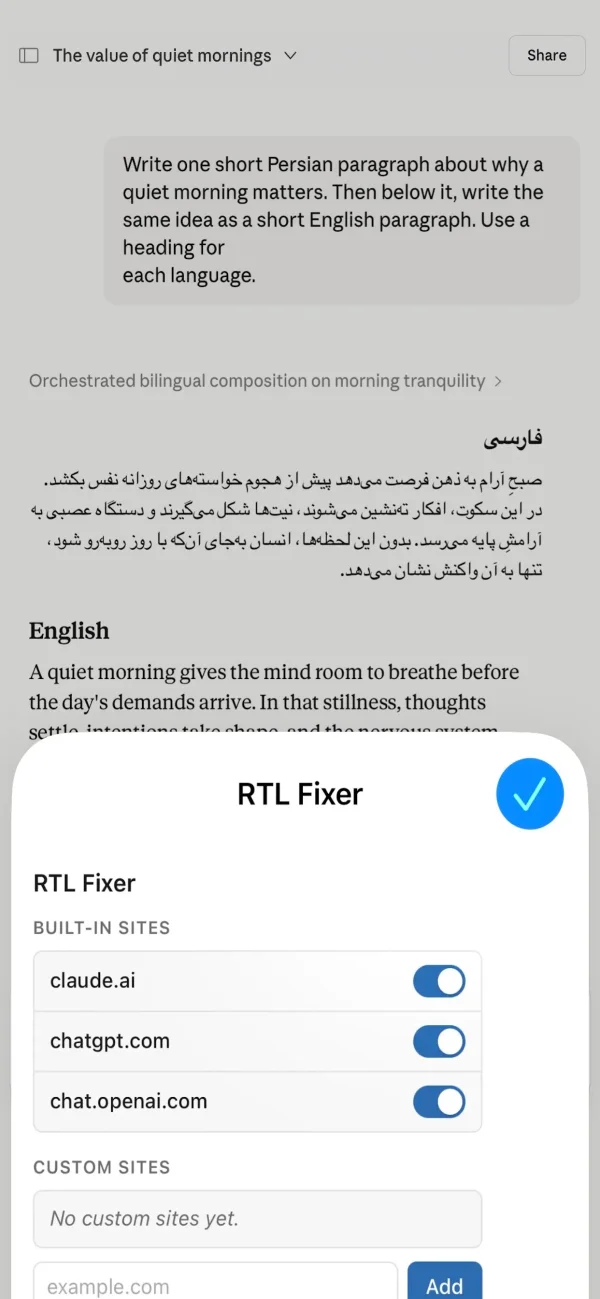
RTL Fixer fixes a small but constant frustration: every Safari extension I tried for right-to-left text in AI chat apps either did nothing, or flipped the entire interface and broke the sidebar, buttons, and input fields. So I built one that doesn't.
When you write to Claude or ChatGPT or any site that you add in Persian, Arabic, Hebrew, or another right-to-left language, the reply renders with right-aligned text. When you write in English, the reply stays left-aligned. Code blocks always stay left-aligned. The interface itself never flips.
HOW IT WORKS
RTL Fixer only touches markdown content: paragraphs, list items, headings, blockquotes, table cells, and similar semantic elements. It never touches the sidebar, the message composer, or any other interface element. There are zero platform-specific selectors, so platform updates do not break it.
Direction is detected using the first strong directional character in each paragraph. A paragraph that starts with English and contains Arabic stays left-aligned. A paragraph that starts with Persian and contains an English variable name stays right-aligned. Numbers, punctuation, and emoji are treated as neutral.
SUPPORTED SITES
- Claude (claude.ai)
- ChatGPT (chatgpt.com)
You can add any other site from the toolbar popup. Custom sites work the same way: enable the extension, type the hostname, and reload.
PRIVACY
RTL Fixer does not collect, transmit, or store any data. Everything happens locally in your Safari browser. There are no analytics, no advertising identifiers, no cookies, and no third-party SDKs. Your preferences (which sites you have enabled) are stored locally in Safari and never leave your device.
The extension only runs on sites you have explicitly enabled, either from the built-in list or by adding them yourself.
REQUIREMENTS
- macOS with Safari 17 or later
- iOS, iPadOS 17 with Safari
LANGUAGES
The extension itself is in English. The text it processes can be in any right-to-left language: Persian (Farsi), Arabic, Hebrew, Urdu, Yiddish, and others.
What’s new
Version 1.0.9 · Sep 28, 2026
This update fixes how math, numbered lists, and mixed-language text display, and makes site settings more reliable.
• Formulas inside Persian, Arabic, or Hebrew text now read correctly, and lines that start with a formula are aligned right-to-left.
• Numbers and bullets on right-to-left list items are always fully visible.
• On right-to-left pages, code and formulas now read left-to-right.
• Sidebars and menus are no longer changed.
• Adding a site that is already in your list no longer removes it, and adding or removing a site can no longer get stuck.
• Privacy Policy and Support links in the app now open in Safari.
App privacy
What SHAHAB ALAMI declares on the App Store about how this app handles data.
-
Data not collected
The developer does not collect any data from this app.
Privacy practices may vary, for example with the features you use or your age.
Information
- Seller
- SHAHAB ALAMI
- Category
- Productivity
- Version
- 1.0.9
- Updated
- Sep 28, 2026
- Released
- May 12, 2026
- Size
- 805.0 KB
- Requires
- iOS 15.4 or later
- Age rating
- 4+
- Price
- Free
- Languages
- English
- Copyright
- © 2026 Shayan Alami
You might also like
-
 Local Time for SafariTime zones converted inline
-
 Clubz Game AppProductivity
-
 Slidexy AI Slides MakerCreate AI slides instantly
-
 Mango | Remember Special DatesNever Miss a Birthday Anymore!
-
 AI_MarketplaceBuy & Sell AI Solutions
-
 Bonix AIEvery AI in one app
-
 Track FocusFocus timer and daily insights
-
 NoteStream — Capture Your MindSmarter Note Taking
-
 Backup Contacts Cleaner ProMy Contacts Backup
-
 TONT: To Do List & Task TimerTime Tracker on Lock Screen