
- Age rating4+
- CategoryUtilities
- Developerygal brami
- LanguagesEnglish
- Size27.8 MB
Links to the official App Store page
Download.org hosts no file of SaveCart. The button opens its official App Store page, published by ygal brami. Listing last checked on Nov 17, 2026.
Screenshots


About
Save smarter. Shop with confidence.
SaveCart is your all-in-one shopping list and discount calculator — built for real stores where tags, percentages,
and “special offers” are everywhere, but the real price isn’t always clear.
Whether you’re stocking up at the supermarket, browsing sales at your favorite shop, or planning a big shopping trip,
SaveCart helps you stay organized, see what you’ll actually pay, and track how much you’re saving — before and during your visit.
Instant discount math
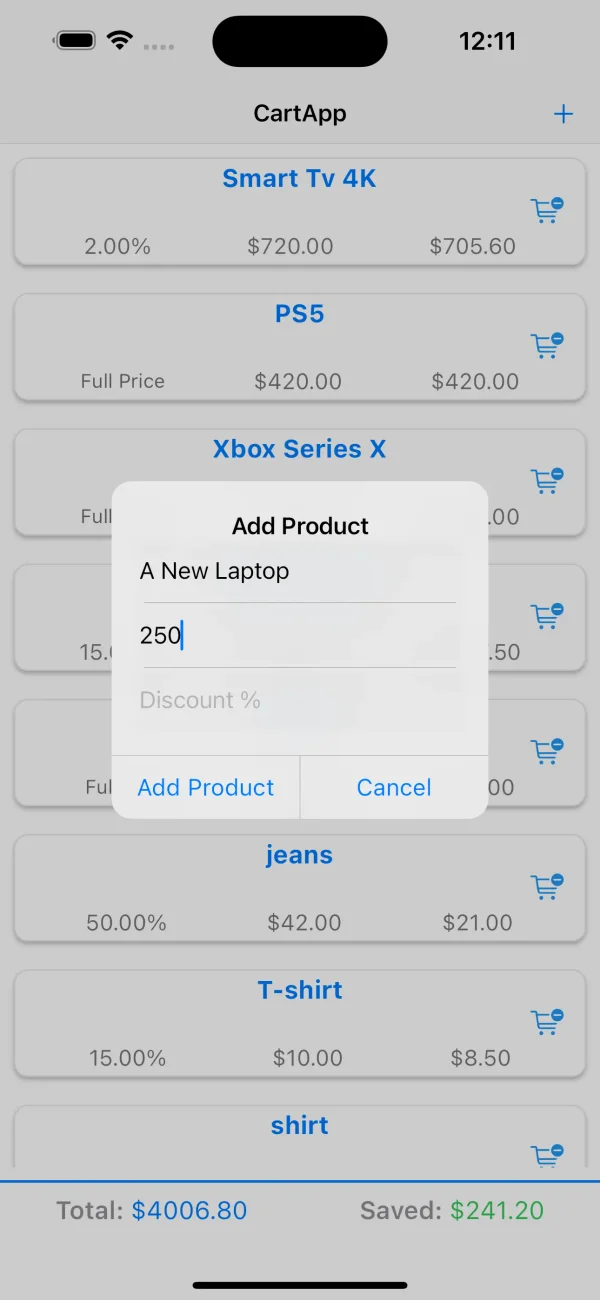
Add any item with its regular price and discount percentage.
SaveCart calculates the final price and your savings automatically — no mental math, no guesswork.
See your totals at a glance
Watch your cart total update in real time. See how much you’re spending, how much you’re saving,
and what the full price would have been — all in one clear summary.
Multiple shopping lists
Create separate lists for different stores, trips, or occasions. Switch between them instantly and keep every shopping plan organized.
Start from scratch or pick a ready-made template — weekly shopping, fruits & vegetables,
cleaning supplies, baby, birthday, BBQ, party, camping, and more.
Budget per list
Set a budget for each list and track how much you have left — or how far over budget you’ve gone.
Shop with a plan, not surprises.
Smart product entry
As you type, SaveCart suggests products from your history and built-in grocery lists in your language.
Categories are assigned automatically based on the product name — or choose your own. View your list flat or grouped by category.
Share & import lists
Share one or more lists as a QR code or file.
The other person scans the QR inside SaveCart or opens a shared file — and the list imports automatically.
Powered by StickCode: your list is compressed to fit more items in a single QR code and encrypted for privacy before sharing.
Built for real shopping
• Add quantities for each item
• Mark products as purchased as you shop
• Organize items with custom categories — or let SaveCart assign them for you
• Search your list quickly in the store
• Swipe to delete with undo — mistakes happen
Designed for everyone
A clean, intuitive interface that’s easy to use even if you’re not tech-savvy.
Dark mode for comfortable use in any lighting. Supports English, Spanish, French, Hebrew, and Russian — including right-to-left layouts.
Your settings, your way
Choose your preferred currency display, customize your default list name, manage categories,
and toggle grouped list view — so SaveCart works the way you shop.
Optional: Remove ads
Prefer an ad-free experience? Make a one-time purchase to remove banner ads permanently.
Restore purchases anytime on a new device.
Shop with clarity. Save with confidence. Download SaveCart today.
What’s new
Version 33.0.1 · Jul 31, 2026
Share lists instantly with QR codes. Send one or more shopping lists to family or friends — they scan the code inside SaveCart and the list imports automatically.
Powered by StickCode. List data is compressed and encrypted (AES-256) before it goes into a QR code, so more items fit in a single scan and your list stays private.
Smarter product entry. Type a product name and get instant suggestions from your history and built-in grocery lists. Categories are assigned automatically as you add items.
Start faster with ready-made templates. Weekly shopping, BBQ, party, camping,
and more - pick a template and start shopping right away.
Import lists from files. shared via AirDrop, email, WhatsApp, and more.
App privacy
What ygal brami declares on the App Store about how this app handles data.
-
Data not collected
The developer does not collect any data from this app.
Privacy practices may vary, for example with the features you use or your age.
Information
- Seller
- ygal brami
- Category
- Utilities
- Version
- 33.0.1
- Updated
- Jul 31, 2026
- Released
- Jun 2, 2023
- Size
- 27.8 MB
- Requires
- iOS 13.0 or later
- Age rating
- 4+
- Price
- Free
- Languages
- English
- Copyright
- © Ygal Brami
You might also like
-
 KirloSmartUtilities
-
 Mobile Price TagUtilities
-
 Autostory: Car Maintenance LogService reminder & oil change
-
 לוטוג׳ן - מחולל המספריםUtilities
-
 My AI EyesUtilities
-
 Talk LLMUtilities
-
 Trackification- Track AnythingNotification-Based Tracking
-
 AntiTheft: Dont Touch My PhoneAnti-Theft alarm for phone
-
 Clipp.netCross-platform clipboard sync.
-
 Wasserwaage & WinkelmesserUtilities