
Scale and SticKey
Musical modes, scales & chords
Designed for iPhone, iPad, iPod touch
$2.99
- Age rating4+
- CategoryMusic
- DeveloperLaura Gabrielson
- LanguagesEnglish
- Size80.0 MB
Links to the official App Store page
Download.org hosts no file of Scale and SticKey. The button opens its official App Store page, published by Laura Gabrielson. Listing last checked on Nov 18, 2026.
Screenshots

About
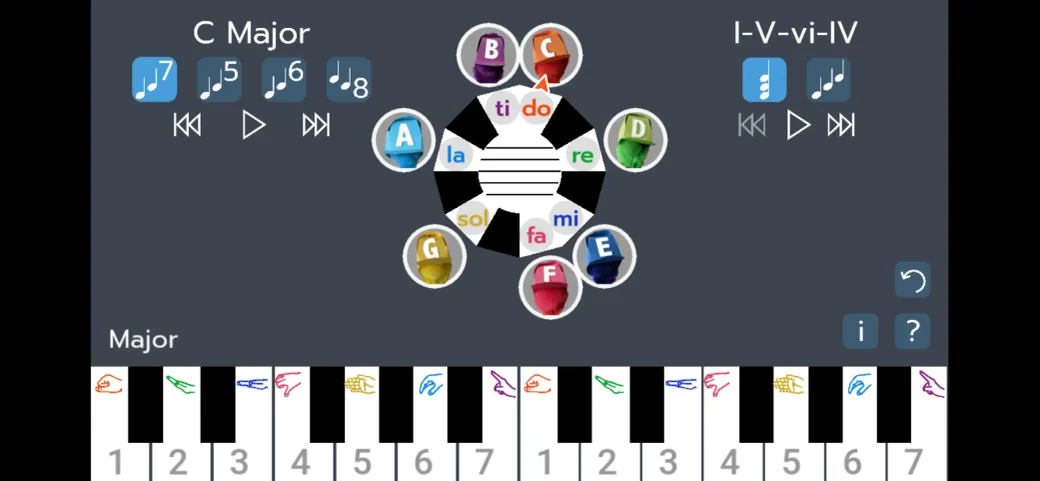
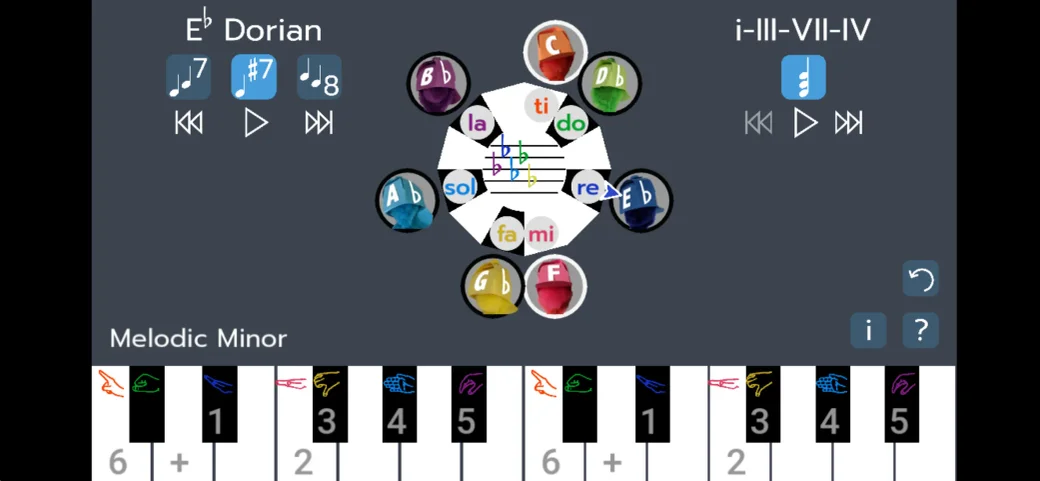
Scale and SticKey makes understanding music theory simple and enjoyable by synthesizing 5 theoretical concepts (modes, key signatures, scales, chord progressions, and solfa) into the concept of building a Note Team (TM).
To get started (clicking the help '?' icon in the app menu will walk you through these steps):
1. Spin the solfa wheel or drag the solfa slider to put 'do' on a new position.
2. Drag the players around the outside of the wheel so that every player lines up with one of the seven solfa positions. (If you get stuck, click the central circle with the '?' to have the app move the players for you.)
3. Once every player is on a solfa position, you have formed a Note Team (TM)! The team captain has an arrow pointing at his solfa symbol, the key signature is shown in the center of the wheel, and the key is named at the top of the screen.
4. To change modes, either double-click on a new solfa name or use the arrows under the key name at the top of the screen. Each time you change modes, you are changing the tonal center (or tonic), which means your team has a new captain. The key name always begins with the name of the team captain.
5. Listen to the scales by clicking the play arrow under the key name. Change the type of scale by selecting a new icon under the key name. Options include: 7-note (heptatonic), 5-note(pentatonic), 6-note (blues), 8-note (bebop) and raised 7th (harmonic or melodic minor) scales.
6. Listen to chord progressions by clicking the arrow under the chord progression. Change the progression style by selecting a new icon under the chord progression, or switch to a new progression using the previous / next arrows next to the play button.
7. Switch to the chords view in the menu to play individual Roman numeral chords.
8.Return all elements to their original positions by clicking the reset button in the menu.
What’s new
Version 3.2 · Apr 22, 2026
Chords view now lets you cycle through the modes by tapping the arrow.
App privacy
What Laura Gabrielson declares on the App Store about how this app handles data.
-
Data not collected
The developer does not collect any data from this app.
Privacy practices may vary, for example with the features you use or your age.
Information
- Seller
- Laura Gabrielson
- Category
- Music
- Version
- 3.2
- Updated
- Apr 22, 2026
- Released
- Oct 5, 2022
- Size
- 80.0 MB
- Requires
- iOS 14.0 or later
- Age rating
- 4+
- Price
- $2.99
- Languages
- English
- Copyright
- © 2026 Attune Music and Math, LLC
You might also like
-
 Chord Learner - Learn chordsMusic
-
 Sonic LogicMIDI controller & editor
-
 FortamentoMusic Idea Generator
-
 MinimicSimple mic based music maker.
-
 Chordal: Chords & Beats StudioPlay chords. Make music.
-
 UltimateScaleMusic scale learning assistant
-
 Rational TonalityReference tones for practice
-
 Stem Splitter - OffgridStemVocal Remover & Backing Tracks
-
 ScaleMate - Visualize HarmonyUnderstand Music Scales Deeply
-
 Piano Companion PRO: chordsMusic Theory, Chords, Scales