Scanlys: Document Scanner
Scan, Convert & Manage PDFs
Designed for iPhone, iPad
Free · In-app purchases
- Age rating4+
- CategoryUtilities
- DeveloperKerem Gonlkrmaz
- LanguagesEnglish+ 5 more
- Size7.8 MB
Links to the official App Store page
Download.org hosts no file of Scanlys: Document Scanner. The button opens its official App Store page, published by Kerem Gonlkrmaz. Listing last checked on Nov 16, 2026.
Screenshots

About
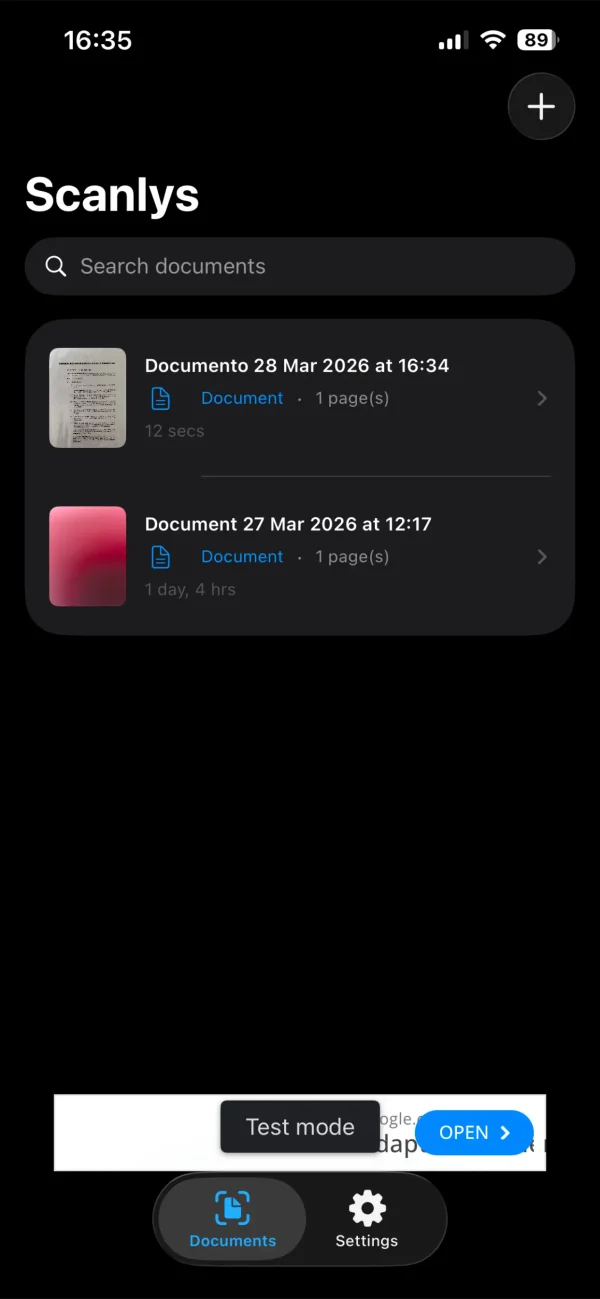
Turn your iPhone into a powerful mobile scanner with Scanlys.
Scanlys is the fastest and most intuitive way to digitize your world. From business contracts and receipts to handwritten notes and sketches, get high-quality scans in seconds. Say goodbye to bulky office scanners and keep your entire office in your pocket!
Why Choose Scanlys?
Smart Edge Detection: Automatically detects document borders and corrects perspective for a perfect crop every time.
Crystal Clear Quality: Use advanced filters (Grayscale, Black & White, Photo) to make text sharp and easy to read.
Multi-Page Scanning: Scan dozens of pages effortlessly and merge them into a single, organized PDF file.
Export & Share: Save your documents as high-resolution PDFs or JPEGs. Share instantly via AirDrop, Email, or upload to iCloud, Google Drive, and Dropbox.
Stay Organized: Manage your documents with ease. Rename, delete, and find your files in a heartbeat.
Scanlys is perfect for:
Professionals: Scan and sign contracts on the go.
Students: Digitize whiteboard notes and textbooks for easy studying.
Freelancers: Keep track of receipts and invoices for easy expense management.
Everyone: Securely store copies of IDs, passports, and important records.
Experience the most modern scanning experience. Simple, fast, and powerful. Download Scanlys today!
What’s new
Version 2.1 · Oct 7, 2026
New in Scanlys 2.1
• Edit pages: reorder, rotate, crop, split, delete or add pages, with Enhanced, Grayscale and B&W filters
• Search inside your documents: find any scan by the text on its pages, right from Spotlight too
• Stay organized with folders, favorites, tags, sorting and a new grid view
• Recently Deleted: restore documents for up to 30 days
• Automatic document type detection
• Import PDFs and images from the Files app
• Export as searchable PDF, password-protected PDF, ZIP or text, or print with AirPrint
• Details & Actions: call numbers, open links, save business cards to Contacts and set reminders from dates
• Translate and read aloud scanned text
• Sign documents with your saved signature
• App lock and lockable documents with Face ID or Touch ID
• Siri and Shortcuts support
• Now available in German, French and Arabic
• Scanlys Pro: remove all ads with a one-time purchase
• New app icon, faster performance and many bug fixes
App privacy
What Kerem Gonlkrmaz declares on the App Store about how this app handles data.
-
Data used to track you
May be used to track you across apps and websites owned by other companies.
- Usage data
-
Data not linked to you
May be collected but is not linked to your identity.
- Usage data
Privacy practices may vary, for example with the features you use or your age.
Information
- Seller
- Kerem Gonlkrmaz
- Category
- Utilities
- Version
- 2.1
- Updated
- Oct 7, 2026
- Released
- Mar 16, 2026
- Size
- 7.8 MB
- Requires
- iOS 18.0 or later
- Age rating
- 4+
- Price
- Free
- In-app purchases
- Yes
- Languages
- English, Arabic, French, German, Spanish, Turkish
- Copyright
- © 2026 Kerem
You might also like
-
 AI Voice Recorder TranscribePrivate Notes Offline
-
 CardSpark: Flashcards & StudyLight cards, works offline
-
 ConesPilotUtilities
-
 Barcode WallpaperQR,Barcode on the Wallpaper
-
 BromidesEasily save images to albums
-
 Ecall - Guard ShieldUtilities
-
 RedCrab CalculatorScientific Calculator& History
-
 OneDialCall contacts with one tap
-
 Noise ClearVoice Denoise
-
 T-Save - Expense & TripsTrack Savings & Light Up Map