
Scholarpen: PDF Notes & Tests
Write on PDFs & make tests
Designed for iPhone, iPad, Mac
Free · In-app purchases
- Age rating4+
- CategoryEducation
- DeveloperBAKI KOC
- LanguagesEnglish+ 21 more
- Size16.5 MB
Links to the official App Store page
Download.org hosts no file of Scholarpen: PDF Notes & Tests. The button opens its official App Store page, published by BAKI KOC. Listing last checked on Nov 25, 2026.
Screenshots


About
Scholarpen is a PDF notebook for teachers and students: write inside your book, keep solutions on their own layer, turn questions into tests, scan the answer sheets with your camera. No account, no subscription.
Write on PDFs
• Open your book's PDF and write right on the page with Apple Pencil or a pen. Your writing scrolls and zooms with the page and never drifts.
• Fountain pen, ballpoint, marker, highlighter; width and color; hold still for a clean shape (triangle, circle, line).
• Select, move, resize, duplicate: lasso, rectangle or ellipse selection.
• Blank notebooks: lined, grid, dotted; A4, A5, A3, Letter. Write at the bottom of the last page and a new page appears. Insert pages, extend a page downward, hide and reorder pages.
• Thousands of stickers: teacher stamps (Well done!, Look again…), special days, planner pieces like washi tape and sticky notes, emoji and flags.
• Text boxes: type (or write with Pencil on iPad); font, size, bold, italic, color, highlight, alignment; x² and H₂O.
Share the exam
• Notes and Solution are two layers: hide the solution in class, show it when you like.
• Send students a PDF with or without solutions, and pick which pages go. Messages, AirDrop, Mail.
• Use one book with a separate workbook per student: the PDF is stored once, the writing stays apart.
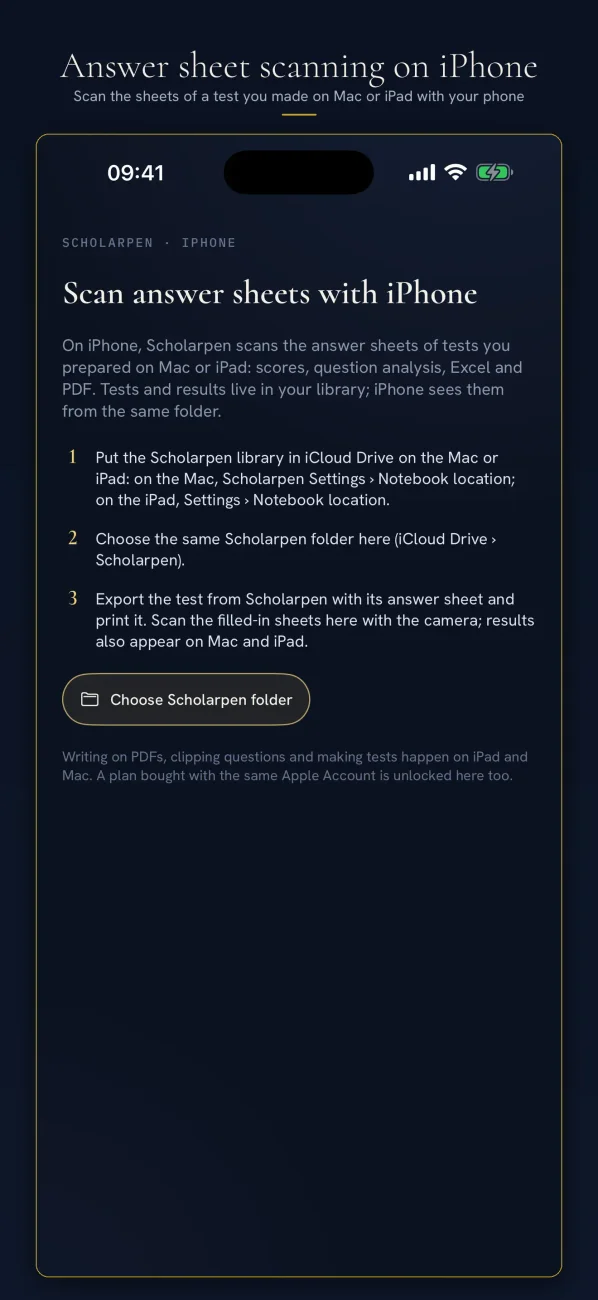
Answer sheet scanning (Teacher plan)
• Add an answer sheet to the end of your test; a QR code identifies the test. The test record stays: scan weeks later, even after you empty the basket.
• The Scan sheets button sits in the toolbar and the library.
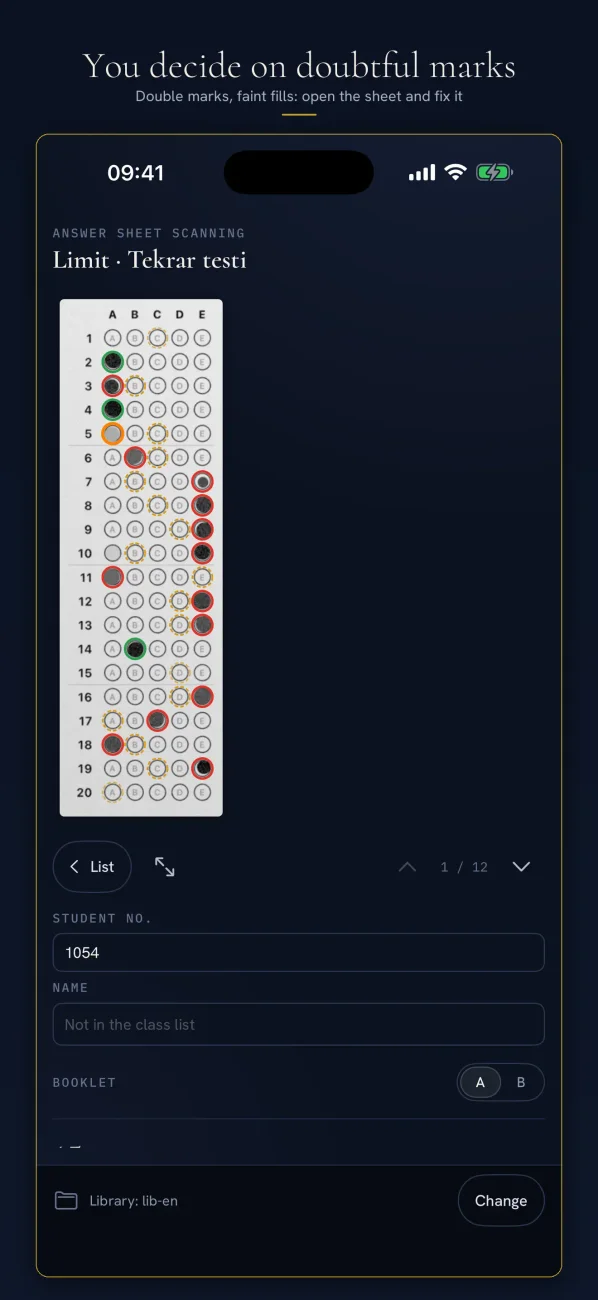
• Scan the filled-in sheets with the iPad or iPhone camera: scores, percent correct per question, class list.
• A one-tap retest from the questions your class struggled with; each student's own mistakes as a PDF.
• Export to Excel and PDF. No server: sheets and results stay on your device.
Make tests
• Question basket: box a question in the book, lay it out on an A4 or Letter test sheet. If the answer key is on the same or the next page, the answer comes in automatically. Solving space, answer key, A/B booklets, templates, your logo.
• Worksheets: concept map, mind map, Venn, fishbone, T-chart, KWL, timeline, cause and effect, flowchart, Frayer card. Build your own from boxes, arrows and areas; move a box and its arrows follow. Add images, write the answers on the Solution layer, hand students the blank sheet.
Mistake notebook (for students)
• Solve right inside your book's PDF. Box a question you got wrong: it lands in the notebook clean, with your first attempt saved.
• It comes back the next day, then after 3, 7, 14, 30 and 60 days; check it against the answer key, filter by topic.
• Clean book: hide all your writing with one tap and solve again. Build a new test from your mistakes.
Teach with it
• Focus: spotlight a question, cover the rest. A curtain that slides in from the edge. Connect the iPad to a projector: the class sees only the page, not your tools.
• On Mac, a screen pen: write over your slides, your browser, anything; freeze the screen, save it as a page (Teacher plan).
Everything stays on your device
• No account, no server. Your books and writing are real files in Files and Finder; with iCloud Drive, Mac and iPad share one library.
• Search in the PDF text and in scanned pages. Version history: go back to writing you deleted by mistake.
• Five looks: Night, Paper, Dwarf, Elf, Academy. 22 languages.
Try it free: 2 books or notebooks, 60 questions in the mistake notebook, 3 tests (with a small "Made with Scholarpen" line at the bottom), scanning of 40 answer sheets from one test, and 24 stickers. Then a one-time Student or Teacher plan; no subscription, unlocks on Mac, iPad and iPhone with the same Apple Account.
For your own books and PDFs you're allowed to use, for classroom use.
What’s new
Version 1.4.4 · Nov 24, 2026
• Small improvements.
Thanks for your feedback.
App privacy
What BAKI KOC declares on the App Store about how this app handles data.
-
Data not linked to you
May be collected but is not linked to your identity.
- Purchases
- Location
- Identifiers
- Usage data
Privacy practices may vary, for example with the features you use or your age.
Information
- Seller
- BAKI KOC
- Category
- Education
- Version
- 1.4.4
- Updated
- Nov 24, 2026
- Released
- Nov 2, 2026
- Size
- 16.5 MB
- Requires
- iOS 17.0 or later
- Age rating
- 4+
- Price
- Free
- In-app purchases
- Yes
- Languages
- English, Danish, Dutch, Finnish, French, German, Hindi, Indonesian, Italian, Japanese, Korean, Malay + 10 more
- Copyright
- © 2026 Baki Koç
You might also like
-
 暗記ノートEducation
-
 トキノート - 大学受験の復習・暗記 自作問題集Education
-
 Flashcards: AI & Spaced ReviewSmart FSRS memory trainer
-
 中学生の英単語-高校受験・定期テスト・入試対策Education
-
 AI単語帳|赤シートに代わる次世代の暗記アプリEducation
-
 Tanpri - Printable FlashcardsCreate & Print Your Own Cards
-
 画像から暗記帳・問題作成[クイズ・資格]-すごい問題集Education
-
 Red Sheet Camera: Study NotesHide answers and memorize fast
-
 Flashcards Maker -QuizCraftVocabulary, Memory & Exam Prep